


Security News
Deno Goes the Way of the Dinosaur
Cloudflare is acquiring Deno’s team, which will provide another year of bug fixes and security updates before ending support for the runtime.
By Sarah Gooding - Oct 16, 2026
Let your agent edit real Excel files, with a review step before anything is saved. MCP server + engine.


Let your agent edit Excel files. Review before anything is saved.
An MCP server for Claude Code, Claude Desktop, Cursor, Codex or any MCP host
that edits the .xlsx / .xlsm files you already have, with a review step:
review_url: a local page with
the workbook, changed cells highlighted, before/after per cell, Accept /
Reject per batch or per cell, Save or Save as… (a copy). With --review-required, only
that page can write the file; the agent just hands you the link.run_script runs the agent's JavaScript against the
workbook in a worker with a hard timeout and lands the result as one
reviewable batch.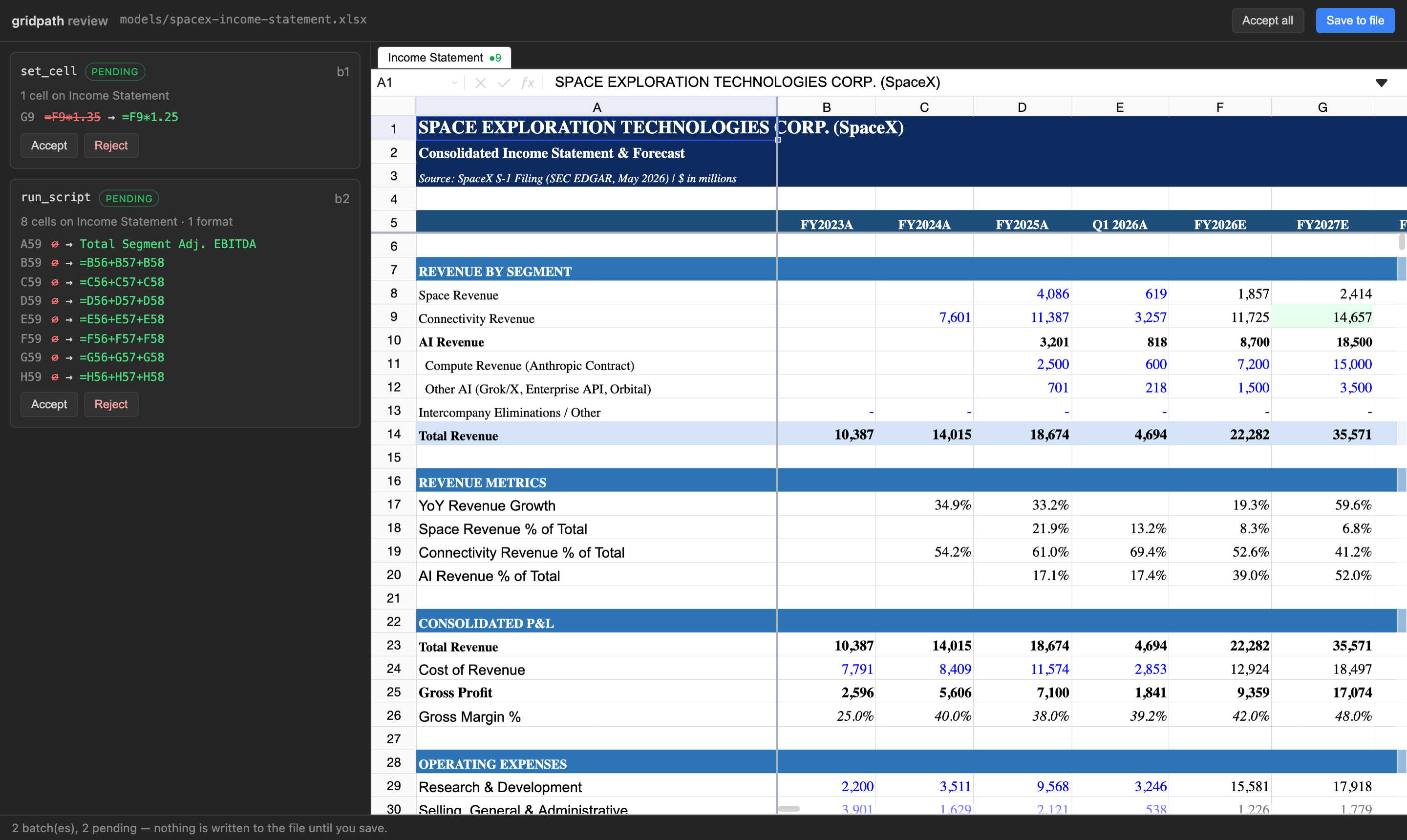
Download gridpath-0.1.9.mcpb
and open it. Claude Desktop shows an install dialog where you pick the folders
Claude may edit and whether saving requires review. Node is bundled; nothing else
to install. Claude Desktop shows its standard "not verified" warning for any
extension installed from a file; the source is public
and nothing is written until you accept and save on the review page.
claude mcp add gridpath -- npx -y gridpath mcp --review-required
Add to Cursor
(one click), or add to mcp.json:
{ "mcpServers": { "gridpath": { "command": "npx", "args": ["-y", "gridpath", "mcp", "--review-required"] } } }
~/.codex/config.toml)[mcp_servers.gridpath]
command = "npx"
args = ["-y", "gridpath", "mcp", "--review-required"]
Same command/args as the Cursor JSON in that host's MCP settings. The server
speaks stdio.
| Flag | Meaning |
|---|---|
--allow <dir> [<dir>...] | Limit the server to these folders. Default: your home directory. |
--review-required | The agent cannot save. save_workbook returns the review link; you accept and save there. Also GRIDPATH_REVIEW_REQUIRED=true. |
--port <n> | Port for the local review server (default: random). |
gridpath review <file> | Reopen the review page for a workbook's pending batches later. |
Pending changes live next to the workbook (.gridpath/<file>.batches.json) until
saved or rejected, so nothing is lost if the agent's session ends.
.xlsx and .xlsm. Verified on real analyst models: a 1.4 MB, 12-sheet,
55,000-formula workbook (76 package parts, 75 byte-identical after an edit) and a
13-sheet .xlsm bank model whose vbaProject.bin came back byte-identical.
Every tool takes path. Cells and ranges are A1 notation.
| Tool | What it does |
|---|---|
describe_workbook (sheet?) | Structural map: sheets, used ranges, header rows, sections, named ranges. Call first. |
find_rows (query, sheet?, max_results?) | Find rows by label across sheets, with an evaluated sample. |
read_range (sheet, range) | Evaluated values, formulas and display text for a range (≤ 500 cells). |
set_cell (sheet, cell, value | formula) | Write one cell. |
set_range (sheet, top_left, values[][]) | Write a block; strings starting with = are formulas. |
copy_range (sheet, source, dest_sheet, dest, mode) | Excel-style copy with reference shifting; all / values / formats. |
run_script (script) | Sandboxed JS with sheet(name).get/set/values/setValues/format/clear; one batch. |
set_format (sheet, range | operations[], format) | Number formats, bold/italic, colors, alignment, wrap. |
clear_range (sheet, range) | Clear values and formulas, keep formatting. |
insert_rows / delete_rows / insert_columns / delete_columns | Structural edits; references, CF and validation ranges follow. |
create_sheet / rename_sheet / delete_sheet | Sheet ops. |
set_column_width / set_row_height / freeze_panes / unfreeze_panes / hide_rows / show_rows / hide_columns / show_columns | Layout. |
merge_cells / unmerge_cells / set_note / delete_note / define_name | Merges, notes, named ranges. |
list_batches | Pending batches and the review link. |
reject_batch (batch_id) | Drop a pending batch; the rest replay onto a fresh model. |
save_workbook (as?) | Patch pending changes into the file, or with as write a patched copy and leave the original untouched. The only tool that writes. In-place saves are gated by --review-required. |
Writes never touch the file. They accumulate as pending batches and every write
returns a readback of what landed (values, formulas, a row_map of labels) plus
the review_url.
Claude, after editing a 1,400-row Canalyst model (2,500+ named ranges, hidden sheets) through GridPath in Cursor, asked how it compared with its built-in approach:
It recalculates live. After I changed row 58, I could read back the new growth rates right away (28.0%, 28.0%, 27.9%) and confirm the change worked. My usual approach, a Python library called openpyxl, doesn't calculate formulas. I'd have to run the file through LibreOffice to get values, and that can differ from Excel on some functions.
It finds things fast. Its row search and workbook map located "Product revenue" and the Assumptions structure in a few calls. Otherwise I'd be scanning a 1,400-row sheet cell by cell.
It leaves the rest of the file alone. It rewrites only the cells that changed. When openpyxl opens and re-saves a heavy model like this one, it can quietly drop or damage charts, data validation, pivot caches or some formatting. That's the biggest risk with my built-in approach.
| gridpath | File-library MCPs (openpyxl etc.) | Live-Excel MCPs (COM) | Browser spreadsheet SDKs | |
|---|---|---|---|---|
| Edits the file you have | yes, patched in place | rewrites the whole file | yes, via Excel | converts to its own format |
| Formulas evaluated | yes, in process | no | yes, needs Excel open | yes, in a hosted app |
| Review before write | yes | no | no | in the vendor's UI |
| Needs installed | Node | Python | Windows + Excel | a web app + account |
| Macros, pivots, add-in data survive | byte-identical | often dropped | yes | not guaranteed |
Benchmarks and methodology, including runs where a plain coding agent does as well as we do, are in the gridpath-evals repo.
open parses the .xlsx into the in-process calculation engine. Tools mutate
that model and read back evaluated results. save_workbook diffs the model
against the file as loaded and patches the original bytes at the zip-part
level. Untouched parts are copied through; nothing regenerates the package.
v0.1. Not yet: fetch_web / edgar_lookup sourcing tools, stage_data,
charts and pivots as edits (they are
preserved, not authored), and the desktop app's own agent loop as a tool.
GridPath is also a desktop app with the same engine and review and its own agent built in.
FSL-1.1-Apache-2.0. Each release becomes Apache 2.0 after two years.
FAQs
Let your agent edit real Excel files, with a review step before anything is saved. MCP server + engine.
The npm package gridpath receives a total of 45 weekly downloads. As such, gridpath popularity was classified as not popular.
We found that gridpath demonstrated a healthy version release cadence and project activity because the last version was released less than a year ago. It has 1 open source maintainer collaborating on the project.
Security News
Cloudflare is acquiring Deno’s team, which will provide another year of bug fixes and security updates before ending support for the runtime.

Security News
Anthropic’s free OSS Scanner uses Mythos and other Claude models to find open source vulnerabilities and send maintainers reports with proposed fixes.

Security News
On Front Lines’ Early Adopters: CISO podcast, Andrew Becherer shares lessons from Datadog, weighs the long-term costs of AI-built tools, and explains how founders can actually gain a CISO’s trust.