ips-le-mcp




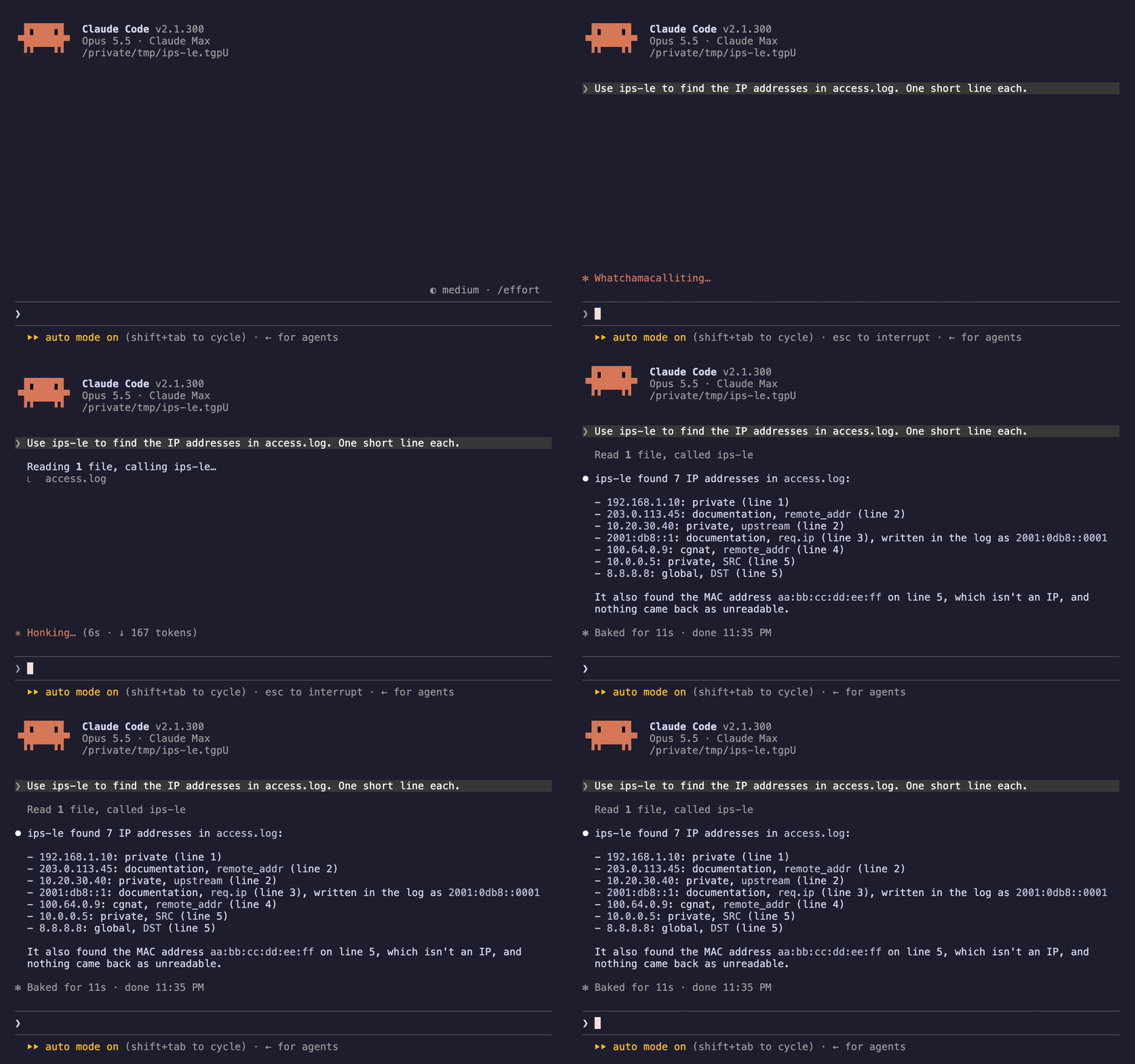
An MCP server that finds every IPv4 and
IPv6 address, CIDR block and MAC address in a document — with its line,
column and key path, its canonical form, and what it is for: loopback,
private, link-local, CGNAT, multicast, broadcast, reserved, documentation,
unique-local or global. It is the extraction engine behind the
IPs-LE editor extension, exposed as a tool
an agent can call.
IPv6 comes back in its RFC 5952 form, so 2001:0db8::0001 and
2001:db8::1 are one address rather than two, and ::ffff:127.0.0.1 is
classified as the loopback address it is.
Text it cannot read unambiguously comes back as a refusal with the reason,
never as a guess. 010.1.1.1 is 8.1.1.1 to a resolver that reads the
leading zero as octal and 10.1.1.1 to one that does not, so it is returned as
octal_hazard rather than as either address.
No dependencies, no network calls, no filesystem access. It resolves no names
and opens no sockets. Content goes in, structured results come out.
Use it
Point any MCP host at npx ips-le-mcp.
Claude Code
claude mcp add ips-le -- npx -y ips-le-mcp
Anything with a JSON config — Cursor, Windsurf, Claude Desktop:
{
  "mcpServers": {
    "ips-le": {
      "command": "npx",
      "args": ["-y", "ips-le-mcp"]
    }
  }
}
VS Code needs nothing here. Install the extension instead — it
carries this server and registers it for you:
VS Code Marketplace
· Open VSX
No Node? The same extract_ips tool ships in a static Rust binary:
cargo install ips-le, then ips-le mcp
(crates.io). The two servers answer
identically — one corpus runs against both, and a differential test feeds both
thousands of generated documents in every format, broken JSON included, and
compares every answer. The binary additionally offers ips_le_scan, which
walks a tree; this server reads no files.
Prefer a global install to npx on every launch:
npm install -g ips-le-mcp
No environment variables, no API key, no configuration of its own. To check it
before wiring it into anything:
echo '{"jsonrpc":"2.0","id":1,"method":"tools/list"}' | npx -y ips-le-mcp
If that prints the tool name, the server works.
The tool
content | string | required. The document text to scan. |
format | string | json, yaml, toml, ini, env, csv, tsv or log. Optional — it decides only the key paths, never which addresses are found. |
filename | string | Used to infer the format when format is absent, e.g. app.yaml or access.log.1. |
kind | string[] | Report only these of ipv4, ipv6, cidr, mac. Refusals are always reported. |
class | string[] | Report only these classes. Refusals are always reported. |
maxResults | number | Default 500, ceiling 5000. |
Every finding carries every field, nulls included: the text as written, a
1-based line and UTF-16 column, the key, the canonical form, the class, a CIDR
block's network, last address and host count (as a decimal string — ::/0
holds 2^128), and the refusal:
{
  "ok": true,
  "data": {
    "addresses": [
      {
        "kind": "ipv6",
        "text": "2001:0db8:0000:0000:0000:0000:0000:0001",
        "line": 1,
        "column": 11,
        "key": "upstream",
        "normalized": "2001:db8::1",
        "class": "documentation",
        "cidr": null,
        "refused": null
      },
      {
        "kind": "cidr",
        "text": "10.0.0.0/30",
        "line": 2,
        "column": 8,
        "key": "allow",
        "normalized": "10.0.0.0/30",
        "class": "private",
        "cidr": {
          "prefix": 30,
          "network": "10.0.0.0",
          "broadcast": "10.0.0.3",
          "last": "10.0.0.3",
          "hosts": "4"
        },
        "refused": null
      },
      {
        "kind": "ipv4",
        "text": "010.1.1.1",
        "line": 3,
        "column": 9,
        "key": "legacy",
        "normalized": null,
        "class": null,
        "cidr": null,
        "refused": {
          "reason": "octal_hazard",
          "detail": "010.1.1.1 has a leading zero. Some resolvers read a leading-zero octet as octal and some as decimal, so this text has two addresses and no way to choose."
        }
      }
    ],
    "refused": 1,
    "format": "yaml"
  },
  "diagnostics": [],
  "meta": {
    "tool": "extract_ips",
    "count": 3,
    "truncated": false
  }
}
A JSON document that does not parse still has its addresses reported, with an
unparsed warning saying the key paths are missing. ok means the scan ran.
Also in the MCP registry
io.github.nolindnaidoo/ips-le —
registry.modelcontextprotocol.io
Thirteen more like it
One tool each, same shape: content in, structured data out, no network and no
filesystem. Every one is on npm as <name>-mcp and in the MCP registry as
io.github.nolindnaidoo/<name>.
Every tool in the family, one page: letools.dev
Built by
Nolin Naidoo — Chief Engineer, AI/ML & Platform
Architecture. nolindnaidoo.com ·
GitHub ·
LinkedIn
Also from the same workshop
Twelve Rust tools built the same way: small, single-purpose, and driven by a
machine rather than a person. pixelcoords and pixelactions make up one loop —
pixelcoords answers where, pixelactions acts there. The ten LE crates are
the terminal half of the extensions they sit in: the same detection, held to
the extension's own corpus, and an exit code instead of a results editor.
Licence
MIT © Nolin Naidoo



