musafety (MULTI AGENTS SAFETY PROTCOL)



Simple, hardened multi-agent safety setup for any git repo.
[!WARNING]
Not affiliated with OpenAI or Codex. Not an official tool.
Why this tool exists
If you run multiple agents at the same time, it is easy to get collisions:
two agents editing the same files, unsafe deletes, broken branch flow, or
confusing ownership.
musafety adds strict guardrails so parallel agent work stays safe and predictable.

The dashboard above is the exact kind of parallel workflow this tool is built for.
It also includes an OpenSpec planning scaffold script so plan-mode workspaces
can be bootstrapped consistently across repos.
Install
npm i -g musafety
Package page: https://www.npmjs.com/package/musafety
Security + maintenance posture
- CI matrix on Node 18/20/22 (
npm test, node --check, npm pack --dry-run)
- trusted publishing workflow uses
npm publish --provenance in GitHub Actions
- OpenSSF Scorecard workflow and weekly Dependabot for GitHub Actions
- Dedicated security disclosure policy in
SECURITY.md
Related tools:
Fast setup (recommended)
musafety setup
That one command runs:
- detects whether OMX/OpenSpec are already globally installed,
- asks strict Y/N approval only if something is missing,
- installs guardrail scripts/hooks,
- repairs common safety problems,
- installs local Codex + Claude musafety helper skill files if missing,
- scans and reports final status.
Setup screenshot
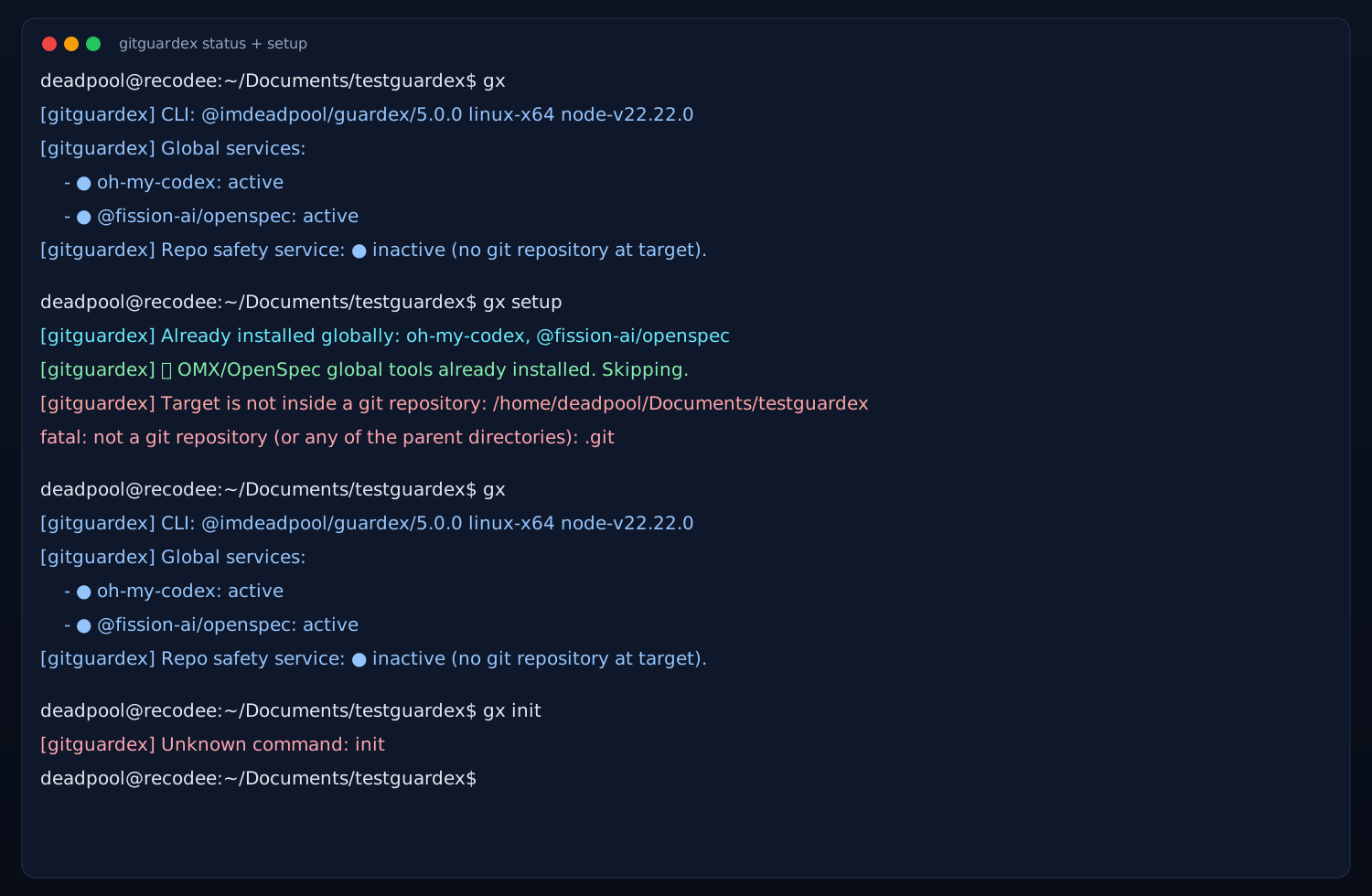
Status logs screenshot

AI helper skills installed by setup/doctor
musafety setup and musafety doctor also ensure these local helper files exist:
- Codex skill:
.codex/skills/musafety/SKILL.md
- Claude command:
.claude/commands/musafety.md (use as /musafety)
Scorecard report generation
Create/update markdown reports from OpenSSF Scorecard JSON:
musafety report scorecard --repo github.com/recodeecom/multiagent-safety
By default this writes:
docs/reports/openssf-scorecard-baseline-YYYY-MM-DD.mddocs/reports/openssf-scorecard-remediation-plan-YYYY-MM-DD.md
Workflow protocol screenshots
1) Start isolated agent branch/worktree
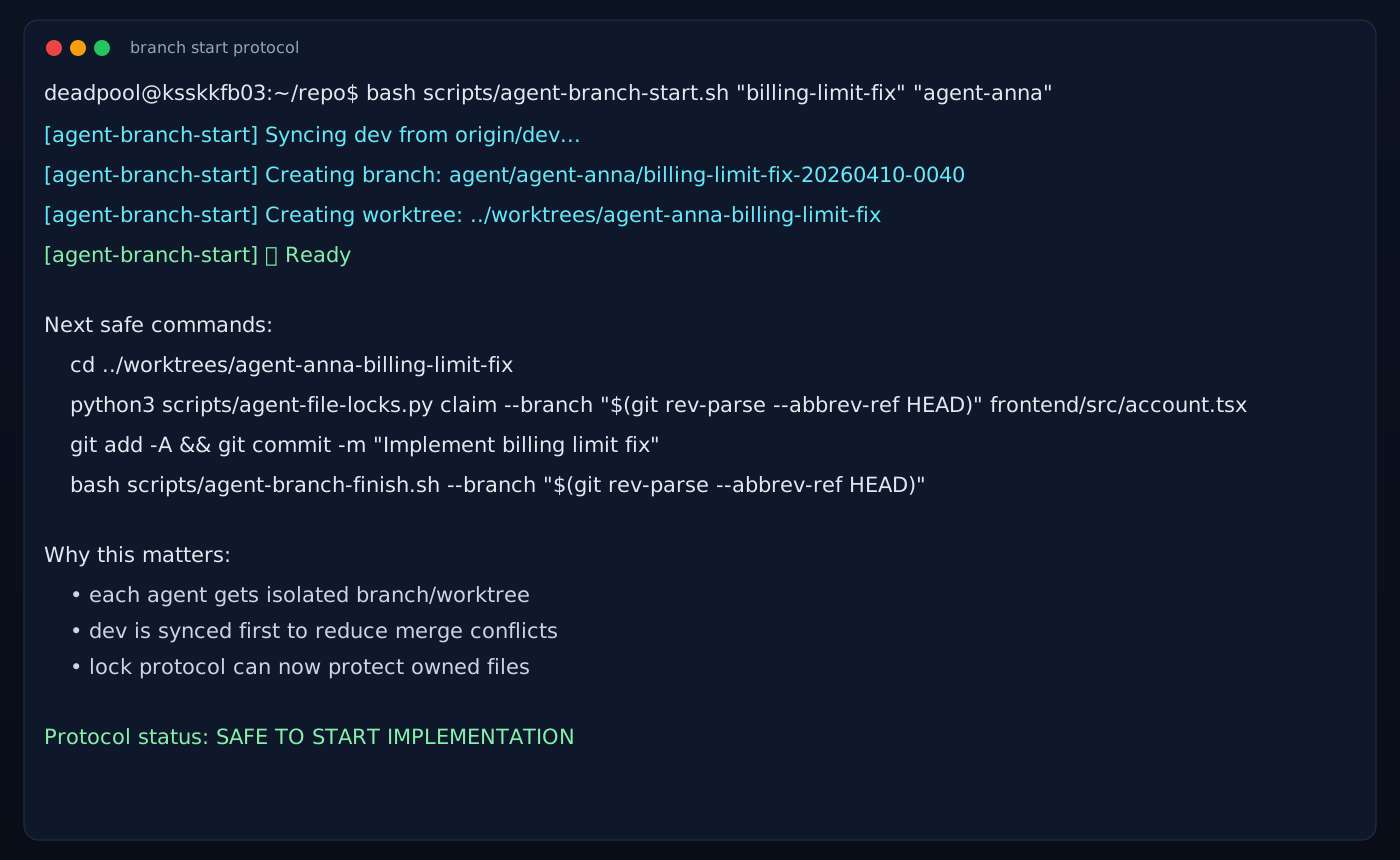
2) Lock claim + deletion guard protocol
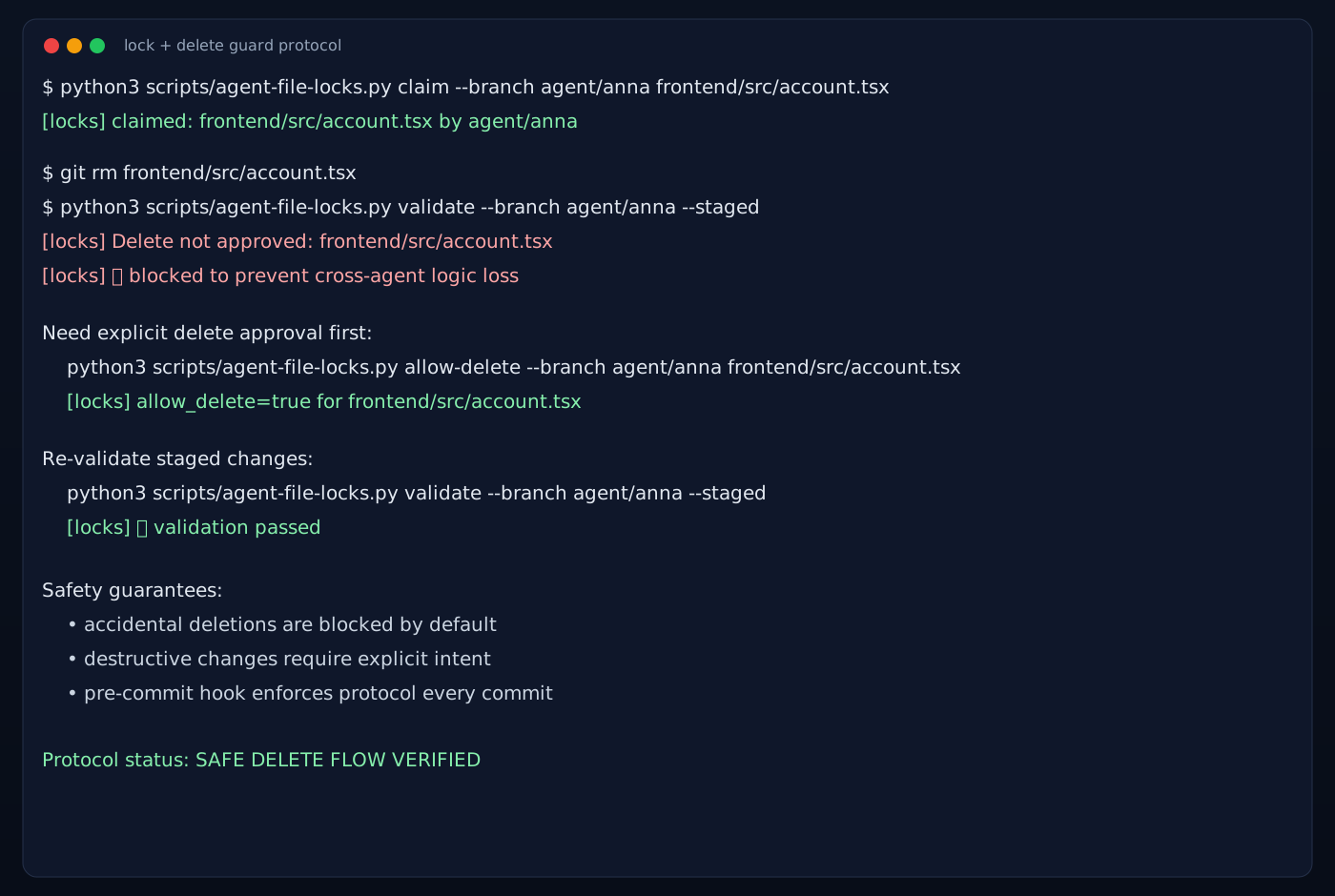
3) Multi-agent branch visibility (IDE/source control style)
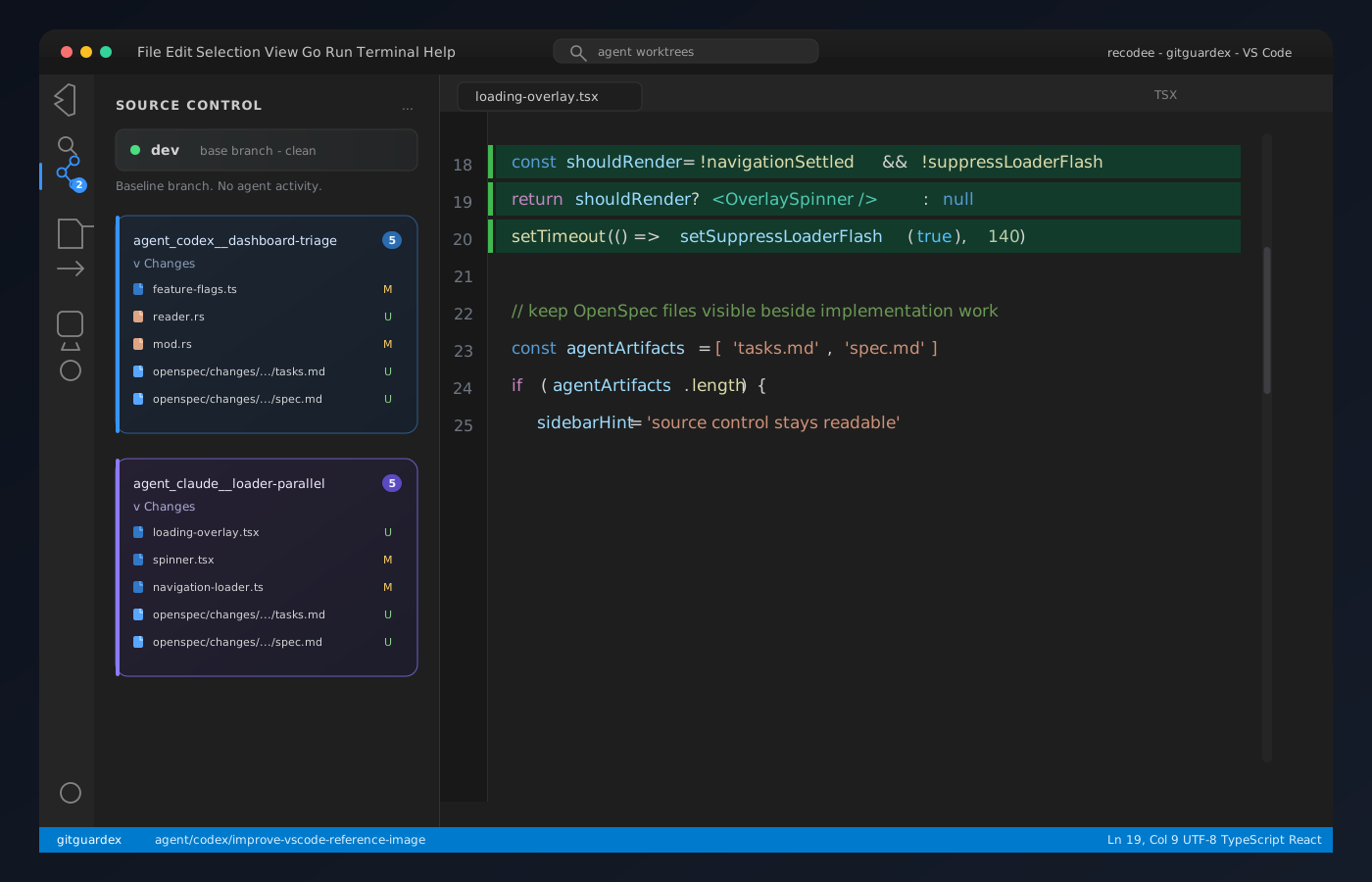
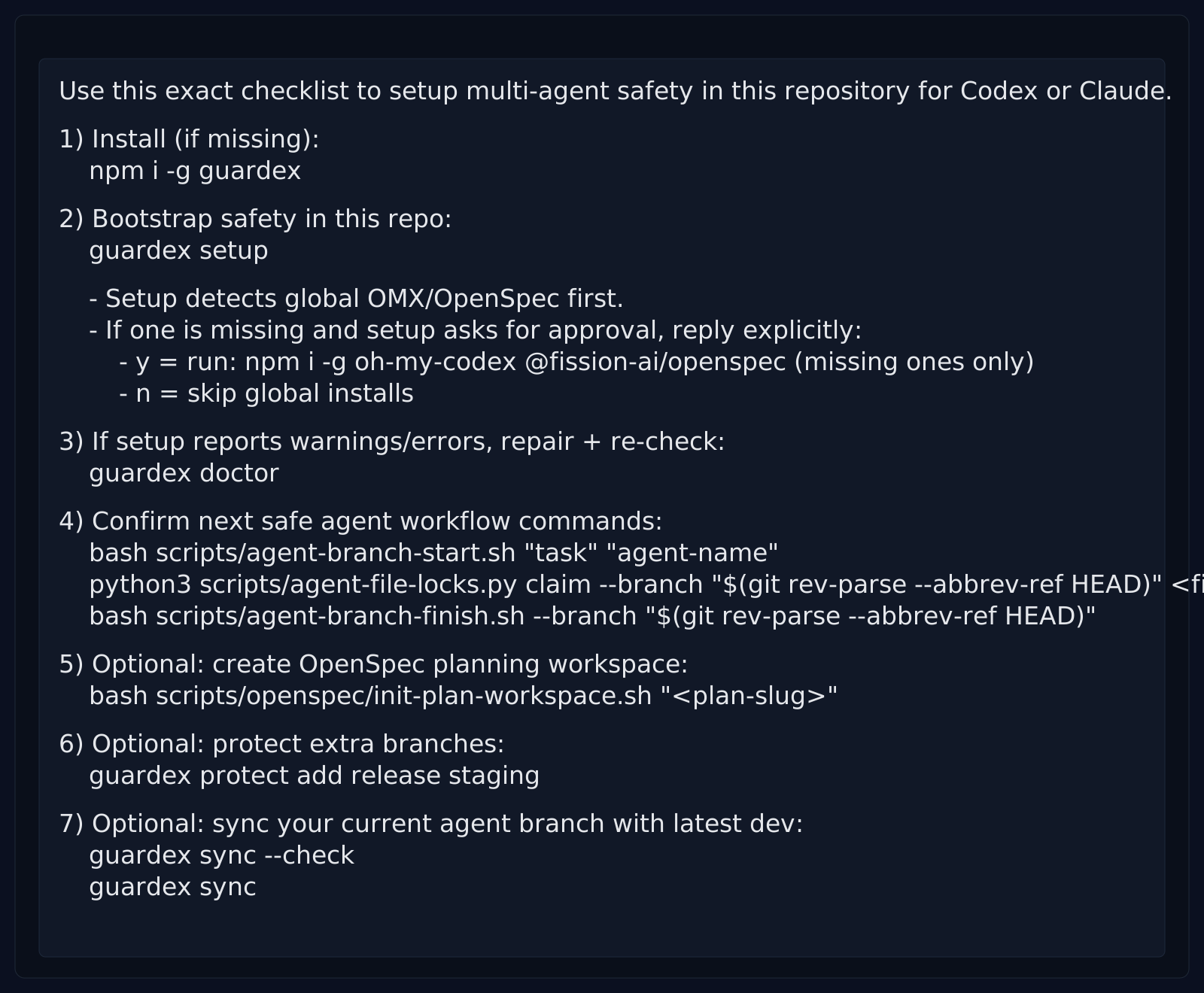
Copy prompt for your AI (Codex / Claude)
musafety copy-prompt
This prints a ready-to-paste prompt.
Prompt preview (SVG)
Commands-only copy mode
If you only want executable commands (without explanatory text):
musafety copy-commands
Example output:
npm i -g musafety
musafety setup
musafety doctor
bash scripts/codex-agent.sh "task" "agent-name"
bash scripts/agent-branch-start.sh "task" "agent-name"
python3 scripts/agent-file-locks.py claim --branch "$(git rev-parse --abbrev-ref HEAD)" <file...>
bash scripts/agent-branch-finish.sh --branch "$(git rev-parse --abbrev-ref HEAD)"
bash scripts/openspec/init-plan-workspace.sh "<plan-slug>"
musafety protect add release staging
musafety sync --check
musafety sync
Full checklist output:
Use this exact checklist to setup multi-agent safety in this repository for Codex or Claude.

1) Install (if missing):
   npm i -g musafety

2) Bootstrap safety in this repo:
   musafety setup

   - Setup detects global OMX/OpenSpec first.
   - If one is missing and setup asks for approval, reply explicitly:
     - y = run: npm i -g oh-my-codex @fission-ai/openspec (missing ones only)
     - n = skip global installs

3) If setup reports warnings/errors, repair + re-check:
   musafety doctor

4) Confirm next safe agent workflow commands:
   bash scripts/codex-agent.sh "task" "agent-name"
   bash scripts/agent-branch-start.sh "task" "agent-name"
   python3 scripts/agent-file-locks.py claim --branch "$(git rev-parse --abbrev-ref HEAD)" <file...>
   bash scripts/agent-branch-finish.sh --branch "$(git rev-parse --abbrev-ref HEAD)"

5) Optional: create OpenSpec planning workspace:
   bash scripts/openspec/init-plan-workspace.sh "<plan-slug>"

6) Optional: protect extra branches:
   musafety protect add release staging

7) Optional: sync your current agent branch with latest dev:
   musafety sync --check
   musafety sync
Basic commands
musafety status [--target <path>] [--json]
musafety setup [--target <path>] [--dry-run] [--yes-global-install|--no-global-install] [--no-gitignore]
musafety doctor [--target <path>] [--dry-run] [--json] [--keep-stale-locks] [--no-gitignore]
musafety copy-prompt
musafety copy-commands
musafety protect list [--target <path>]
musafety protect add <branch...> [--target <path>]
musafety protect remove <branch...> [--target <path>]
musafety protect set <branch...> [--target <path>]
musafety protect reset [--target <path>]
musafety sync --check [--target <path>] [--base <branch>] [--json]
musafety sync [--target <path>] [--base <branch>] [--strategy rebase|merge] [--ff-only]
musafety report scorecard [--target <path>] [--repo github.com/<owner>/<repo>] [--scorecard-json <file>] [--output-dir <path>] [--date YYYY-MM-DD]
bash scripts/agent-worktree-prune.sh --base dev
bash scripts/openspec/init-plan-workspace.sh <plan-slug>
No command defaults to musafety status (non-mutating health/status view).
musafety status reports CLI/runtime info, global OMX/OpenSpec service status, and repo safety service state.
When run in an interactive terminal, default musafety checks npm for a newer version first
and asks [y/N] whether to update immediately (default is N).
- Interactive setup: prompts for Y/N approval before global OMX/OpenSpec install.
- Interactive prompt is strict (
[y/n]) and waits for explicit answer.
- Non-interactive setup: skips global installs by default; use
--yes-global-install to force.
Advanced commands
musafety install [--target <path>] [--force] [--skip-agents] [--skip-package-json] [--no-gitignore] [--dry-run]
musafety fix [--target <path>] [--dry-run] [--keep-stale-locks] [--no-gitignore]
musafety scan [--target <path>] [--json]
musafety report help
Keep agent branches synced with dev
Use sync checks before finishing agent branches:
musafety sync --check
musafety sync
Defaults:
- base branch:
dev (or multiagent.baseBranch)
- strategy:
rebase (or multiagent.sync.strategy)
Useful variants:
musafety sync --strategy merge
musafety sync --all-agent-branches --check
By default, agent-branch-finish.sh also blocks finishing when your branch is behind origin/<base> and points to musafety sync.
Optional pre-commit behind-threshold gate (off by default):
git config multiagent.sync.requireBeforeCommit true
git config multiagent.sync.maxBehindCommits 0
With that enabled, agent-branch commits are blocked if the branch is behind origin/<base> by more than the configured threshold.
Configure protected branches
Default protected branches are:
You can manage additional protected branches via CLI:
musafety protect list
musafety protect add release staging
musafety protect remove dev
musafety protect set main release hotfix
musafety protect reset
Configuration is stored in local git config key:
multiagent.protectedBranches
What is protected
- direct commits to protected branches (defaults:
dev, main, master; configurable via musafety protect ...)
- protected-branch commits are blocked regardless of commit client (including VS Code Source Control)
- Codex-session commits on non-
agent/* branches are blocked by default (multiagent.codexRequireAgentBranch=true)
- overlapping file ownership between agents
- unapproved deletions of claimed files
- risky stale/missing lock state
- accidental loss of critical guardrail files
- in-place branch bootstrap requires explicit opt-in (
--in-place --allow-in-place)
- setup also writes a managed
.gitignore block so generated musafety scripts/hooks stay out of normal git status noise by default
- includes
oh-my-codex/ by default to keep local OMX source clones out of repo status
- pass
--no-gitignore if you want to keep tracking these files in git
Files it installs
scripts/agent-branch-start.sh
scripts/agent-branch-finish.sh
scripts/codex-agent.sh
scripts/agent-worktree-prune.sh
scripts/agent-file-locks.py
scripts/install-agent-git-hooks.sh
scripts/openspec/init-plan-workspace.sh
.githooks/pre-commit
.codex/skills/musafety/SKILL.md
.claude/commands/musafety.md
.omx/state/agent-file-locks.json
If package.json exists, it also adds helper scripts (agent:*).
Local development
npm test
node --check bin/multiagent-safety.js
npm pack --dry-run
Release notes
v0.4.6
- Added repository metadata (
repository, bugs, homepage, funding) in package manifest.
- Added CI workflow for Node 18/20/22 with packaging and syntax verification.
- Added npm provenance-oriented release workflow, OpenSSF Scorecard workflow, and Dependabot for Actions.
- Added explicit
SECURITY.md and CONTRIBUTING.md.
v0.4.5
- Added optional pre-commit behind-threshold sync gate (
multiagent.sync.requireBeforeCommit, multiagent.sync.maxBehindCommits).
- Added
musafety sync workflow (--check, sync strategies, report mode).
agent-branch-finish.sh now blocks finishing when source branch is behind origin/<base> (config-aware).
v0.4.4
- Added
scripts/agent-worktree-prune.sh to templates/install.
agent-branch-finish.sh now auto-runs prune after merge (best effort).- Added npm helper script:
agent:cleanup.
v0.4.2
- Setup now detects existing global OMX/OpenSpec installs first.
- If tools are already present, setup skips global install automatically.
- Interactive approval is now strict
[y/n] (waits for explicit answer).
- Added setup screenshot to README.
- Added 3 additional workflow screenshots (branch start, lock/delete guard, source-control view).
v0.4.0
- Added setup-time Y/N approval prompt for optional global install of:
oh-my-codex@fission-ai/openspec
- Added setup flags for automation:
--yes-global-install--no-global-install
- Added official repo links for OMX and OpenSpec.



