Network-AI: Multi-Agent Orchestration Framework
The plug-and-play AI agent orchestrator for TypeScript/Node.js -- connect 12 agent frameworks with zero glue code












Legacy Users: This skill works with Clawdbot and Moltbot (now OpenClaw). If you're searching for Moltbot Security, Clawdbot Swarm, or Moltbot multi-agent -- you're in the right place!
If network-ai saves you time, a ⭐ on GitHub helps others find it.
Connect agents across 12 frameworks through a shared blackboard with built-in security, compliance enforcement, and behavioral governance -- in a single npm install. No glue code, no lock-in.
Why Network-AI?
- Framework-agnostic -- LangChain, AutoGen, CrewAI, MCP, OpenAI Assistants, and 7 more in one orchestrator
- Governed coordination -- FSM-controlled agent turns, permission gating, audit trails, budget ceilings
- Shared state -- Atomic blackboard with conflict resolution for safe parallel agent coordination
- Production security -- AES-256 encryption, HMAC audit logs, rate limiting, input sanitization
- Zero config -- Works out of the box with
createSwarmOrchestrator()
Hello World -- Get Running in 60 Seconds
import { createSwarmOrchestrator, CustomAdapter } from 'network-ai';
const adapter = new CustomAdapter();
adapter.registerHandler('greeter', async (payload) => {
return { result: `Hello, ${payload.params.name}! Your task: ${payload.action}` };
});
const orchestrator = createSwarmOrchestrator({
adapters: [{ adapter }],
});
orchestrator.blackboard.write('status', { ready: true }, 'greeter');
const result = await adapter.executeAgent('greeter', {
action: 'welcome',
params: { name: 'World' },
}, { agentId: 'greeter' });
console.log(result.data);
That's it. No config files, no setup wizards. Add more agents, swap frameworks, layer on security -- all optional.
Demo
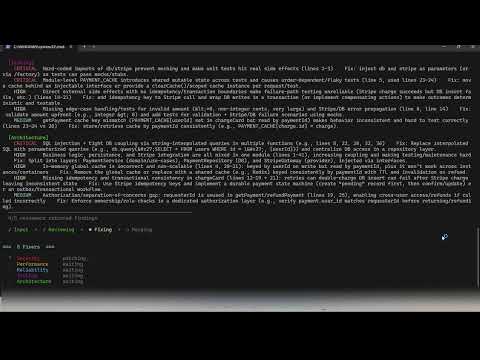
5-agent code review swarm — parallel specialist agents coordinated through a shared blackboard
The demo shows a code review swarm, but Network-AI is not a code review tool. The same orchestration pattern works for research pipelines, data processing, content moderation, customer support routing, document analysis, financial workflows — any task where multiple agents need to coordinate without stepping on each other.
Run the demo yourself: 05-code-review-swarm.ts is in the repo. Copy .env.example to .env, add your OPENAI_API_KEY, then run npx ts-node examples/05-code-review-swarm.ts. Supports 4 modes: built-in code review, paste your own code, system design document, or custom role for any content type (proposals, policies, job descriptions, emails). Examples 01–03 cover all core framework features with no API key required. 04-live-swarm.ts (live AI research swarm) is coming soon.
Why This Exists -- The Multi-Agent Race Condition Problem
Most agent frameworks let you run multiple AI agents in parallel. None of them protect you when those agents write to the same resource at the same time.
The "Bank Run" scenario:
Agent A reads balance:  $10,000
Agent B reads balance:  $10,000       (same moment)
Agent A writes balance: $10,000 - $7,000 = $3,000
Agent B writes balance: $10,000 - $6,000 = $4,000   <-- Agent A's write is gone
Both agents thought they had $10,000. Both spent from it. You just lost $3,000 to a race condition. This isn't theoretical -- it happens any time two LLM agents hit a shared database, file, or API concurrently.
This is a split-brain problem. Without concurrency control, your agents will:
- Corrupt shared state -- Two agents overwrite each other's blackboard entries
- Double-spend budgets -- Token costs exceed limits because agents don't see each other's spending
- Produce contradictory outputs -- Agent A says "approved", Agent B says "denied", both write to the same key
How Network-AI prevents this:
const blackboard = new LockedBlackboard('.');
const changeId = blackboard.proposeChange('account:balance', { amount: 7000, type: 'debit' }, 'agent-a');
blackboard.validateChange(changeId);
blackboard.commitChange(changeId);
python scripts/swarm_guard.py budget-init --task-id "task_001" --budget 10000
Network-AI wraps your agent swarm with file-system mutexes, atomic commits, and token budget ceilings so race conditions, double-spends, and split-brain writes simply cannot happen. This works with any framework -- LangChain, CrewAI, AutoGen, or anything else connected through the adapter system.
Features
Core Orchestration (Multi-Agent Coordination)
- Agent-to-Agent Handoffs -- Delegate tasks between sessions using OpenClaw's
sessions_send
- Permission Wall (AuthGuardian) -- Gate access to sensitive APIs with justification-based approval
- Shared Blackboard -- Markdown-based coordination state for agent communication
- Parallel Execution Patterns -- Merge, vote, chain, and first-success synthesis strategies
- Task Decomposition -- Automatic breaking of complex tasks into parallel subtasks
Plug-and-Play Adapter System (v3.0) -- 12 AI Agent Frameworks
- AdapterRegistry -- Route agents to the right framework automatically
- OpenClaw Adapter -- Native OpenClaw skill execution via
callSkill
- LangChain Adapter -- Supports Runnables (
.invoke()) and plain functions
- AutoGen Adapter -- Supports
.run() and .generateReply() agents
- CrewAI Adapter -- Individual agents and full crew orchestration
- MCP Adapter -- Model Context Protocol tool handlers
- LlamaIndex Adapter -- Query engines, chat engines, and agent runners
- Semantic Kernel Adapter -- Microsoft SK kernels, functions, and planners
- OpenAI Assistants Adapter -- Assistants API with thread management
- Haystack Adapter -- Pipelines, agents, and components
- DSPy Adapter -- Modules, programs, and predictors
- Agno Adapter -- Agents, teams, and functions (formerly Phidata)
- Custom Adapter -- Register any function or HTTP endpoint as an agent
- BaseAdapter -- Extend to write your own adapter in minutes
Content Quality Gate (AI Safety)
- BlackboardValidator (Layer 1) -- Rule-based validation at ~159K-1M ops/sec
- QualityGateAgent (Layer 2) -- AI-assisted review with quarantine system
- Hallucination Detection -- Catches vague, unsupported, or fabricated content
- Dangerous Code Detection -- Blocks
eval(), exec(), rm -rf, and other risky patterns
- Placeholder Rejection -- Rejects TODO/FIXME/stub content from entering the blackboard
Security Module (Defense-in-Depth)
- HMAC-Signed Tokens -- Cryptographic token generation with expiration
- Input Sanitization -- XSS, injection, path traversal, and prototype pollution prevention
- Blackboard Path Safety -- Change ID sanitization prevents directory traversal in atomic commits
- Rate Limiting -- Per-agent request throttling with lockout on failed auth
- AES-256-GCM Encryption -- Encrypt sensitive blackboard entries at rest
- Privilege Escalation Prevention -- Trust-ceiling enforcement
- Cryptographic Audit Logs -- Tamper-evident signed audit trail with chain continuation
- Secure Gateway -- Integrated security layer wrapping all operations
Operational Safety & Governance
- Swarm Guard -- Prevents "Handoff Tax" (wasted tokens) and detects silent agent failures
- Atomic Commits -- File-system mutexes prevent split-brain in concurrent writes
- Priority-Based Preemption -- Higher-priority agents preempt lower-priority writes on same-key conflicts (
priority-wins strategy)
- Cost Awareness -- Token budget tracking with automatic SafetyShutdown
- Budget-Aware Handoffs --
intercept-handoff command wraps sessions_send with budget checks
--active-grants Observability -- Real-time view of which agents hold access to which APIs, with TTL countdown--audit-summary Observability -- Per-agent and per-resource breakdown of permission requests, grants, and denials- Justification Hardening -- 16-pattern prompt-injection detector, keyword-stuffing defense, structural coherence scoring
Project Structure
Network-AI/
|-- index.ts                  # Core orchestrator (SwarmOrchestrator, SharedBlackboard, AuthGuardian, TaskDecomposer)
|-- security.ts               # Security module (tokens, encryption, rate limiting, audit)
|-- setup.ts                  # Developer setup & installation checker
|-- package.json              # NPM manifest & scripts
|-- tsconfig.json             # TypeScript configuration
|-- skill.json                # OpenClaw skill metadata
|-- SKILL.md                  # OpenClaw skill definition (frontmatter + instructions)
|-- QUICKSTART.md             # 5-minute getting-started guide
|-- requirements.txt          # Python dependencies
|-- swarm-blackboard.md       # Runtime blackboard state (auto-generated)
|-- adapters/                 # Plug-and-play agent framework adapters (12 frameworks)
|   |-- index.ts              # Barrel exports for all adapters
|   |-- base-adapter.ts       # Abstract base class for adapters
|   |-- adapter-registry.ts   # Multi-adapter routing & discovery
|   |-- openclaw-adapter.ts   # OpenClaw skill adapter
|   |-- langchain-adapter.ts  # LangChain adapter (Runnables & functions)
|   |-- autogen-adapter.ts    # AutoGen adapter (.run() & .generateReply())
|   |-- crewai-adapter.ts     # CrewAI adapter (agents & crews)
|   |-- mcp-adapter.ts        # MCP tool handler adapter
|   |-- custom-adapter.ts     # Custom function/HTTP agent adapter
|   |-- llamaindex-adapter.ts # LlamaIndex adapter (query/chat engines, agent runners)
|   |-- semantic-kernel-adapter.ts  # Microsoft Semantic Kernel adapter
|   |-- openai-assistants-adapter.ts # OpenAI Assistants API adapter
|   |-- haystack-adapter.ts   # deepset Haystack adapter (pipelines, agents)
|   |-- dspy-adapter.ts       # Stanford DSPy adapter (modules, programs)
|   |-- agno-adapter.ts       # Agno adapter (agents, teams -- formerly Phidata)
|-- types/                    # TypeScript type definitions
|   |-- agent-adapter.d.ts    # Universal adapter interfaces (IAgentAdapter, AgentPayload, etc.)
|   |-- openclaw-core.d.ts    # OpenClaw-specific type stubs
|-- lib/                      # TypeScript utilities
|   |-- swarm-utils.ts        # Node.js helper functions
|   |-- locked-blackboard.ts  # Atomic commits with file-system mutexes
|   |-- blackboard-validator.ts # Content quality gate (BlackboardValidator + QualityGateAgent)
|-- scripts/                  # Python helper scripts
|   |-- check_permission.py   # AuthGuardian permission checker
|   |-- validate_token.py     # Token validation
|   |-- revoke_token.py       # Token revocation
|   |-- blackboard.py         # Shared state management (with atomic commits)
|   |-- swarm_guard.py        # Handoff tax, failure prevention, & budget tracking
|-- references/               # Detailed documentation
|   |-- adapter-system.md     # Adapter architecture & writing custom adapters
|   |-- auth-guardian.md      # Permission system details
|   |-- blackboard-schema.md  # Data structures
|   |-- trust-levels.md       # Agent trust configuration
|   |-- mcp-roadmap.md        # MCP networking implementation plan
|-- test-standalone.ts        # Core orchestrator tests (79 tests)
|-- test-security.ts          # Security module tests (33 tests)
|-- test-adapters.ts          # Adapter system tests (139 tests)
|-- test-priority.ts          # Priority & preemption tests (64 tests)
|-- test-ai-quality.ts        # AI quality gate demo
|-- test.ts                   # Full integration test suite
Quick Start
See QUICKSTART.md for a 5-minute getting-started guide.
Installation
As a Dependency (recommended)
npm install network-ai
That's it. No native dependencies, no build step.
For Development (contributing / running tests)
git clone https://github.com/jovanSAPFIONEER/Network-AI
cd Network-AI
npm install
pip install -r requirements.txt
Verify Development Setup
npm run setup:check
npm run setup -- --list
npm run setup:example
Running in PowerShell (Windows)
All commands work in PowerShell. The only difference from bash is how you set environment variables.
Set your API key for the current session:
$env:OPENAI_API_KEY = "sk-..."
Or load it from .env automatically — copy the template first:
Copy-Item .env.example .env # then open .env and fill in your key
Run the examples (no API key needed):
npx ts-node examples/01-hello-swarm.ts
npx ts-node examples/02-fsm-pipeline.ts
npx ts-node examples/03-parallel-agents.ts
Run the interactive launcher (picks which example to run):
npx ts-node run.ts
Run the AI code review swarm demo (requires OPENAI_API_KEY):
$env:OPENAI_API_KEY = "sk-..."
npx ts-node examples/05-code-review-swarm.ts
Run the tests:
npm test                      # Core orchestrator (79 tests)
npm run test:security         # Security module (33 tests)
npm run test:adapters         # Adapter system (139 tests)
npm run test:priority         # Priority & preemption (64 tests)
npm run test:all              # All suites in sequence
Tip: To persist OPENAI_API_KEY across sessions, add it to your PowerShell profile or set it as a user environment variable via System Properties → Environment Variables.
For OpenClaw Users
Copy this skill into your OpenClaw workspace:
cp -r Network-AI ~/.openclaw/workspace/skills/swarm-orchestrator
Or install via ClawHub:
clawhub install network-ai
Usage
TypeScript / Node.js API
Basic Setup
import {
SwarmOrchestrator,
SharedBlackboard,
AuthGuardian,
createSwarmOrchestrator,
} from 'network-ai';
const orchestrator = createSwarmOrchestrator();
Using Adapters (Plug-and-Play)
import {
createSwarmOrchestrator,
AdapterRegistry,
CustomAdapter,
LangChainAdapter,
} from 'network-ai';
const custom = new CustomAdapter();
custom.registerHandler('my-agent', async (payload) => {
return { result: 'done' };
});
const langchain = new LangChainAdapter();
langchain.registerRunnable('researcher', myLangChainRunnable);
const orchestrator = createSwarmOrchestrator({
adapters: [
{ adapter: custom },
{ adapter: langchain },
],
});
Blackboard & Permissions
const blackboard = new SharedBlackboard('.');
blackboard.write('task:analysis', { status: 'running' }, 'orchestrator');
const data = blackboard.read('task:analysis');

const auth = new AuthGuardian();
const grant = auth.requestPermission('data_analyst', 'DATABASE', 'read',
  'Need customer order history for sales report');
Python Scripts
1. Initialize Budget (First!)
python scripts/swarm_guard.py budget-init --task-id "task_001" --budget 10000
2. Budget-Aware Handoffs
python scripts/swarm_guard.py intercept-handoff \
  --task-id "task_001" \
  --from orchestrator \
  --to data_analyst \
  --message "Analyze Q4 revenue data"
Output (if allowed):
HANDOFF ALLOWED: orchestrator -> data_analyst
   Tokens spent: 156
   Budget remaining: 9,844
   Handoff #1 (remaining: 2)
   -> Proceed with sessions_send
3. Check Permissions
python scripts/check_permission.py \
  --agent data_analyst \
  --resource DATABASE \
  --justification "Need customer order history for sales report"
Output:
GRANTED
Token: grant_85364b44d987...
Expires: 2026-02-04T15:30:00Z
Restrictions: read_only, max_records:100
3a. View Active Grants
See which agents currently hold access to which APIs:
python scripts/check_permission.py --active-grants
python scripts/check_permission.py --active-grants --agent data_analyst
python scripts/check_permission.py --active-grants --json
Output:
Active Grants:
======================================================================
  Agent:       data_analyst
  Resource:    DATABASE
  Scope:       read:orders
  Token:       grant_c1ea828897...
  Remaining:   4.4 min
  Restrictions: read_only, max_records:100
  ------------------------------------------------------------------

Total: 1 active, 0 expired
3b. Audit Summary
Summarize permission activity across all agents:
python scripts/check_permission.py --audit-summary
python scripts/check_permission.py --audit-summary --last 50 --json
Output:
Audit Summary
======================================================================
  Requests:     12
  Grants:        9
  Denials:       3
  Grant Rate:   75%

  By Agent:
  --------------------------------------------------
  Agent                  Requests     Grants    Denials
  data_analyst                  4          3          1
  orchestrator                  5          4          1
  strategy_advisor              3          2          1
4. Use the Blackboard
python scripts/blackboard.py write "task:analysis" '{"status": "running"}'
python scripts/blackboard.py read "task:analysis"
python scripts/blackboard.py propose "chg_001" "key" '{"value": 1}'
python scripts/blackboard.py validate "chg_001"
python scripts/blackboard.py commit "chg_001"
python scripts/blackboard.py list
5. Fan-Out / Fan-In with Shared Blackboard
Coordinate multiple specialized agents working on independent subtasks, then merge results:
import { LockedBlackboard } from 'network-ai';
import { Logger } from 'network-ai';
const logger = Logger.create('fan-out');
const board = new LockedBlackboard('.', logger, { conflictResolution: 'first-commit-wins' });
const agents = ['reliability', 'security', 'cost', 'operations', 'performance'];
for (const pillar of agents) {
const id = board.propose(`eval:${pillar}`, { score: Math.random(), findings: [] }, pillar);
board.validate(id, 'orchestrator');
board.commit(id);
}
const results = agents.map(pillar => ({
pillar,
...board.read(`eval:${pillar}`)
}));
const summary = board.propose('eval:summary', {
overall: results.reduce((sum, r) => sum + r.score, 0) / results.length,
pillars: results
}, 'orchestrator');
board.validate(summary, 'orchestrator');
board.commit(summary);
This pattern works with any framework adapter -- LangChain agents, AutoGen agents, CrewAI crews, or any mix. The blackboard ensures no agent overwrites another's results.
6. Priority-Based Conflict Resolution (Phase 3)
import { LockedBlackboard } from 'network-ai';
const board = new LockedBlackboard('.', { conflictResolution: 'priority-wins' });
const lowId = board.propose('shared:config', { mode: 'draft' }, 'worker', undefined, 1);
const highId = board.propose('shared:config', { mode: 'final' }, 'supervisor', undefined, 3);
board.validate(lowId, 'orchestrator');
board.commit(lowId);
board.validate(highId, 'orchestrator');
board.commit(highId);
board.read('shared:config');
7. Check Budget Status
python scripts/swarm_guard.py budget-check --task-id "task_001"
python scripts/swarm_guard.py budget-report --task-id "task_001"
Adapter System
The adapter system lets you plug any agent framework into the orchestrator. Each adapter implements the IAgentAdapter interface.
OpenClawAdapter | OpenClaw | registerSkill(name, skillRef) | openclaw-core |
LangChainAdapter | LangChain | registerRunnable(name, runnable) or registerFunction(name, fn) | None (BYOC) |
AutoGenAdapter | AutoGen | registerAgent(name, agent) -- supports .run() and .generateReply() | None (BYOC) |
CrewAIAdapter | CrewAI | registerAgent(name, agent) or registerCrew(name, crew) | None (BYOC) |
MCPAdapter | MCP | registerTool(name, handler) | None (BYOC) |
LlamaIndexAdapter | LlamaIndex | registerQueryEngine(), registerChatEngine(), registerAgentRunner() | None (BYOC) |
SemanticKernelAdapter | Semantic Kernel | registerKernel(), registerFunction() | None (BYOC) |
OpenAIAssistantsAdapter | OpenAI Assistants | registerAssistant(name, config) | None (BYOC) |
HaystackAdapter | Haystack | registerPipeline(), registerAgent(), registerComponent() | None (BYOC) |
DSPyAdapter | DSPy | registerModule(), registerProgram(), registerPredictor() | None (BYOC) |
AgnoAdapter | Agno | registerAgent(), registerTeam(), registerFunction() | None (BYOC) |
CustomAdapter | Any | registerHandler(name, fn) or registerHttpAgent(name, config) | None |
BYOC = Bring Your Own Client. All adapters (except OpenClaw) are self-contained with zero npm dependencies. You provide your framework's SDK objects and the adapter wraps them.
Writing a Custom Adapter
Extend BaseAdapter:
import { BaseAdapter } from 'network-ai';
import type { AgentPayload, AgentResult } from 'network-ai';
class MyAdapter extends BaseAdapter {
readonly name = 'my-framework';
async executeAgent(agentId: string, payload: AgentPayload): Promise<AgentResult> {
return { success: true, output: 'result', metadata: { adapter: this.name } };
}
async listAgents() { return []; }
async isAgentAvailable(id: string) { return true; }
}
See references/adapter-system.md for the full adapter architecture guide.
API Architecture & Performance
Your swarm is only as fast as the backend it calls into.
Network-AI is backend-agnostic — every agent in a swarm can call a cloud API, a different cloud API, or a local GPU model. That choice has a direct and significant impact on speed, parallelism, and reliability.
Why It Matters
When you run a 5-agent swarm, Network-AI can dispatch all 5 calls simultaneously. Whether those calls actually execute in parallel depends entirely on what's behind each agent:
| Single cloud API key (OpenAI, Anthropic, etc.) | Rate-limited | 40–70s sequential | RPM limits force sequential dispatch + retry waits |
| Multiple API keys / providers | True parallel | 8–15s | Each agent hits a different key or provider |
| Local GPU (Ollama, llama.cpp, vLLM) | True parallel | 5–20s depending on hardware | No RPM limit — all 5 agents fire simultaneously |
| Mixed (some cloud, some local) | Partial | Varies | Local agents never block; cloud agents rate-paced |
The Single-Key Rate Limit Problem
Cloud APIs enforce Requests Per Minute (RPM) limits per API key. When you run 5 agents sharing one key and hit the ceiling, the API silently returns empty responses — not a 429 error, just blank content. Network-AI's swarm demos handle this automatically with sequential dispatch (one agent at a time) and adaptive header-based pacing that reads the x-ratelimit-reset-requests header to wait exactly as long as needed before the next call.
Single key (gpt-5.2, 6 RPM limit):
  Agent 1 ──call──▶ response (7s)
                                wait 1s
  Agent 2 ──call──▶ response (7s)
                                wait 1s
  ... (sequential)
  Total: ~60s for 5 agents + coordinator
Multiple Keys or Providers = True Parallel
Register each reviewer agent against a different API key or provider and dispatch fires all 5 simultaneously:
import { CustomAdapter, AdapterRegistry } from 'network-ai';
const registry = new AdapterRegistry();
for (const reviewer of REVIEWERS) {
const adapter = new CustomAdapter();
const client = new OpenAI({ apiKey: process.env[`OPENAI_KEY_${reviewer.id.toUpperCase()}`] });
adapter.registerHandler(reviewer.id, async (payload) => {
const resp = await client.chat.completions.create({ ... });
return { findings: extractContent(resp) };
});
registry.register(reviewer.id, adapter);
}
Local GPU = Zero Rate Limits
Run Ollama or any OpenAI-compatible local server and drop it in as a backend. No RPM ceiling means every agent fires the moment the previous one starts — true parallel for free:
const localClient = new OpenAI({
apiKey : 'not-needed',
baseURL : 'http://localhost:11434/v1',
});
adapter.registerHandler('sec_review', async (payload) => {
const resp = await localClient.chat.completions.create({
model : 'llama3.2',
messages: [...],
});
return { findings: extractContent(resp) };
});
Mixing Cloud and Local
The adapter system makes it trivial to give some agents a cloud backend and others a local one:
registry.register('test_review', localAdapter);
registry.register('arch_review', localAdapter);
registry.register('sec_review', cloudAdapter);
Network-AI's orchestrator, blackboard, and trust model stay identical regardless of what's behind each adapter. The only thing that changes is speed.
Summary
| One cloud API key | Sequential dispatch, 40–70s per 5-agent swarm — fully handled automatically |
| Multiple cloud keys | Near-parallel, 10–15s — use one key per adapter instance |
| Local GPU (Ollama, vLLM) | True parallel, 5–20s depending on hardware |
| Home GPU + cloud mix | Local agents never block — cloud agents rate-paced independently |
The framework doesn't get in the way of any of these setups. Connect whatever backend you have and the orchestration layer handles the rest.
Cloud Provider Performance
Not all cloud APIs perform the same. Model size, inference infrastructure, and tier all affect how fast each agent gets a response — and that directly multiplies across every agent in your swarm.
| OpenAI gpt-5.2 | 6–10s per call | 3–6 RPM | Flagship model, high latency, strict RPM |
| OpenAI gpt-4o-mini | 2–4s per call | 500 RPM | Fast, cheap, good for reviewer agents |
| OpenAI gpt-4o | 4–7s per call | 60–500 RPM | Balanced quality/speed |
| Anthropic Claude 3.5 Haiku | 2–3s per call | 50 RPM | Fastest Claude, great for parallel agents |
| Anthropic Claude 3.7 Sonnet | 4–8s per call | 50 RPM | Stronger reasoning, higher latency |
| Google Gemini 2.0 Flash | 1–3s per call | 15 RPM (free) | Very fast inference, low RPM on free tier |
| Groq (Llama 3.3 70B) | 0.5–2s per call | 30 RPM | Fastest cloud inference available |
| Together AI / Fireworks | 1–3s per call | Varies by plan | Good for parallel workloads, competitive RPM |
Key insight: A 5-agent swarm using gpt-4o-mini at 500 RPM can fire all 5 agents truly in parallel and finish in ~4s total. The same swarm on gpt-5.2 at 6 RPM must go sequential and takes 60s. The model tier matters more than the orchestration framework.
Choosing a Model for Swarm Agents
- Speed over depth (many agents, real-time feedback) →
gpt-4o-mini, gpt-5-mini, claude-3.5-haiku, gemini-2.0-flash, groq/llama-3.3-70b
- Depth over speed (fewer agents, high-stakes output) →
gpt-4o, claude-3.7-sonnet, gpt-5.2
- Free / no-cost testing → Groq free tier, Gemini free tier, or Ollama locally
- Production swarms with budget → Multiple keys across providers, route different agents to different models
All of these plug into Network-AI through the CustomAdapter by swapping the client's baseURL and model string — no other code changes needed.
max_completion_tokens — The Silent Truncation Trap
One of the most common failure modes in agentic output tasks is silent truncation. When a model hits the max_completion_tokens ceiling it stops mid-output and returns whatever it has — no error, no warning. The API call succeeds with a 200 and finish_reason: "length" instead of "stop".
This is especially dangerous for code-rewrite agents where the output is a full file. A fixed max_completion_tokens: 3000 cap will silently drop everything after line ~150 of a 200-line fix.
# What you set vs what you need

max_completion_tokens: 3000  →  enough for a short blog post
                             →  NOT enough for a 200-line code rewrite

# Real numbers (gpt-5-mini, order-service.ts rewrite):
  Blockers section:  ~120 tokens
  Fixed code:        ~2,800 tokens  (213 lines with // FIX: comments)
  Total needed:      ~3,000 tokens  ← hits the cap exactly, empty output
  Fix: set to 16,000 → full rewrite delivered in one shot
Lessons learned from building the code-review swarm:
| Fixed code output was empty | max_completion_tokens: 3000 too low for a full rewrite | Raise to 16000+ for any code-output agent |
finish_reason: "length" silently discards output | Model hits cap, returns partial response with no error | Always check choices[0].finish_reason and alert on "length" |
gpt-5.2 slow + expensive for reviewer agents | Flagship model = high latency + $14/1M output tokens | Use gpt-5-mini ($2/1M, 128k output, same RPM) for reviewer/fixer agents |
| Coordinator + fixer as two separate calls | Second call hits rate limit window, adds 60s wait | Merge into one combined call with a structured two-section response format |
Rule of thumb for max_completion_tokens by task:
| Short classification / sentiment | 200–500 |
| Code review findings (one reviewer) | 400–800 |
| Blocker summary (coordinator) | 500–1,000 |
| Full file rewrite (≤300 lines) | 12,000–16,000 |
| Full file rewrite (≤1,000 lines) | 32,000–64,000 |
| Document / design revision | 16,000–32,000 |
All GPT-5 variants (gpt-5, gpt-5-mini, gpt-5-nano, gpt-5.2) support 128,000 max output tokens — the ceiling is never the model, it's always the cap you set.
Cloud GPU Instances (Self-Hosted on AWS / GCP / Azure)
Running your own model on a cloud GPU VM (e.g. AWS p3.2xlarge / A100, GCP a2-highgpu, Azure NC series) sits between managed APIs and local hardware:
| A100 (80GB) + vLLM, Llama 3.3 70B | True parallel | Faster — 0.5–2s per call | None |
| H100 + vLLM, Mixtral 8x7B | True parallel | Faster — 0.3–1s per call | None |
| T4 / V100 + Ollama, Llama 3.2 8B | True parallel | Comparable | None |
Since you own the endpoint, there are no rate limits — all 5 agents fire at the same moment. At inference speeds on an A100, a 5-agent swarm can complete in 3–8 seconds for a 70B model, comparable to Groq and faster than any managed flagship model.
The tradeoff is cost (GPU VMs are $1–$5/hr) and setup (vLLM install, model download). For high-volume production swarms or teams that want no external API dependency, it's the fastest architecture available. The connection is identical to local Ollama — just point baseURL at your VM's IP.
Permission System
The AuthGuardian evaluates requests using:
| Justification | 40% | Quality of business reason (hardened against prompt injection) |
| Trust Level | 30% | Agent's established trust |
| Risk Assessment | 30% | Resource sensitivity + scope |
Approval threshold: 0.5
Resource Types
DATABASE | 0.5 | read_only, max_records:100 |
PAYMENTS | 0.7 | read_only, no_pii_fields, audit_required |
EMAIL | 0.4 | rate_limit:10_per_minute |
FILE_EXPORT | 0.6 | anonymize_pii, local_only |
Security Module
The security module (security.ts) provides defense-in-depth protections:
| Token Manager | SecureTokenManager | HMAC-signed tokens with expiration |
| Input Sanitizer | InputSanitizer | XSS, injection, traversal prevention |
| Rate Limiter | RateLimiter | Per-agent request throttling + lockout |
| Encryptor | DataEncryptor | AES-256-GCM encryption for sensitive data |
| Permission Hardener | PermissionHardener | Trust-ceiling & privilege escalation prevention |
| Audit Logger | SecureAuditLogger | Cryptographically signed audit entries |
| Gateway | SecureSwarmGateway | Integrated security layer wrapping all ops |
Agent Trust Levels
orchestrator | 0.9 | Primary coordinator |
risk_assessor | 0.85 | Compliance specialist |
data_analyst | 0.8 | Data processing |
strategy_advisor | 0.7 | Business strategy |
| Unknown | 0.5 | Default |
Handoff Protocol
Format messages for delegation:
[HANDOFF]
Instruction: Analyze monthly sales by product category
Context: Using database export from ./data/sales_export.csv
Constraints: Focus on top 5 categories only
Expected Output: JSON summary with category, revenue, growth_pct
[/HANDOFF]
Testing
Run all test suites:
npm run test:all
npm test
npm run test:security
npm run test:adapters
npx ts-node test.ts
Test Python scripts:
python scripts/check_permission.py --agent orchestrator --resource PAYMENTS \
--justification "Generating monthly revenue report for management" --json
python scripts/blackboard.py write "test:key" '{"value": 123}' --ttl 60
python scripts/blackboard.py read "test:key"
python scripts/revoke_token.py --list-expired
python scripts/revoke_token.py --cleanup
Test results (315 total):
test-standalone.ts -- 79 passed (blackboard, auth, integration, persistence, parallelization, coding domain, quality gate)test-security.ts -- 33 passed (tokens, sanitization, rate limiting, encryption, permissions, audit)test-adapters.ts -- 139 passed (12 adapters: Custom, LangChain, AutoGen, CrewAI, MCP, LlamaIndex, Semantic Kernel, OpenAI Assistants, Haystack, DSPy, Agno + registry routing, integration, edge cases)test-priority.ts -- 64 passed (priority-based preemption, conflict resolution, constructor overloads, backward compatibility)
Audit Trail
Logged events: permission_granted, permission_denied, permission_revoked, ttl_cleanup, result_validated
The security module's SecureAuditLogger produces cryptographically signed entries that can be verified for tamper detection.
Documentation
Configuration
Modify Trust Levels
Edit scripts/check_permission.py:
DEFAULT_TRUST_LEVELS = {
"orchestrator": 0.9,
"my_new_agent": 0.75,
}
Adjust Token TTL
GRANT_TOKEN_TTL_MINUTES = 5
Exports
The module exports everything needed for programmatic use:
import SwarmOrchestrator, { SharedBlackboard, AuthGuardian, TaskDecomposer } from 'network-ai';
import { BlackboardValidator, QualityGateAgent } from 'network-ai';
import { createSwarmOrchestrator } from 'network-ai';
import {
AdapterRegistry, BaseAdapter,
OpenClawAdapter, LangChainAdapter, AutoGenAdapter,
CrewAIAdapter, MCPAdapter, CustomAdapter,
LlamaIndexAdapter, SemanticKernelAdapter, OpenAIAssistantsAdapter,
HaystackAdapter, DSPyAdapter, AgnoAdapter,
} from 'network-ai';
import type {
IAgentAdapter, AgentPayload, AgentContext, AgentResult, AgentInfo,
AdapterConfig, AdapterCapabilities,
TaskPayload, HandoffMessage, PermissionGrant, SwarmState,
AgentStatus, ParallelTask, ParallelExecutionResult, SynthesisStrategy,
} from 'network-ai';
License
MIT License -- See LICENSE
Contributing
If you find Network-AI useful, give it a star -- it helps others discover the project and motivates development:

Want to contribute code?
- Fork the repository
- Create a feature branch
- Make your changes
- Run all tests (
npm run test:all)
- Submit a pull request
Other ways to help:
- Report bugs or suggest features via Issues
- Share Network-AI with your team or on social media
- Write about your experience using it
Compatible with 12 agent frameworks: OpenClaw, LangChain, AutoGen, CrewAI, MCP, LlamaIndex, Semantic Kernel, OpenAI Assistants, Haystack, DSPy, Agno, and any custom adapter
Competitive Comparison
How Network-AI compares to other multi-agent frameworks:
| Multi-framework support | 12 adapters | LangChain only | AutoGen only | CrewAI only | Claude only |
| Shared state (blackboard) | Atomic commits, TTL, priority | LangGraph state | Shared context | Shared memory | Project memory |
| Conflict resolution | Priority preemption, last-write-wins | None | None | None | None |
| Fan-out / fan-in | Native (parallel + merge) | LangGraph branches | Group chat | Parallel tasks | Subagents |
| Permission gating | AuthGuardian (weighted scoring) | None | None | None | None |
| Budget tracking | Token ceiling + per-task budgets | Callbacks only | None | None | None |
| Audit trail | HMAC-signed, tamper-evident | None | None | None | None |
| Encryption at rest | AES-256-GCM | None | None | None | None |
| Observability | --active-grants, --audit-summary | LangSmith (SaaS) | None | None | None |
| Rate limiting | Per-agent with lockout | None | None | None | None |
| Justification hardening | 16-pattern injection defense | None | None | None | None |
| Language | TypeScript/Node.js | Python | Python | Python | Python |
| Dependencies | Zero (per adapter) | Heavy | Heavy | Heavy | Moderate |
| License | MIT | MIT | CC-BY-4.0 | MIT | MIT |
Key differentiator: Network-AI is the only framework that combines multi-framework orchestration with a governance layer (permissions, audit, encryption, budget enforcement). Other frameworks focus on one LLM provider; Network-AI wraps all of them.
Related Concepts
Network-AI fits into the broader AI agent ecosystem:
- Multi-Agent Systems -- Coordinate multiple AI agents working together on complex tasks
- Agentic AI -- Build autonomous agents that reason, plan, and execute using LLMs
- Behavioral Control Plane -- Govern agent behavior with permission gating, compliance enforcement, and audit trails
- Swarm Intelligence -- Parallel fan-out/fan-in patterns with voting, merging, and chain strategies
- Model Context Protocol (MCP) -- Standard protocol support for LLM tool integration
- Agent-to-Agent (A2A) -- Inter-agent communication via shared blackboard and handoff protocol
- Context Engineering -- Manage and share context across agent boundaries
- Agentic Workflows -- Task decomposition, parallel processing, and synthesis pipelines
- LLM Orchestration -- Route tasks to the right agent framework automatically
- Agent Governance -- Permission gating, budget enforcement, audit logging, and compliance monitoring
If you're using LangGraph, Dify, Flowise, PraisonAI, AutoGen/AG2, CrewAI, or any other agent framework, Network-AI can integrate with it through the adapter system.
Keywords (for search)
ai-agents, agentic-ai, multi-agent, multi-agent-systems, multi-agent-system, agent-framework, ai-agent-framework, agentic-framework, agentic-workflow, llm, llm-agents, llm-agent, large-language-models, generative-ai, genai, orchestration, ai-orchestration, swarm, swarm-intelligence, autonomous-agents, agents, ai, typescript, nodejs, mcp, model-context-protocol, a2a, agent-to-agent, function-calling, tool-integration, context-engineering, rag, ai-safety, multi-agents-collaboration, multi-agents, aiagents, aiagentframework, plug-and-play, adapter-registry, blackboard-pattern, agent-coordination, agent-handoffs, token-permissions, budget-tracking, cost-awareness, atomic-commits, hallucination-detection, content-quality-gate, behavioral-control-plane, governance-layer, compliance-enforcement, fan-out-fan-in, agent-observability, permission-gating, audit-trail, OpenClaw, Clawdbot, Moltbot, Clawdbot Swarm, Moltbot Security, Moltbot multi-agent, OpenClaw skills, AgentSkills, LangChain adapter, LangGraph, AutoGen adapter, AG2, CrewAI adapter, MCP adapter, LlamaIndex adapter, Semantic Kernel adapter, OpenAI Assistants adapter, Haystack adapter, DSPy adapter, Agno adapter, Phidata adapter, Dify, Flowise, PraisonAI, custom-adapter, AES-256 encryption, HMAC tokens, rate limiting, input sanitization, privilege escalation prevention, ClawHub, clawhub, agentic-rag, deep-research, workflow-orchestration, ai-assistant, ai-tools, developer-tools, open-source





