Network-AI
TypeScript/Node.js multi-agent orchestrator — shared state, guardrails, budgets, and cross-framework coordination












Network-AI is a TypeScript/Node.js multi-agent orchestrator that adds coordination, guardrails, and governance to any AI agent stack.
- Shared blackboard with locking — atomic
propose → validate → commit prevents race conditions and split-brain failures across parallel agents
- Guardrails and budgets — FSM governance, per-agent token ceilings, HMAC audit trails, and permission gating
- 15 adapters — LangChain (+ streaming), AutoGen, CrewAI, OpenAI Assistants, LlamaIndex, Semantic Kernel, Haystack, DSPy, Agno, MCP, Custom (+ streaming), OpenClaw, A2A, Codex, and MiniMax — no glue code, no lock-in
- Persistent project memory (Layer 3) —
context_manager.py injects decisions, goals, stack, milestones, and banned patterns into every system prompt so agents always have full project context
The silent failure mode in multi-agent systems: parallel agents writing to the same key
use last-write-wins by default — one agent's result silently overwrites another's mid-flight.
The outcome is split-brain state: double-spends, contradictory decisions, corrupted context,
no error thrown. Network-AI's propose → validate → commit mutex prevents this at the
coordination layer, before any write reaches shared state.
Use Network-AI as:
- A TypeScript/Node.js library —
import { createSwarmOrchestrator } from 'network-ai'
- An MCP server —
npx network-ai-server --port 3001
- A CLI —
network-ai bb get status / network-ai audit tail
- An OpenClaw skill —
clawhub install network-ai
5-minute quickstart → | Architecture → | All adapters → | Benchmarks →
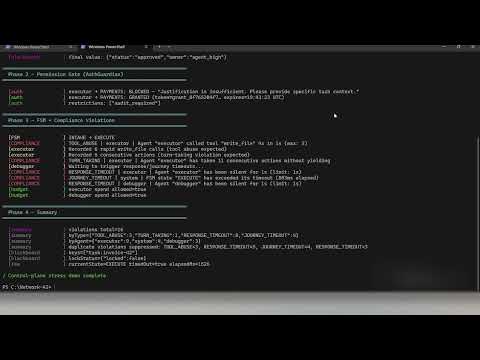
Try the control-plane stress test — no API key, ~3 seconds:
npx ts-node examples/08-control-plane-stress-demo.ts
Runs priority preemption, AuthGuardian permission gating, FSM governance, and compliance
monitoring against a live swarm. No external services required.
If it saves you from a race condition, a ⭐ helps others find it.
Why teams use Network-AI
| Race conditions in parallel agents | Atomic blackboard: propose → validate → commit with file-system mutex |
| Agent overspend / runaway costs | FederatedBudget — hard per-agent token ceilings with live spend tracking |
| No visibility into what agents did | HMAC-signed audit log on every write, permission grant, and FSM transition |
| Locked into one AI framework | 15 adapters — mix LangChain + AutoGen + CrewAI + Codex + MiniMax + custom in one swarm |
| Agents escalating beyond their scope | AuthGuardian — scoped permission tokens required before sensitive operations |
| Agents lack project context between runs | ProjectContextManager (Layer 3) — inject decisions, goals, stack, and milestones into every system prompt |
Architecture
%%{init: {'theme': 'base', 'themeVariables': {'primaryColor': '#1e293b', 'primaryTextColor': '#e2e8f0', 'primaryBorderColor': '#475569', 'lineColor': '#94a3b8', 'clusterBkg': '#0f172a', 'clusterBorder': '#334155', 'edgeLabelBackground': '#1e293b', 'edgeLabelColor': '#cbd5e1', 'titleColor': '#e2e8f0'}}}%%
flowchart TD
    classDef app        fill:#1e3a5f,stroke:#3b82f6,color:#bfdbfe,font-weight:bold
    classDef security   fill:#451a03,stroke:#d97706,color:#fde68a
    classDef routing    fill:#14532d,stroke:#16a34a,color:#bbf7d0
    classDef quality    fill:#3b0764,stroke:#9333ea,color:#e9d5ff
    classDef blackboard fill:#0c4a6e,stroke:#0284c7,color:#bae6fd
    classDef adapters   fill:#064e3b,stroke:#059669,color:#a7f3d0
    classDef audit      fill:#1e293b,stroke:#475569,color:#94a3b8
    classDef context    fill:#3b1f00,stroke:#b45309,color:#fef3c7

    App["Your Application"]:::app
    App -->|"createSwarmOrchestrator()"| SO

    PC["ProjectContextManager\n(Layer 3 — persistent memory)\ngoals · stack · decisions\nmilestones · banned"]:::context
    PC -->|"injected into system prompt"| SO

    subgraph SO["SwarmOrchestrator"]
        AG["AuthGuardian\n(permission gating)"]:::security
        AR["AdapterRegistry\n(route tasks to frameworks)"]:::routing
        QG["QualityGateAgent\n(validate blackboard writes)"]:::quality
        BB["SharedBlackboard\n(shared agent state)\npropose → validate → commit\nfilesystem mutex"]:::blackboard
        AD["Adapters — plug any framework in, swap freely\nLangChain · AutoGen · CrewAI · MCP · LlamaIndex · …"]:::adapters

        AG -->|"grant / deny"| AR
        AR -->|"tasks dispatched"| AD
        AD -->|"writes results"| BB
        QG -->|"validates"| BB
    end

    SO --> AUDIT["data/audit_log.jsonl"]:::audit
FederatedBudget is a standalone export — instantiate it separately and optionally wire it to a blackboard backend for cross-node token budget enforcement.
→ Full architecture, FSM journey, and handoff protocol
Install
npm install network-ai
No native dependencies, no build step. Adapters are dependency-free (BYOC — bring your own client).
Use as MCP Server
Start the server (no config required, zero dependencies):
npx network-ai-server --port 3001
npx ts-node bin/mcp-server.ts --port 3001
Then wire any MCP-compatible client to it.
Claude Desktop — add to ~/Library/Application Support/Claude/claude_desktop_config.json (macOS) or %APPDATA%\Claude\claude_desktop_config.json (Windows):
{
  "mcpServers": {
    "network-ai": {
      "url": "http://localhost:3001/sse"
    }
  }
}
Cursor / Cline / any SSE-based MCP client — point to the same URL:
{
  "mcpServers": {
    "network-ai": {
      "url": "http://localhost:3001/sse"
    }
  }
}
Verify it's running:
curl http://localhost:3001/health
curl http://localhost:3001/tools
Tools exposed over MCP:
blackboard_read / blackboard_write / blackboard_list / blackboard_delete / blackboard_existsbudget_status / budget_spend / budget_reset — federated token trackingtoken_create / token_validate / token_revoke — HMAC-signed permission tokensaudit_query — query the append-only audit logconfig_get / config_set — live orchestrator configurationagent_list / agent_spawn / agent_stop — agent lifecyclefsm_transition — write FSM state transitions to the blackboard
Each tool takes an agent_id parameter — all writes are identity-verified and namespace-scoped, exactly as they are in the TypeScript API.
Options: --no-budget, --no-token, --no-control, --ceiling <n>, --board <name>, --audit-log <path>.
CLI
Control Network-AI directly from the terminal — no server required. The CLI imports the same core engine used by the MCP server.
npx ts-node bin/cli.ts bb set status running --agent cli
npx ts-node bin/cli.ts bb get status
npx ts-node bin/cli.ts bb snapshot
network-ai bb list
network-ai audit tail
network-ai auth token my-bot --resource blackboard
network-ai bb | Blackboard — get, set, delete, list, snapshot, propose, commit, abort |
network-ai auth | AuthGuardian — issue tokens, revoke, check permissions |
network-ai budget | FederatedBudget — spend status, set ceiling |
network-ai audit | Audit log — print, live-tail, clear |
Global flags on every command: --data <path> (data directory, default ./data) · --json (machine-readable output)
→ Full reference in QUICKSTART.md § CLI
Two agents, one shared state — without race conditions
The real differentiator is coordination. Here is what no single-framework solution handles: two agents writing to the same resource concurrently, atomically, without corrupting each other.
import { LockedBlackboard, CustomAdapter, createSwarmOrchestrator } from 'network-ai';
const board = new LockedBlackboard('.');
const adapter = new CustomAdapter();
adapter.registerHandler('analyst', async () => {
const id = board.propose('report:status', { phase: 'analysis', complete: true }, 'analyst');
board.validate(id, 'analyst');
board.commit(id);
return { result: 'analysis written' };
});
adapter.registerHandler('reviewer', async () => {
const id = board.propose('report:review', { approved: true }, 'reviewer');
board.validate(id, 'reviewer');
board.commit(id);
const analysis = board.read('report:status');
return { result: `reviewed phase=${analysis?.phase}` };
});
createSwarmOrchestrator({ adapters: [{ adapter }] });
const [, ] = await Promise.all([
adapter.executeAgent('analyst', { action: 'run', params: {} }, { agentId: 'analyst' }),
adapter.executeAgent('reviewer', { action: 'run', params: {} }, { agentId: 'reviewer' }),
]);
console.log(board.read('report:status'));
console.log(board.read('report:review'));
Add budgets, permissions, and cross-framework agents with the same pattern. → QUICKSTART.md
Demo — Control-Plane Stress Test (no API key)
Runs in ~3 seconds. Proves the coordination primitives without any LLM calls.
npm run demo -- --08
What it shows: atomic blackboard locking, priority preemption (priority-3 wins over priority-0 on same key), AuthGuardian permission gate (blocked → justified → granted with token), FSM hard-stop at 700 ms, live compliance violation capture (TOOL_ABUSE, TURN_TAKING, RESPONSE_TIMEOUT, JOURNEY_TIMEOUT), and FederatedBudget tracking — all without a single API call.
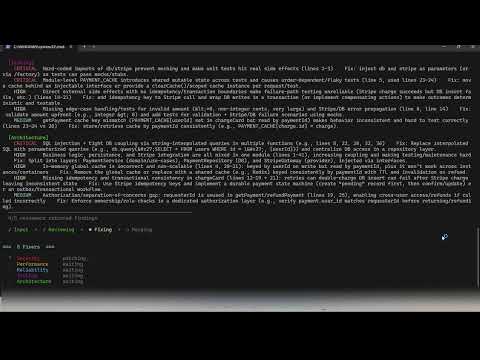
8-agent AI pipeline (requires OPENAI_API_KEY — builds a Payment Processing Service end-to-end):
npm run demo -- --07
Adapter System
15 adapters, zero adapter dependencies. You bring your own SDK objects.
CustomAdapter | Any function or HTTP endpoint | registerHandler(name, fn) |
LangChainAdapter | LangChain | registerAgent(name, runnable) |
AutoGenAdapter | AutoGen / AG2 | registerAgent(name, agent) |
CrewAIAdapter | CrewAI | registerAgent or registerCrew |
MCPAdapter | Model Context Protocol | registerTool(name, handler) |
LlamaIndexAdapter | LlamaIndex | registerQueryEngine(), registerChatEngine() |
SemanticKernelAdapter | Microsoft Semantic Kernel | registerKernel(), registerFunction() |
OpenAIAssistantsAdapter | OpenAI Assistants | registerAssistant(name, config) |
HaystackAdapter | deepset Haystack | registerPipeline(), registerAgent() |
DSPyAdapter | Stanford DSPy | registerModule(), registerProgram() |
AgnoAdapter | Agno (formerly Phidata) | registerAgent(), registerTeam() |
OpenClawAdapter | OpenClaw | registerSkill(name, skillRef) |
A2AAdapter | Google A2A Protocol | registerRemoteAgent(name, url) |
CodexAdapter | OpenAI Codex / gpt-4o / Codex CLI | registerCodexAgent(name, config) |
MiniMaxAdapter | MiniMax LLM API (M2.5 / M2.5-highspeed) | registerAgent(name, config) |
Streaming variants (drop-in replacements with .stream() support):
LangChainStreamingAdapter | LangChainAdapter | Calls .stream() on the Runnable if available; falls back to .invoke() |
CustomStreamingAdapter | CustomAdapter | Pipes AsyncIterable<string> handlers; falls back to single-chunk for plain Promises |
Extend BaseAdapter (or StreamingBaseAdapter for streaming) to add your own in minutes. See references/adapter-system.md.
Works with LangGraph, CrewAI, and AutoGen
Network-AI is the coordination layer you add on top of your existing stack. Keep your LangChain chains, CrewAI crews, and AutoGen agents — and add shared state, governance, and budgets around them.
| Cross-framework agents in one swarm | ✅ 15 built-in adapters | ⚠️ Nodes can call any code; no adapter abstraction | ⚠️ Extensible via tools; CrewAI-native agents only | ⚠️ Extensible via plugins; AutoGen-native agents only |
| Atomic shared state (conflict-safe) | ✅ propose → validate → commit mutex | ⚠️ State passed between nodes; last-write-wins | ⚠️ Shared memory available; no conflict resolution | ⚠️ Shared context available; no conflict resolution |
| Hard token ceiling per agent | ✅ FederatedBudget (first-class API) | ⚠️ Via callbacks / custom middleware | ⚠️ Via callbacks / custom middleware | ⚠️ Built-in token tracking in v0.4+; no swarm-level ceiling |
| Permission gating before sensitive ops | ✅ AuthGuardian (built-in) | ⚠️ Possible via custom node logic | ⚠️ Possible via custom tools | ⚠️ Possible via custom middleware |
| Append-only audit log | ✅ plain JSONL (data/audit_log.jsonl) | ⚠️ Not built-in | ⚠️ Not built-in | ⚠️ Not built-in |
| Encryption at rest | ✅ AES-256-GCM (TypeScript layer) | ⚠️ Not built-in | ⚠️ Not built-in | ⚠️ Not built-in |
| Language | TypeScript / Node.js | Python | Python | Python |
Testing
npm run test:all
npm test
npm run test:security
npm run test:adapters
npm run test:streaming
npm run test:a2a
npm run test:codex
npm run test:priority
npm run test:cli
1,449 passing assertions across 18 test suites (npm run test:all):
test-phase4.ts | 147 | FSM governance, compliance monitor, adapter integration |
test-phase5f.ts | 127 | SSE transport, McpCombinedBridge, extended MCP tools |
test-phase5g.ts | 121 | CRDT backend, vector clocks, bidirectional sync |
test-phase6.ts | 121 | MCP server, control-plane tools, audit tools |
test-adapters.ts | 140 | All 15 adapters, registry routing, integration, edge cases |
test-phase5d.ts | 117 | Pluggable backend (Redis, CRDT, Memory) |
test-standalone.ts | 88 | Blackboard, auth, integration, persistence, parallelisation, quality gate |
test-phase5e.ts | 87 | Federated budget tracking |
test-phase5c.ts | 73 | Named multi-blackboard, isolation, backend options |
test-codex.ts | 51 | Codex adapter: chat, completion, CLI, BYOC client, error paths |
test-minimax.ts | 50 | MiniMax adapter: lifecycle, registration, chat mode, temperature clamping |
test-priority.ts | 64 | Priority preemption, conflict resolution, backward compat |
test-a2a.ts | 35 | A2A protocol: register, execute, mock fetch, error paths |
test-streaming.ts | 32 | Streaming adapters, chunk shapes, fallback, collectStream |
test-phase5b.ts | 55 | Pluggable backend part 2, consistency levels |
test-phase5.ts | 42 | Named multi-blackboard base |
test-security.ts | 34 | Tokens, sanitization, rate limiting, encryption, audit |
test-cli.ts | 65 | CLI layer: bb, auth, budget, audit commands |
Documentation
| QUICKSTART.md | Installation, first run, CLI reference, PowerShell guide, Python scripts CLI |
| ARCHITECTURE.md | Race condition problem, FSM design, handoff protocol, project structure |
| BENCHMARKS.md | Provider performance, rate limits, local GPU, max_completion_tokens guide |
| SECURITY.md | Security module, permission system, trust levels, audit trail |
| ENTERPRISE.md | Evaluation checklist, stability policy, security summary, integration entry points |
| AUDIT_LOG_SCHEMA.md | Audit log field reference, all event types, scoring formula |
| ADOPTERS.md | Known adopters — open a PR to add yourself |
| INTEGRATION_GUIDE.md | End-to-end integration walkthrough |
| references/adapter-system.md | Adapter architecture, writing custom adapters |
| references/auth-guardian.md | Permission scoring, resource types |
| references/trust-levels.md | Trust level configuration |
Use with Claude, ChatGPT & Codex
Three integration files are included in the repo root:
Claude API / Codex:
import tools from './claude-tools.json' assert { type: 'json' };
Custom GPT Actions:
In the GPT editor → Actions → Import from URL, or paste the contents of openapi.yaml.
Set the server URL to your running npx network-ai-server --port 3001 instance.
Claude Projects:
Copy the contents of claude-project-prompt.md (below the horizontal rule) into a Claude Project's Custom Instructions field. No server required for instruction-only mode.
Contributing
- Fork → feature branch →
npm run test:all → pull request
- Bugs and feature requests via Issues
MIT License — LICENSE · CHANGELOG · CONTRIBUTING · 
Keywords
multi-agent · agent orchestration · AI agents · agentic AI · agentic workflow · TypeScript · Node.js · LangGraph · CrewAI · AutoGen · MCP · model-context-protocol · LlamaIndex · Semantic Kernel · OpenAI Assistants · Haystack · DSPy · Agno · OpenClaw · ClawHub · shared state · blackboard pattern · atomic commits · guardrails · token budgets · permission gating · audit trail · agent coordination · agent handoffs · governance · cost-awareness





