nextjs-mcp-architecture
An MCP server that learns your Next.js project's own architecture, so your
coding agent finds the right file in one call instead of six greps.
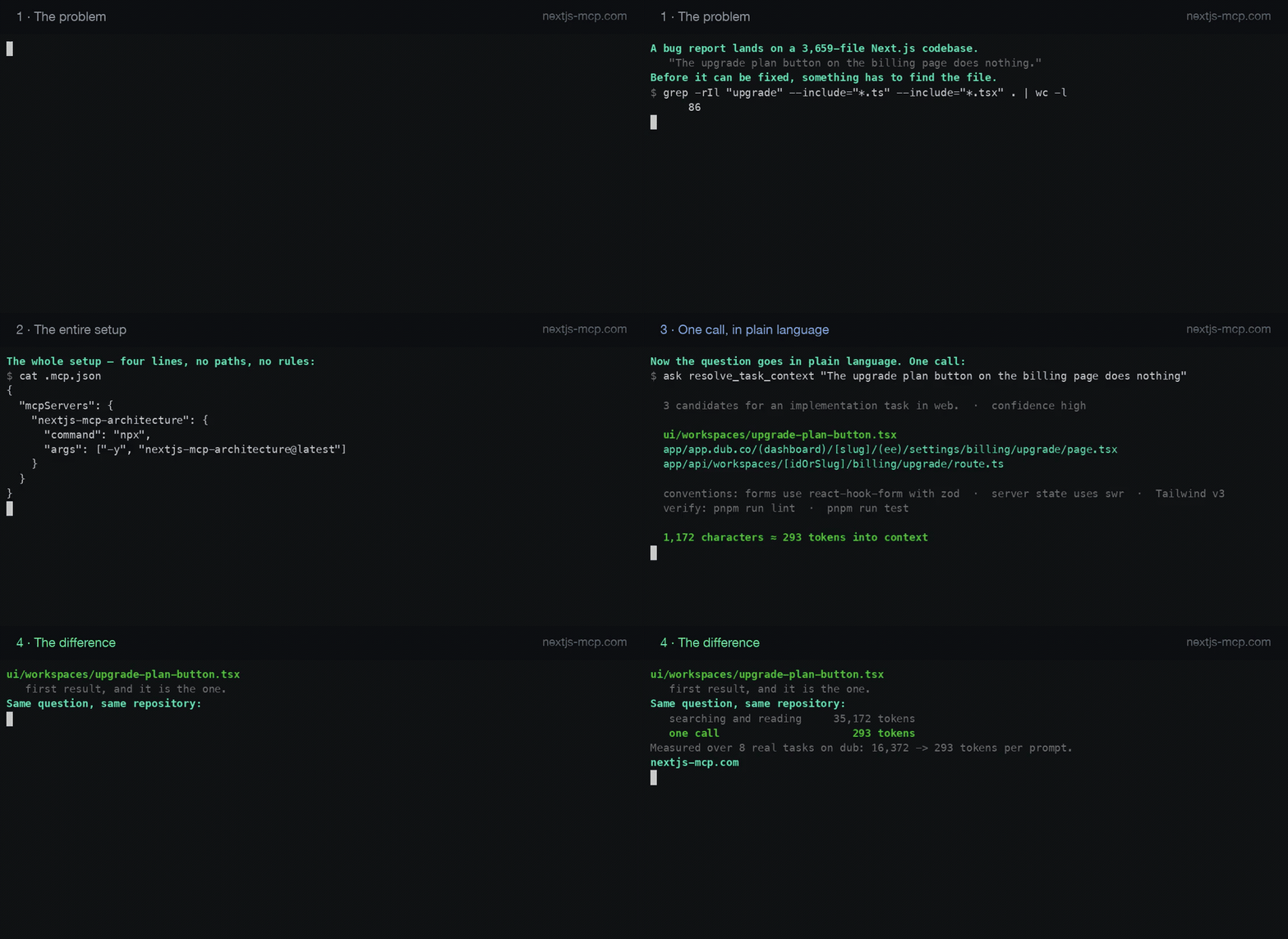
Recorded against dub — 3,659 files, not a
toy project. Every number on screen is measured: the file counts come from
running grep on that repository, and the token figures from the
benchmark, which you can reproduce.
No configuration. No absolute paths in your MCP config. No rules to write.
{
  "mcpServers": {
    "nextjs-mcp-architecture": {
      "command": "npx",
      "args": ["-y", "nextjs-mcp-architecture@latest"]
    }
  }
}
That is the whole setup. There is no cwd and no env block on purpose.
Why
Two things quietly dominate what an agent costs you on a real codebase:
- Discovery. The agent does not know where anything lives, so it greps,
globs and reads its way to the file it needed, several tool calls before the
actual work starts.
- The architecture document. A mature project's
CLAUDE.md or
copilot-instructions.md runs to tens of kilobytes and is loaded into
context on every prompt, whether or not that prompt needs it.
This server attacks both: it answers discovery questions from a local index in
one call, and it serves your conventions on demand in ~300-token slices
instead of as a permanent wall of text.
Measured
Eight prompts a developer would actually type, run against
dubinc/dub — an open-source Next.js product of
3,593 files — once the way an agent searches today, once through this server.
| Tokens to find the owning file | 16,372 | 293 |
| Right file found | 6/8 | 6/8 |
56× less context per task, at the same accuracy. dub was chosen
knowing it is a hard case for us: everything in it is named in plain English,
so grep works about as well as grep can work.
The harness ships with this package and the run is deterministic — no model
call, no network — so you can clone dub and reproduce every figure, or point it
at your own project. See BENCHMARK.md, included in this package.
It learns your project, it does not impose ours
Generic linters ship someone else's conventions. This does not. On first use
it reads your project and derives the rules your code already follows,
with a measured confidence for each:
94% of hook files (47/50) in this project are named use*.ts under
src/hooks. src/utils/fetchUser.ts declares a hook and deviates.
Conforming example: src/hooks/useOrders.ts
A convention is only enforced when the evidence supports it: the Wilson score
lower bound must reach 0.80, which in practice means at least 16 conforming
files with no exceptions, or 25 with at most one. Weaker patterns are reported
as observations and improve search ranking, but never produce a finding — and
a project too young to have conventions gets none invented for it.
Alongside that, a short list of Next.js correctness rules always applies,
because those are framework facts rather than opinions: a Node built-in
imported into the client bundle, a private environment variable read in the
browser, next/headers in a client component. The client boundary is followed
through the import graph, so a component whose parent declares 'use client'
is not reported for lacking its own directive.
It also reads whatever you already have — AGENTS.md, CLAUDE.md,
.github/copilot-instructions.md, .github/instructions, .github/skills,
.cursor/rules, components.json. Those sources are commonly duplicated
between .github/ and .claude/, so they are deduplicated and distilled to
the actual directives — on the order of 1,300 tokens — with the full text of
any section available on request rather than loaded up front.
Make your agent reach for it
Installing the server does not change an agent's habits. One that already knows
how to grep will keep grepping unless its instructions say there is something
better — the difference between paying for discovery once and paying for it on
every prompt.
Paste this into your AGENTS.md, CLAUDE.md or
.github/copilot-instructions.md:
## Finding code

Call `resolve_task_context` with the task in plain language **before** reading
or searching for anything. It returns the files that own the task, the
conventions that apply to them, and the command that verifies the change.

- Do not glob or grep to locate a feature. That is the cost this server exists
  to remove.
- Use `find_symbol` rather than opening files to find where something is
  declared.
- Use `get_route_context` for anything addressed by a URL.
- Call `check_conventions` on the files you changed before reporting done.

Fall back to grep only when a tool's answer includes `degradations` saying the
index is partial, or when you already know the exact file.
Deliberately short: that file loads on every prompt, so a page of prose here
would spend more context than the server saves.
Tools
resolve_task_context | Given a task in plain language: the few files that own it, the conventions that apply, and the commands that verify it |
find_symbol | Where a component, hook or type is declared, and which files use it |
get_route_context | Which page serves a URL, which layouts wrap it, where the client boundary is |
get_project_profile | The actual stack: version, router, aliases, styling, data, forms, ORM, tests |
get_project_conventions | What this project's own code does, with the evidence — and what its docs say |
check_conventions | Framework correctness and convention drift in the files you just changed |
get_project_context | Which project was resolved and how, and which apps it contains |
list_projects | Every candidate project root visible on this machine |
set_project_root | Pin the project for the rest of the session |
Measured on a 2,100-file project: the whole tool surface costs about 1,550 tokens
of permanent context, and a typical answer is 70–310 tokens.
Paid add-on
Subscribers install nextjs-mcp-architecture-pro alongside this package. It
adds impact_analysis, audit_architecture and find_duplicates, plus a local
dashboard (npx nextjs-mcp-dashboard) showing the module dependency graph,
findings, learned conventions and near-duplicates, with the report downloadable
as Markdown or HTML.
The add-on is registered only when a valid licence is present. Without one its
tools are not advertised at all, so a free user never pays context for them.
The free tier is genuinely useful on its own. What the add-on adds is measuring
and managing the architecture, not finding files — every file in your project
is in the index either way, because a file the index has never heard of could
not be returned at all.
Current plans and prices are on the website; putting them in a README is how
they end up out of date in a copy nobody remembers to edit.
How fast
Measured against a real 2,100-file Next.js application:
| Cold index build | 412 ms |
| Warm start (nothing changed) | 53 ms |
| Search query | 0.2 ms |
| Project profile, cached | 0.16 ms |
| Index on disk | 1.5 MB, in your OS cache directory |
Requirements
Node.js 20 or newer. No native dependencies — nothing to compile, so npx
cannot fail on a node-gyp build. Three packages total, about one second to
install.
Where the index lives
Your operating system's cache directory, never your repository:
| macOS | ~/Library/Caches/nextjs-mcp-architecture |
| Windows | %LOCALAPPDATA%\nextjs-mcp-architecture |
| Linux | $XDG_CACHE_HOME/nextjs-mcp-architecture (usually ~/.cache) |
Each project gets a sub-directory named after a hash of its absolute path, so
two projects on one machine cannot read each other's index and nothing appears
in your git status or Docker build context. Deleting the directory is safe —
the next tool call rebuilds it.
Directories for projects untouched for 30 days are deleted automatically, and
the 50 most recent are kept. The sweep is scheduled a few seconds after the
first tool call, so it never sits in front of an answer you are waiting for.
If a subscription lapses, nothing of yours is touched and nothing is
stranded. The index is rebuilt at the free budget on the next call: every file
stays findable by name and path, surplus file contents are dropped, and the
cache file gets smaller — on a 3,593-file project, 3.3 MB to 1.7 MB. Renewing
rebuilds the deep index the same way.
Privacy
Everything runs locally. Your source, file names and prompts are not
transmitted anywhere. Licence verification is an offline signature check
against a key embedded in the package.
Licence
Commercial, source-available. Free-tier use is perpetual and permitted
commercially. See the LICENSE file included in this package.



