notion-db-js
⚠️ Warning: Package Under Development
This package is currently in the development stage. Some features are limited or not yet implemented. It is not recommended for use in production environments.
notion-db-js is a JavaScript/TypeScript library designed to simplify interactions with Notion databases. This library abstracts the complexities of directly dealing with the Notion API, allowing for easier database operations.
Current Implementation Status
✅ Implemented:
- Basic initialization
- Insert records (
insert())
- Full record selection (
select())
⏳ Not Yet Implemented:
- Column-specific selection
- Update operations
- Delete operations
- Filtering
- Sorting
- Pagination
- Full TypeScript support
Installation
npm install notion-db-js
Basic Usage
Initialization
import NotionDB from "notion-db-js";
let notionDB: NotionDB | null = null;
async function initializeNotionDB() {
if (!notionDB) {
notionDB = new NotionDB(process.env.NOTION_INTEGRATION_TOKEN as string);
await notionDB.initialize();
}
return notionDB;
}
Fetching All Records
const db = await initializeNotionDB();
const { data, error } = await db.from("your-database-name").select();

if (error) {
  console.error("Error fetching data:", error);
} else {
  console.log("Fetched data:", data);
}
Creating a Record
const db = await initializeNotionDB();
const newRecordId = await db.from("your-database-name").insert({
  title: "New Record",
  description: "This is a new record",
  status: "active",
});
Next.js Integration Example
Here's a real-world example of using notion-db-js in a Next.js API route:
import { NextRequest, NextResponse } from "next/server";
import NotionDB from "notion-db-js";
let notionDB: NotionDB | null = null;
async function initializeNotionDB() {
if (!notionDB) {
notionDB = new NotionDB(process.env.NOTION_INTEGRATION_TOKEN as string);
await notionDB.initialize();
}
return notionDB;
}
export async function POST(req: NextRequest) {
const body = await req.json();
try {
const db = await initializeNotionDB();
const { blogName, domain, email, template } = body;
await db.from("notion-press-db").insert({
blogName,
domain,
email,
template,
});
return NextResponse.json(
{ success: true, message: "Databases initialized successfully" },
{ status: 200 }
);
} catch (error) {
console.error(error);
return NextResponse.json({
message: "NotionDBへの保存に失敗しました。",
});
}
}
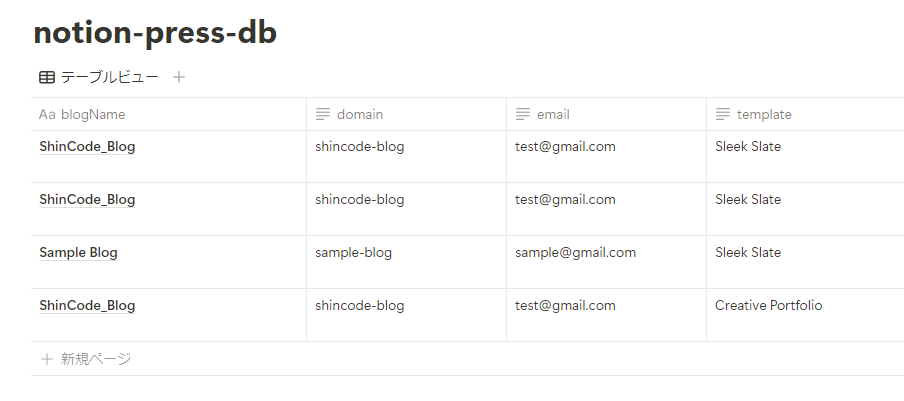
Using this code, you can save data to your Notion database as shown in the image below:
Architecture Overview
The diagram above illustrates how notion-db-js acts as a bridge between your Next.js application and the Notion API, simplifying database operations.
Known Limitations
- Currently only supports full table selection (no column-specific selection)
- Update and delete operations are not yet implemented
- TypeScript support is limited
- No filtering or sorting capabilities yet
- Basic error handling only
Contributing
Bug reports and feature requests are welcome on GitHub Issues. Pull requests are also welcome.
License
This project is released under the MIT License. See the LICENSE file for details.
Author
ShinCode
If you have any questions or need support, please open an issue on GitHub Issues.




