

Security News
RubyGems Adds Cooldown Feature to Bundler for Newly Published Gems
RubyGems and Bundler 4.0.13 introduced an opt-in cooldown feature that delays newly published gems during dependency resolution.
By Sarah Gooding - Jun 05, 2026
Terminal-native runner for JetBrains Rider / IntelliJ .http flow files, with an interactive Ink TUI and a plain-text reporter for CI.
A terminal-native HTTP flow runner. Run and explore Rider/IntelliJ
.httpfiles from the command line, with an interactive three-pane TUI or straight-line output for CI.
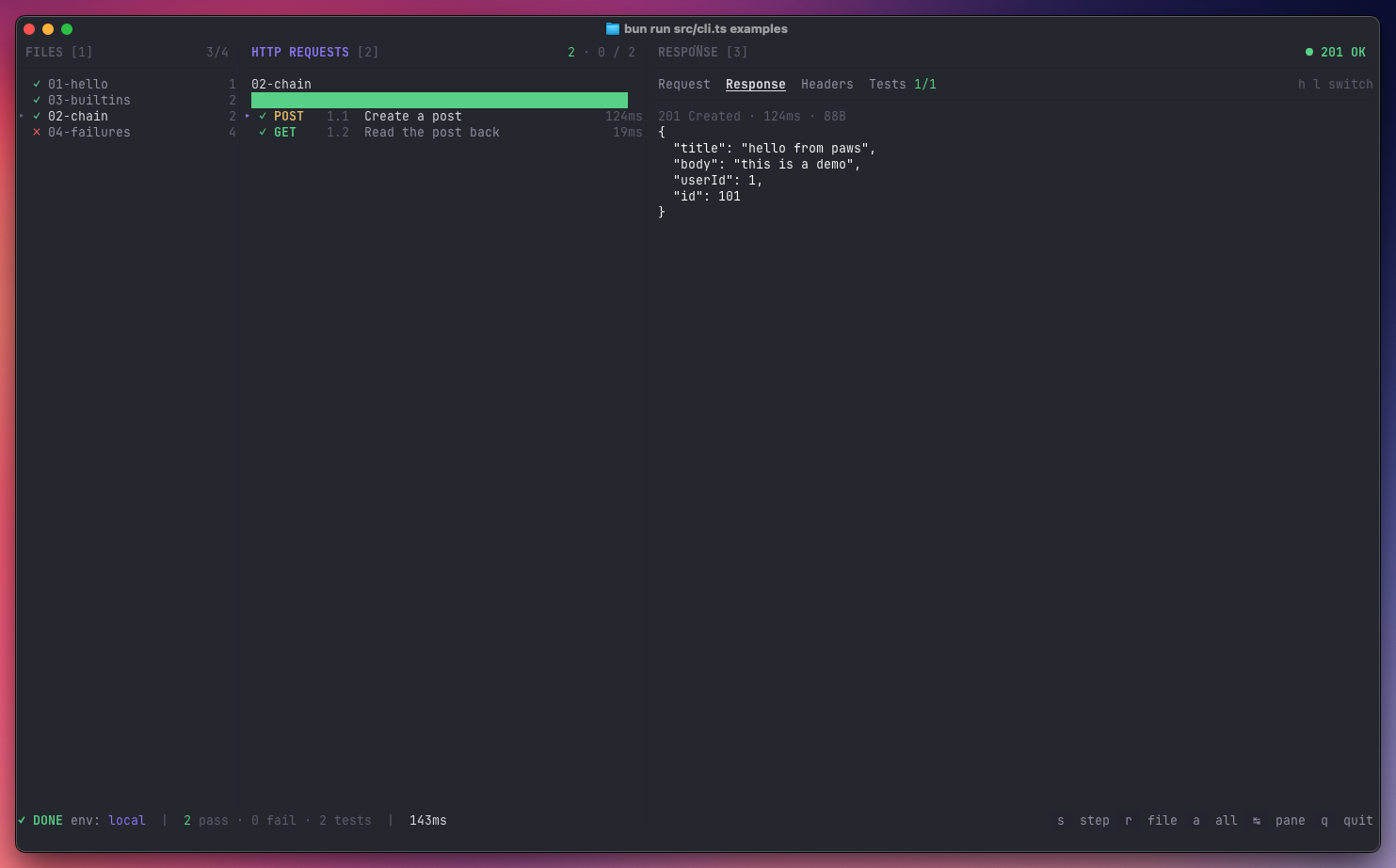
paws-http is to the terminal what the JetBrains HTTP Client is to Rider. Point
it at a .http file (or a directory full of them) and it'll run the requests,
execute the JavaScript pre- and post-scripts, evaluate
client.test/client.assert assertions, and chain values between steps via
client.global.set.
Run it without installing:
npx paws-http
Or install globally:
npm install -g paws-http
Requires Node.js 22+.
Hacking on
paws-httpitself? See CONTRIBUTING.md for the source-based setup with Bun.
Try the bundled examples (they hit public APIs — no local server needed):
paws-http                         # launcher
paws-http run examples            # interactive three-pane view
paws-http run examples/01-hello.http
paws-http run examples/01-hello.http --only 1.1   # single step, non-interactive
paws-http                         browse files interactively (launcher)
paws-http run <file.http>         run a single .http flow
paws-http run <dir>               run every .http in a directory, recursively
paws-http run <file> --only 1.3   run one step from a file
paws-http env list                list environments in the nearest env.json

  -e, --env <name>          environment (default: local)
  -f, --fail-fast           stop on the first failed step
      --only <step>         run only the step with this num (e.g. 1.2)
  -n, --non-interactive     force the console reporter (skip the TUI)
paws-http auto-picks a mode: if your terminal is a TTY you get the Ink-based
three-pane TUI; otherwise you get a coloured console report and a non-zero exit
code on failure. Pass -n / --non-interactive (or set CI=1, or pipe stdout)
to force the console reporter explicitly — handy for scripts and pipelines.
| key | action |
|---|---|
← / → | cycle panes (Files → Requests → Response) |
Tab | next pane |
1 2 3 | jump to Files / Requests / Response |
↑ / ↓ | move within the active pane |
, / . | cycle through files (works in any pane) |
h / l | switch tab in the Response pane |
| key | action |
|---|---|
s | run the selected step (only) |
r | run every step in the active file |
a | run every step in every file |
| key | action |
|---|---|
q | quit |
esc | quit |
paws-http reads the same environment files as Rider, discovered by walking up
from the .http file:
http-client.env.json — checked into the repo, one object per environment.http-client.private.env.json — gitignored, merged on top for local secrets.{
"local": {
"baseurl": "http://localhost:8080",
"Security": {
"Auth": {
"admin_auth": { "Type": "Mock", "Token": "{{admin_token}}" }
}
}
},
"dev": {
"baseurl": "https://api.example.dev",
"Security": {
"Auth": { "admin_auth": { "Type": "OAuth2" } }
}
}
}
OAuth2 entries in v1 look for a pre-fetched bearer token under
Security.Auth.<name>.Token in the private env file — paws-http won't run the
OAuth2 flow for you.
### 1.1 Title separators (numeric labels optional)GET / POST / PUT / PATCH / DELETE / HEAD / OPTIONS###HTTP/1.1 on the request lineKey: Value< ./path/to/file for a file upload< {% … %} pre-request script> {% … %} response handler (client.test, client.assert, etc.){{$timestamp}} {{$uuid}} {{$random.integer(a, b)}}
{{$auth.token("name")}}http-client.env.json + private overrides)# and // commentsNot yet supported: import … from "utilities", OAuth2 flows, JSONPath body
expansion ({{$.items..name}}).
.http file### 1.1 Create a post
POST {{baseurl}}/posts
Content-Type: application/json
{
"title": "hello",
"userId": 1
}
> {%
client.test("created", function() {
client.assert(response.status === 201, "expected 201");
});
client.global.set("post_id", response.body.id);
%}
### 1.2 Read it back
GET {{baseurl}}/posts/{{post_id}}
MIT — see LICENSE.
FAQs
Terminal-native runner for JetBrains Rider / IntelliJ .http flow files, with an interactive Ink TUI and a plain-text reporter for CI.
We found that paws-http demonstrated a healthy version release cadence and project activity because the last version was released less than a year ago. It has 1 open source maintainer collaborating on the project.
Did you know?

Socket for GitHub automatically highlights issues in each pull request and monitors the health of all your open source dependencies. Discover the contents of your packages and block harmful activity before you install or update your dependencies.
Security News
RubyGems and Bundler 4.0.13 introduced an opt-in cooldown feature that delays newly published gems during dependency resolution.

Security News
pnpm 11.5 now recognizes npm staged publish approvals in release metadata, preventing those releases from being mistaken for lower-trust package publishes.

Security News
Federal audit finds NIST lacked a plan to clear the NVD backlog, wasted funds on duplicate work, and delayed use of CISA data.