Pomo 
$ npm install -g pomo
$ pomojs --help
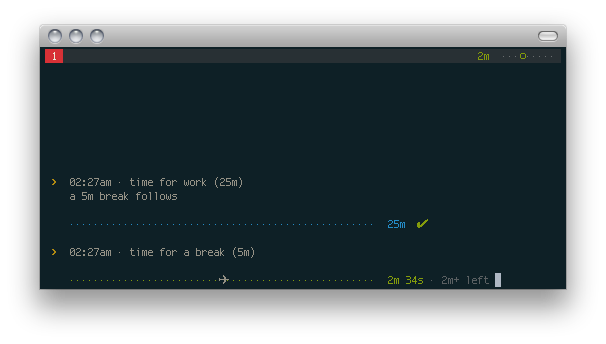


Get started
$ pomojs
$ pomojs "Conquer the world"
$ pomojs -w 30
$ pomojs -b 12
$ pomojs --help
Features
- ridiculously simple (just type
pomojs)
- configurable work and break durations (
pomojs --work 10 --break 2)
- announces via text-to-speech ("5 minutes to go!")
- notifications
- no support for long breaks (this is a feature. problem?)
- tmux support (status bar integration, shown above)
- optional logging
Requirements
- node.js (required)
- osx 10.8+:
gem install terminal-notifier
- linux:
sudo apt-get install libnotify-bin
- osx (others): growlnotify
- linux:
sudo apt-get install espeak
see growl readme for growl requirements.
Tips
Tmux integration
Just add this to ~.tmux.conf: (works almost exactly like in pomo.rb)
set-option -g status-right '#(cat ~/.pomo_stat)'
...then invoke it with pomojs -t.
Logging
Invoke it with pomojs -l ~/.pomo.log to log any pomodoros. Log file looks like
this:
[2013-06-17 mon]
6:14am - 6:44am = work on things (25m + 5m)
7:05am - 7:32am = do great stuff (25m + 2m, stopped)

[2013-06-18 tue]
6:14am - 6:44am = eat pizza (25m + 5m)
Saving your settings
Add this to your shell config, so that the next time you can invoke pomojs
with preset settings:
alias pomo="pomojs --log ~/.pomo.log --tmux"
Even add more presets:
alias longpomo="pomo -b 20"
alias minipomo="pomo -w 10"
Also see
Acknowledgements
Tomato icon by artbees. (via iconfinder.net)
(c) 2013, Rico Sta. Cruz. MIT





