react-native-image-carousell
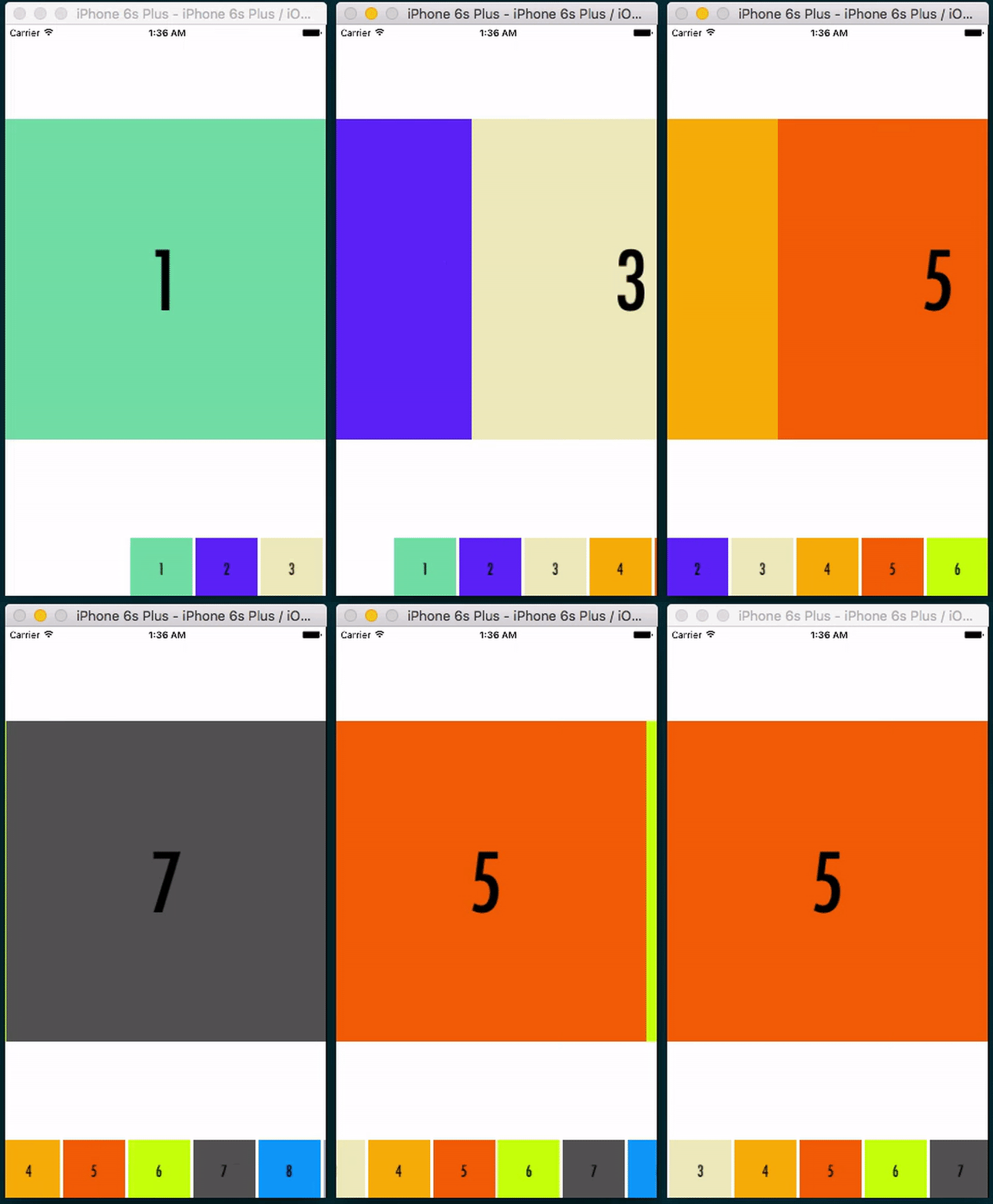
A component for image gallery carousell like iOS Photos app
Features
- Has a bottom preview for near photos and will scroll responsively
- Support zoom
- Will hide preview when zoomScale > 1
- Currently iOS support only, check #2
Installation
npm install --save react-native-image-carousell
Usage
import ImageCarousell from 'react-native-image-carousell';

class Example extends React.Component {
  constructor(props) {
    super(props);
    const dataSource = new ListView.DataSource({
      rowHasChanged: (r1, r2) => r1 !== r2,
    });
    this.state = {
      dataSource: dataSource.cloneWithRows([
        require('./images/1.png'),
        require('./images/2.png'),
        require('./images/3.png'),
        require('./images/4.png'),
        require('./images/5.png'),
        require('./images/6.png'),
        require('./images/7.png'),
        require('./images/8.png'),
        require('./images/9.png'),
        require('./images/10.png'),
      ]),
    };
  }

  render() {
    return (
      <View style={styles.container}>
        <ImageCarousell
          dataSource={this.state.dataSource}
        />
      </View>
    );
  }
}
Properties
dataSource | ListView.DataSource | The image data source | true |
initialIndex | number | The initial image to show based on dataSource index (Default 0) | |
showPreview | bool | To show bottom image preview (Default true) | |
previewImageSize | number | Preview image size (Default 80) | |
width | number | Width for ImageCarousell (Default is Dimensions.get('window').width | |
height | number | Height for ImageCarousell (Default is Dimensions.get('window').height | |
style | View.propTypes.style | Custom style for ImageCarousell | |
previewContainerStyle | View.propTypes.style | Custom style for bottom preview container | |
imageStyle | View.propTypes.style | Custom style for Image | |
previewImageStyle | View.propTypes.style | Custom style for bottom preview image | |
getImageSourceFromDataSource | function | The getter for each dataSource row. (Default is (row) => row.You could however to use (row) => { uri: row.get('image') } if you use Immutable.js | |
renderScrollComponent | function | Custom ScrollView component for ListView | |
Example
Check Example
License
MIT




