Stimulus Autocomplete controller
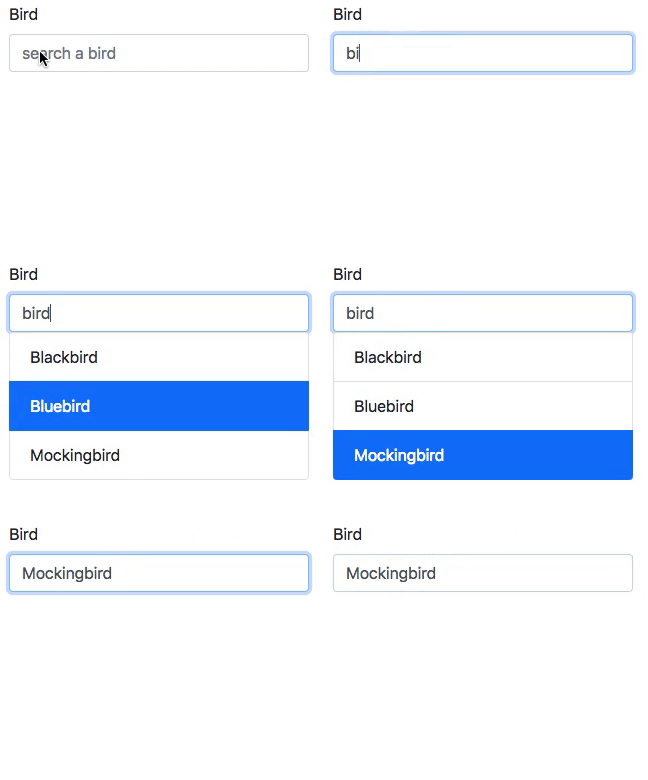
This is a tiny stimulus controller (1.5kB gzipped) to make a selection from a
list of results fetched from the server.
Installation
yarn add stimulus-autocomplete
Usage
Load your stimulus application as usual and the register the autocomplete
controller with it:
import { Application } from 'stimulus'
import { definitionsFromContext } from 'stimulus/webpack-helpers'
import { Autocomplete } from 'stimulus-autocomplete'

const application = Application.start()

const context = require.context('controllers', true, /.js$/)
application.load(definitionsFromContext(context))

application.register('autocomplete', Autocomplete)
To use the autocomplete, you need some markup as this:
<div data-controller="autocomplete" data-autocomplete-url="/birds/search">
  <input type="text" data-target="autocomplete.input"/>
  <input type="hidden" name="bird_id" data-target="autocomplete.hidden"/>
  <ul data-target="autocomplete.results"></ul>
</div>
The component makes a request to the data-autocomplete-url to fetch results for
the contents of the input field. The server must answer with an html fragment:
<li role="option" data-autocomplete-value="1">Blackbird</li>
<li role="option" data-autocomplete-value="2">Bluebird</li>
<li role="option" data-autocomplete-value="3">Mockingbird</li>
If the controller has a hidden target, that field will be updated with the value
of the selected option. Otherwise, the search text field will be updated.
Events
autocomplete.change fires when the users selects a new value from the autocomplete
field. The event detail contains the value and textValue properties of the
selected result.loadstart fires before the autocomplete fetches the results from the server.load fires when results have been successfully loaded.error fires when there's an error fetching the results.loadend fires when the request for results ends, successfully or not.toggle fires when the results element is shown or hidden.
Optional parameters
min-length set the minimum number of charaters required to make an autocomplete request.
Examples
There's a minimal example in the examples directory. To run it:
$ cd examples
$ yarn install
$ yarn run start
Credits
Heavily inspired on github's autocomplete element.
Contributing
Bug reports and pull requests are welcome on GitHub at https://github.com/afcapel/stimulus-autocomplete. This project is intended to be a safe, welcoming space for collaboration, and contributors are expected to adhere to the Contributor Covenant code of conduct.
License
This package is available as open source under the terms of the MIT License.




