简介

uiadmin的express实现版本,无需进行vue开发即可实时动态生成管理后台。
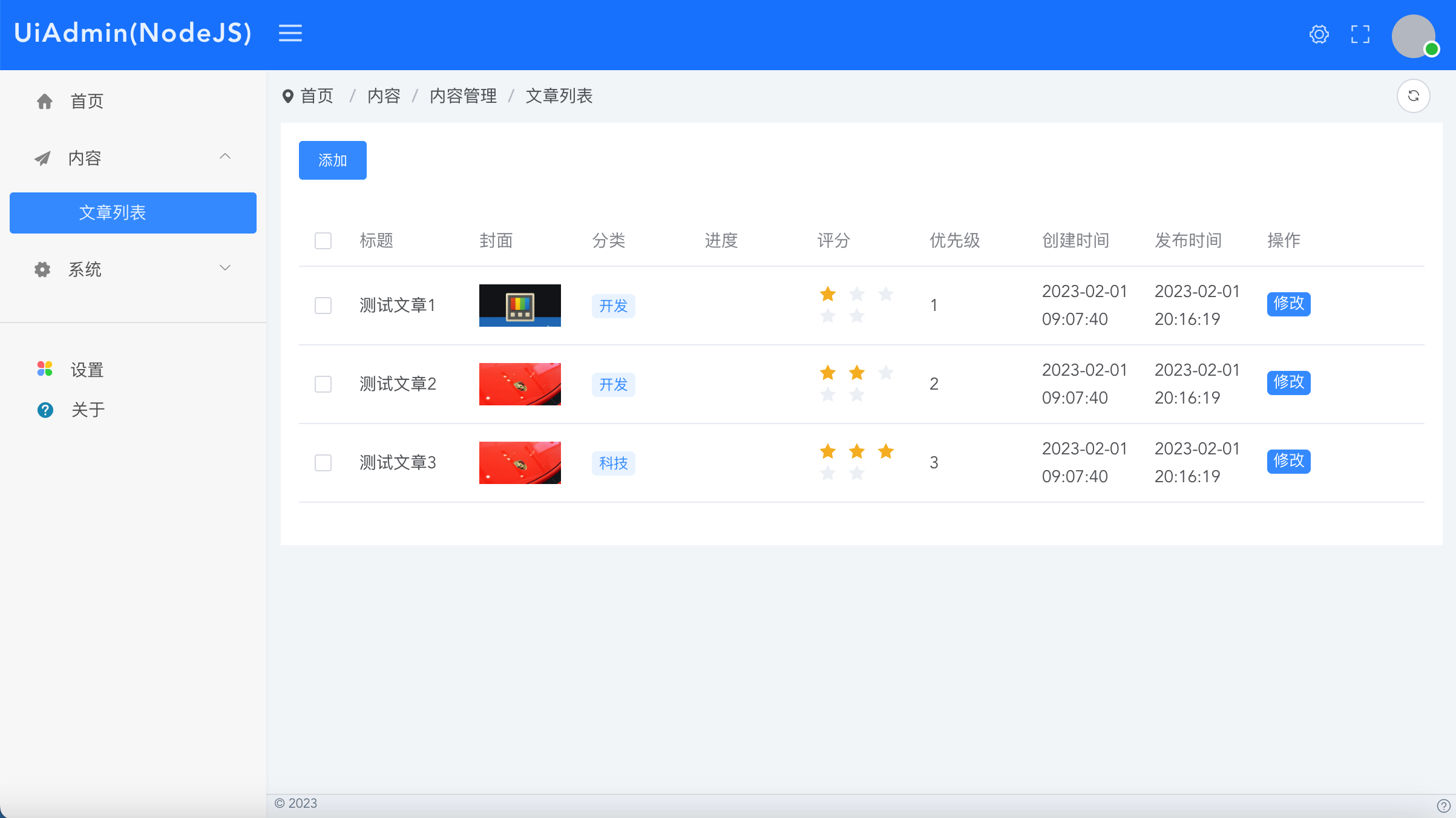
Builder文档
https://uiadmin.net/docs/builder
官方脚手架
下载脚手架工程
如果您不想自己搭建项目工程,可以直接使用官方的脚手架。
https://gitee.com/uiadmin/uiadmin/tree/master/back-end-js/
下载后执行
npm i
npm i -g @babel/cli
npm run start
访问:localhost:4000/xyadmin/
输入账号admin密码uiadmin登录即可进入管理后台页面
开发
仿照DemoController进行业务开发
自建工程使用步骤
安装
npm i uiadmin-express
npm i -g @babel/cli
配置babel
babel.config.js文件增加如下配置
注意删除.babelrc
const path = require('path')
module.exports = {
    "plugins": [
      ["@babel/plugin-proposal-decorators", { "legacy": true }],
      ["@babel/plugin-proposal-class-properties", { "loose": true }],
      ["@babel/plugin-proposal-private-methods", { "loose": true }],
      ["@babel/plugin-proposal-private-property-in-object", { "loose": true }]
    ],
    "presets": [
      [
        "@babel/preset-env"
      ]
    ]
}
配置启动
package.json配置如下命令,其中app为你的express应用入口。
"scripts": {
    "start": "babel-node app"
}
配置文件
根目录新建config/default.yml文件
uiadmin:
  site:
    # 网站名称
    title: "UiAdmin"
    #正方形logo
    logo: ""
    #带有标题的横logo
    logoTitle: ""
    logoBadge: ""
  system:
    api-version: "1.0.0"
    menu-from: "annotation"
  user:
    user-role:
      - id: 1
        name: super_admin
        title: 超级管理员
        menus: ""
        status: 1
      - id: 2
        name: admin
        title: 管理员
        menus: [
          "/v1/admin/demo/lists"
        ]
        status: 1
    user-list:
      - id: 1
        nickname: "admin"
        username: "admin"
        password: "uiadmin"
        avatar: ""
        roles: "super_admin"
        status: 1
初始化
app.js请参考如下代码
// 必须,支持node_modules中的装饰器等语法
require("@babel/register")({
  // This will override `node_modules` ignoring - you can alternatively pass
  // an array of strings to be explicitly matched or a regex / glob
  ignore: [],
  plugins: [
    ["@babel/plugin-proposal-decorators", { "legacy": true }],
    ["@babel/plugin-proposal-class-properties", { "loose": true }],
    ["@babel/plugin-proposal-private-methods", { "loose": true }],
    ["@babel/plugin-proposal-private-property-in-object", { "loose": true }]
  ]
});
const express = require('express')
const app = express()
const port = 4000
var bodyParser = require('body-parser');
app.use(bodyParser.json());
app.use(bodyParser.urlencoded({ extended: false }));

// 配置
const myconfig = require('config-lite')({
  filename: 'default',
  config_basedir: __dirname,
  config_dir: 'config'
});

// 引入
const {
  Controller, Get, RootUrl, Post, MenuItem, UiAdmin, config, XyBuilderList, XyBuilderForm
} =  require('uiadmin-express')

// 调用uiadmin
app.use(new UiAdmin())
config.configs = myconfig


// 默认控制器
@Controller
class IndexController {
  // 首页
  @Get('/')
  home(req, res) {
    res.send("<div style='text-align:center'><a href='/xyadmin/'>点击打开UiAdmin通用后台</a>,账号admin密码uiadmin。</div><iframe style='width: 100%;height: calc(100vh - 20px)' src='/xyadmin/'></iframe>")
  }
}
app.use(new IndexController())

// 文章管理后台控制器(演示DEMO)
@Controller
class DemoController {
  @RootUrl('/api')
  url() {}

  @MenuItem({title: "文章列表", path: "/demo/lists", pmenu: "/content", menuType: 1,
    routeType: "list", apiSuffix: "", apiParams: "", apiMethod: "GET", sortnum: 0})
  @Get('/v1/admin/demo/lists')
  lists(req, res) {
    let dataList = [
      {
        "title": "测试文章1",
        "cate": "开发",
        "cover": "https://ts2.cn.mm.bing.net/th?id=ORMS.11d30098d0f4a79a42c6352014e0f066&pid=Wdp&w=300&h=156&qlt=90&c=1&rs=1&dpr=2&p=0",
        "level": 1,
        "progress": 50,
        "updateTime": "2023-02-01 20:16:19",
        "createTime": "2023-02-01 09:07:40",
        "status": 1
      },
      {
        "title": "测试文章2",
        "cate": "开发",
        "cover": "https://ts2.cn.mm.bing.net/th?id=ORMS.ed34ae135a326a834ca9d3379be134d3&pid=Wdp&w=300&h=156&qlt=90&c=1&rs=1&dpr=2&p=0",
        "level": 2,
        "progress": 80,
        "updateTime": "2023-02-01 20:16:19",
        "createTime": "2023-02-01 09:07:40",
        "status": 1
      },
      {
        "title": "测试文章3",
        "cate": "科技",
        "cover": "https://ts2.cn.mm.bing.net/th?id=ORMS.ed34ae135a326a834ca9d3379be134d3&pid=Wdp&w=300&h=156&qlt=90&c=1&rs=1&dpr=2&p=0",
        "level": 3,
        "progress": 90,
        "updateTime": "2023-02-01 20:16:19",
        "createTime": "2023-02-01 09:07:40",
        "status": 1
      },
    ]
    let xyBuilderList = new XyBuilderList();
    xyBuilderList
      .init()
      .addColumn("title", "标题", {
        type: "text"
      })
      .addColumn("cover", "封面", {
        type: "image",
      })
      .addColumn("cate", "分类", {
        type: "tag",
        prefixType: "dot",
        options: []
      })
      .addColumn("progress", "进度", {
        type: "progress"
      })
      .addColumn("level", "评分", {
        type: "rate"
      })
      .addColumn("level", "优先级", {
        prefixType: "dot",
        useOptions: true,
        options: [
          {title: "低", value: 1, color: "#c6cdd4"},
          {title: "中", value: 2, color: "#0488de"},
          {title: "高", value: 3, color: "#ff9d28"}
        ]
      })
      .addColumn("createTime", "创建时间", {
        type: "time",
      })
      .addColumn("updateTime", "发布时间", {
        type: "time",
      })
      .addTopButton("add", "添加", {
        title: "新增",
        pageType: "drawer",
        modalType: "form",
        api: "/v1/admin/demo/add",
        width: "1000px"
      })
      .addColumn("rightButtonList",  "操作", {
        type: "rightButtonList",
        minWidth: "120px"
      })
      .addRightButton("edit", "修改", {
        title: "修改",
        pageType: "drawer",
        modalType: "form",
        api: "/v1/admin/demo/edit",
        width: "1000px"
      })
      .setDataList(dataList)

    res.json({
      code: 200,
      msg: '成功',
      data: {
        listData: xyBuilderList.getData()
      }
    });
  }

  @MenuItem({title: "文章新增", path: "/demo/add", pmenu: "/demo/lists", menuType: 2,
    routeType: "form", apiSuffix: "", apiParams: "", apiMethod: "GET", sortnum: 0})
  @Get('/v1/admin/demo/add')
  add(req, res) {
    let xyBuilderForm = new XyBuilderForm();
    xyBuilderForm.init()
      .addFormItem("name", "文章标题", "text", "", {})
      .addFormItem("content", "文章内容", "html", "", {})
      .addFormItem("level", "登记", "select", "", {
        options:[
          {'title': "低", value: 1},
          {'title': "中", value: 2},
          {'title': "高", value: 3},
        ]
      })

    res.json({
      code: 200,
      msg: '成功',
      data: {
        formData: xyBuilderForm.getData()
      }
    });
  }

  @MenuItem({title: "文章修改", path: "/demo/edit", pmenu: "/demo/lists", menuType: 2,
    routeType: "form", apiSuffix: "", apiParams: "", apiMethod: "GET", sortnum: 0})
  @Get('/v1/admin/demo/edit/:id')
  add(req, res) {
    let xyBuilderForm = new XyBuilderForm();
    xyBuilderForm.init()
      .addFormItem("id", "ID", "text", "", {
        disabled: true
      })
      .addFormItem("name", "文章标题", "text", "", {})
      .addFormItem("content", "文章内容", "html", "", {})
      .addFormItem("level", "登记", "select", "", {
        options:[
          {'title': "低", value: 1},
          {'title': "中", value: 2},
          {'title': "高", value: 3},
        ]
      })
      .setFormValues({
        id: 123123,
        name: "text",
        content: "测试",
        level: 2
      })

    res.json({
      code: 200,
      msg: '成功',
      data: {
        formData: xyBuilderForm.getData()
      }
    });
  }
}
app.use(new DemoController())
app.listen(port, () => {
console.log(http://127.0.0.1:${port})
})
启动
npm run start
访问{host:端口}/xyadmin/
输入账号admin密码uiadmin登录即可进入管理后台页面
开发
仿照DemoController进行业务开发




