vite-plugin-tailwind-legacy
⚡ Vite plugin that generates Tailwind v4 CSS with legacy browser compatibility fallback using Tailwind CSS v3.
Read this in other languages: Português
✨ Why use it?
Problem:
❌ Tailwind v4 uses modern CSS features like oklch() that break in older browsers
❌ Conventional polyfills don't completely solve the problem
❌ Maintaining two CSS versions manually is cumbersome
Solution:
✅ Automatically generates a Tailwind v3 fallback for legacy browsers
✅ ZERO impact on Tailwind v4 for modern browsers
✅ Only legacy devices receive the fallback CSS
🎬 See the demos in the images below 👇
The plugin's goal is to maintain a consistent experience on legacy browsers without compromising Tailwind v4's advantages (for modern browsers). With careful development for both realities, your site will have very similar appearance and functionality in any browser - modern or old - while you continue leveraging all the advanced v4 features in your workflow.
✨ Features
This plugin executes an extra step after the build to:
-
Generate legacy CSS with tailwindcss@3 compatible with older browsers
-
Dynamically inject the legacy CSS in browsers that don't support Tailwind v4 (like Chrome < 111) through a browser-check.js script in the build HTML files
🚀 Installation
npm install --save-dev vite-plugin-tailwind-legacy
yarn add vite-plugin-tailwind-legacy --dev
⚙️ Configuration
- Add the
vite-plugin-tailwind-legacy plugin to your Vite config.
import { defineConfig } from 'vite'
import tailwindcss from '@tailwindcss/vite'
import TailwindLegacyPlugin from 'vite-plugin-tailwind-legacy';

export default defineConfig(({ command }) => {
  const isBuild = command === 'build';

   return {
      plugins: [
        react(),
        tailwindcss(),
        TailwindLegacyPlugin({
          tailwindConfig: 'tailwind.config.legacy.js',
          assetsDir: 'dist/assets',
          publicPath: '/static/assets/',
          injectInHTML: true,
        })
      ],
}
})
🛠 Important Information
⚠️ Special Attention - Before proceeding, pay attention to these two important pieces of information:
1 - The content field - it should point to your Vite's final build:
content: ["./dist/**/*.{html,js}"],
2 - Colors
Tailwind v4 uses oklch() as the default color format, which doesn't work in older browsers. To ensure functionality:
- Use hexadecimal colors (
#RRGGBB) in your theme
- Convert
oklch values (https://oklch.com)
Basic example:
colors: {
primary: '#1445e2',
secondary: '#4f46e5'
}
⚙️ Tailwind Configuration (Legacy Version)
📁 Create a tailwind.config.legacy.js file in the same directory as your vite.config.ts with this base structure (Change colors to match your theme):
module.exports = {
content: ["./dist/**/*.{html,js}"],
darkMode: ['class'],
theme: {
extend: {
colors: {
background: '#fefeff',
foreground: '#333333',
card: '#ffffff',
"card-foreground": '#333333',
popover: '#ffffff',
"popover-foreground": '#333333',
primary: '#1445e2',
"primary-foreground": '#f9f9f9',
secondary: '#0598f6',
"secondary-foreground": '#f9f9f9',
muted: '#f0f0ff',
"muted-foreground": '#7a7a99',
accent: '#b76b2c',
"accent-foreground": '#ffffff',
destructive: '#e74c3c',
"destructive-foreground": '#fff2f2',
border: '#e0e0f0',
input: '#e0e0f0',
ring: '#333333',
chart: {
1: '#c96d3f',
2: '#47c1a9',
3: '#4297e7',
4: '#8a64d1',
5: '#df5d8f',
},
base: {
100: '#fefeff',
200: '#f0f0ff',
300: '#e3e3ff',
content: '#333333',
},
neutral: '#6b6b8d',
"neutral-content": '#fefeff',
info: '#5bbef0',
"info-content": '#f6faff',
success: '#63d182',
"success-content": '#f0fff5',
warning: '#f6d365',
"warning-content": '#fff9e3',
error: '#e74c3c',
"error-content": '#fff2f2',
sidebar: '#fbfbff',
"sidebar-foreground": '#252525',
"sidebar-primary": '#252525',
"sidebar-primary-foreground": '#fbfbff',
"sidebar-accent": '#f0f0ff',
"sidebar-accent-foreground": '#252525',
"sidebar-border": '#e8e8e8',
"sidebar-ring": '#737373',
},
borderRadius: {
sm: 'calc(0.625rem - 4px)',
md: 'calc(0.625rem - 2px)',
lg: '0.625rem',
xl: 'calc(0.625rem + 4px)',
},
height: {
...Array.from({ length: 1000 }, (_, i) => i + 1).reduce((acc, val) => {
acc[val] = `${val * 0.25}rem`;
return acc;
}, {}),
},
width: {
...Array.from({ length: 1000 }, (_, i) => i + 1).reduce((acc, val) => {
acc[val] = `${val * 0.25}rem`;
return acc;
}, {}),
},
padding: {
...Array.from({ length: 1000 }, (_, i) => i + 1).reduce((acc, val) => {
acc[val] = `${val * 0.25}rem`;
return acc;
}, {}),
},
margin: {
...Array.from({ length: 1000 }, (_, i) => i + 1).reduce((acc, val) => {
acc[val] = `${val * 0.25}rem`;
return acc;
}, {}),
},
gap: {
...Array.from({ length: 1000 }, (_, i) => i + 1).reduce((acc, val) => {
acc[val] = `${val * 0.25}rem`;
return acc;
}, {}),
},
zIndex: {
...Array.from({ length: 1000 }, (_, i) => i + 1).reduce((acc, val) => {
acc[val] = `${val}`;
return acc;
}, {}),
},
},
},
plugins: [
require('tailwindcss-animate'),
function({ addBase }) {
addBase({
'button': {
backgroundColor: 'transparent',
backgroundImage: 'none',
padding: 0,
border: 'none',
outline: 'none',
cursor: 'pointer',
},
});
},
],
};
📝 How to Use
- Install the plugin as shown above
- Configure your Vite config according to the example
- Create the Tailwind configuration file
- Run your Vite build normally [it might ask for authorization to install tailwind-v3 [this shouldn't interfere with your project as it won't install in your project's
package.json]]
🛠 Specific Configurations
Default configs:
TailwindLegacyPlugin({
tailwindConfig: 'tailwind.config.legacy.js',
inputCSS: 'input.css',
assetsDir: 'dist/assets',
publicPath: '/static/assets/',
buildDir: 'dist',
injectInHTML: true,
deleteStyles: ['app', 'layout'],
outputCSSName: 'tailwind-v3-legacy.css',
})
📂 tailwindConfig
Default: 'tailwind.config.legacy.js'
What it does: Specifies the path to the Tailwind v3 configuration file
When to change: If you want to use a different name for the configuration file or directory
Example:
tailwindConfig: './config/tailwind-legacy-config.js'
📄 inputCSS
Default: 'input.css'
What it does: Specifies the temporary input CSS file name that will be created during the build process
When to change: If you need to avoid conflicts with existing files in your project
Example:
inputCSS: 'legacy-input.css'
inputCSS: 'src/test/legacy-input.css'
📁 assetsDir
Default: 'dist/assets'
What it does: Defines where the generated CSS and JS files will be saved
When to change: If your build uses a different directory structure
Example:
assetsDir: 'build/static'
🌐 publicPath
Default: '/static/assets/'
What it does: Controls the public path used to load assets in the HTML
When to change: When assets are served from a different path
Example:
publicPath: '/static/'
publicPath: 'https://cdn.example.com/assets/'
📂 buildDir
Default: 'dist'
What it does: Specifies the build output directory where HTML files are located for script injection
When to change: When using different frameworks (e.g., Nuxt uses .output/public, Next.js uses out, etc.)
Example:
buildDir: '.output/public'
buildDir: 'out'
✨ injectInHTML
Default: true
What it does: Automatically injects the legacy browser check script
When to disable (false): For SSG (like Next.js, Gatsby), you can use the backend (Django, for example) to check the client's browser before serving the HTML, avoiding misconfiguration, and you can already inject the output.css generated by the plugin.
For server-side implementations (Django, Rails, etc), see:
BACKEND-INTEGRATION.md
(Includes examples of browser detection and controlled fallback)
🎯 deleteStyles
Default: [] (empty array)
What it does: Defines which CSS files will be removed in legacy browsers. If empty, removes ALL styles. If filled, removes only the specified ones.
When to use: When you want to preserve some styles (e.g., component CSS, critical styles) and only replace Tailwind.
Example:
deleteStyles: ['app', 'layout']
deleteStyles: ['app.css', 'layout.css']
📄 outputCSSName
Default: 'tailwind-v3-legacy.css'
What it does: Defines the name of the CSS file generated by Tailwind v3 for legacy browsers.
When to change: To customize the fallback file name or avoid conflicts.
Example:
outputCSSName: 'legacy-styles.css'
🔄 Browser Compatibility
🚨 Legacy Browser Limitations
The Flexbox/Grid gap feature doesn't have full support in:
- Chrome < 84 (released in 2020)
- Firefox < 80 (released in 2020)
- Safari < 14.1 (released in 2021)
- Edge < 84 (released in 2020)
You can work around this by using other CSS classes in your project, keeping in mind compatibility with very old browsers.
❓ How does it work?
-
The vite-plugin-tailwind-legacy creates a v3-based CSS file for legacy browsers
-
It adds a script to HTML files that checks if it's a legacy browser, and if so, uses output.css as a fallback for legacy browsers.
🔄 vite-plugin-tailwind-legacy Flow
graph TD
    A[Browser Accesses Page] --> B[Loads Default Tailwind v4]
    B --> C{Is Legacy Browser?}
    C -->|NO - Modern Browser| D[Do Nothing]
    C -->|YES - Legacy Browser| E[Remove Tailwind v4 Dynamically]
    E --> F[Inject Tailwind v3 CSS]

    style D fill:#005a1c,stroke:#166534
    style F fill:#005a1c,stroke:#166534
    style E fill:#c67000,stroke:#92400e
🔍 Examples
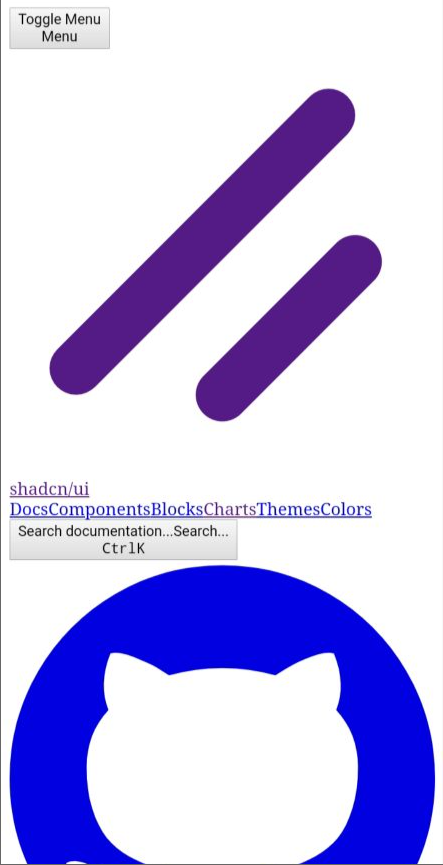
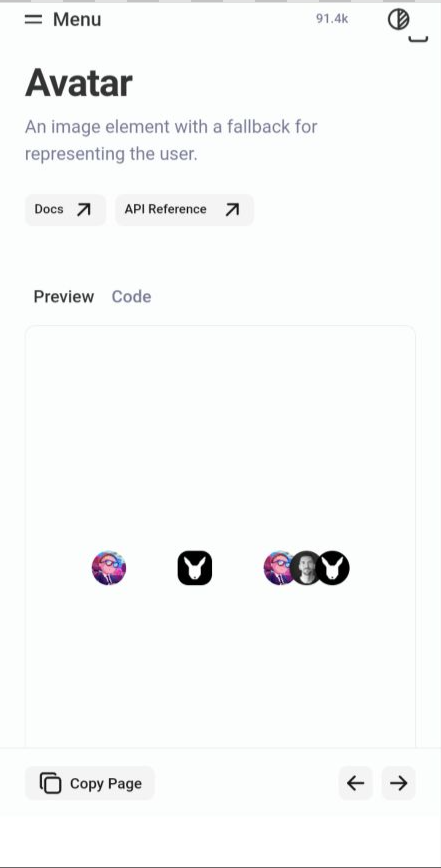
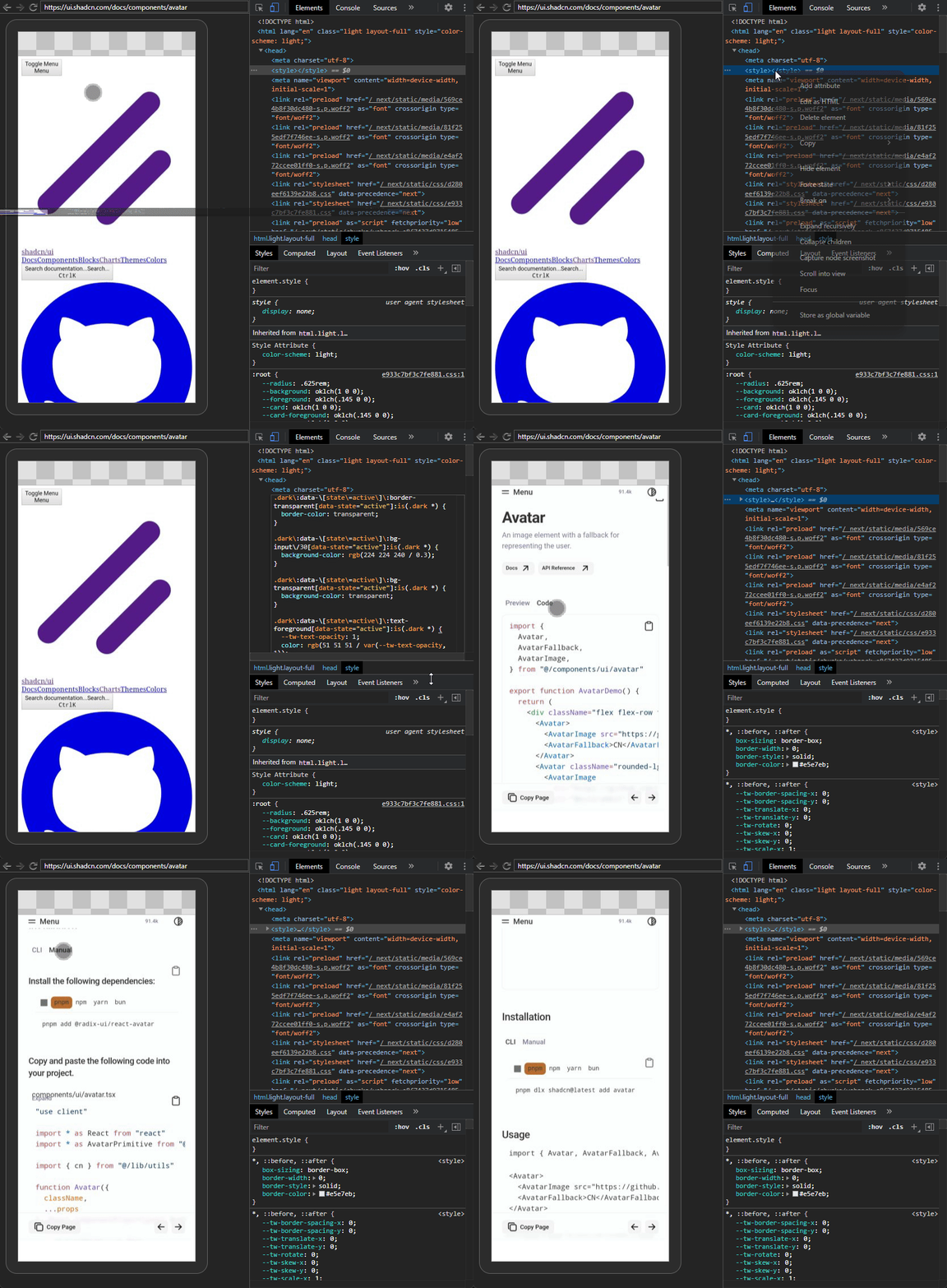
Before and after the plugin on Chrome 85.0.4183.102 mobile (just generated output.css and applied it to the site via Developer Tools)
Shadcn https://ui.shadcn.com/docs/components/avatar
Sites in development with Tailwind v4 =>
Before and after the plugin on Chrome 85.0.4183.102 mobile
📊 Performance
- Zero impact on modern browsers (no extra CSS loaded)
- Minimal impact on legacy browsers (only one additional HTTP request)
- Generated CSS is automatically minified