GloomyTags
GloomyTags is a Vue.js component for adding and removing tags. It allows users to add or remove tags in an input field, with support for customizable styling and input control.
Installation
To add the GloomyTags component to your Vue project, install it using either npm or yarn:
npm install vue-tag-maker
or
yarn add vue-tag-maker
Usage
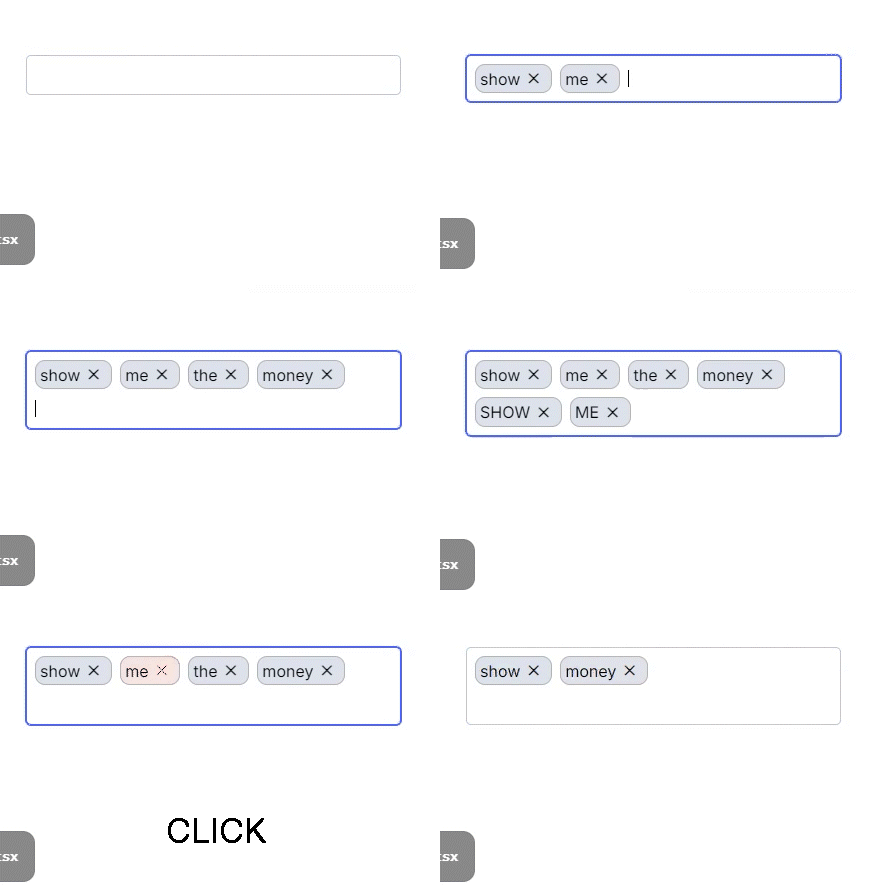
-
Component Registration
Register the component in the Vue file where you want to use it:
<script>
import GloomyTags from 'vue-tag-maker'

export default {
  components: { GloomyTags },
  data() {
    return {
      tags: [] // initial state
    }
  },
  methods: {
    updateTags(newTags) {
      this.tags = newTags
    }
  }
}
</script>

<template>
  <GloomyTags :state="tags" :setState="updateTags" />
</template>
-
Component Properties
The GloomyTags component supports the following properties:
name: The name of the input field.placeHolder: The placeholder text for the input field.state: The current array of tags.setState: A function to update the array of tags.onChange: A callback function that is called when tags are changed.onBlur: A callback function that is called when the input field loses focus.separators: An array of keys that separate tags. Defaults to [].disableBackspaceRemove: If true, prevents tags from being removed with the backspace key. Defaults to false.onExisting: A callback function that is called when an existing tag is entered.onRemoved: A callback function that is called when a tag is removed.disabled: Disables the input field if true. Defaults to false.isEditOnRemove: If true, switches to edit mode when a tag is removed. Defaults to false.beforeAddValidate: A validation function that is called before adding a tag.onKeyUp: A callback function that is called when a key is released in the input field.classNames: An object with customized CSS class names.throttleTime: The throttle time (ms) for tag addition requests. Defaults to 300.
-
Component Methods
The GloomyTags component includes the following methods:
cursorToInput: Focuses the input field when the gloomy-tag--container is clicked.handleKeyDown: Handles key input events to add or remove tags.handleTagRemove: Removes a specific tag.
-
Styling
The GloomyTags component uses scoped CSS for styling. The CSS includes the following elements:
.gloomy-tag--container: The default style for the tag input container..gloomy-tag--input: The default style for the input field..gloomy-tag--tag: The default style for each tag..gloomy-tag--focus: The style for a focused tag..gloomy-tag--tag.disappearing: The style for a tag that is being removed.
Example
<template>
  <div id="app">
    <GloomyTags
      :state="tags"
      :setState="updateTags"
      name="tags"
      placeHolder="Type and press enter"
      :separators="['Enter', ',']"
      :classNames="{ tag: 'custom-tag-class', input: 'custom-input-class' }"
    />
  </div>
</template>

<script setup lang="ts">
import { ref } from 'vue'
import GloomyTags from 'vue-tag-maker'

const tags = ref<string[]>([])

function updateTags(newTags: string[]) {
  tags.value = newTags
}
</script>
Contributing
For those who wish to contribute, please refer to the CONTRIBUTING.md file.
License
This project is licensed under the MIT License. For more details, please refer to the LICENSE file.




