
Zero Server
Zero configuration web framework.
Features |
Installation |
Getting Started |
Examples |
Docs

Zero is a web framework to simplify modern web development. It allows you to build your application without worrying about package management or routing. It's as simple as writing your code in a mix of Node.js, React, HTML, MDX, Vue, Svelte, Python, and static files and putting them all in a folder. Zero will serve them all. Zero abstracts the usual project configuration for routing, bundling, and transpiling to make it easier to get started.
An example project with different types of pages, all in one folder:
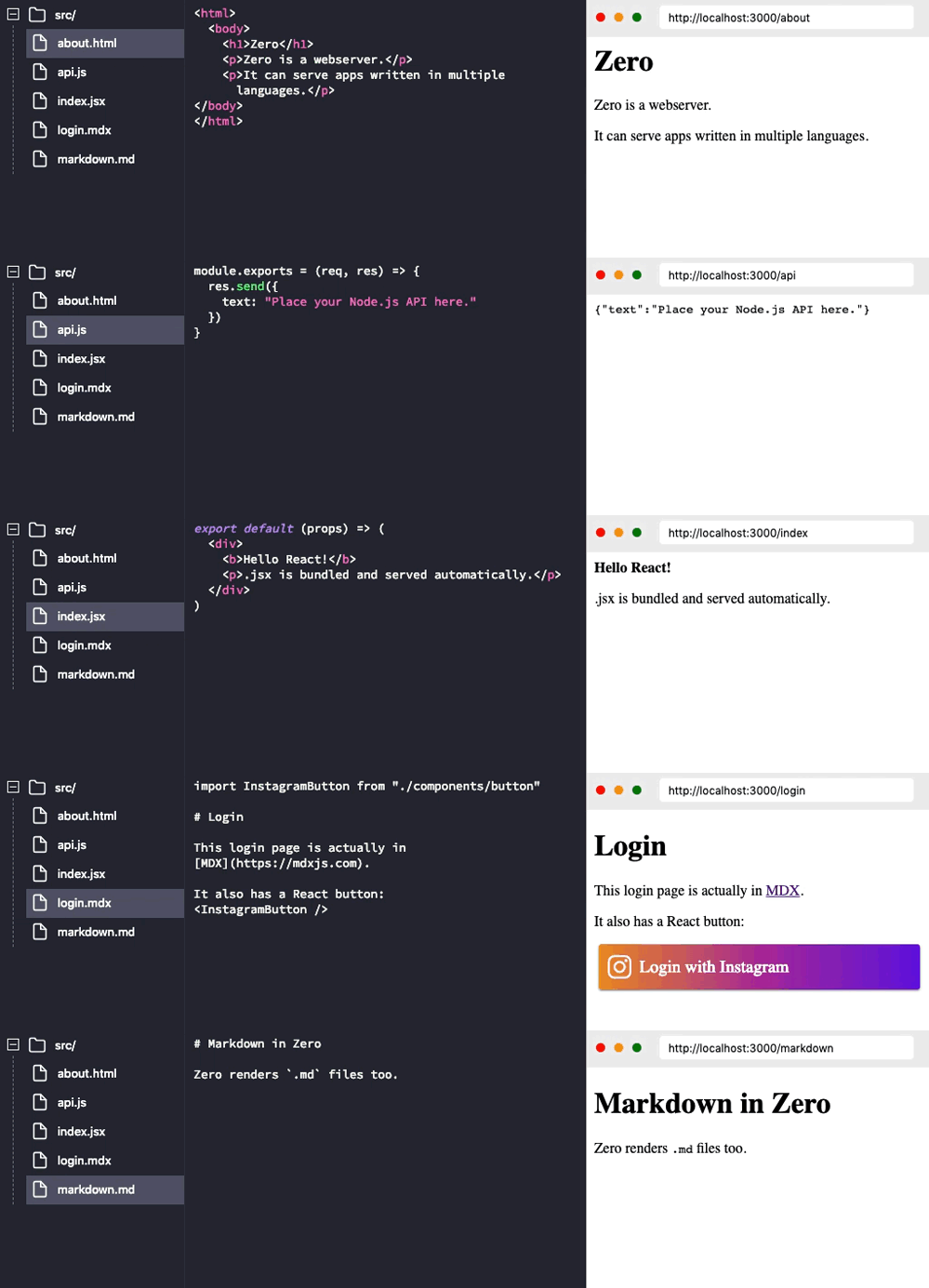
Features
Auto Configuration: Your project folder doesn't require config files. You just place your code and it's automatically compiled, bundled and served.
File-system Based Routing: If your code resides in ./api/login.js it's exposed at http://<SERVER>/api/login. Inspired by good ol' PHP days.
Auto Dependency Resolution: If a file does require('underscore'), it is automatically installed and resolved. You can always create your own package.json file to install a specific version of a package.
Multiple Languages: Zero is designed to support code written in many languages all under a single project. Imagine this:
- Exposing your Tensorflow model as a python API.
- Using React pages to consume it.
- Writing the user login code in Node.js.
- Your landing pages in a mix of HTML or Markdown/MDX.
All under a single project folder as a single web application.
Play on Glitch
You can play with Zero without installing it locally. Click the button below:

Installation
You can install zero globally by:
npm install -g zero
Getting Started
Let's start by making a website that tells us server time.
First we need to create an API endpoint in Node.js to tell us time in JSON.
Create a new folder and add a new file time.js in that folder. In this file, export a function that accepts Request and Response objects (like Express):
const moment = require("moment");
module.exports = (req, res) => {
var time = moment().format("LT");
res.send({ time: time });
};
Once saved, you can cd into that folder and start the server like this:
zero
Running this command will automatically install any dependencies (like momentjs here) and start the web server.
Open this URL in the browser: http://localhost:3000/time
You just created an API endpoint 🎉:

Keep the server running. Now let's consume our API from a React page, create a new file index.jsx and add the following code:
import React from "react";
export default class extends React.Component {
static async getInitialProps() {
var json = await fetch("/time").then(resp => resp.json());
return { time: json.time };
}
render() {
return <p>Current time is: {this.props.time}</p>;
}
}
This is a standard React component. With one additional hook for initial data population:
getInitialProps is an async static method which is called by zero when the page loads. This method can return a plain object which populates props.
Now go to this URL: http://localhost:3000/ and you should see the current server time rendered by React while fetch-ing an API endpoint you created earlier:

zero automatically bundles your code and supports server-side rendering. You don't need to fiddle with webpack anymore.
That's it! You just created a web application.
Supported Languages
Auto Dependency Resolution
If a file does require('underscore'), the latest version of that package is automatically installed from NPM and resolved.
But sometimes you want to use a specific version or a dependency from a private repository. You can do that by creating a package.json in your project folder and adding dependencies to it. Zero will install those versions instead.
Example (package.json):
{
  "name": "myapp",
  "dependencies": {
    "underscore": "^1.4.0",
    "private_ui_pkg": "git+https://github.com/user/repo.git"
  }
}
Contributing
Please see our CONTRIBUTING.md
License
Zero is Apache-2.0 licensed.





