AVAP API Source Control
The AVAP API Source Control extension for Visual Studio Code makes it easy to build and manage versions of your AVAP APIs.
To get started, check out: Working with AVAP API Source Control extension for Visual Studio Code at AVAP Alexandria, our resource site, alexandria.avapframework.com. You can also find more information at AVAP Developer Portal developer.avapframework.com.
Find troubleshooting tips and additional technical information at AVAP Communities, communities.avapframework.com
AVAP API Source Control requires the installation of the base extension, AVAP Dev Extensions for Visual Studio Code
Support for Developers
The AVAP API Source Control extension for Visual Studio Code offers support when running on vscode.dev. This includes free access to alexandria.avapframework.com and communities.avapframework.com.
Installed Extensions
The AVAP API Source Control extension for Visual Studio Code will not install any other extension. It is necessary to install the base extension: AVAP Dev Extensions for Visual Studio Code.
Quick start
-
Step 1. Install the AVAP API Source Control extension.
-
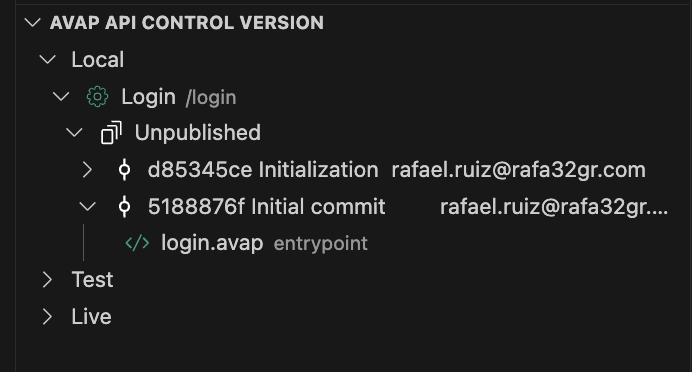
Step 2. You can now view all your environments, APIs, and tests per environment.
-
Step 3. Create a new API.
-
Step 4. Create a new AVAP (.avap) file or use the proposed template to start coding!
Overview of the extension features
The AVAP API Source Control for Visual Studio Code allows you to navigate between different environments in your deployment, creating new APIs or managing versions of existing APIs
- Navigation system set for easy location of API products, APIs, and published versions.
- Creation of API products.
- Version control.
- API cloning.
- Commit management.
AVAP CLI integration
AVAP CLI gives you access to the full AVAP management command set in an isolated environment. For more information on available commands, see Get started with AVAP CLI.
Feedback
- Join the AVAP Community and share your feedback with us at communites.avapframework.com
- Find us on Twitter
License
AVAP API Source Control extension for Microsoft Visual Studio Code
Copyright (c) 101OBEX Corp.
All rights reserved.
MIT License
Permission is hereby granted, free of charge, to any person obtaining a copy of this software and associated documentation files (the "Software"), to deal in the Software without restriction, including without limitation the rights to use, copy, modify, merge, publish, distribute, sublicense, and/or sell copies of the Software, and to permit persons to whom the Software is furnished to do so, subject to the following conditions:
The above copyright notice and this permission notice shall be included in all copies or substantial portions of the Software.
THE SOFTWARE IS PROVIDED AS IS, WITHOUT WARRANTY OF ANY KIND, EXPRESS OR IMPLIED, INCLUDING BUT NOT LIMITED TO THE WARRANTIES OF MERCHANTABILITY, FITNESS FOR A PARTICULAR PURPOSE AND NONINFRINGEMENT. IN NO EVENT SHALL THE AUTHORS OR COPYRIGHT HOLDERS BE LIABLE FOR ANY CLAIM, DAMAGES OR OTHER LIABILITY, WHETHER IN AN ACTION OF CONTRACT, TORT OR OTHERWISE, ARISING FROM, OUT OF OR IN CONNECTION WITH THE SOFTWARE OR THE USE OR OTHER DEALINGS IN THE SOFTWARE.




