Aus Accounting MCP



Australian accounting tools for Claude, Cursor, Codex and other MCP clients. The
server runs on your machine over stdio, needs no API key or account, and makes no
network calls once installed.
- ATO small business benchmarks: compare a business's P&L figures with the
benchmark ranges for its industry.
- Payday Super: review contribution timing for one payday or a whole employer,
and build a 4-file evidence pack for a practitioner's workpaper.
- Division 7A: get the benchmark interest rate and review s 109N loan terms and
s 109E minimum yearly repayments for one loan. Matters outside that scope are refused.
- 9 tax and super worksheets: GST, resident basic tax, CGT, FBT, first-year
depreciation, quarterly SG, Schedule 1 PAYG withholding, super contribution caps and
account-based pension minimums, each within a stated period and scope.
- Cited research: search your own Markdown library, or a local copy of federal tax
legislation, with every result cited to its file and line, or its Act, section and
compilation.
- Test data: generate synthetic CTR and BAS fixtures for integration testing.
Not tax advice. Payday Super and Division 7A reviews are experimental and need
human review before consequential accounting action. Fixtures are not a lodgement.
Ryan Duguid is not a registered tax agent or BAS agent. Project support is limited
to software issues reproduced with fabricated data. Do not send taxpayer information
or request advice, return preparation, tax-treatment confirmation, or lodgement.
See DISCLAIMER.md.
Install
Requires Python 3.10+ and uv:
uvx aus-accounting-mcp
The server waits for an MCP client over stdio. Tool calls read bundled data and any
folders you configure. They do not contact the ATO or the Federal Register, change
records or lodge. Your MCP host still sends tool arguments and results to its model
provider, so use fabricated data with a hosted model.
uvx keeps the version it first downloaded. To upgrade, name the release in your
client configuration, for example aus-accounting-mcp==<version>.
Client integration
For Claude Desktop, Cursor, Windsurf and other hosts that run local stdio servers:
{
  "mcpServers": {
    "aus-accounting": {
      "command": "uvx",
      "args": ["aus-accounting-mcp"]
    }
  }
}
Add to Cursor,
or from a terminal:
claude mcp add --scope user aus-accounting -- uvx aus-accounting-mcp
codex mcp add aus-accounting -- uvx aus-accounting-mcp
The client setup guide
covers Gemini CLI, VS Code, Zed and others. ChatGPT connectors and the Claude.ai web
app accept only remote servers, so they cannot run this one.
Example requests
Ask in plain English. Each of these fabricated requests resolves to one tool call:
| "Compare a hairdresser with $180,000 sales, no other income, $60,000 wages, $30,000 rent and $40,000 other expenses to the ATO benchmarks." | get_ato_benchmarks |
| "Super for a 6 August 2026 payday was $120 and was sent on 14 August. As at 20 August, is it on time?" | calc_payday_super_deadline |
| "What is the Division 7A benchmark interest rate for 2026-27?" | get_div7a_benchmark_rate |
| "An employee who gave a TFN and claims the tax-free threshold (scale 2) is paid a regular $1,000 weekly wage in 2026-27, with no offsets, loans, bonuses or other adjustments. How much PAYG should be withheld?" | calculate_tax_worksheet |
Tools
list_ato_benchmark_industries | Find a business type in the bundled ATO dataset. |
get_ato_benchmarks | Compare supplied P&L figures with ATO benchmark ranges. |
calc_payday_super_deadline | Review timing for one super contribution. |
review_payday_super_contributions | Review related contributions together for one employer. |
build_payday_super_evidence_pack | Return 4 review files in memory for a practitioner's workpaper. |
calculate_tax_worksheet | Calculate one of 9 worksheets with established scope and period. |
get_div7a_benchmark_rate | Get a reviewed Division 7A benchmark rate, or UNKNOWN. |
review_div7a_loan | Review s 109N terms and s 109E minimum yearly repayments for one supplied amalgamated loan. |
refuse_div7a | Explain unsupported Division 7A matters. Call without arguments. |
search_accounting_library | Search a configured local Markdown library. |
read_accounting_library | Read cited lines from that library. |
search_tax_legislation | Find provisions in a configured local legislation corpus, best match first. |
read_tax_legislation_section | Read one cited provision in full, in parts when it is long. |
define_tax_term | Find an expression's statutory definitions in that corpus. |
search_tax_rates | Find legislated rates and thresholds with the provision that sets them. |
generate_synthetic_sbr_fixture | Generate fabricated CTR/BAS test data. |
Missing figures remain unknown. Preserve UNKNOWN, REFUSED, not_supplied and
null results; ok: true means the tool ran, not that a review passed. Supply an
explicit assessment date and fund-receipt evidence, both the date and the amount
received (received with matched_amount), before reading a Payday Super result
as ON_TIME.
The research tools need a folder you supply: set AUS_ACCOUNTING_LIBRARY_ROOT to an
authorised Markdown folder, or AUS_ACCOUNTING_CORPUS_ROOT to a legislation corpus,
such as one built by au-tax-legislation-corpus.
The package ships neither. A corpus row is a point-in-time copy, not a live lookup.
The reference
covers every exclusion, input rule, prompt, resource, the evidence pack format and
the evaluation suite. The website guide
has further examples.
30-second demonstration
From apps/aus-accounting-mcp/ in a repository checkout, run the fabricated example. It shows the tools running on synthetic data; it is not evidence that a review passed:
uv run --locked aus-accounting-mcp-demo
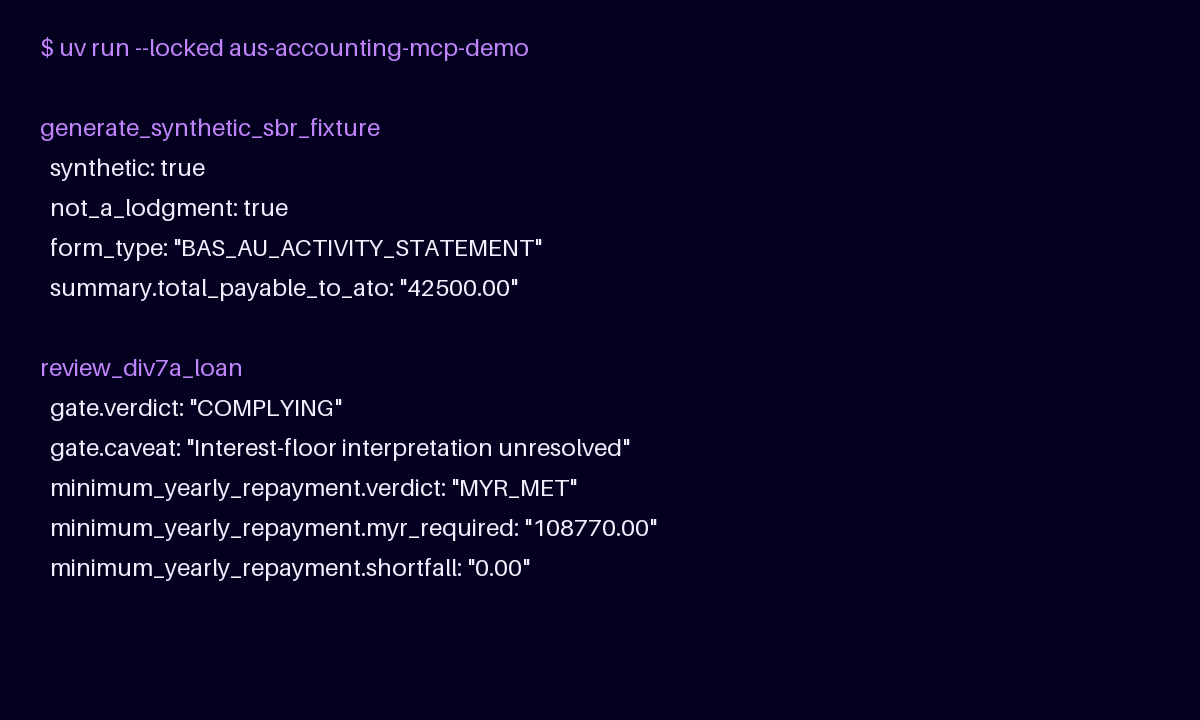
The checked text transcript
and proof and provenance
record the expected output, limitations and asset source.
Licence and releases
MIT License. Created by Ryan Duguid.
Release notes,
v0.2.9 release record,
CITATION.cff.



