Awaitless



Adaptive durable execution for coding agents.
Run commands through one execution layer. Quick work returns inline; longer or
queued work becomes durable across local, SSH, and Slurm. Your workload stays
on infrastructure you already own.
Agents submit work. Awaitless owns execution.
Awaitless is the adaptive durable execution layer between coding agents and the
compute they use. It gives agents one stable job contract while reusing your local
machine, SSH hosts, and Slurm clusters underneath.
简体中文 · Documentation ·
Benchmarks · PyPI
One job lifecycle across your existing compute
Coding agent → submit work → Awaitless owns the job lifecycle → Local / SSH / Slurm
| Stable IDs, state, cancellation, bounded logs, and Artifacts survive client disconnects. | Durable FIFO admission prevents too many jobs from entering a named resource at once. | Exit codes and results remain available by Job ID or replayable completion cursor. |
Awaitless owns the job lifecycle, not the hardware. It does not discover
resources, understand GPU topology, allocate multiple resources, or replace a
cluster scheduler. Operators name queues and set fixed concurrency; Slurm
continues to handle requests such as --gpus 2 --mem 64G and all physical
cluster scheduling.
Your coding agent should write code, not babysit jobs
An agent can write its own run → sleep → check loop. The harder problem is
making job identity, disconnect recovery, queue admission, cancellation, and
result delivery reliable across long workloads and changing sessions. Without
that execution layer, the agent repeatedly pulls the same growing log back into
its context:
ssh gpu 'run_benchmark > job.log 2>&1 &'
ssh gpu 'tail -n 200 job.log'
ssh gpu 'tail -n 200 job.log'
Awaitless turns that lifecycle into one adaptive execution call and one result
boundary:
awaitless run --json --host gpu --artifact results.json -- ./run_benchmark
awaitless wait job_019F... --json
Detached JSON also includes job_state, wait_state, delivery_state, and a
ready-to-copy next_command. A client-side wait timeout is not a workload
failure: use awaitless wait --last --json for the most recently detached Job,
or use the returned command with its stable Job ID. To inspect benchmark lines
without reading a large tail, use awaitless logs <job-id> --grep 'PASS|FAIL|median|CV'.
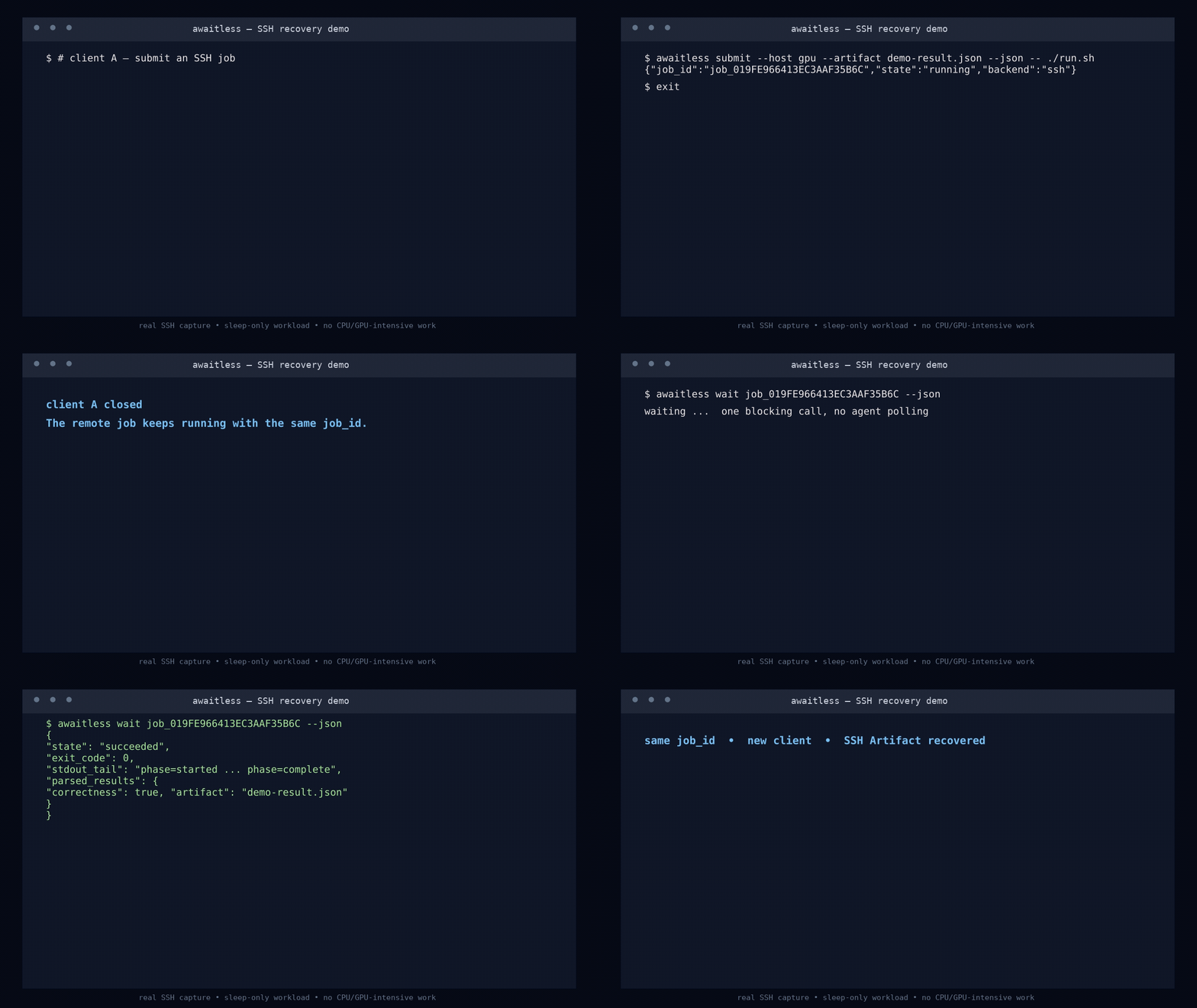
Every run is durable before launch. Finishing within the inline window looks
like an ordinary command result; crossing it only detaches the waiter. Interrupt
the waiter, close the MCP client, or start a fresh agent session: the Job keeps
running and its stable ID recovers the result.
Queue work before a named resource is free
Create a durable FIFO queue once, then submit every command immediately:
awaitless queue create gpu0 --concurrency 1

awaitless submit --queue gpu0 -- python train_a.py
awaitless submit --queue gpu0 -- python train_b.py
awaitless submit --queue gpu0 -- python train_c.py
The first command runs and the others report queued. Each starts automatically
when capacity becomes available. This is durable admission control for a named
scarce resource: fixed concurrency and FIFO ordering, with no priority or
preemption. Awaitless never kills running work to make room for a later job.
Operators can also bind adaptive runs to a queue globally or per host:
[hosts.gpu]
hostname = "gpu.example.com"
queue = "gpu0"
The Agent can then call run without choosing a queue or probing the GPU first.
This queue does not discover resources, understand GPU topology, dynamically
allocate devices, issue leases, or combine requests such as two GPUs plus 64 GB
of memory. Use Slurm or another scheduler for those responsibilities; Awaitless
provides the Agent-facing job lifecycle around that scheduler.
Consume whichever job finishes next
v0.7 adds completions ... --drain --json for consuming a small parallel set
in one call without client-side cursor bookkeeping. Long jobs can emit
structured heartbeat updates with wait --progress-interval 30s. Use
--capture-log PATH for command-owned logs and --resource gpu=0 or
--device 0 for explicit exclusive admission; terminal results freeze bounded
logs, diagnostics, timing, environment, and a SHA-256 identified snapshot.
Submit independent work up front, keep every Job ID, then wait at one durable
completion boundary:
awaitless completions job_A job_B job_C --json
awaitless completions job_A job_B job_C --after cmp_... --json
The first call returns already-finished work immediately or blocks until at
least one selected Job completes. Process the batch before advancing to
next_cursor; reusing an older cursor safely replays the same completion IDs.
If the client disappears, a new session can continue from the saved cursor.
Awaitless makes continuation results durably available—it does not run the
agent's next reasoning step or require a resident notification service.
The v0.8 evidence suite replaces historical call-count demos with four
questions: does an Agent choose the protocol correctly, does a Job survive
faults without duplicate launch, does Awaitless keep execution-management state
out of the reasoning loop, and does adaptive run preserve low friction for
short commands? See the v0.8 evidence plan.
v0.8 evidence status
Release evidence is model- and commit-specific. The checked-in suite does not
carry numbers from earlier versions or from a different model. Run the v0.8
benchmarks, inspect every raw record, then publish a dated report with model,
config hash, git commit, skipped workloads, and all failures in the denominator.
The reviewed v0.8 evidence report includes the
complete raw records and analysis summaries rather than a selected score.
Try the recovery story in 30 seconds
Linux, Python 3.10+, and Bash are required. Run the built-in demo without a
persistent install:
uvx --from awaitless-runner awaitless demo --json
The demo submits two local jobs, terminates their first completion waiter, then
uses new clients to consume both bounded results and JSON Artifacts by cursor.
For regular CLI use:
uv tool install awaitless-runner
awaitless doctor --json
pip install awaitless-runner works too.
Give it to your coding agent
Add one stdio MCP server to your client's configuration (adapt the outer key to
your client):
{
  "mcpServers": {
    "awaitless": {
      "command": "uvx",
      "args": ["awaitless-runner"]
    }
  }
}
The preferred run tool returns quick commands inline and automatically gives
longer or queued work a durable handle. Tasks-aware clients can still use
run_job, while low-level clients retain submit_job and wait_for_job.
Retrying an expensive submission with the same
client_request_id cannot launch a duplicate job. For parallel work, every
client can use wait_for_completions regardless of MCP Tasks support.
The normative identity, lifecycle, continuation, completion, Artifact, and
compatibility contract is Awaitless Agent Job Protocol.
Codex plugin
This repository is also a Codex plugin. Its manifest bundles the Awaitless agent
skill with the stdio MCP server, which Codex launches through uvx. Install the
repository from a local Codex marketplace, then start a new Codex task so the
skill and MCP tools are loaded together.
The plugin requires uvx on PATH; the first MCP launch downloads
awaitless-runner from PyPI if it is not already cached.
For direct CLI use, the whole loop is:
awaitless run --json --name tests -- python -m pytest -q
awaitless wait <job-id> --json
awaitless wait --last --json
One interface, three places to run
| Local | Durable process-group tracking, cancellation, bounded logs, and transactional named queues. |
| SSH | The same job contract plus queues coordinated on the target host, with no remote daemon. |
| Slurm | Real sbatch scheduling plus durable Slurm IDs, queue/accounting state, exit codes, logs, cancellation, and Artifacts. |
Use --backend, --host, or configuration defaults to switch targets without
changing how the agent submits and collects work.
Why not just use a shell or tmux?
| Blocking shell call | Quick inspection and interactive work | Lifecycle management once an engineering command runs longer than expected. |
Shell polling / nohup | Keeping a basic command alive | IDs, status, exit-code recovery, bounded logs, cancellation, deduplication, and result parsing. |
tmux | Humans detaching from interactive shells, REPLs, and TUIs | A reliable non-interactive job protocol and wrapper glue. |
| Awaitless | Agent-run builds, tests, benchmarks, remote jobs, and cluster work | Only the command and, optionally, the JSON Artifact to return. |
Awaitless does not replace interactive terminals or Slurm. It gives coding
agents durable fixed-concurrency queues on local/SSH machines and delegates
cluster resource scheduling to Slurm.
How it works
flowchart LR
    A["Coding agent"] -->|"run"| B["Awaitless MCP / CLI"]
    B --> C[("SQLite job record")]
    C --> Q["Optional queue admission"]
    Q -->|"capacity available"| D{"Backend"}
    D --> L["Local process"]
    D --> S["SSH host"]
    D --> H["Slurm allocation"]
    L --> I{"Finished inline?"}
    S --> I
    H --> I
    I -->|"yes: result"| A
    I -->|"no: durable handle"| A
    A -. "reconnect with stable ID" .-> C
    C --> E["Durable completion cursor"]
    E -->|"state + exit code + bounded logs + Artifacts"| A
There is no Awaitless daemon, HTTP service, or hosted sandbox. Each invocation
opens the same SQLite store; submitted runners and scheduler jobs outlive the
stdio server that created them. Full logs remain on disk while only bounded
tails enter the agent context.
Documentation
License
MIT




