claude-real-video




▶ The 60-second pixel film — sound on (mp4 on GitHub) · an AI agent searches "how can an LLM truly understand video?", finds a key, and unlocks vision.
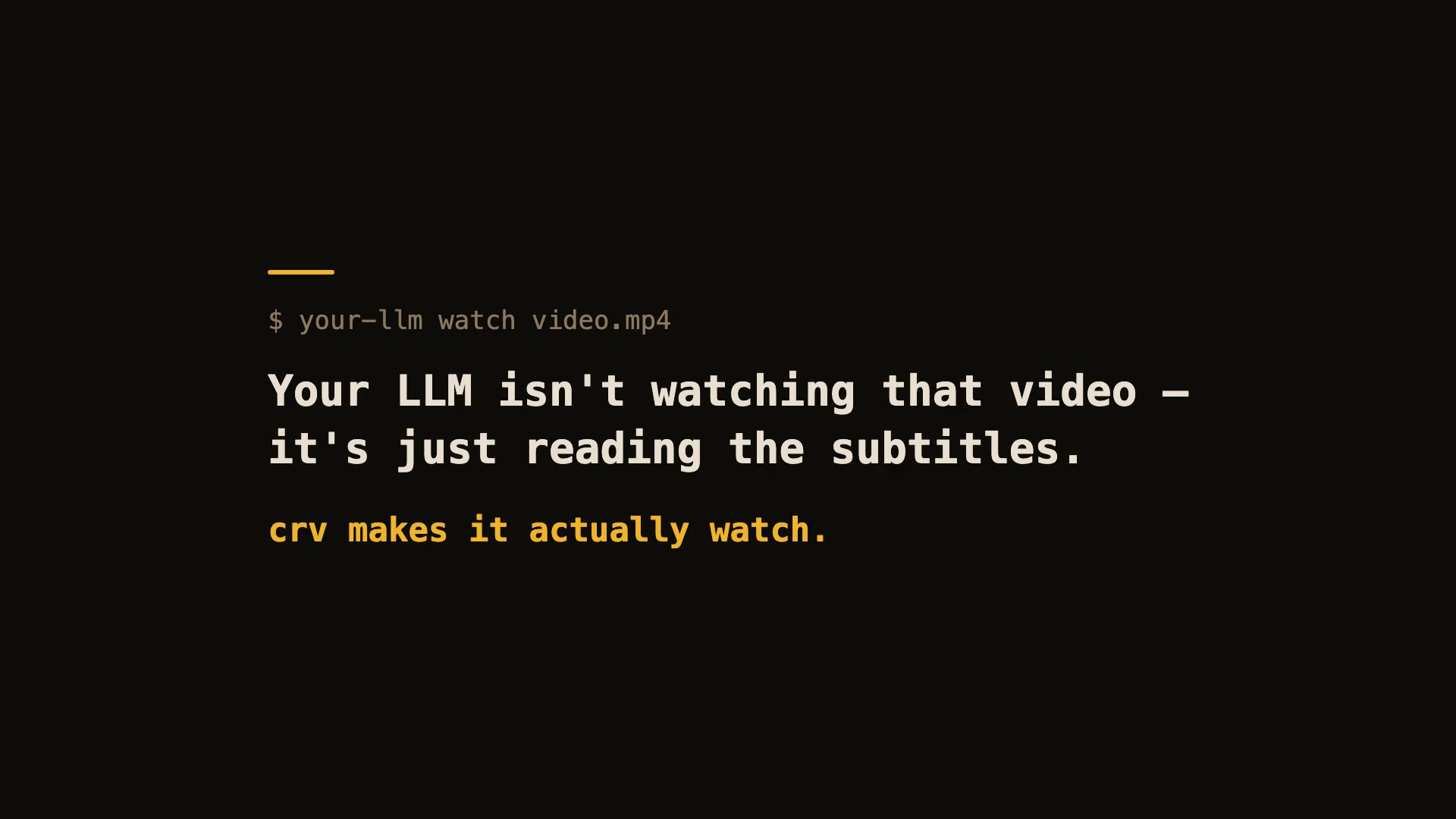
60-second real demo — real install, real run, real viewer.
Let Claude — or any LLM — actually watch a video.
pip install "claude-real-video[whisper]"
npx skills add HUANGCHIHHUNGLeo/claude-real-video
Claude Code plugin marketplace (enable auto-update in /plugin → Marketplaces if you want it):
/plugin marketplace add HUANGCHIHHUNGLeo/claude-real-video
/plugin install claude-real-video@claude-real-video
Then paste a video link into your agent and ask about it. (CLI-only use? crv "<url>" works with just the pip install.)
Naming: crv is the short name for claude-real-video (the PyPI package). The paid add-on, crv Pro, is sold on Capafy under the listing name "llm-real-video Pro".
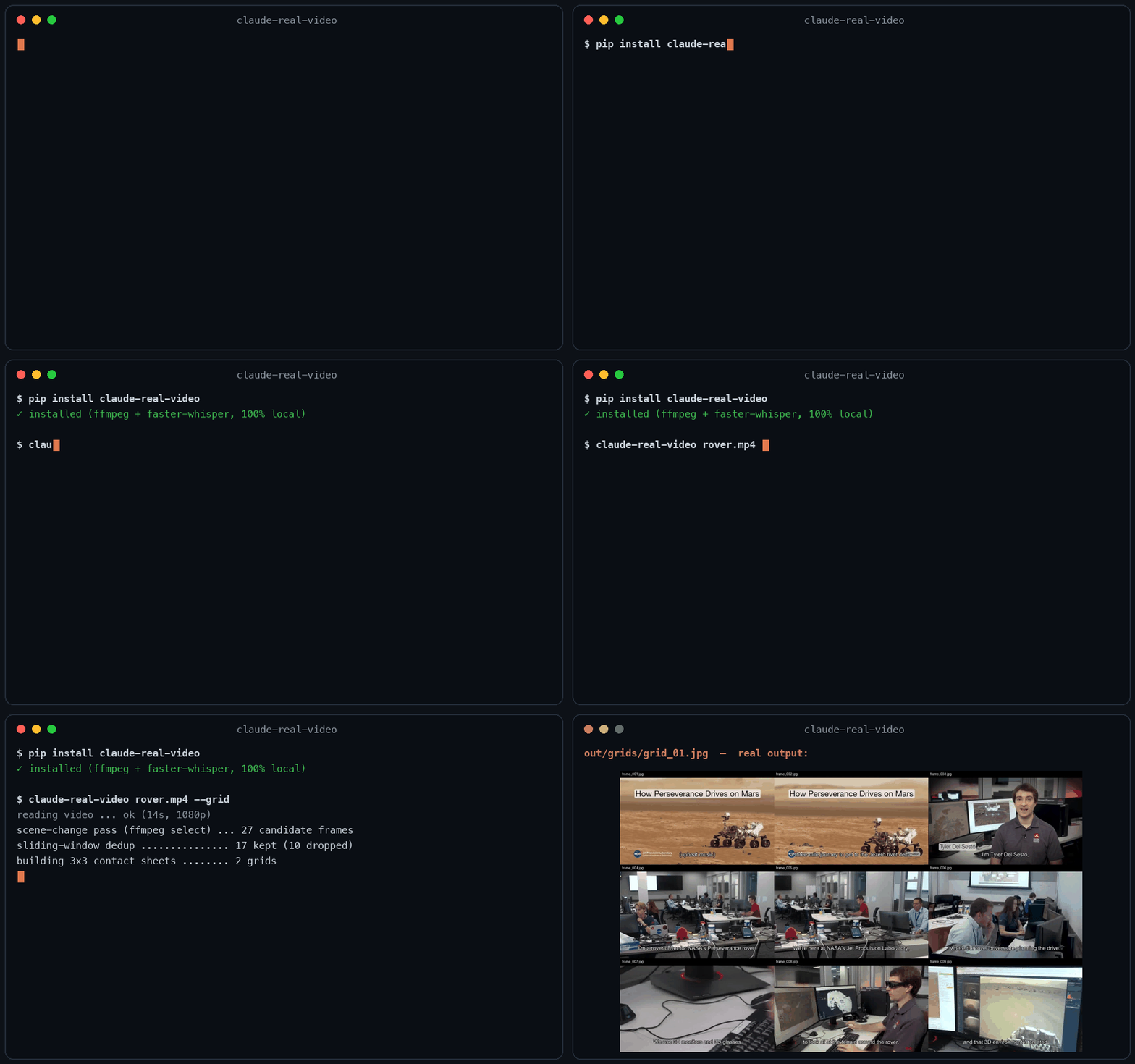
Same 58-second clip: fixed 1 fps sampling = 58 frames. crv keeps the 26 that actually differ — and --grid packs them into 3 contact sheets. Fewer tokens, nothing missed.
This free version lets your AI see the video. crv Pro lets it understand it — how it was shot (cut rhythm, camera moves) plus a timestamped timeline of what frames can't show: gestures, expressions, voice pitch shifts, emotion, sound events. One-time price $29 — get it on Capafy or buy with card via Lemon Squeezy.
Most AI tools don't really see a video. Paste a YouTube link into ChatGPT and it
reads the transcript, not the picture. Claude won't take a video file at all.
Even Gemini, which can read video natively, has to send it up to Google and
samples frames at a fixed interval (1 fps by default), so fast cuts slip past.
claude-real-video does it differently, and the processing runs locally: point it at a URL or a
file, and it pulls the frames that actually matter (every scene change, not a
fixed quota), throws away the near-duplicates, transcribes the audio, and hands
you a clean folder any LLM can read. All the processing happens on your own machine — what gets sent anywhere is only the frames/text you choose to paste into an LLM afterwards.
crv "https://www.youtube.com/watch?v=..."
Then drop the frames + MANIFEST.txt into Claude / ChatGPT / Gemini and ask away.
No terminal needed — run crv-web and a local page opens (Traditional Chinese / Simplified Chinese / English): paste a YouTube or Reels link or a file path, click Analyze, open the result viewer. Video analysis and output generation run on your machine — the source video never gets uploaded. (If you then paste the extracted frames or transcript into a cloud LLM, that data goes to that provider.)
Want to eyeball what the model will see first? Add --viewer — it writes a local viewer.html (video + keyframe grid + transcript) you can double-click open. No network, no extra installs.
Slow-changing content (animation tutorials, gradual morphs, slow pans): add --adaptive — frames are picked against their rolling neighbourhood instead of a fixed threshold, so a 2-3s squash-and-stretch that never spikes any single frame still gets captured.
Text-heavy content (lecture slides, screen recordings, talking-head explainers): add --text-anchors — extra frames are forced at subtitle-cue timestamps, so each spoken segment gets a matching visual even when the scene barely changes. Needs a sidecar .srt/.vtt or an embedded subtitle track — captions burned into the pixels can't be detected. At most one forced frame per second; scene detection is untouched.
Multi-speaker content (interviews, podcasts, meetings): add --speakers — every transcript line gets a speaker label ([SPEAKER_00], [SPEAKER_01], …) so the model can follow who said what. Runs a local diarization model (45 MB, downloads once, no account or token needed). Install with pip install "claude-real-video[speakers]".
Not doing LLM work? It also works as a general-purpose video keyframe extractor —
scene-change detection + dedup, no ML models to download.
Using Claude Code — or any coding agent? One command installs the skill
(works with Claude Code, Cursor, Codex, Copilot, Gemini CLI and other
agentskills.io-compatible hosts):
pip install "claude-real-video[whisper]"
npx skills add HUANGCHIHHUNGLeo/claude-real-video
Then just paste a video link into your agent and ask about it.
Manual install (clone + copy)
git clone https://github.com/HUANGCHIHHUNGLeo/claude-real-video.git
mkdir -p ~/.claude/skills && cp -r claude-real-video/skills/claude-real-video ~/.claude/skills/
New in 0.3.0 — tell it why you're watching, and keep what it finds:
crv "https://youtu.be/..." --why "find the pricing strategy" --kb ~/notes
--why makes the analysis focus on what you care about instead of a generic summary;
--kb saves the result as a dated note in your own notes folder, so it doesn't die in crv-out.
Measured numbers
Real run on a 3-minute 640x360 video (benchmark/jfk-rice.mp4), Mac mini M4, local CPU, frames + dedup only (--no-transcribe). Image tokens estimated with Anthropic's (width x height) / 750 — 307 tokens/frame at 640x360.
| default (scene-change + 1s floor) | 170 (from 180 extracted) | 23.5 s | ~52k |
--max-frames 80 | 80 | 23.4 s | ~25k |
--adaptive (catches slow morphs) | 270 | 36.8 s | ~83k |
Dedup v0.7.16 — small-subject fast action no longer disappears. A percentage comparator is structurally blind to a subject that covers <1% of the frame (it can never change 8% of the pixels). Found in a user's 2,181-video batch run; fixed with a third "action channel". Synthetic repro — static 1280x720 shot, a 40x90 px subject (0.4% of frame) moves fast only in the last 10 of 65 frames:
| v0.7.15 | 2 | 1 / 10 |
| v0.7.16 | 11 | 10 / 10 — full trajectory |
Why not just sample frames?
Most "let an LLM watch a video" scripts (and Gemini's own pipeline) grab frames
at a fixed interval — e.g. one per second. That over-samples a static
screencast and under-samples a fast-cut reel. claude-real-video is smarter:
| Frame selection | every N seconds | scene-change detection + density floor |
| Repeated shots (A-B-A cuts) | sent again every time | sliding-window dedup sends each shot once |
| Static slide (10 min) | ~600 near-identical frames | collapses to 1 (dedup) |
| Fast-cut reel | misses frames between samples | catches each visual change |
| Audio | often ignored | Whisper transcript w/ language detect |
| Where the processing happens | often in someone's cloud | on your machine (you choose what to share with an LLM afterwards) |
| Input | usually local file only | URL (yt-dlp) or local file |
You feed the model fewer, more meaningful frames — cheaper context, better
understanding.
Install
pip install "claude-real-video[whisper]"
pip install claude-real-video
pip extras never install themselves — without [whisper] there is no speech-to-text
(videos that ship their own subtitles still get a transcript).
System requirement: ffmpeg
ffmpeg / ffprobe are used for frame extraction and audio, and aren't
pip-installable. Install them once:
| macOS | brew install ffmpeg |
| Linux | sudo apt install ffmpeg (or your distro's package manager) |
| Windows | winget install Gyan.FFmpeg — or choco install ffmpeg — or download a build and add its bin\ folder to your PATH |
Verify it's on your PATH:
ffmpeg -version
Transcription uses the whisper CLI (installed by the [whisper] extra, or
pip install openai-whisper). Whisper also relies on ffmpeg.
Faster + hallucination-proof transcripts (recommended): install the [fast]
extra and crv automatically switches to
faster-whisper — same models, same
output files, several times faster, and gated by Silero VAD (voice-activity
detection): music-only or silent audio yields an honest "no speech" note instead
of whisper's classic invented caption. No new flags to learn:
pip install 'claude-real-video[fast]'
If both are installed, faster-whisper wins; if it ever fails, crv falls back
to the whisper CLI on its own.
Works on macOS, Windows, and Linux — Python 3.10+.
Usage
crv "https://www.instagram.com/reel/XXXX/"
crv lecture.mp4 -o out --lang en
crv clip.mp4 --no-transcribe
crv "https://..." --cookies cookies.txt
python -m claude_real_video ... works as an alias for crv too.
Options
-o, --out | crv-out | output directory |
--overwrite | off | replace a previous analysis living in the output directory (without this, a non-empty output dir is refused to avoid mixing videos) |
--scene | 0.30 | scene-change sensitivity (lower = more frames) |
--fps-floor | 1.0 | at least one frame every N seconds |
--max-frames | auto: clamp(150, duration×1.5, 600) | hard cap on total frames (explicit value always wins) |
--adaptive | off | adaptive scene detection: catches slow morphs (2-3s squash/stretch, gradual pans) a fixed threshold misses, by comparing each frame against its rolling neighbourhood |
--text-anchors | off | force extra frames at subtitle-cue timestamps (sidecar .srt/.vtt or embedded track) — for videos where meaning changes faster than pixels; at most one forced frame per second |
--speakers | off | label every transcript line with the speaker ([SPEAKER_00] …) via local diarization — needs pip install "claude-real-video[speakers]", 45 MB model downloads once |
--lang | auto | Whisper language (en, zh, auto, ...) |
--whisper-model | base | Whisper model for transcription (tiny/base/small/medium/large/turbo — base is fast; want sharper transcripts? --whisper-model turbo is one flag away: a pruned large-v3 — much faster than large with a minor quality trade-off, one-time 1.6GB download, ~6GB memory) |
--dedup-threshold | 8 | % of pixels that must change for a frame to count as new; higher = fewer frames (the settled-local detector's gate scales with it too) |
--dedup-window | 4 | compare against the last N kept frames — a shot the model already saw doesn't come back after a cutaway (1 = consecutive-only) |
--report | off | keep dropped frames in ./dropped + write report.html visualising every keep/drop decision |
--no-transcribe | off | skip audio |
--keep-audio | off | also save the full soundtrack (audio.m4a) so audio models can hear it |
--viewer | off | also write viewer.html — browse the video, keyframes and transcript in one local page (double-click to open) |
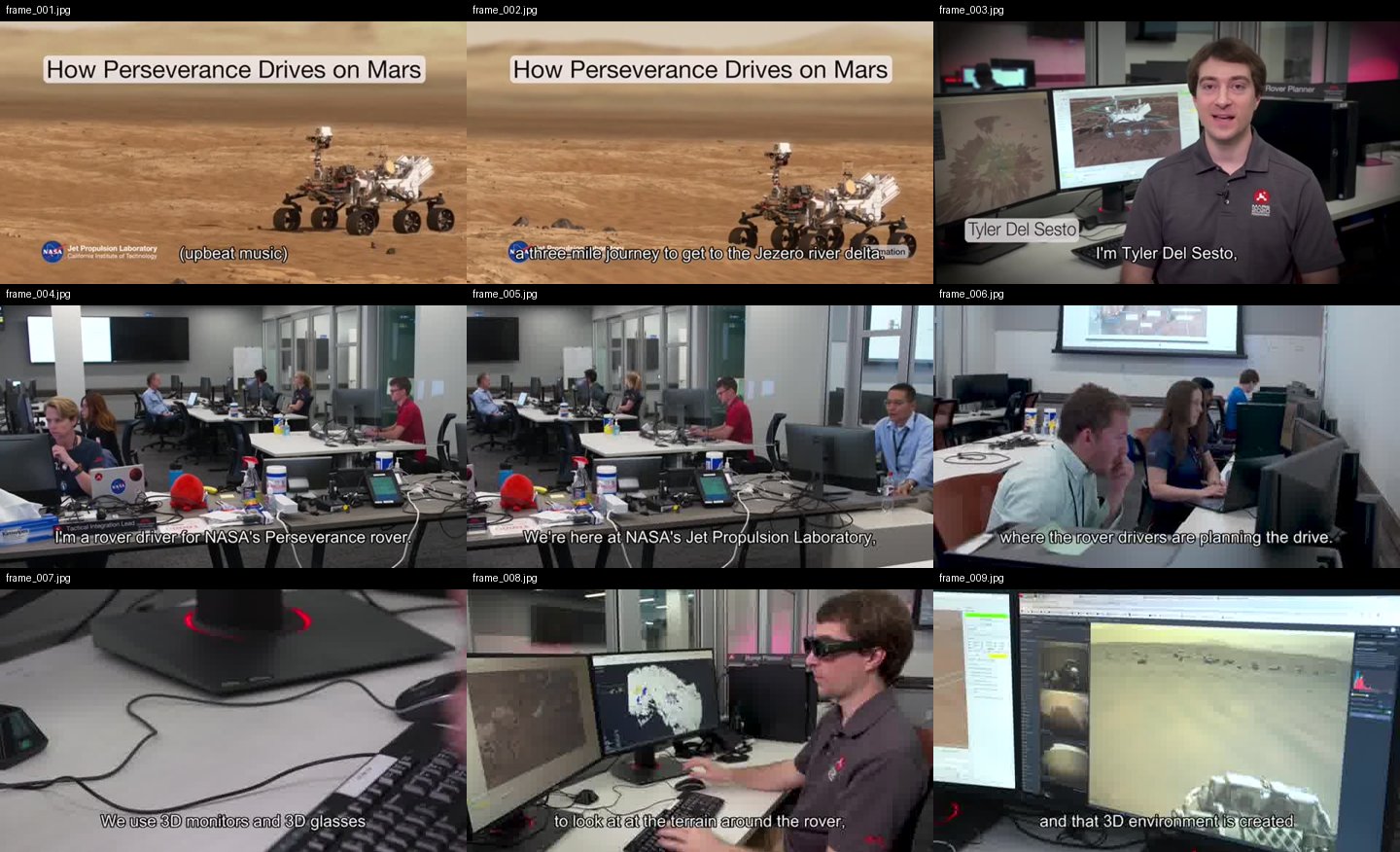
--grid | off | also tile the kept frames into 3x3 contact sheets (./grids) — consecutive frames side by side help the model follow motion and progression |
--why | – | why you're watching, e.g. --why "find the pricing strategy" — written into MANIFEST.txt so the model analyses with that lens instead of a generic summary |
--kb | – | also save the analysis as a dated markdown note into this folder (your Obsidian vault, notes dir, ...) — so it joins your knowledge base instead of dying in crv-out |
--cookies | – | Netscape cookie file for login-gated sources |
--cookies-from-browser | – | read login cookies straight from your own browser — chrome, safari, firefox or edge (your own account only) |
What --grid output looks like
One contact sheet = nine consecutive keyframes, in order, filenames on each cell — the model reads a sequence, not scattered stills:
MCP server (Claude Desktop / Cursor / any MCP client)
crv also ships as an MCP server, so MCP clients can ask for a video to be
watched directly — same local pipeline, zero cloud.
pip install 'claude-real-video[mcp]'
Claude Code:
claude mcp add crv -- crv-mcp
Claude Desktop — add to claude_desktop_config.json:
{ "mcpServers": { "crv": { "command": "crv-mcp" } } }
Tools: watch_video(source, max_frames, language, transcribe) returns the
timestamped transcript plus the first batch of keyframes as images;
get_frames(source, start_index, count) pages through the rest. Analyses are
cached under ~/.cache/crv-mcp, so follow-up questions about the same video
are instant.
mcp-name: io.github.HUANGCHIHHUNGLeo/claude-real-video
Verified end-to-end on Claude Code (the model described a test video's frames
correctly through the tool). Claude Desktop and Cursor speak the same MCP
stdio protocol — config above; open an issue if anything misbehaves.
Use it from Python
from claude_real_video import process

r = process("https://youtu.be/...", "out", lang="en")
print(r.frame_count, r.transcript_path)
How it works
- Fetch —
yt-dlp for URLs (optional cookies), or copy a local file.
- Extract — one chronological
ffmpeg select pass grabs every scene change
plus a density floor (at least one frame every --fps-floor seconds), so
fast cuts and slow screencasts are both covered.
- Dedup — three channels against a sliding window of the last
--dedup-window kept frames, so an A-B-A cutaway doesn't re-send a shot the
model has already seen. A global channel measures real pixel difference
(downscaled RGB, not a perceptual hash — hashes go blind on flat colours and
equal-luma hue changes); --dedup-threshold is the % of it that must change.
A settled-local channel (v0.7.4) catches what the global one can't see:
thin pen strokes, caption/text-card swaps and small UI updates that average
out to ~0% globally. It looks, on a finer signature, for a region that
differs strongly from every recent kept frame (with 1px shift tolerance, so
film grain and frame jitter don't trigger) and is no longer changing — a
settled new state, not motion mid-flight — with a cooldown so continuous
motion that pauses every second (a waving flag, drifting smoke) can't keep
re-firing. The final frame is evaluated even if still in motion (so a video's closing state is never lost), but it must clear both contrast gates like any other frame. --report writes report.html showing every keep/drop decision
with its diff % (settled-local keeps are labelled), for tuning.
- Text — if the video already has subtitles (a sidecar
.srt/.vtt next to a
local file, or an embedded subtitle track), those are used as the transcript —
faster and more accurate than re-transcribing. Only when there are no subtitles
does it fall back to Whisper on the audio (skipped cleanly if there's no audio).
- Audio (optional,
--keep-audio) — save the full original soundtrack
(audio.m4a: music + speech + effects, copied losslessly when possible). The
transcript only has the words; the audio file lets a model that can listen
(Gemini, GPT-4o, …) actually hear the music and tone.
- Timestamps — every kept frame's source-video time survives the whole
pipeline (extraction → dedup →
--max-frames thinning → renaming) and is
written to frames.json (file / timestamp_sec / timestamp /
selection_reason). Cite visual evidence as frame_012 @ 00:03:41, align
frames with transcript.json segments, or feed the map to a video-RAG
pipeline. In viewer.html, click any keyframe → "play video from here".
- Manifest —
MANIFEST.txt summarises everything for the model.
So the model can see (key frames), read (transcript) and — with --keep-audio —
hear (full soundtrack) the video. The transcript is plain text any model can read;
the tool doesn't burn subtitles into the video — burning is a presentation choice,
not something needed to make a video AI-readable.
Notes
- Only download content you have the right to. The
--cookies option is for
your own, authorised access — don't ship credentials in a repo.
- Use one output folder per video. Re-running into a folder that already holds
an analysis is refused (so two videos never mix); pass
--overwrite to replace it.
crv Pro — understand how a video was shot
The free tool gives your AI keyframes and a transcript — enough to know what a video is about. crv Pro adds everything else: how it's shot, how it's cut, how it's spoken, what it feels like. All computed on your machine, written as plain text any LLM can read.
- Camera & pacing (
--motion) — every shot auto-labelled: static, pan, tilt, zoom, handheld. Full shot table: per-shot duration, cuts per minute, pacing across open/middle/close. High-motion shots get 0.2s-apart burst frames.
- Sound & emotion (
--senses) — voice emotion, tone curves and audio events (laughter, SFX, ambience) timestamped segment by segment. Vocals and music auto-separated: emotion reads the clean voice, music gets its own BPM + energy track. No-dialogue footage (MVs, film) falls back to reading mood from color and light.
- Interactive viewer (
--viewer) — one self-contained web page per analysis: the video, a clickable event timeline that jumps to the second, a transcript that highlights along with playback. EN / 繁中 / 简中.
- Two reports, one flag (
--ai-report) — with your own API key: one report on how it's shot, one on what it says.
- Breakdown report (
--breakdown) — hook analysis, pacing curve, camera language, and a rubric your own LLM completes into a full teardown.
One-time price $29:
Following the build? I'm documenting the road from open-source tool to first paying customer, in public — @LeoAidoAI on X.
FAQ
What is the best tool to let an LLM watch or analyze a video?
It depends on what "watch" means for you. If you just want one answer about one clip and don't mind uploading it, a hosted multimodal model (e.g. Gemini) is the shortest path. If you want any LLM — Claude, GPT, Gemini or a local model — to analyze video reproducibly and locally, you want a preprocessing pipeline: scene-aware keyframes + a timestamped transcript, handed to the model as evidence it can cite. That pipeline is exactly what claude-real-video does, in one command, with nothing leaving your machine. Uniform frame sampling (1 fps) either misses cuts or floods the context window; scene-aware extraction keeps the frames that carry information.
How can I make Claude understand a video?
Claude cannot ingest video files directly. The working approach:
pip install "claude-real-video[fast]"
npx skills add HUANGCHIHHUNGLeo/claude-real-video
Then in Claude Code: Analyze this video: /path/to/video.mp4. The skill extracts scene-aware keyframes, a timestamped transcript (transcript.json), a frame→timestamp map (frames.json) and a MANIFEST.txt that tells the model how to read the folder — so Claude can cite frame_012 @ 00:03:41 instead of guessing.
What is claude-real-video?
An MIT-licensed Python CLI (crv) that turns a video into what an LLM can actually read: scene-aware keyframes (with real source timestamps that survive dedup and renaming), sliding-window deduplication so small-subject motion isn't thrown away, and local Whisper transcription with optional speaker labels. Works with YouTube URLs or local files, runs 100% locally. It exists because subtitles alone are not watching — models that only read the transcript hallucinate everything visual.
Who makes this
Built by Leo Huang — a one-person company running on AI.
I post what actually breaks and what works while building tools like this:
https://x.com/LeoAidoAI
License
MIT




