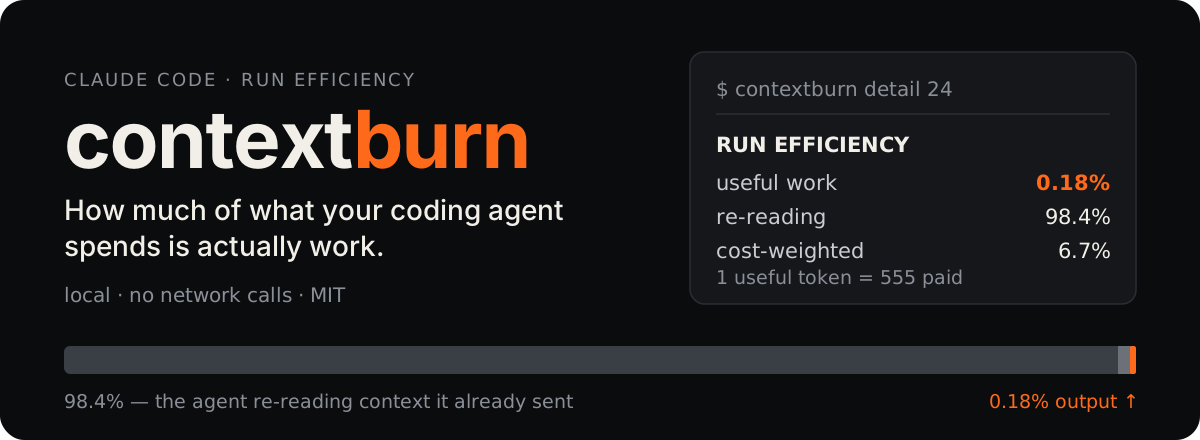

contextburn reads the transcripts Claude Code already writes on your machine and tells you what
share of the tokens you paid for became model output — and how much was the agent re-reading
context it had already sent.
Token counters answer "how much did I spend?". This answers "how much of it was work?" — a
normalised share, so it can be compared across sessions, models and ways of working.
Try it
cp bin/contextburn ~/bin/contextburn && chmod +x ~/bin/contextburn
contextburn detail 24
Why two numbers
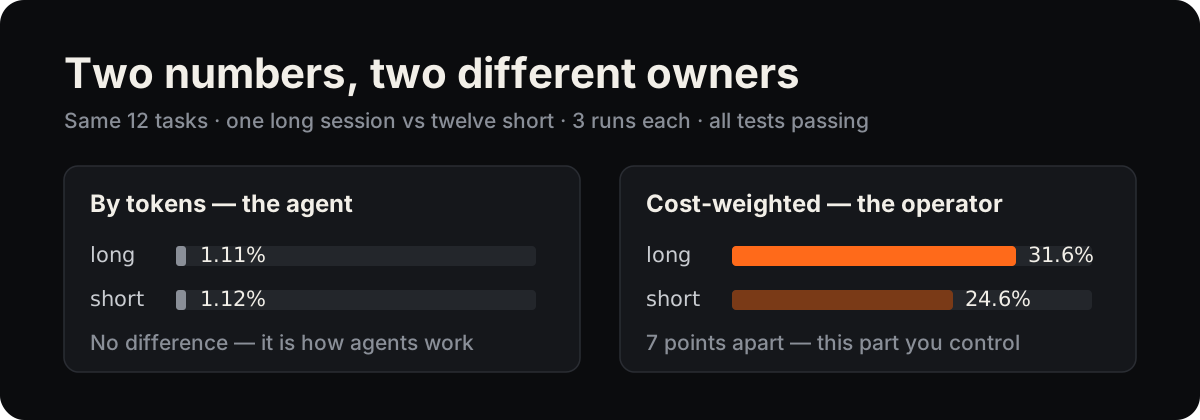
- By tokens the share barely moves. Every agent step resends the accumulated context, so
re-reading dominates whatever you do — it describes the agent.
- Cost-weighted the share does move, because cached reads are priced far below fresh input and
output. It depends on how you run sessions — it describes you.
The comparison above comes from a controlled experiment with its dataset and analysis scripts:
Clear Every Third Task: A Measured U-Curve in the Context Economy of Coding Agents.
How it counts
- Reads local Claude Code transcripts (
~/.claude/projects/**/*.jsonl). Nothing leaves the
machine — no network calls at all.
- Deduplicates usage records by message id and keeps the element-wise maximum. A streaming runtime
writes an early snapshot and a final record for the same call: counting both double-counts it,
keeping only the first halves the output.
- Weights the cost share with per-model prices kept at the top of
bin/contextburn. Update them
there when they change.
Commands
contextburn | what is burning tokens right now |
contextburn detail [hours] | run efficiency, sessions, and what specifically inflated the context |
contextburn window | the current 5-hour subscription window |
contextburn --json | machine-readable state (used by the menu-bar app) |
contextburn --probe <hours> | raw JSON dump of the parsed sessions |
contextburn --efficiency [hours] | run efficiency as JSON |
contextburn mcp | start the MCP server |
Configuration
CONTEXTBURN_LANG or ~/.config/contextburn/lang | en | interface language: en or ru |
CONTEXTBURN_DAY_START | 6 | hour your day starts — the daily total resets here |
CONTEXTBURN_WARN | 30000000 | tokens/hour that turns the menu-bar counter yellow |
CONTEXTBURN_ALARM | 90000000 | tokens/hour that turns it red |
The language file exists because the menu-bar app is launched from Finder, where environment
variables never reach it: echo ru > ~/.config/contextburn/lang switches both the app and the CLI.
MCP server
Let the agent read its own run efficiency mid-session. The package ships a dependency-free MCP
server (stdio) with two tools: run_efficiency returns the shares as structured data, and
spend_breakdown returns the full report.
claude mcp add contextburn -- uvx contextburn mcp
app/main.swift is a small status-bar app. It polls contextburn --json once a minute and shows the
current burn rate with an hourly graph; click a bar to see that hour's breakdown.
swiftc -O -o ContextBurn app/main.swift
Set CONTEXTBURN_BIN=/path/to/contextburn if the CLI is not in ~/bin or the usual Homebrew paths.
Limits
- Claude Code transcripts only, for now.
- The cost-weighted share is only as current as the price table in
bin/contextburn.
Citing
Software DOI (all versions): 10.5281/zenodo.22712985. GitHub's "Cite this repository" button gives the
reference; metadata is in CITATION.cff.
Author
Evgenii Arsentev — arsentev.ai ·
ORCID 0000-0002-9120-7298
This project was published as tokmon on its first day and renamed to avoid confusion with
unrelated tools of that name; TOKMON_* environment variables still work.
License
MIT — see LICENSE.



