


Security News
Deno Goes the Way of the Dinosaur
Cloudflare is acquiring Deno’s team, which will provide another year of bug fixes and security updates before ending support for the runtime.
By Sarah Gooding - Oct 16, 2026
doc-control
Advanced tools
Deterministic, LLM-first control of Word documents: addresses, anchors, tracked-change batches and a safety layer.
 doc-control
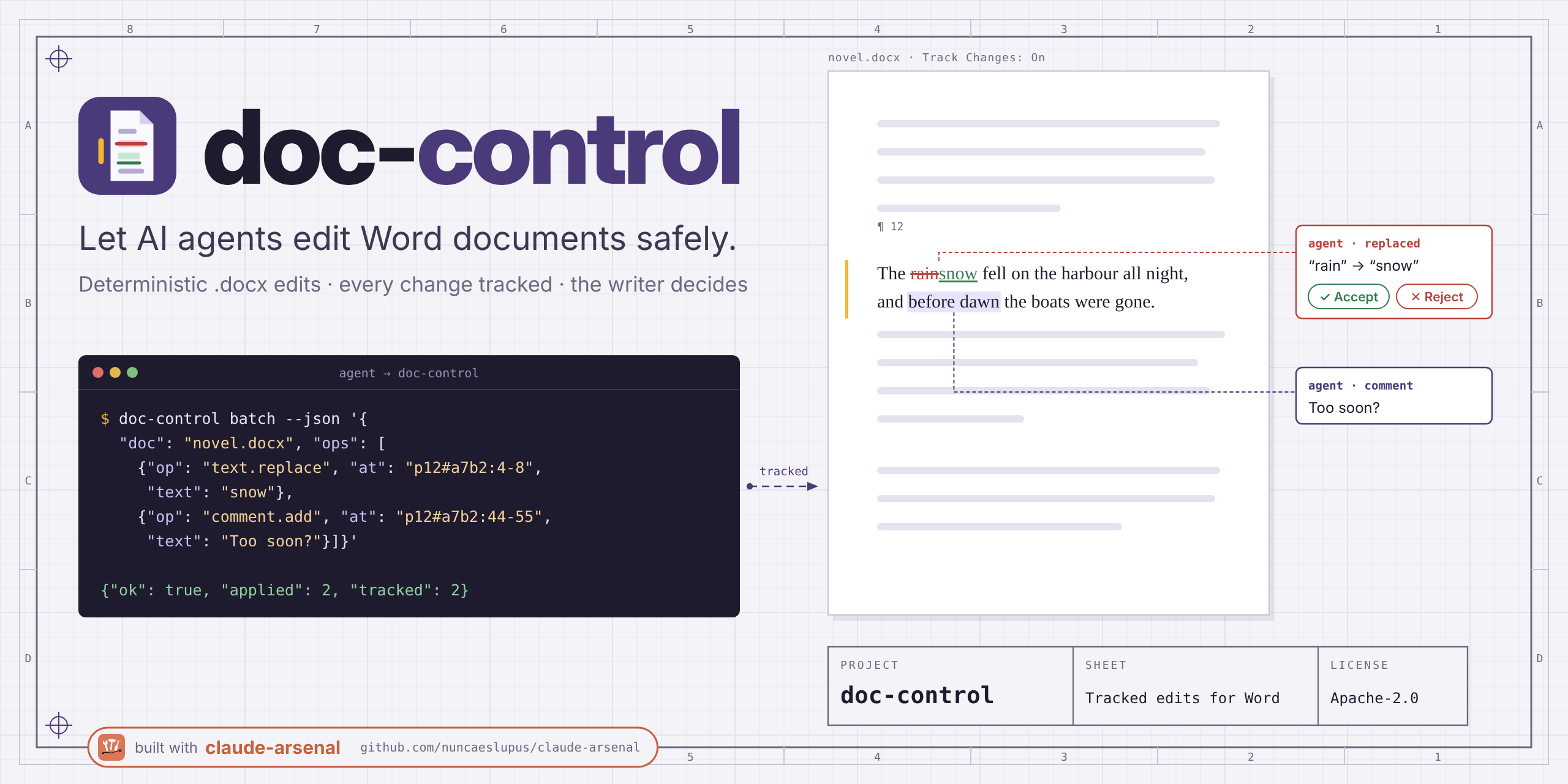
Status: file engine working (pre-1.0; the API may still change). The live engine drives LibreOffice Writer and Microsoft Word (Windows). See
status/specification.mdandstatus/plan.md.
A deterministic tool that lets AI agents work on Word documents quickly, precisely and safely, ideally live in the Word window the writer has open. Every content change is a tracked change the writer can accept or reject.
For anyone — writers and editors first — who wants an AI agent's help inside a Word document without a single silent change.
No Python needed. Every release on the latest release page
carries a Claude Desktop extension and an installer. Both install for the current Windows
user only, need no admin rights, and work with any Claude account, the free plan included.
They drive Microsoft Word live; LibreOffice live control still needs the Python install
below. The full guide (checksums, updates, uninstalling, moving from uvx) is
docs/install-windows.md.
.mcpb)doc-control-X.Y.Z-windows-x64.mcpb from the latest release.Claude Desktop then warns, in red, that the extension can access everything on your computer. Every local extension gets that warning; it is expected. Double-clicking the file does not install it: Windows only asks which program should open it.
-setup.exe), for the command linedoc-control-X.Y.Z-windows-x64-setup.exe from the latest release.doc-control server.capabilities works there.To update, install the newer release the same way. To uninstall, remove the extension from Settings > Extensions, or the installer's copy from Windows Settings > Apps ("doc-control X.Y.Z"). A winget package is coming.
Install with pip install doc-control (or run it without installing: uvx doc-control).
Python 3.11+, no other dependencies. To drive the Word that is open on Windows, install
doc-control[live] (it adds pywin32); LibreOffice needs no extra package.
Command line, JSON in and JSON out:
doc-control doc.outline --json '{"doc": "Novela.docx"}'
doc-control text.find --json '{"doc": "Novela.docx", "query": "lluvia"}'
doc-control doc.batch --json '{"doc": "Novela.docx", "ops": [
  {"op": "text.replace", "at": "p12#a7b2a7b2:4-10", "text": "nieve"},
  {"op": "comment.add", "at": "p40#c0ffee00", "text": "¿Seguro?"}]}'
doc-control server.help doc.batch   # the JSON Schema of any operation
Every write is a tracked change by DOC_CONTROL_AUTHOR (default Claude), made after a
backup and verified, with history.undo and history.* to go back. Addresses like
p12#a7b2a7b2 come from read results and fail loudly if the paragraph changed.
One edit can also go straight to its own operation (text.replace, para.insert,
para.delete, comment.add, revision.accept, revision.reject), which runs it as a
one-edit doc.batch.
For a change the writer has already approved in the chat, batch, term.rename and
restore take "tracked": false: the same edit with this call's own revisions accepted in
the same verified write, so no revision mark is left (other tracked changes stay; a paragraph
that holds one is refused). Tracked stays the default. undo of a plain write restores the
backup, so it works only while the document is exactly as that write left it (later edits must
be undone first; otherwise BATCH_CONFLICT). A plain edit inside a tracked-inserted table row is
allowed; rejecting that row later removes the plain text too. File engine only for now.
From Python, a document can be held open for many reads, with whole results:
from doc_control import api

with api.open("Novela.docx") as doc:
    for p in doc.paragraphs(normalized=True, pages=True):
        print(p["at"], p["style_name"], p["page"], p["text"][:40])
    chapters = doc.run("doc.segment", {"unit": "chapters"})["chapters"]
Recipes propose batches of fixes (Spanish typography, quotes, dashes, spacing, empty
paragraphs and more): recipe.list, then recipe.run returns a batch to review and apply.
Reads cover the body only unless asked; stories opts in to the rest ("notes" for
footnotes and endnotes, "headers" for headers and footers) on para.list,
text.find, para.locate, para.get, doc.outline, doc.stats and revision.list.
Their paragraphs carry an address with a prefix (fn3/p1#0c9e0c9e, en2/…, hdr1.default/…,
ftr1.first/…) that the edit operations accept, so a tracked edit inside a footnote or a
running header works like one in the body. A body read stays as fast as before.
doc-control para.list --json '{"doc": "Tesis.docx", "stories": ["body", "notes"]}'
doc-control text.replace --json '{"doc": "Tesis.docx", "at": "fn3/p1#0c9e0c9e:4-10", "text": "2019"}'
doc-control note.add --json '{"doc": "Tesis.docx", "at": "p40#c0ffee00:17", "kind": "footnote", "text": "Ver el cap. 2."}'
doc-control section.list --json '{"doc": "Tesis.docx"}'
doc-control table.get --json '{"doc": "Tesis.docx", "table": 1}'
doc-control table.row.insert --json '{"doc": "Tesis.docx", "table": 1, "after_row": 2, "cells": ["a", "b"]}'
doc-control table.row.delete --json '{"doc": "Tesis.docx", "table": 1, "row": 4}'
note.add inserts the reference mark and the note as tracked insertions (rejecting them
removes both); the row operations write tracked row insertions and deletions. All of it is
backed up, verified and undoable like any other write. scripts/real_word_stories.py
checks it in real Word (see docs/real-word-check.md).
layout.get returns the document's page plan: per section where it starts (from), its
break, its page numbering and its header and footer text per kind (default, first,
even; null inherits the previous section's). layout.apply takes a plan in the same
shape and brings the document to it. This one gives a novel an unnumbered title page,
then starts chapter 1 on a right-hand page numbered 1, with the chapter title in the odd
headers and the book title in the even ones:
doc-control layout.get --json '{"doc": "Novela.docx"}'
doc-control layout.apply --json '{"doc": "Novela.docx", "untracked": true, "plan": {
  "version": 1, "two_sided": true, "mirror_margins": true,
  "sections": [
    {"from": "p1#ea7412aa", "break": "nextPage",
     "numbering": {"shown": false, "start": 1, "format": "lowerRoman"},
     "header": {"default": "", "even": ""}, "footer": {"default": "", "even": ""}},
    {"from": "p2#5fac7aad", "break": "oddPage",
     "numbering": {"shown": true, "start": 1, "format": "decimal"},
     "header": {"default": "{chapter}", "even": "La casa del río"},
     "footer": {"default": "{PAGE}", "even": "{PAGE}"}}]}}'
Each from is the address of the paragraph the section starts at (from doc.outline or
para.list). {PAGE}, {NUMPAGES} and {chapter} (the current Heading 1) become
fields. Keys left out stay as they are. Breaks and numbering go in as tracked changes;
a new header or footer part and the two-sided and mirror settings cannot be tracked in
Word, so the plan needs untracked: true (without it the answer names what needs it).
Run it with "dry_run": true first to see the changes; nothing is written unless the
plan read back from the result equals the request. A new section break adds a paragraph
to carry it, so the addresses after it renumber: read them again with layout.get.
Fields: field.list shows every field (TOC, PAGE, SEQ, REF, citations) and whether its
result is stale; toc.insert, caption.add, xref.add, index.mark and
index.insert add them as tracked insertions; field.update refreshes the TOC, page,
sequence and reference results through headless LibreOffice (ENGINE_UNAVAILABLE
without it; set_update_on_open asks Word to refresh them on open instead). An index is
built by Word (F9); citation fields are never changed. scripts/real_word_layout.py checks the
result in real Word (see docs/real-word-check.md).
With LibreOffice Writer installed, the same front doors work on the open window: the writer sees each comment and tracked change appear, and saves when they choose.
doc-control live.open --json '{"doc": "Novela.docx"}'
doc-control live.select --json '{"doc": "Novela.docx", "find_phrase": "lluvia fina"}'
doc-control doc.batch --json '{"doc": "Novela.docx", "engine": "live", "ops": [
  {"op": "comment.add", "at": "p40#c0ffee00", "text": "¿Seguro?"}]}'
doc-control live.close --json '{"doc": "Novela.docx", "save": true}'
Live doc.batch takes comment.add, text.replace and para.insert; anything else, or a
machine with no app to drive, answers ENGINE_UNAVAILABLE with the reason
(live.status lists the apps found). LibreOffice needs a Python its own bridge was
built for: the system Python with python3-uno for a distribution's package, the
Python version the snap bundles for the snap (live.status names it). Closing never
drops unsaved work: a changed document needs save or discard.
Operations are named resource.action (doc.outline, text.find, para.list); the
names used before 0.7.0 (outline, find, paragraphs.list…) still run but are no longer
listed (renamed operations).
References: operations · errors.
.docx with the Python standard library only,
rewriting only the parts it touches. Read operations also take a .txt, .md or
.odt file (hard-wrapped text detected; Markdown # headings and OpenDocument
headings become Heading styles); writes refuse it.doc-control mcp, stdio) for Claude Desktop / Cowork and other MCP clients.unintended_changes == 0 as a gate.It will replace docx-fixer, whose rules become packs built on this tool, and
serve literary-critic as its first downstream consumer.
doc-control mcp serves every operation as an MCP tool over stdio, one tool per
operation (para.move becomes para_move), with the same JSON Schemas and the
same response envelope as the CLI. Every tool also declares an outputSchema, and a
successful call returns the envelope as structuredContent too (an error has none). It
needs nothing beyond the package itself:
{
  "mcpServers": {
    "doc-control": { "command": "uvx", "args": ["doc-control", "mcp"] }
  }
}
To drive the Word a writer has open on Windows, the server needs the live extra:
"args": ["--from", "doc-control[live]", "doc-control", "mcp"].
Everything runs on your machine and nothing leaves it, with one opt-in exception.
If you set DOC_CONTROL_UPDATE_CHECK=1 (the .mcpb setting "Check for updates"), it asks
the GitHub Releases API for the latest version at most once a day, caches the answer in
your local app data (%LOCALAPPDATA%\doc-control on Windows), and reports
update: {current, latest, mcpb_url, checked_at} in server.capabilities and live.status.
It never downloads or installs anything. Left off (the default), it makes no request.
This repo uses claude-arsenal
(spec-driven workflow, gated tasks in arsenal/tasks/). See CLAUDE.md.
Same author:
FAQs
Deterministic, LLM-first control of Word documents: addresses, anchors, tracked-change batches and a safety layer.
We found that doc-control demonstrated a healthy version release cadence and project activity because the last version was released less than a year ago. It has 1 open source maintainer collaborating on the project.
Security News
Cloudflare is acquiring Deno’s team, which will provide another year of bug fixes and security updates before ending support for the runtime.

Security News
Anthropic’s free OSS Scanner uses Mythos and other Claude models to find open source vulnerabilities and send maintainers reports with proposed fixes.

Security News
On Front Lines’ Early Adopters: CISO podcast, Andrew Becherer shares lessons from Datadog, weighs the long-term costs of AI-built tools, and explains how founders can actually gain a CISO’s trust.