

Security News
Happy Birthday, Shai-Hulud
It has been one year since Shai-Hulud made its first appearance on npm.
By Sarah Gooding - Sep 18, 2026
easel-paint
Advanced tools
A headless painting engine for AI agents: brushes, paint load, wet blending, canvas texture.
Can an LLM paint with real brush strokes, rather than draw with pixels? Yes — this is the API for it.
Easel is a headless painting engine for AI agents: brushes, paint load, wet blending and canvas texture, driven from Python, from a shell, or over MCP. A brush carries a finite load of paint and runs out along a stroke. Paint lands wet and mixes with what is already there, in a pigment model where blue and yellow make green rather than grey. The canvas has tooth, and a brush low on paint catches only the high points — so dry brush is not a special effect, it is what happens when you run out of paint on rough canvas. Between strokes you look at your own work, which is the whole point: the engine is built for an agent that can see what it just did.
It is not a drawing library, not a rasteriser, and not an image generator — nothing here turns a prompt into a picture. You choose and make every mark. There are no layers, and no undo that costs nothing: you work in passes, and when something is wrong you paint over it.
Read the guide before you paint. The engine is only the brush;
PAINTER.md is the method, and six measured runs say the method
is the half that matters. It ships inside the package, so there is nothing to go and
find: easel guide prints its first page — the whole workflow, about a thousand
words — and easel guide --full prints the rest.
from easel import Session, blob, cell

s = Session(1024, 768, texture="linen", ground="toned_grey", seed=7)
s.palette["shadow"] = s.palette.mix("ultramarine", "burnt_umber", 0.4)

s.block_in(blob(cell("D5")), brush="bristle", color="shadow", density=0.8)
s.look(values=True)                       # check the value structure
s.stroke([(0.2, 0.6), (0.6, 0.55), (0.9, 0.62)], "bristle", "yellow_ochre")
s.export("painting.png")
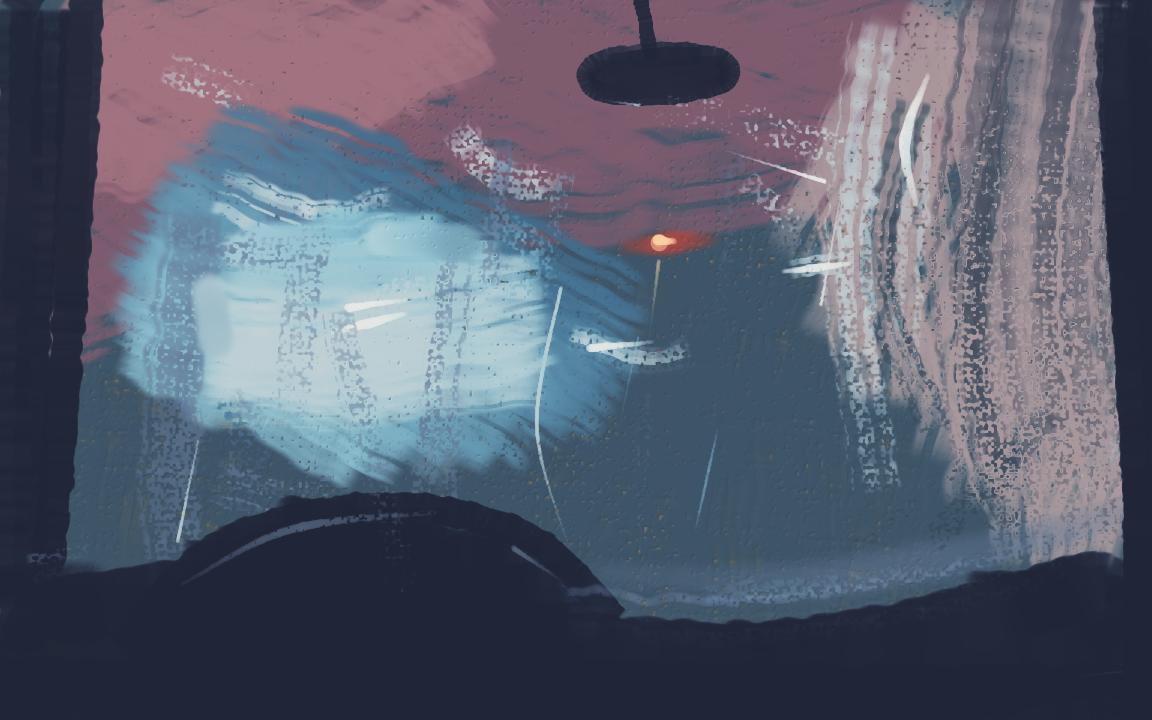
Inside a car wash, from the driver's seat — 206 strokes of a 300 budget, 1152×720 linen, no reference photograph. The nineteen pass scripts beside it reproduce that PNG byte for byte.

A laundromat at night, from across the street — 286 strokes of a 300 budget, 1024×768 linen, no reference photograph. Fourteen pass scripts beside it reproduce that PNG byte for byte.

A heron in a flooded parking lot at dawn — 253
strokes of a 320 budget, 1024×768 rough canvas, no reference photograph. The same subject
was painted twice by the same painter to separate two kinds of fault;
PAINTINGS.md
has both attempts side by side.
Every one of these was painted by a language model working from PAINTER.md,
one call to this API at a time, with no human hand on the canvas and nothing traced.
Every stroke is in the log, every time-lapse was rebuilt from it, and the notes beside
each painting say what went wrong as well as what went right.
PAINTINGS.md gathers the record, and The worked examples below
says what each one is made of.
If you are about to paint from the guide yourself: have you decided what to paint? If you have, these are yours to study and the scripts beside them are the best thing here. If you have not, do not look — a worked example names a subject and a named subject chooses for you, as six of six fresh sessions once demonstrated by painting a noun the guide had merely listed in passing. Decide first, then look.
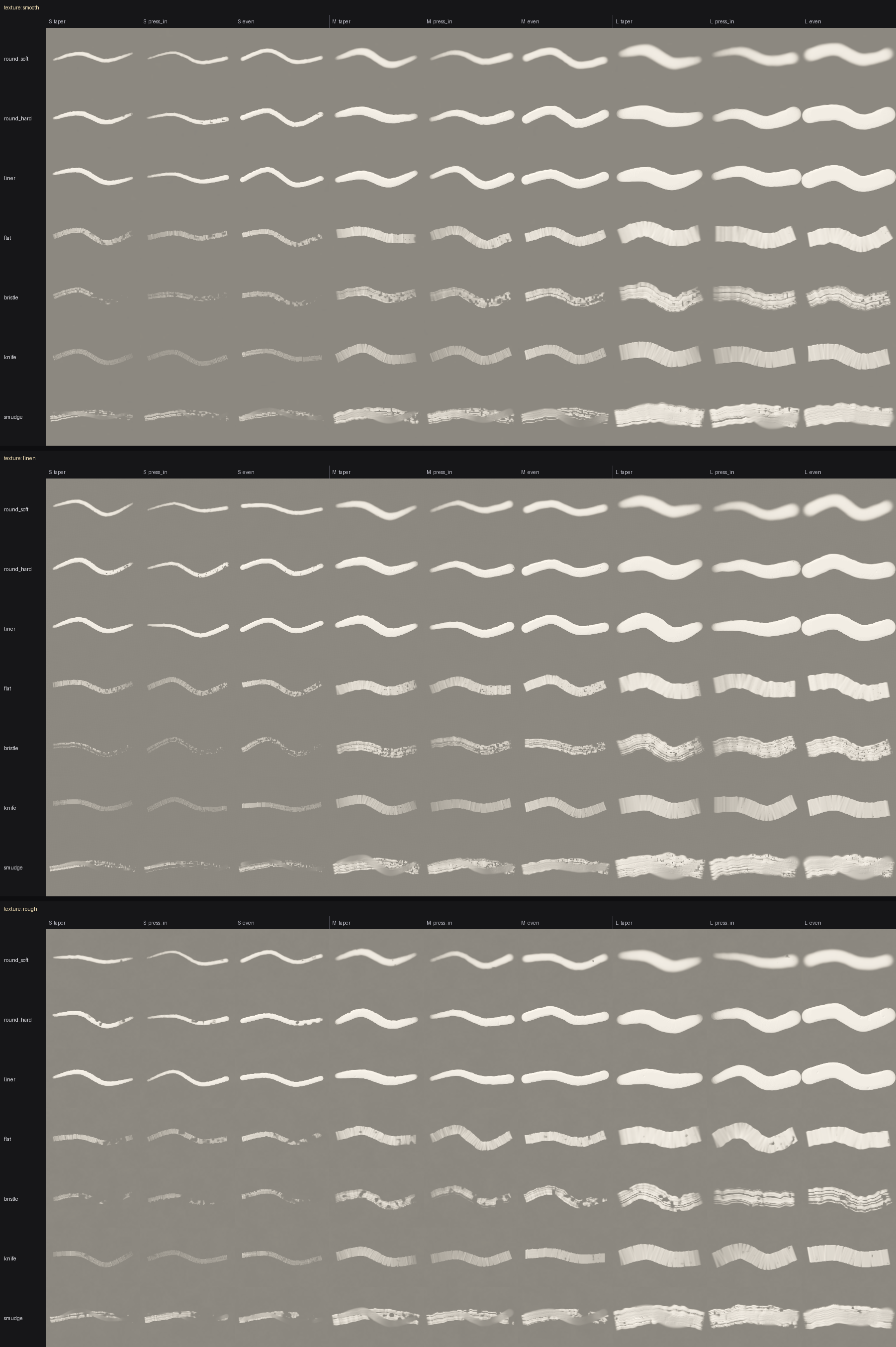
Every brush, size and pressure profile, on each canvas texture. Regenerate with
python scripts/make_brush_sampler.py — this sheet is the project's primary test
artefact, and looking at it catches what the test suite cannot.
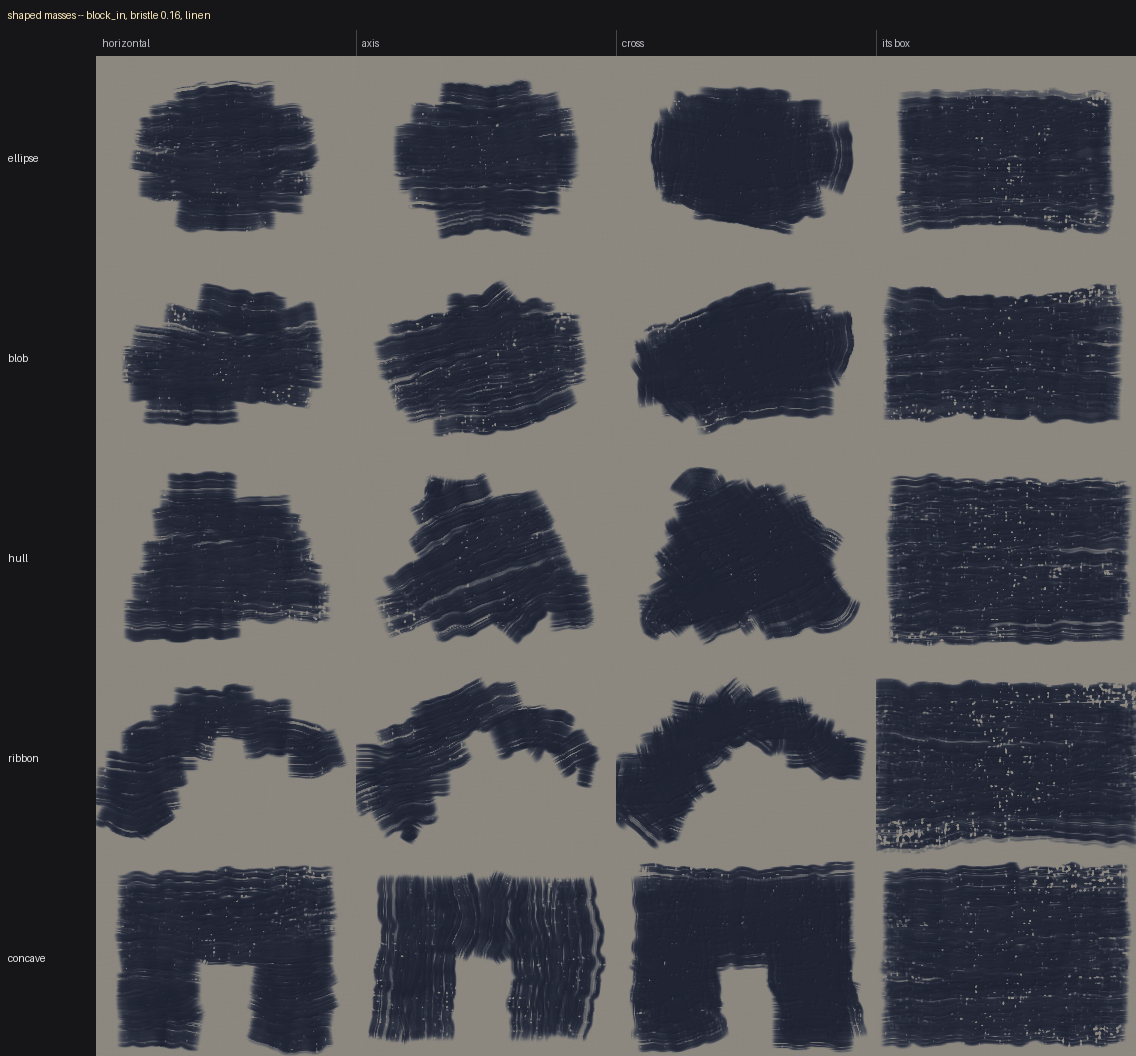
A mass does not have to be a rectangle. Each row is one way of building a shape,
each column a way of sweeping it; the last column is the box that mass would have
been. Regenerate with python scripts/make_shape_sampler.py.
Requires Python 3.12 or newer. Only numpy and Pillow — nothing that is painful to build on Windows.
pip install easel-paint          # the engine, the CLI and the Python API
pip install "easel-paint[mcp]"   # and the MCP server
From a checkout, pip install -e . and pip install -e ".[mcp]" do the same two
things.
Either installs an easel command. Pip puts it in the interpreter's scripts
directory, which is often not on PATH (it warns when it is not), so
python -m easel ... is always available as the same command by another name.
The MCP server is an opt-in extra because nothing else in the engine imports it. See MCP server below.
PAINTER.md is the guide written for you. It teaches the workflow —
tone the ground, paint back to front, check values, refine, edges, highlights
last — rather than listing functions, and it opens with the first hour: the whole
method on one page, so the nine warm-up exercises come before anything else.
If you have already installed the package you do not need that link. All five
documents ship inside the wheel: python -m easel guide prints the first hour,
--full prints the rest, and easel.docs.read() hands you any of them as text.
It is one file of five, and every rule in the five is stated once, in the file it
belongs to, and linked from everywhere else. PAINTER.md is held to a word budget by
the test suite so that it stays the file a painter can hold in their head; the numbers
it quotes are measured in CALIBRATION.md, and what painters reported about their own
sessions is kept there too rather than beside the rules.
PAINTER.md | the method: the loop, the order of work, the mistakes, the exercises, the checklist. Held in your head |
RECIPES.md | one situation at a time: the calls in order, what it looks like when it goes wrong, and the number behind it |
PAINTING.md | how the paint, the brushes and the planning tools behave; copying a photograph, in its last chapter. Read once |
REFERENCE.md | the facts: units, defaults, what each argument does |
CALIBRATION.md | the measurement behind every number the other four quote, each with what it was measured on |
The engine is designed around one habit:
Look every five to fifteen strokes. A stroke you did not look at was a guess.
llms.txt is
the same signpost in the format a model fetching this repository is increasingly told
to look for: the summary, what to know before reading further, and where each document
is, in about 850 words.
| Piece | What it does |
|---|---|
Session | The one object you hold. Canvas, palette, seed, history, look(). |
Canvas | Linear-light RGB plus wetness, thickness, sketch (graphite) and canvas height (tooth). |
| Brushes | round_soft, round_hard, liner, flat, bristle, knife, smudge. Procedural tips, and tip_wobble gives a round one a silhouette of its own, redrawn per mark. |
Palette | A limited pigment set with no black. Mix, tint, shade, and name your mixes. |
| Regions | region("top-left"), cell("D6"), horizon(0.4), below(...), between(...). |
| Shapes | A mass that is not a box: blob, ellipse, hull, union, ribbon, polygon, and s.circle() for one that is round in pixels on any canvas. smooth() cuts the corners off an outline. Any of them goes where a region goes. |
| Masses | block_in(place, ...) fills a rectangle or a shape with overlapping passes, stopping at the silhouette, or drawing its contour with edge="clean"; solid=True when it has to be solid paint, because density spaces the passes rather than filling them. sweep(edge, ...) lays a mass as passes along its own boundary, stepped inward. Both emit ordinary strokes. |
| Passages and repairs | scumble(band, a, b, n) lays a soft passage as n overlapping passes stepping between two values — the thing a gradient tool would be for, as paint — and direction="inward" runs them round a patch instead of across it, for a value falling off from a centre. cover(place, color) buries a mistake with every clause of the correction recipe already set. smudge(edge, ...) loses an edge along its own shape: points, or a mass whose outline it walks. |
look() | Grid overlay, greyscale values, region crop, side-by-side, diff, landmarks, and a fine grid of labelled tenths inside a crop. |
| Drawing | pencil() lays graphite under the paint, which covers it in proportion to what actually lands. Not counted as a stroke. |
| Planning | preview() shows where a mark would go over both panels; rehearse() paints it on a copy and shows what it would look like; cost() says what it charges and cost_line() says why; paint() then paints that same plan, so no line of it is written twice. Only the last of the four touches the canvas. |
| Measuring | compare(reference) gives the per-cell value of both and the difference, as a table and a heat map. compare({place: value}) measures against your own written value plan instead, for painting with no reference at all — and names the pairs the plan itself puts within 0.10 of each other. prepare(reference) cuts the photograph into numbered masses. palette.chroma_of is how coloured, beside value_of for how light. |
| The check | report() reads the guide's standing warnings off the log — one brush at one size for a whole pass, a stack of passes at one angle, a bristle too small to be a brush, detail before the masses, a pressure list asking a chisel for a width, the subject's share of the marks — and run prints it beside the budget line after every pass. |
| Budget | Session(budget=300) holds the split a painter is told to write down: run reports spent and remaining, and cost flags a plan that would eat a large share of what is left. Nothing is ever refused. |
| History | Every stroke logged as data. Undo, replay, GIF time-lapse, contact sheet. |
Coordinates are always normalised 0.0–1.0 with the origin top-left. Raw pixels are
never exposed, because absolute pixel coordinates are exactly what a language model
is worst at.
Session state lives in a single .easel file, so you can work in increments from a
shell without holding a Python process open.
easel new painting.easel --size 1024x768 --texture linen --ground toned_grey --seed 7 --budget 300
easel run painting.easel first_pass.py
easel run painting.easel first_pass.py --rehearse   # against a copy, committing nothing
easel run painting.easel p2_sea.py p3_rocks.py --rehearse   # ...both passes, one copy
easel run painting.easel p4_tower.py --check         # the post-pass check over the whole painting
easel look painting.easel --grid
easel look painting.easel --values
easel look painting.easel --region D4 --fine --reference ref.jpg
easel mark painting.easel top_l 0.335 0.315
easel compare painting.easel ref.jpg
easel prepare painting.easel ref.jpg --level coarse
easel undo painting.easel 3
easel export painting.easel painting.png
easel timelapse painting.easel painting.gif --every 3 --scale 240
easel brushes
easel guide                                          # the method, in about a thousand words
easel guide --full                                   # all of PAINTER.md
easel guide --painting                               # the reasons under the rules
easel guide --recipes                                # the calls, in order, for a thing
easel guide --reference                              # units, defaults, every argument
Every one of these also works as python -m easel ..., for when the easel
executable is not on PATH.
A script run by easel run gets the session pre-bound as s, with the whole public
API already in scope — it needs no imports. A prelude.py beside the session file is
run first in the same scope, so helpers and mixtures survive between passes;
--prelude other.py names a different one and --no-prelude turns it off.
The same verbs again, for a client that speaks MCP — and the difference worth
having is that the looking tools hand back the picture rather than a path to it.
look, preview, rehearse, compare and prepare return their PNG inline, so
the loop the guide asks for (look every five to fifteen strokes) costs one call.
pip install "easel-paint[mcp]"
easel-mcp --dir ~/paintings          # or: python -m easel.mcp_server
Or without installing anything, which is the form a client configures:
uvx --from "easel-paint[mcp]" easel-mcp --dir ~/paintings
Both halves of that are named because both are needed: the server is an opt-in
extra, and its console script is easel-mcp rather than easel-paint. The server
is listed in the official MCP registry as io.github.Gemberkoekje/easel;
server.json at
the repository root is what is published there.
Fifteen tools: the twelve CLI verbs, plus preview, rehearse and cost — the
three questions about a mark that has not been made yet. Marks are made by run,
which takes the script as text, and run(rehearse=true) tries a whole pass against a
copy and commits nothing. A place is a name, a cell, a span, a rectangle, an outline,
or a shape builder like {"blob": "D5", "radius": 0.12}.
run executes Python sent by its client, exactly as easel run does: launch it
for a painter you would hand a shell to.
Every session takes a seed, and the same script with the same seed produces the same
PNG. Each stroke draws its randomness from a generator derived from
(seed, stroke index) rather than from one running stream, so a stroke's jitter
depends only on which stroke it is — not on how much randomness earlier calls
happened to consume.
That is what makes replay exact:
s.replay()          # rebuilds the whole painting from its log; identical export
s.replay(upto=40)   # the state after the first 40 records
It is also how easel undo works across separate shell invocations: session files
carry the log, not undo snapshots.
Golden-image tests hold this honest. tests/golden/ stores a hash and a PNG for a
fixed script of marks on each texture, plus the whole brush sampler; a change to
what a mark looks like fails the suite, and the failure hands you both images to
compare. They caught a real one on their first run: the tip-mask cache was keyed on
the rounded radius while the mask was built from the exact one, so what a script
painted depended on what had run before it in the same process.
A few decisions worth knowing about, because they are the ones that make output look painted rather than generated:
p = 0.35). Plain RGB averaging turns every mixture
grey-brown; a hard reflectance floor is also needed, or a channel-zero colour
swamps the mix and red + blue comes out green. That floor clips the arithmetic
only and is taken back off the mixture, so a colour darker than it still lays as
written. See src/easel/color.py.tip_wobble, which is off by default: a disc is the right silhouette for
most marks and the wrong one for fifteen small marks in a row, where it prints one
shape fifteen times.flat brush's width is the mass it lays.Early, and feature-complete against what it was specified to be. The engine, palette,
composition helpers, look(), history, CLI, the precision tools (drawing, landmarks,
preview, rehearse, compare, prepare), shaped masses and the MCP server all work. The
server came last, on the rule that anything changing the API lands before the thing
that exposes it, and it has kept up with every change since.
Every one of those pieces was added or corrected because a painter actually used the guide against the engine and wrote down what it cost them — an engine change lands with a test and a measurement behind it, and a guide change stays a hypothesis until the next session paints against it and says so.
paintings/ holds the paintings those sessions made, and each is an
end-to-end worked example rather than a gallery: the numbered pass scripts that built
it, the prelude.py of helpers and mixtures beside them, NOTES.md in the painter's
own words, and the finished PNG and time-lapse — so the order a painting was made in is
readable rather than reconstructed, which is the one thing the guide cannot teach
abstractly and the thing a first-time painter is least sure of.
Two different claims live here, and this page used to make the stronger one about
every painting. The one that holds everywhere is that the log replays byte for
byte: a stroke's randomness is drawn from (seed, stroke index), so a saved painting
comes back exactly as it was painted, and golden-image tests hold that. Whether the
committed scripts rebuild the canvas is a separate question and the answer is per
painting — seven of the fourteen say Reproducible: not claimed in their own table in
PAINTINGS.md, usually because a drawing pass was rewritten and re-run,
or look scripts ran as passes between the painting ones, and a mark's texture is
seeded from its place in the log. Each painting's table says which of the two it
claims; the ones that claim the stronger one were checked by sha256.
PAINTER.md points here with a condition attached, and the condition is the whole
trade: if you chose your subject before opening this repository, these are yours; if
you have not chosen, they will choose for you. A worked example names a subject and a
named subject leaks — but a painter who decided first cannot be steered by a noun, so
the cost of hiding these no longer has to be paid by the painter who would most benefit
from them. If you are about to run the measurement protocol in LESSONS.md, that rule
is the protocol, not a suggestion.
PAINTINGS.md is the same paintings read from the outside rather
than from the painter's seat: what they cost, what failed, and how good they actually
are.
The guide's own five files are in the table above. Two more sit behind them, for
somebody working on the project rather than painting with it.
LESSONS.md is what six measured painting runs and an adversarial
review left behind: the method, the engine decisions that are load-bearing, the traps,
and what is still open — read it before changing the engine or the guide, because it
is also where the rules about how the guide may change are written down.
SUGGESTIONS.md is the register of what thirteen painters asked for
after using the guide: what was wrong, and what was done about it, one pair of lines
each. Every item on it is done — including the eight that were answered by measuring
them and finding nothing to fix, which say so.
CHANGELOG.md is the
same history cut by release rather than by painter: what changed in each version, which
defaults moved, and what a script that leaves an argument off will paint differently
after upgrading.
MIT — see LICENSE.
The optional Mixbox pigment model gives better
mixing than the built-in one, but its reference implementation is CC BY-NC. It is
therefore an opt-in extra (pip install "easel-paint[mixbox]"), not a dependency — check
that its licence suits your use before enabling it.
FAQs
A headless painting engine for AI agents: brushes, paint load, wet blending, canvas texture.
We found that easel-paint demonstrated a healthy version release cadence and project activity because the last version was released less than a year ago. It has 1 open source maintainer collaborating on the project.
Security News
It has been one year since Shai-Hulud made its first appearance on npm.

Research
/Security News
Operators behind PolinRider used a compromised GitHub account to plant malware in four development versions of a Packagist package with 700,000+ downloads.

Security News
GitHub Actions now supports cache-mode, a least-privilege control on the Actions cache aimed at the cache poisoning technique behind recent compromises.