==================================================
Graylint – show new linter errors in Python code
|build-badge| |license-badge| |pypi-badge| |downloads-badge| |black-badge| |changelog-badge|
.. |build-badge| image:: https://github.com/akaihola/graylint/actions/workflows/python-package.yml/badge.svg
:alt: master branch build status
:target: https://github.com/akaihola/graylint/actions/workflows/python-package.yml?query=branch%3Amaster
.. |license-badge| image:: https://img.shields.io/badge/License-BSD%203--Clause-blue.svg
:alt: BSD 3 Clause license
:target: https://github.com/akaihola/graylint/blob/master/LICENSE.rst
.. |pypi-badge| image:: https://img.shields.io/pypi/v/graylint
:alt: Latest release on PyPI
:target: https://pypi.org/project/graylint/
.. |downloads-badge| image:: https://pepy.tech/badge/graylint
:alt: Number of downloads
:target: https://pepy.tech/project/graylint
.. |black-badge| image:: https://img.shields.io/badge/code%20style-black-000000.svg
:alt: Source code formatted using Black
:target: https://github.com/psf/black
.. |changelog-badge| image:: https://img.shields.io/badge/-change%20log-purple
:alt: Change log
:target: https://github.com/akaihola/graylint/blob/master/CHANGES.rst
.. |next-milestone| image:: https://img.shields.io/github/milestones/progress/akaihola/graylint/2?color=red&label=release%202.0.1
:alt: Next milestone
:target: https://github.com/akaihola/graylint/milestone/3
What?
This utility runs linters on Python source code files.
However, when run in a Git repository, it runs the linters both in an old and a newer
revision of the source tree. It then only reports those linting messages which appeared
after the modifications to the source code files between those revisions.
To integrate Graylint with your IDE or with pre-commit_,
see the relevant sections below in this document.
.. _Pytest: https://docs.pytest.org/
.. _community support channel: https://github.com/akaihola/graylint/discussions
Why?
You want to lint your code with more or less strict linter rules.
Your code base is known to violate some of those linter rules.
When running the linters, you only want to see the new violations which have appeared
e.g. in your open feature branch, compared to the branch point from the main branch.
This can also be useful
when contributing to upstream codebases that are not under your complete control.
Note that this tool is meant for special situations
when dealing with existing code bases.
You should just aim to conform 100% with linter rules
when starting a project from scratch.
How?
To install or upgrade, use::
pip install --upgrade graylint~=2.0.0
Or, if you're using Conda_ for package management::
conda install -c conda-forge graylint~=0.0.1
conda update -c conda-forge graylint
..
**Note:** It is recommended to use the '``~=``' "`compatible release`_" version
specifier for Graylint. See `Guarding against linter compatibility breakage`_ for
more information.
As an example,
the graylint --lint pylint <myfile.py>
or graylint --lint pylint <directory> command
reads the original file(s),
runs Pylint on them in the original state of the current commit,
then runs Pylint again on the working tree,
and finally filters out the messages which appeared in both runs.
Alternatively, you can invoke the module directly through the python executable,
which may be preferable depending on your setup.
Use python -m graylint instead of graylint in that case.
By default, graylint doesn't run any linters.
You can enable individual linters with the
-L <linter> / --lint <linter> command line options:
.. _Conda: https://conda.io/
.. _conda-forge: https://conda-forge.org/
Example
This example walks you through a minimal practical use case for Graylint.
First, create an empty Git repository:
.. code-block:: shell
$ mkdir /tmp/test
$ cd /tmp/test
$ git init
Initialized empty Git repository in /tmp/test/.git/
In the root of that directory, create the Python file our_file.py
which violates one Pylint rule:
.. code-block:: python
first_name = input("Enter your first name: ")
if first_name == "Guido":
print("I know you")
else:
print("Nice to meet you")
.. code-block:: shell
$ pylint our_file.py
************* Module our_file
our_file.py:1:0: C0114: Missing module docstring (missing-module-docstring)
Your code has been rated at 7.50/10 (previous run: 7.50/10, +0.00)
Commit that file:
.. code-block:: shell
$ git add our_file.py
$ git commit -m "Initial commit"
[master (root-commit) a0c7c32] Initial commit
1 file changed, 3 insertions(+)
create mode 100644 our_file.py
Now modify the fourth line in that file:
.. code-block:: python
first_name = input("Enter your first name: ")
if first_name == "Guido":
print("I know you")
elif True:
print("Nice to meet you")
.. code-block:: shell
$ pylint our_file.py
************* Module our_file
our_file.py:1:0: C0114: Missing module docstring (missing-module-docstring)
our_file.py:4:5: W0125: Using a conditional statement with a constant value (using-constant-test)
Your code has been rated at 6.00/10 (previous run: 7.50/10, -1.50)
You can ask Graylint to show only the newly appeared linting violations:
.. code-block:: shell
$ graylint --lint pylint our_file.py
our_file.py:4:5: W0125: Using a conditional statement with a constant value (using-constant-test) [pylint]
You can also ask Graylint to run linters on all Python files in the repository:
.. code-block:: shell
$ graylint --lint pylint .
Or, if you want to compare to another branch (or, in fact, any commit)
instead of the last commit:
.. code-block:: shell
$ graylint --lint pylint --revision main .
Customizing graylint and linter behavior
Mypy_, Pylint_, Flake8_ and other compatible linters are invoked as
subprocesses by graylint, so normal configuration mechanisms apply for each of those
tools. Linters can also be configured on the command line, for example::
graylint -L "mypy --strict" .
graylint --lint "pylint --errors-only" .
The following command line arguments can also be used to modify the defaults:
-r REV, --revision REV
Revisions to compare. The default is HEAD..:WORKTREE: which compares the
latest commit to the working tree. Tags, branch names, commit hashes, and other
expressions like HEAD~5 work here. Also a range like main...HEAD or
main... can be used to compare the best common ancestor. With the magic value
:PRE-COMMIT:, Graylint works in pre-commit compatible mode. Graylint expects
the revision range from the PRE_COMMIT_FROM_REF and PRE_COMMIT_TO_REF
environment variables. If those are not found, Graylint works against HEAD.
Also see --stdin-filename= for the :STDIN: special value.
--stdin-filename PATH
The path to the file when passing it through stdin. Useful so Graylint can find
the previous version from Git. Only valid with --revision=<rev1>..:STDIN:
(HEAD..:STDIN: being the default if --stdin-filename is enabled).
-c PATH, --config PATH
Read Graylint configuration from PATH. Note that linters run by Graylint
won't read this configuration file.
-v, --verbose
Show steps taken and summarize modifications
-q, --quiet
Reduce amount of output
--color
Enable syntax highlighting even for non-terminal output. Overrides the
environment variable PY_COLORS=0
--no-color
Disable syntax highlighting even for terminal output. Overrides the environment
variable PY_COLORS=1
-W WORKERS, --workers WORKERS
How many parallel workers to allow, or 0 for one per core [default: 1]
-L CMD, --lint CMD
Run a linter on changed files. CMD can be a name or path of the linter
binary, or a full quoted command line with the command and options. Linters read
their configuration as normally, and aren't affected by -c / --config.
Linter output is syntax highlighted when the pygments package is available if
run on a terminal and or enabled by explicitly (see --color).
To change default values for these options for a given project,
add a [tool.graylint] section to pyproject.toml in the
project's root directory, or to a different TOML file specified using the -c /
--config option. For example:
.. code-block:: toml
[tool.graylint]
src = [
"src/mypackage",
]
revision = "master"
lint = [
"pylint",
]
log_level = "INFO"
Editor integration
Many editors have plugins or recipes for running linters.
You may be able to adapt them to be used with graylint.
Currently we have no specific instructions for any editor,
but we welcome contributions to this document.
Using as a pre-commit hook
To use Graylint locally as a Git pre-commit hook for a Python project,
do the following:
-
Install pre-commit_ in your environment
(see pre-commit Installation_ for details).
-
Create a base pre-commit configuration::
pre-commit sample-config >.pre-commit-config.yaml
-
Append to the created .pre-commit-config.yaml the following lines:
.. code-block:: yaml
-
install the Git hook scripts and update to the newest version::
pre-commit install
pre-commit autoupdate
When auto-updating, care is being taken to protect you from possible incompatibilities
introduced by linter updates. See Guarding against linter compatibility breakage_ for
more information.
If you'd prefer to not update but keep a stable pre-commit setup, you can pin linters
you use to known compatible versions, for example:
.. code-block:: yaml
- repo: https://github.com/akaihola/graylint
rev: 1.0.0
hooks:
- id: graylint
args:
- --isort
- --lint
- mypy
- --lint
- flake8
- --lint
- pylint
additional_dependencies:
- mypy==0.990
- flake8==5.0.4
- pylint==2.15.5
.. _pre-commit: https://pre-commit.com/
.. _pre-commit Installation: https://pre-commit.com/#installation
Using arguments
You can provide arguments, such as choosing linters, by specifying args.
Note the inclusion of the ruff Python package under additional_dependencies:
.. code-block:: yaml
GitHub Actions integration
You can use Graylint within a GitHub Actions workflow
without setting your own Python environment.
Great for enforcing that no linter regressions are introduced.
Compatibility
This action is known to support all GitHub-hosted runner OSes. In addition, only
published versions of Graylint are supported (i.e. whatever is available on PyPI).
You can search workflows in public GitHub repositories_ to see how Graylint is being
used.
.. _search workflows in public GitHub repositories: https://github.com/search?q=%22uses%3A+akaihola%2Fgraylint%22+path%3A%2F%5E.github%5C%2Fworkflows%5C%2F.*%2F&type=code
Usage
Create a file named .github/workflows/graylint.yml inside your repository with:
.. code-block:: yaml
name: Lint
on: [push, pull_request]
jobs:
lint:
runs-on: ubuntu-latest
steps:
- uses: actions/checkout@v4
with:
fetch-depth: 0
- uses: actions/setup-python@v5
- uses: akaihola/graylint@2.0.0
with:
options: "-v"
src: "./src"
version: "~=2.0.0"
lint: "flake8,pylint==2.13.1"
There needs to be a working Python environment, set up using actions/setup-python
in the above example. Graylint will be installed in an isolated virtualenv to prevent
conflicts with other workflows.
"uses:" specifies which Graylint release to get the GitHub Action definition from.
We recommend to pin this to a specific release.
"version:" specifies which version of Graylint to run in the GitHub Action.
It defaults to the same version as in "uses:",
but you can force it to use a different version as well.
Graylint versions available from PyPI are supported, as well as commit SHAs or branch
names, prefixed with an @ symbol (e.g. version: "@master").
The revision: "master..." (or "main...") option instructs Graylint
to run linters in the branching point from main branch
and then run them again in the current branch.
If omitted, the Graylint GitHub Action will determine the commit range automatically.
"src:" defines the root directory to run Graylint for.
This is typically the source tree, but you can use "." (the default)
to also lint Python files like "setup.py" in the root of the whole repository.
You can also configure other arguments passed to Graylint via "options:".
It defaults to "".
You can e.g. add "--verbose" for debug logging.
To run linters through Graylint, you can provide a comma separated list of linters using
the lint: option. Only flake8, pylint and mypy are supported. Other
linters may or may not work with Graylint, depending on their message output format.
Versions can be constrained using pip syntax, e.g. "flake8>=3.9.2".
.. _Using linters:
Using linters
Graylint supports any linter with output in one of the following formats::
<file>:<linenum>: <description>
<file>:<linenum>:<col>: <description>
Most notably, the following linters/checkers have been verified to work with Graylint:
- Mypy_ for static type checking
- Pylint_ for generic static checking of code
- Flake8_ for style guide enforcement
cov_to_lint.py_ for test coverage
To run a linter, use the --lint / -L command line option with the linter
command or a full command line to pass to a linter. Some examples:
-L flake8: enforce the Python style guide using Flake8_-L "mypy --strict": do static type checking using Mypy_--lint="pylint --ignore='setup.py'": analyze code using Pylint_-L cov_to_lint.py: read .coverage and list non-covered modified lines
Note: Full command lines aren't fully tested on Windows. See issue #456_ for a
possible bug (in Darker which is where Graylint code originates from).
Graylint also groups linter output into blocks of consecutive lines
separated by blank lines.
Here's an example of cov_to_lint.py_ output::
$ graylint --revision 0.1.0.. --lint cov_to_lint.py src
src/graylint/__main__.py:94:  no coverage:             logger.debug("No changes in %s after isort", src)
src/graylint/__main__.py:95:  no coverage:             break

src/graylint/__main__.py:125: no coverage:         except NotEquivalentError:

src/graylint/__main__.py:130: no coverage:             if context_lines == max_context_lines:
src/graylint/__main__.py:131: no coverage:                 raise
src/graylint/__main__.py:132: no coverage:             logger.debug(
.. _Mypy: https://pypi.org/project/mypy
.. _Pylint: https://pypi.org/project/pylint
.. _Flake8: https://pypi.org/project/flake8
.. _cov_to_lint.py: https://gist.github.com/akaihola/2511fe7d2f29f219cb995649afd3d8d2
.. _#456: https://github.com/akaihola/darker/issues/456
Syntax highlighting
Graylint automatically enables syntax highlighting for the -L/--lint option
if it's running on a terminal and the
Pygments_ package is installed.
You can force enable syntax highlighting on non-terminal output using
- the
color = true option in the [tool.graylint] section of pyproject.toml
of your Python project's root directory,
- the
PY_COLORS=1 environment variable, and
- the
--color command line option for graylint.
You can force disable syntax highlighting on terminal output using
- the
color = false option in pyproject.toml,
- the
PY_COLORS=0 environment variable, and
- the
--no-color command line option.
In the above lists, latter configuration methods override earlier ones, so the command
line options always take highest precedence.
.. _Pygments: https://pypi.org/project/Pygments/
Guarding against linter compatibility breakage
Graylint relies on calling linters with well-known command line arguments
and expects their output to conform to a defined format.
Graylint is subject to becoming incompatible with future versions of linters
if either of these change.
To protect users against such breakage, we test Graylint daily against main branches of
supported linters and strive to proactively fix any potential incompatibilities through
this process. If a commit to a linter's main branch introduces an incompatibility
with Graylint, we will release a first patch version for Graylint that prevents
upgrading that linter and a second patch version that fixes the incompatibility.
A hypothetical example:
- Graylint 9.0.0; Pylint 35.12.0
-> OK
- Graylint 9.0.0; Pylint
main (after 35.12.0)
-> ERROR on CI test-future_ workflow
- Graylint 9.0.1 released, with constraint
Pylint<=35.12.0
-> OK
- Pylint 36.1.0 released, but Graylint 9.0.1 prevents upgrade; Pylint 35.12.0
-> OK
- Graylint 9.0.2 released with a compatibility fix, constraint removed; Pylint 36.1.0
-> OK
If a Pylint release introduces an incompatibility before the second Graylint patch
version that fixes it, the first Graylint patch version will downgrade Pylint to the
latest compatible version:
- Graylint 9.0.0; Pylint 35.12.0
-> OK
- Graylint 9.0.0; Pylint 36.1.0
-> ERROR
- Graylint 9.0.1, constraint
Pylint<=35.12.0; downgrades to Pylint 35.12.0
-> OK
- Graylint 9.0.2 released with a compatibility fix, constraint removed; Pylint 36.1.0
-> OK
To be completely safe, you can pin both Graylint and Pylint to known good versions, but
this may prevent you from receiving improvements in Black.
It is recommended to use the '~=' "compatible release_" version specifier for
Graylint to ensure you have the latest version before the next major release that may
cause compatibility issues.
See issue #382_ and PR #430_ in Darker (where this feature originates from)
for more information.
.. _compatible release: https://peps.python.org/pep-0440/#compatible-release
.. _test-future: https://github.com/akaihola/graylint/blob/master/.github/workflows/test-future.yml
.. _#382: https://github.com/akaihola/darker/issues/382
.. _#430: https://github.com/akaihola/darker/issues/430
How does it work?
Graylint runs linters in two different revisions of your repository,
records which lines of current files have been edited or added,
and tracks which lines they correspond to in the older revision.
It then filters out any linter errors which appear in both revisions
on matching lines.
Finally, only remaining errors in the newer revision are displayed.
License
BSD. See LICENSE.rst.
Interesting code formatting and analysis projects to watch
The following projects are related to Graylint in some way or another.
Some of them we might want to integrate to be part of a Graylint run.
- Darker__ – Reformat code only in modified blocks of code
- diff-cov-lint__ – Pylint and coverage reports for git diff only
- xenon__ – Monitor code complexity
__ https://github.com/akaihola/darker
__ https://gitlab.com/sVerentsov/diff-cov-lint
__ https://github.com/rubik/xenon
Contributors ✨
See README.rst_ for the list of contributors.
This project follows the all-contributors_ specification.
Contributions of any kind are welcome!
.. _README.rst: https://github.com/akaihola/graylint/blob/master/README.rst
.. _emoji key: https://allcontributors.org/docs/en/emoji-key
.. _all-contributors: https://allcontributors.org
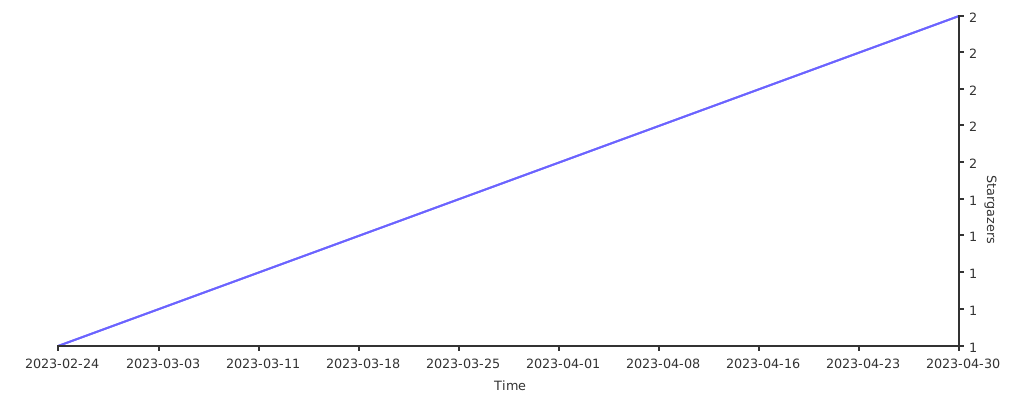
GitHub stars trend
|stargazers|_
.. |stargazers| image:: https://starchart.cc/akaihola/graylint.svg
.. _stargazers: https://starchart.cc/akaihola/graylint