

Research
/Security News
Miasma Mini Shai-Hulud Hits ImmobiliareLabs npm Packages
Miasma Mini Shai-Hulud hits @immobiliarelabs Backstage plugins, targeting GitLab and LDAP auth packages on npm.
By Socket Research Team - Jun 26, 2026
imagezmq
Advanced tools
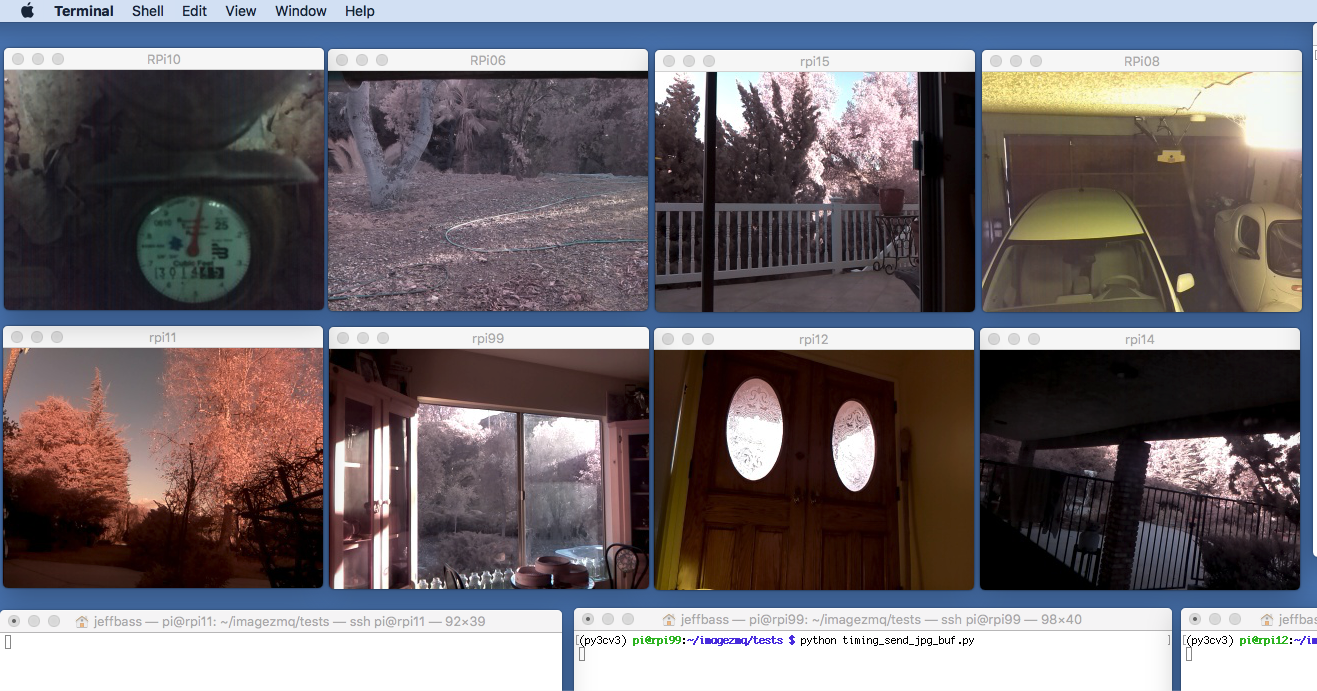
imagezmq is a set of Python classes that transport OpenCV images from one computer to another using PyZMQ messaging. For example, here is a screen on a Mac computer showing simultaneous video streams from 8 Raspberry Pi cameras:
.. image:: https://raw.githubusercontent.com/jeffbass/imagezmq/master/docs/images/screenshottest.png
Using imagezmq, this is possible with 11 lines of Python on each Raspberry Pi and with 8 lines of Python on the Mac.
First, run this receiver program on the Mac (or other display computer):
.. code-block:: python
# run this program on the Mac to display image streams from multiple RPis
import cv2
import imagezmq
image_hub = imagezmq.ImageHub()
while True: # show streamed images until Ctrl-C
rpi_name, image = image_hub.recv_image()
cv2.imshow(rpi_name, image) # 1 window for each RPi
cv2.waitKey(1)
image_hub.send_reply(b'OK')
Then, on each Raspberry Pi, run this sender program:
.. code-block:: python
# run this program on each RPi to send a labelled image stream
# you can run it on multiple RPi's; 8 RPi's running in above example
import socket
import time
from picamera2 import Picamera2
import imagezmq

sender = imagezmq.ImageSender(connect_to='tcp://jeff-macbook:5555')

rpi_name = socket.gethostname() # send RPi hostname with each image
picam = Picamera2()
picam.start()
time.sleep(2)  # allow camera sensor to warm up
while True:  # send images as stream until Ctrl-C
    image = picam.capture_array()
    sender.send_image(rpi_name, image)
Wow! A video surveillance system with 8 (or more!) Raspberry Pi cameras in 19 lines of Python.
imagezmq is an easy to use image transport mechanism for a distributed image processing network. For example, a network of a dozen Raspberry Pis with cameras can send images to a more powerful central computer. The Raspberry Pis perform image capture and simple image processing like flipping, blurring and motion detection. Then the images are passed via imagezmq to the central computer for more complex image processing like image tagging, text extraction, feature recognition, etc.
Each imageZMQ message is a (text_message, image) tuple. The text
portion of the tuple identifies the source and other info about the image. In
the example above, the text_message portion identifies which RPi is sending the
the image so that the receiver can put each unique RPi image stream into a
specific window. More details about the imageZMQ tuples in the above example
are here <https://github.com/jeffbass/imagezmq>_.
There are a number of high quality and well maintained messaging protocols for passing messages between computers. I looked at MQTT, RabbitMQ, AMQP and ROS as alternatives. I chose ZMQ and its Python PyZMQ bindings for several reasons:
imagezmq has been transporting images from a dozen Raspberry Pi computers
scattered around my farm to 2 linux image hub servers for over 2
years. The RPi's capture and send dozens to thousands of frames frames a day.
imagezmq has worked very reliably and is very fast. You can learn more about
my "science experiment urban permaculture farm" project at
Yin Yang Ranch project overview <https://github.com/jeffbass/yin-yang-ranch>_.
ZMQ allows many different messaging patterns. Two are implemented in imagezmq:
There are advantages and disadvantages for each pattern. REQ/REP is the default. See the documentation (link below) for more details.
imagezmq has been tested with:
Install OpenCV, including Numpy, into a Python Virtual Environment. Then be sure to install imagezmq into the same virtual environment. For example, on a Raspberry Pi running Raspberry Pi OS Bookworm, my virtual environment is named py311cv4.
Install imageZMQ using pip:
.. code-block:: bash
workon py311cv4  # use your virtual environment name
pip install imagezmq
imagezmq has a directory of tests organized into sender and receiver pairs. You will get all the source code for imagezmq including all the test programs by cloning the GitHub repository:
.. code-block:: bash
git clone https://github.com/jeffbass/imagezmq.git
imagezmq is open source. The source code, tests and
documentation are at Imagezmq on GitHub <https://github.com/jeffbass/imagezmq>_.
The documentation, including links to application examples,
starts from the table of contents in the README.
FAQs
Transporting OpenCV images via ZMQ
The pypi package imagezmq receives a total of 2,893 weekly downloads. As such, imagezmq popularity was classified as popular.
We found that imagezmq demonstrated a healthy version release cadence and project activity because the last version was released less than a year ago. It has 1 open source maintainer collaborating on the project.
Did you know?

Socket for GitHub automatically highlights issues in each pull request and monitors the health of all your open source dependencies. Discover the contents of your packages and block harmful activity before you install or update your dependencies.
Research
/Security News
Miasma Mini Shai-Hulud hits @immobiliarelabs Backstage plugins, targeting GitLab and LDAP auth packages on npm.

Security News
Rolldown paused Rust React Compiler integration after a 5MB binary size increase raised concerns about shipping React-specific code to all Vite users.

Security News
/Research
Mini Shai-Hulud expands into the Go ecosystem after hitting LeoPlatform npm packages and targeting GitHub Actions workflows.