

Research
/Security News
Popular npm Packages in the keyv and Cacheable Namespaces Compromised in Active Supply Chain Attack
Popular npm packages keyv and cacheable compromised.
By Socket Research Team - Aug 04, 2026
mcp-server-relay
Advanced tools
A wonderfully simple tool that moves information—files, code, data, comments, directions, etc.—between Claude Desktop and Claude Code while keeping their main context windows separate.
Both Claudes can send messages autonomously—when they need input from the other side, they just do it. You get a system notification when something arrives. You fetch when you're ready.
Why? Desktop and Code have different strengths. Desktop is better for conversation—planning, brainstorming, reviewing, iterating on prose. Code is better for execution—editing files, running commands, working through errors. But they don't share context. If you draft something in Desktop and want Code to implement it, or you want Desktop's opinion on code you're writing, you're copy-pasting between apps.
Relay connects them without requiring you to manually specify questions and cut & paste between windows. This is basic functionality that should have been integrated by Anthropic.
You're always in control. Messages sit in the buffer until you explicitly fetch them. The models can't pull from the relay on their own—you have to type get or /get. This means there's no runaway inter-LLM conversation burning through your tokens. You see a notification, you decide whether to check it.
[In Desktop]
You:     Send my last error message to Code.
Desktop: [sends via relay]

[notification pops up in Code's terminal]

[In Code]
You:     /get (You can also type "get" but /get is faster.)
Code:    Got it. That's from line 47 in parser.py—the regex isn't matching.
         [fixes the bug]
[In Code]
You:     My classifier's stuck at 72% accuracy. Send the
         training config and last epoch's metrics to Desktop.
Code:    [sends config.yaml and metrics via relay]

[System notification appears that a message has been sent to Desktop]

[In Desktop]
You:     get
Desktop: [fetches config and metrics]
         The loss curve suggests you're underfitting. Learning
         rate 1e-5 is conservative for a model this size...

You:     What would you try?
Desktop: Bump to 3e-5, add warmup steps, and your batch size
         of 8 is small—if memory allows, try 16. Also the
         class imbalance is brutal: 80/15/5 split. Consider
         weighted loss or oversampling the minority classes.

You:     Specify the changes.
Desktop: [sends updated config via relay]

[System notification appears that a message has been sent to Code]

[In Code]
You:     /get
Code:    Got it. Updating config.yaml and adding class weights
         to the loss function.
         [edits files, starts training run]

         Epoch 12: accuracy up to 79%, but precision on
         class 2 dropped. Want Desktop's take?

You:     Yeah, send the confusion matrix.
Code:    [sends via relay]

[In Desktop]
You:     get
Desktop: Class 2 is getting confused with class 0—they may be
         semantically close. I need more examples.
         [automatically sends request to Code via relay]
Type get in Desktop or /get in Code to check for messages from the other side. That's the primary interaction.
Sending is easy and implicit. When you say "Ask Desktop if this looks right" or "Send the README to Code," the models recognize the intent and call the relay automatically. Models may also send messages on their own if they decide they need input from the other side.
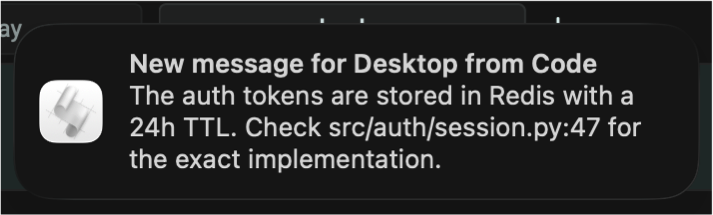
When a message arrives, you'll get a system notification so you know to check the other side. No need to poll manually.
| Platform | Method | Notes |
|---|---|---|
| macOS | osascript | Native notification center |
| Linux | notify-send | Requires libnotify |
| Windows | PowerShell toast | Native toast notifications |
Notifications include sound. Duration and display behavior are controlled by your OS settings.
What's uvx? uvx runs Python packages directly without installing them globally. It handles dependencies automatically. If you don't have it: curl -LsSf https://astral.sh/uv/install.sh | sh (See astral.sh/uv for more info.)
Add to your Claude Desktop config:
~/Library/Application Support/Claude/claude_desktop_config.json~/.config/Claude/claude_desktop_config.json%APPDATA%\Claude\claude_desktop_config.json{
"mcpServers": {
"relay": {
"command": "uvx",
"args": ["mcp-server-relay", "--client", "desktop"]
}
}
}
Restart Claude Desktop.
Add to .mcp.json in your project root:
{
  "mcpServers": {
    "relay": {
      "command": "uvx",
      "args": ["mcp-server-relay", "--client", "code"]
    }
  }
}
/get slash command (optional)uvx mcp-server-relay --setup-code
This copies the slash command to ~/.claude/commands/.
The relay is global. The buffer at ~/.relay_buffer.db is shared across all projects. Claude Desktop has no concept of which project you're working on—it's a general-purpose chat interface—so per-project isolation isn't practical. This is intentional: one user, one machine, one relay.
If you switch projects in Code, the relay comes with you. Old messages from the previous project may still be there; use relay_clear() if you want a fresh start. If you want separate conversations in Desktop for different projects, just start a new chat there.
Large files are slow. For messages a page or two in length, the relay is fast. For large files, it's faster to drag them directly into the interface you want. You can still send accompanying context via relay.
| Tool | Description |
|---|---|
relay_send(message, sender) | Send a message (sender: "desktop" or "code") |
relay_fetch(limit, reader, unread_only) | Fetch recent messages, optionally mark as read |
relay_clear() | Delete all messages from the buffer |
~/.relay_buffer.dbMichael Coen — mhcoen@alum.mit.edu · mhcoen@gmail.com
FAQs
MCP relay server for Claude Desktop <-> Claude Code communication
We found that mcp-server-relay demonstrated a healthy version release cadence and project activity because the last version was released less than a year ago. It has 1 open source maintainer collaborating on the project.
Did you know?

Socket for GitHub automatically highlights issues in each pull request and monitors the health of all your open source dependencies. Discover the contents of your packages and block harmful activity before you install or update your dependencies.
Research
/Security News
Popular npm packages keyv and cacheable compromised.

Security News
A misconfiguration gave three Anthropic models internet access, and one, believing it was in a simulation, shipped a credential-stealing package to PyPI.

Security News
/Company News
Socket has joined the new Composer and Packagist sponsorship program as a launch sponsor, supporting the team that keeps PHP's package ecosystem secure.