The current stable releases on PyPI and conda-forge suffer from issues related to Bitnami image deprecation that prevent successful deployments.
These issues have been resolved on the main branch and will be included in the upcoming 2025.10.1 release.
If trying to deploy nebari in the meantime, please install directly from the main branch e.g. pip install git+https://github.com/nebari-dev/nebari.git@main.
Your open source data science platform. Built for scale, designed for collaboration.
Automated data science platform. From JupyterHub to Cloud environments with
Dask Gateway.
Nebari is an open source data platform that enables users to build and maintain cost-effective and scalable compute platforms
on HPC or Kubernetes with minimal DevOps overhead.
This repository details the Nebari (Kubernetes) version.
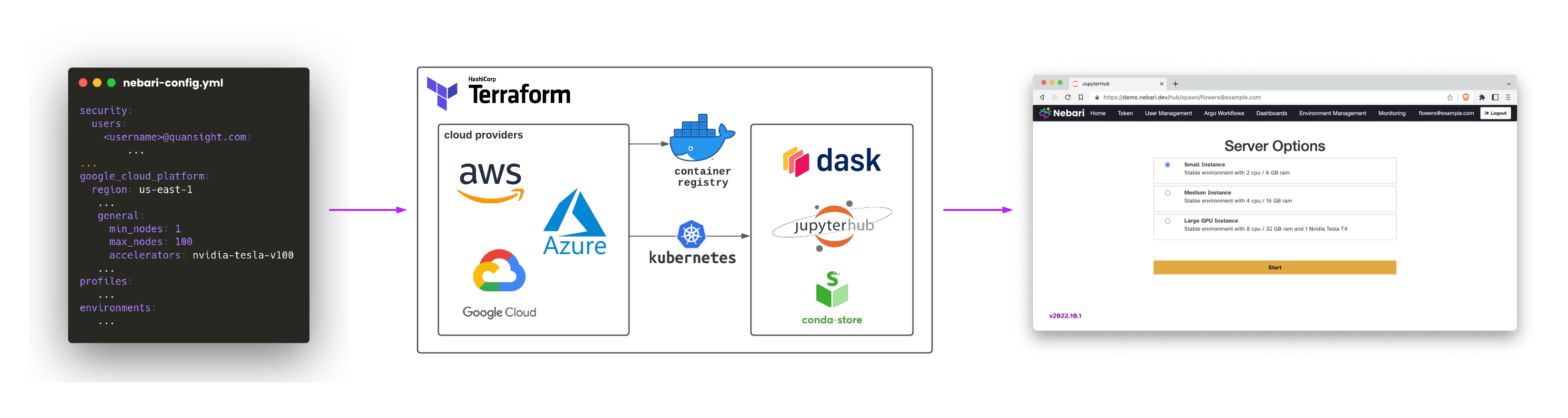
Terraform handles the build, change, and versioning of the infrastructure.
Helm helps to define, install, and manage Kubernetes resources.
GitHub Actions is used to automatically create commits when the configuration file (nebari-config.yaml) is rendered,
as well as to kick off the deployment action.
Nebari aims to abstract all these complexities for its users.
Hence, it is not necessary to know any of the technologies mentioned above to have your project successfully deployed.
TLDR: If you know GitHub and feel comfortable generating and using API keys, you should have all it takes to deploy and maintain your system without the need for a dedicated
DevOps team. No need to learn Kubernetes, Terraform, or Helm.
Cloud Providers ☁️
Nebari offers out-of-the-box support for the major public cloud providers:
Amazon AWS, GCP, and Microsoft Azure.
Installation 💻
Pre-requisites
Operating System: Currently, Nebari supports development on macOS and Linux operating systems. Windows is NOT supported.
However, we would welcome contributions that add and improve support for Windows.
You need Python >= 3.10 on your local machine or virtual environment to work on Nebari.
Adopting virtual environments (conda, pipenv or
venv) is also encouraged.
Install Nebari
To install Nebari type the following commands in your command line:
Install using conda:
conda install -c conda-forge nebari

# if you prefer using mamba
mamba install -c conda-forge nebari
Install using pip:
pip install nebari
Once finished, you can check Nebari's version (and additional CLI arguments) by typing:
nebari --help
If successful, the CLI output will be similar to the following:
usage: nebari [-h] [-v] {deploy,destroy,render,init,validate} ...

Nebari command line

positional arguments:
  {deploy,destroy,render,init,validate}
                        Nebari

optional arguments:
  -h, --help            show this help message and exit
  -v, --version         Nebari version
Usage 🚀
Nebari requires setting multiple environment variables to automate the deployments fully.
For details on obtaining those variables, check the Nebari Get started documentation.
Once all the necessary credentials are gathered and set as UNIX environment variables, Nebari can be
deployed in minutes.
For detailed step-by-step instructions on how to deploy Nebari, check the Nebari documentation.
Nebari HPC
An HPC version of Nebari is available for SLURM-based high-performance computing environments.
Check out the Nebari SLURM repository.
GitHub Discussions is our user forum. It can be used to raise discussions about a subject,
such as: "What is the recommended way to do X with Nebari?"
Issues for queries, bug reporting, feature requests, documentation, etc.
We work around the clock to make Nebari better, but sometimes your query might take a while to get a reply. We
apologize in advance and ask you to please, be patient :pray:.
Code of Conduct 📖
To guarantee a welcoming and friendly community, we require all community members to follow our Code of Conduct.
Ongoing Support
If you're using Nebari and would like professional support, please get in touch with the Nebari development team.
A Jupyter and Dask-powered open source data science platform.
We found that nebari demonstrated a healthy version release cadence and project activity because the last version was released less than a year ago.It has 7 open source maintainers collaborating on the project.
Did you know?
Socket for GitHub automatically highlights issues in each pull request and monitors the health of all your open source dependencies. Discover the contents of your packages and block harmful activity before you install or update your dependencies.
Socket uncovered four malicious NuGet packages targeting ASP.NET apps, using a typosquatted dropper and localhost proxy to steal Identity data and backdoor apps.
Socket is proud to join the OpenJS Foundation as a Silver Member, deepening our commitment to the long-term health and security of the JavaScript ecosystem.