# Interactive AI REPL (default)
openosint

# Web interface
openosint web

# Direct tool (no AI)
openosint email target@example.com
Try the live demo → — bring your own Anthropic / OpenRouter / Ollama key, no signup.
Cloud or self-host? Cloud: zero setup, pay per call, hosted by us. Self-host: free forever, your own API keys, full control.
📬 Agents & OSINT — the newsletter
One AI-OSINT workflow you can run + a ruthless roundup of what's new, every week.
Subscribe →
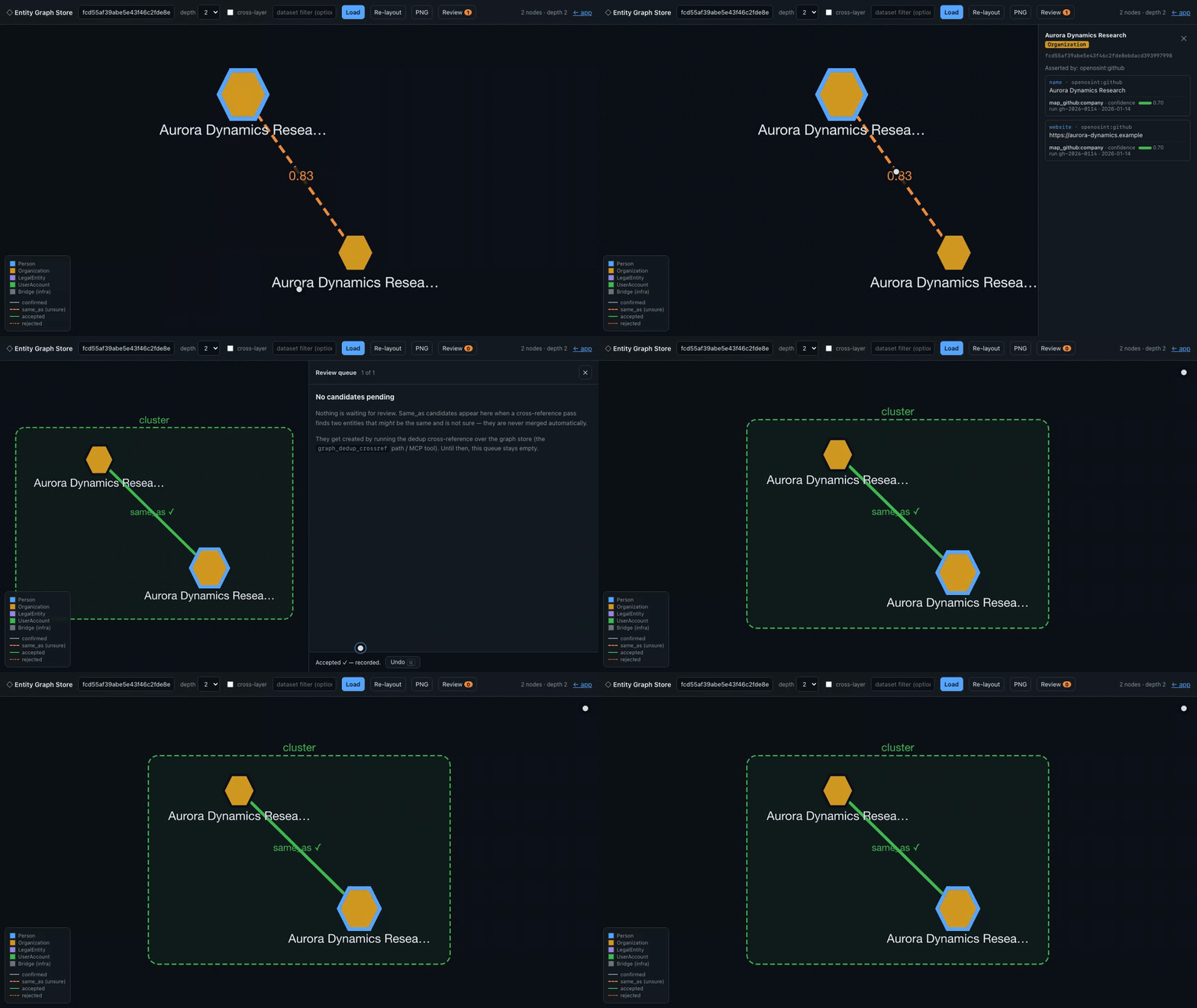
Investigation results land live on the globe — click a point to pivot. Watch the sharper MP4.
Deterministic, synthetic-data demo — every entity shown is fictional; regenerate with demo/web_demo.py.
The entities are seeded at the statement layer, not produced by today's mappers — see demo/README.md.
TestMu AI (formerly LambdaTest) is an AI-native testing cloud platform built for modern engineering teams. It covers everything from autonomous test creation and fast execution to testing AI agents, chatbots and voice assistants.
Open: Breach / Compromised-Credential Data · Email / Identity Lookup — see SPONSORSHIP.md.
Usage
Start the REPL and investigate any target — the agent decides which tools to run and chains them on findings:
Anthropic Claude (default), local Ollama, or any OpenAI-compatible endpoint (LiteLLM, vLLM, LM Studio, ...)
Native MCP server
All 20 tools exposed to Claude Code, Claude Desktop, and any MCP-compatible client — no extra config
Parallel execution
--parallel runs complementary tools concurrently via asyncio.gather()
Reports
PDF + Markdown auto-saved after every investigation (reportlab optional)
Session history
All REPL sessions saved to ~/.openosint/history/; browse with openosint history
Web UI
Browser-based AI chat with streaming output, tool cards, light/dark theme
Legal Disclaimer: OpenOSINT is intended for legal and authorized use only.
Users are solely responsible for ensuring their use complies with all applicable laws and regulations.
The authors accept no liability for misuse. See DISCLAIMER.md.
Tools
Tool
Powered by
What it investigates
search_email
holehe
Social accounts linked to an email address
search_username
sherlock
Username presence across 300+ platforms
search_breach
HaveIBeenPwned v3 API
Data breach exposure
search_whois
python-whois
Domain registrant and DNS info
search_ip
ipinfo.io
Geolocation, ASN, hostname
search_domain
sublist3r
Subdomain enumeration
generate_dorks
built-in
12 targeted Google dork URLs (no network calls)
search_paste
psbdmp.ws
Pastebin dump mentions
search_phone
phoneinfoga
Carrier, country, line type
search_shodan
Shodan API
Open ports, banners, CVEs
search_virustotal
VirusTotal API v3
Verdict from 70+ antivirus engines
search_ip2location
IP2Location.io API
Enhanced IP intel: VPN/Proxy/Tor/datacenter flags (sponsored)
search_censys
Censys Search API
Internet-facing infrastructure, certificates
search_abuseipdb
AbuseIPDB v2 API
IP abuse reputation: confidence score, reports, country, ISP
Queries IP2Location.io for enhanced IP intelligence: geolocation, ISP, ASN, and — on the Security Plan — VPN/Proxy/Tor/datacenter detection. Sponsored integration. Requires IP2LOCATION_API_KEY.
openosint ip2location 8.8.8.8
[IP2Location] City: Mountain View, CA, US  |  ISP: Google LLC
[IP2Location] VPN: No  |  Proxy: No  |  TOR: No  |  Datacenter: Yes
[Censys] Open Ports: 53, 443, 853 | ASN: AS15169 Google LLC
search_abuseipdb
Checks an IP against AbuseIPDB v2. Returns abuse confidence score, total reports, country, ISP, and last reported timestamp. Requires ABUSEIPDB_API_KEY.
openosint abuseipdb 198.51.100.1
[AbuseIPDB] Abuse Confidence Score: 87%  |  Total Reports: 143
⚠️  HIGH ABUSE CONFIDENCE — flagged by AbuseIPDB
Warning appears when abuseConfidenceScore exceeds 50%.
Executes live Google dork queries through the Bright Data SERP API¹, returning structured results (title, URL, snippet). Defaults to 5 dorks per run; each is a separate billable API call. Requires BRIGHTDATA_API_KEY and BRIGHTDATA_SERP_ZONE.
[+] Dork: "john doe" site:linkedin.com
    Title:   John Doe | LinkedIn
    URL:     https://www.linkedin.com/in/john-doe-12345
scrape_url
Fetches any public URL through Bright Data Web Unlocker¹, bypassing Cloudflare/CAPTCHA. Returns clean Markdown. Requires BRIGHTDATA_API_KEY and BRIGHTDATA_UNLOCKER_ZONE.
openosint scrape https://example.com
[Web Unlocker] Remote status: 200
# Example Domain
This domain is for use in illustrative examples in documents.
search_footprint
Collects a target's public search-engine footprint via Bright Data SERP API¹. Detects entity type (email, username, domain, phone, or full name) and runs entity-type-aware Google queries, returning structured results plus Entity Correlation Graph nodes/edges for discovered domains and profiles. Requires BRIGHTDATA_API_KEY and BRIGHTDATA_SERP_ZONE.
openosint footprint johndoe99
Graph module (optional)
An additive FollowTheMoney entity graph —
statement-level provenance, an append-only store, non-destructive same_as
deduplication, and a human review queue — sits alongside the tools above
without changing anything about them. Opt in with pip install "openosint[graph]" (Python 3.10+) or "openosint[graph-dedup]" (adds
same_as scoring, needs Python 3.11+), then use it via three MCP tools:
graph_export, graph_neighbors, graph_review_candidates. See
docs/graph.md for the full guide and a worked example.
The same workflow is shown end to end — including the .ftm export that
passes ftm validate — in the terminal demo in
docs/graph.md; the web UI walkthrough is the demo at the top
of this README.
Interfaces
Web UI
pip install "openosint[web]"
openosint web
# Opens http://localhost:8080 automatically
Browser-based AI chat with streaming tool output, inline result cards, light/dark theme toggle. Supports local inference via Ollama or any OpenAI-compatible endpoint — no Anthropic API key required.
Try the live demo → — bring your own Anthropic / OpenRouter / Ollama key, no signup.
# Fully local (no API key) — requires Ollama runtime: https://ollama.com
ollama pull llama3.2
openosint web
# Settings -> Ollama (local) -> model: llama3.2# OpenAI-compatible endpoint (LiteLLM, vLLM, LM Studio, ...)export OPENAI_BASE_URL="http://localhost:4000/v1"
openosint web
# Settings -> OpenAI API
Breaking change (v2.28+): key usage now follows bind address, not an env var.
Bound to 127.0.0.1/localhost (the default) — no change: keys in your .env
work as before. Bound to any other interface (--host 0.0.0.0, which already
requires --allow-remote) — the web UI never uses a key from your environment
to serve a request; every caller must supply their own, and breach lookups
(search_breach) are disabled outright. This applies regardless of any env
var, including OPENOSINT_DEMO_MODE, which can only add restriction, never
remove it. If you were exposing the web UI on a LAN with your own keys and no
per-caller auth in front of it, that access pattern no longer works.
Running behind a reverse proxy? A loopback bind (127.0.0.1) only means
the OS accepted the connection from this machine — it says nothing about
who can reach it if something in front (nginx, Caddy, a Docker/K8s sidecar,
a tunnel) forwards requests to it from elsewhere. By default, a request that
carries proxy-forwarding headers (X-Forwarded-For, X-Forwarded-Proto,
X-Forwarded-Host, Forwarded, CF-Connecting-IP) is treated exactly like
a non-loopback bind: your local keys are never used, breach lookups are
blocked, and the caller is told why. If you deliberately serve this
through a reverse proxy and want it to behave like a normal local
instance for requests relayed by that proxy, set OPENOSINT_TRUSTED_PROXY=true.
This is a separate variable from the existing TRUSTED_PROXY (which only
affects which IP a rate-limit bucket is attributed to — a low-stakes,
already-loosely-scoped setting some self-hosters already have on).
Reusing that flag here would have silently upgraded an existing
rate-limit-only configuration into one that also permits credentialed
access, without asking. OPENOSINT_TRUSTED_PROXY gets its own explicit
opt-in for that reason. Setting it does not blindly trust the
forwarded headers' content — internally inconsistent values (e.g. two
disagreeing X-Forwarded-Proto values on one request) are still treated
as public regardless. Setting OPENOSINT_TRUSTED_PROXY=true means you
are choosing to serve credentialed lookups to whoever your reverse proxy
relays to this instance — you are the controller for their queries, the
same way OpenOSINT Cloud is for its customers. Put real authentication in
front of it if "whoever the proxy relays" is broader than you intend.
Interactive REPL
Run openosint with no arguments to start the AI-powered REPL:
REPL commands:
Command
Description
<target>
Investigate any target — email, username, domain, IP, name
clear
Reset conversation memory
save
Save last report to reports/
tools
List available tools and their status
config
Show current configuration
history
Browse saved sessions
help
Show all commands
exit / Ctrl-D
Exit
All sessions are auto-saved to ~/.openosint/history/. Browse with openosint history.
For the REPL/CLI with an OpenAI-compatible backend:
MCP hosts launch this server with a cwd that has nothing to do with your
.env (often your home directory, or wherever the host itself runs from).
The server falls back to a repo-root .env for a source checkout, then an
upward search from that arbitrary cwd — but for a pip installed
openosint, neither is reliable. Setting OPENOSINT_ENV_FILE in the
client's own env block above, as shown, is the one option guaranteed to
work regardless of how the host launches the process.
Prefer zero setup? The OpenOSINT Email Recon Actor is also available as a hosted MCP tool via the Apify MCP Server — no server to run, no config file to edit. Try for free.
Agentic use via Claude Code:
$ claude
> Investigate target@example.com. Trace any username found
  across other platforms and compile a full report.
Installation
# From PyPI (recommended)
pip install openosint

# Updating
pip install --upgrade openosint

# From source
git clone https://github.com/OpenOSINT/OpenOSINT.git
cd OpenOSINT
pip install -e .
Copy .env.example to .env and fill in your keys. .env is read from the
directory you run openosint from (searched upward, like git finds
.git) — it does not need to be at any particular "project root", and a
regular pip install works the same way as running from a source checkout.
Set OPENOSINT_ENV_FILE=/path/to/.env to point at an explicit file instead
(useful for the MCP server, which is launched by its host with an arbitrary
working directory). A real environment variable always takes priority over
a value in .env.
Variable
Tool
Required
Purpose
ANTHROPIC_API_KEY
AI agent
Yes (or Ollama / OpenAI)
Anthropic API key
ANTHROPIC_MODEL
AI agent
Optional
Model name to request (default: claude-sonnet-5). Replaces the deprecated OPENOSINT_MODEL.
OPENAI_BASE_URL
AI agent
Optional
Base URL of an OpenAI-compatible endpoint (e.g. http://localhost:4000/v1)
OPENAI_API_KEY
AI agent
Optional
API key for the endpoint (local servers may ignore it)
OPENAI_MODEL
AI agent
Optional
Model name to request (default: gpt-4o-mini)
OPENOSINT_ENV_FILE
All
Optional
Explicit path to a .env file, overriding the directory search above
GitHub API — raises rate limit 60 → 5000 req/h — get one
BRIGHTDATA_API_KEY
search_dorks_live, scrape_url, search_footprint
Optional
Bright Data — get one¹ (free tier: 5,000 req/month)
BRIGHTDATA_SERP_ZONE
search_dorks_live, search_footprint
Optional
Your Bright Data SERP zone name (e.g. serp_api1)
BRIGHTDATA_UNLOCKER_ZONE
scrape_url
Optional
Your Bright Data Web Unlocker zone name (e.g. web_unlocker1)
CLI Reference
Flag / Subcommand
Description
openosint
Interactive AI REPL (default)
openosint web [--port N] [--no-browser]
Launch browser UI
openosint email ADDRESS [-t N]
Direct email scan
openosint username HANDLE [-t N]
Direct username scan
openosint shodan QUERY [-t N]
Shodan lookup
openosint virustotal TARGET [-t N]
VirusTotal lookup
openosint censys TARGET [-t N]
Censys lookup
openosint ip2location IP [-t N]
IP2Location lookup
openosint abuseipdb IP [-t N]
AbuseIPDB reputation check
openosint github QUERY [-t N]
GitHub profile/repo/email discovery
openosint dns DOMAIN [-t N]
DNS records + email security analysis
openosint multi TARGETS
Parallel multi-target investigation (max 10)
openosint history [--all] [open N] [clear]
View/manage REPL session history
-v, --verbose
Enable debug logging to stderr
-t, --timeout N
Override subprocess timeout (seconds)
--api-key KEY
Anthropic API key (overrides env var)
--parallel
Run complementary tools concurrently
--json
Output results as structured JSON
--provider {anthropic,ollama,openai}
AI provider (default: anthropic)
--ollama-model MODEL
Ollama model name (default: llama3.2)
--ollama-host URL
Ollama server URL (default: http://localhost:11434)
--openai-base-url URL
OpenAI-compatible endpoint base URL (env: OPENAI_BASE_URL)
--openai-model MODEL
Model to request from the endpoint (default: gpt-4o-mini; env: OPENAI_MODEL)
--openai-api-key KEY
API key for the endpoint (env: OPENAI_API_KEY)
--no-pdf
Disable automatic PDF generation
Docker
# Build and run
docker compose up --build

# One-off command
docker compose run --rm openosint email target@example.com --json
Set ANTHROPIC_API_KEY (and optionally HIBP_API_KEY, IPINFO_TOKEN) in a .env file or export them before running docker compose. Reports are persisted to ./reports/ via a volume mount.
DigitalOcean App Platform: see .do/app.yaml for App Platform configuration.
OpenOSINT is used by OSINT practitioners, security researchers, and developers actively evaluating intelligence APIs. Every time a user configures an integration, the docs route them to that provider's sign-up page — high-intent exposure at the moment of adoption.
Featured Integration ($2,000/year or $220/month): recommended/default provider for one tool category, exclusive. Logo + badge across README, docs, CLI banner, and Web UI. One vendor per category.
Current sponsors and open categories are listed in the sponsor block at the top of this README. Full media kit, pricing, and the referral funnel: SPONSORSHIP.md.
Earn 30–45% commission promoting the AI OSINT Prompt Pack, Operator's Playbook, and Complete Kit.
Good fit for OSINT/infosec newsletter authors, security YouTube channels, and tool-directory maintainers.
OpenOSINT is free and MIT-licensed for everyone — personal projects, commercial products, SaaS, and closed-source are all covered with no purchase required. Organizations that additionally need a vendor contract, written warranty, indemnification, SLA, or priority support for procurement and compliance can purchase a commercial plan. Three tiers available from €300/year — see COMMERCIAL.md for full details and pricing. Contact: commercial@openosint.tech.
Contributing
Issues and pull requests are welcome. See CONTRIBUTING.md for the development workflow, integration registration checklist, and coding conventions. Please read DISCLAIMER.md before contributing.
Regenerating the demo GIF/MP4
export OPENOSINT_DEMO_KEY=sk-ant-...   # your Anthropic key — never committed
openosint web &                        # start the web server on :8080
make demo                              # record -> encode -> write docs/assets/demo-web-graph.*
git add docs/assets/demo-web-graph.*
AI-powered OSINT agent, MCP server, and CLI. Interactive REPL + 19 tools. Anthropic Claude or local Ollama. For authorized security research use only.
The pypi package openosint receives a total of 732 weekly downloads. As such, openosint popularity was classified as not popular.
We found that openosint demonstrated a healthy version release cadence and project activity because the last version was released less than a year ago.It has 1 open source maintainer collaborating on the project.
The compromise affects MemTensor's MemOS, an open source memory framework for large language models (LLMs) and AI agents. Both npm package @memtensor/memos-cloud-openclaw-plugin and the PyPI package MemoryOS are compromised. They drop cross-platform Go binaries that exfiltrate developer secrets.












 Investigation results land live on the globe — click a point to pivot.