VortexaSDK


Welcome to Vortexa's Python Software Development Kit (SDK)! We built the SDK to
provide fast, interactive, programmatic exploration of our data. The tool lets
Data Scientists, Analysts and Developers efficiently explore the world’s
waterborne oil movements, and to build custom models & reports with minimum
setup cost.
The SDK sits as a thin python wrapper around
Vortexa's API, giving you immediate access to pandas
DataFrames.
Example
In an interactive Python console, run:
>>> from datetime import datetime
>>> from vortexasdk import CargoMovements
>>> df = CargoMovements()\
.search(filter_activity='loading_state',
filter_time_min=datetime(2017, 8, 2),
filter_time_max=datetime(2017, 8, 3))\
.to_df()
returns:
| 0 | 1998 | ALSIA SWAN | Clean products | Lube Oils | 2017-08-01T06:10:45+0000 | 2017-08-27T14:38:15+0000 |
| 1 | 16559 | IVER | Dirty products | nan | 2017-08-02T17:20:51+0000 | 2017-09-07T07:52:20+0000 |
| 2 | 522288 | BLUE SUN | Crude | Gharib | 2017-08-02T04:22:09+0000 | 2017-08-13T10:32:09+0000 |
Quick Start
Try me out in your browser:

Installation
pip install vortexasdk
or
pip3 install vortexasdk
The SDK requires Python version 3.9. See Setup FAQ for more details.
To install the SDK on an Apple ARM-based machine, use Python versions 3.9.19 and use the latest version of pip. This is supported in the SDK versions 1.0.0 or higher.
Authentication
Set your VORTEXA_API_KEY environment variable, that's all. Alternatively, the
SDK prompts to you enter your API Key when running a script interactively.
To get an API key and experiment with Vortexa's data, you can
request a demo here.
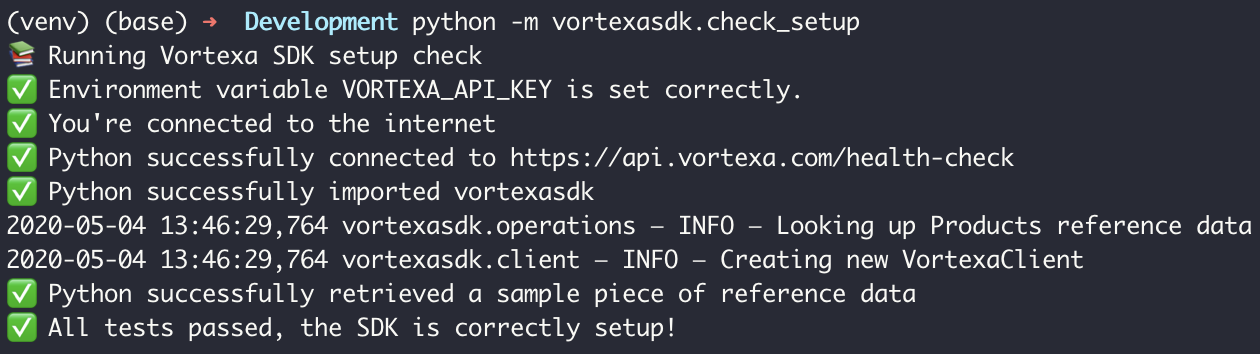
Check Setup
To check the SDK is setup correctly, run the following in a bash console:
python -m vortexasdk.check_setup
or
python3 -m vortexasdk.check_setup
A successful setup looks like this:
Next Steps
Learn how to call
Endpoints
Glossary
The Glossary can be found at
Vortexa API Documentation. The Glossary outlines key
terms, functions and assumptions aimed at helping to extract powerful findings
from our data.
Documentation
Read the documentation at
VortexaSDK Docs
Contributing
We welcome contributions! Please read our
Contributing Guide
for ways to offer feedback and contributions.
Thanks goes to these wonderful contributors
(emoji key):
This project follows the
all-contributors
specification. Contributions of any kind welcome!






