// File: README.md
Why Bob's CLI?
Every other AI coding assistant lives in a browser, disconnected from your actual workflow. Bob lives where your code lives — in your terminal. He sees your files, understands your architecture, writes code with your approval, and learns how YOU work over time.
We believe AI should empower developers, not exploit them. Your code stays on your machine. Your data belongs to you. No surveillance, no vendor lock-in, no token meters draining your wallet while you think. Bob's CLI is built for the developer who refuses to hand over sovereignty in exchange for convenience. This is AI that works FOR you — on YOUR hardware, under YOUR control, at YOUR pace. Power to the people who build.
| Local file awareness | ✅ | ✅ | ✅ | ✅ |
| Zero-cost local model | ✅ | ✅ | ❌ | ❌ |
| Behavioral profiling | ✅ | ❌ | ❌ | ❌ |
| Personalization Mode | ✅ | ❌ | ❌ | ❌ |
| Digital twin simulation | ✅ | ❌ | ❌ | ❌ |
| Autonomous task dispatch | ✅ | ❌ | ❌ | ❌ |
| Multi-agent orchestration | ✅ | ❌ | ❌ | ❌ |
| Supervised commit review | ✅ | ❌ | ❌ | ❌ |
| Conversation persistence | ✅ | ✅ | ❌ | Partial |
| Deep Dives & Forks | ✅ | ❌ | ❌ | ❌ |
| Remote execution (SovereignLink) | ✅ | Partial | ❌ | ❌ |
| Cross-surface sync (CLI ↔ Web) | ✅ | ✅ | ❌ | ❌ |
| Autonomous code repair | ✅ | ✅ | ❌ | ✅ |
| Source code stays on-device | ✅ | ✅ | ❌ | ✅ |
| Encrypted cloud backup (VaultBob) | ✅ | ❌ | ❌ | ❌ |
| Per-file surgical restore | ✅ | ❌ | ❌ | ❌ |
| Full machine migration | ✅ | ❌ | ❌ | ❌ |
Installation
pnpm add -g @bobsworkshop/cli
Or with npm:
npm install -g @bobsworkshop/cli
Verify:
bob whoami
Requirements:
- Node.js 18+
- Any terminal (VS Code, Android Studio, Windows Terminal, iTerm, PowerShell)
- For local AI: Ollama with a downloaded model
- For platform features: A Bob's Workshop account
📖 Full setup guide: https://seedling-io.gitbook.io/bob-cli/
Quick Start
Local-First (Free)
bob chat "hello, what can you help me with?"
Bob auto-detects Ollama running on your machine. No configuration needed. No internet. No API keys. No cost. Your code never leaves your machine.
Platform (Subscribers)
bob login
bob chat "help me refactor this service"
Sync to web. Access Claude, Gemini, deep dives, forks, personalization, and UserBob.
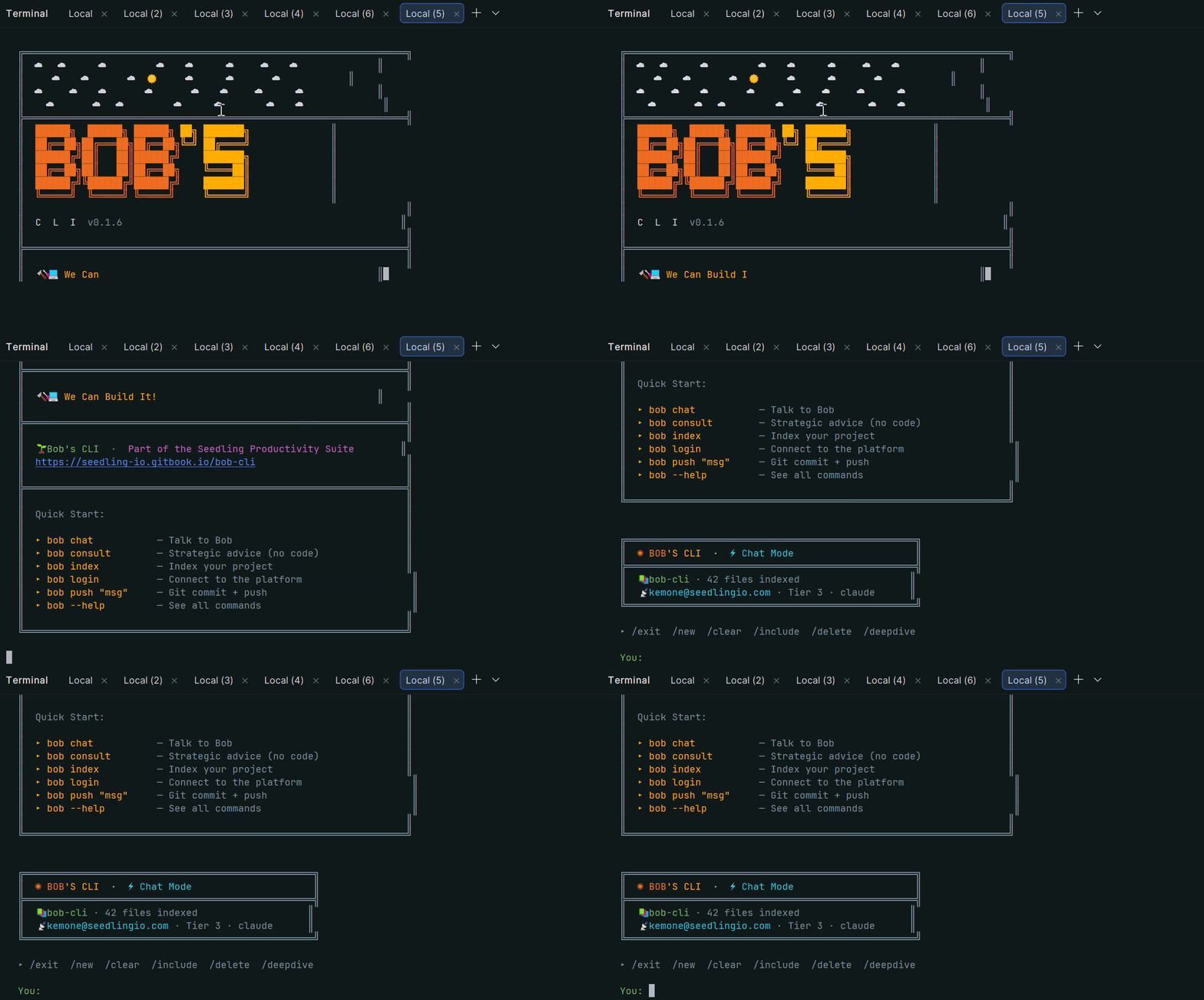
First Run Experience
When you first install Bob's CLI, you're greeted with a branded welcome screen:
Features
| Chat | AI coding partner with automatic file discovery |
| Consult | Strategic advice, no code output |
| Index | AI-powered project understanding |
| Analyse | Full QA code review with auto-fix |
| Autonomy | Autonomous repair across entire codebase |
| Profile | Behavioral DNA profiling + dashboard |
| The Crew | Multi-agent orchestration — spawn a team, set a mission, ship code |
| VaultBob | Encrypted backup, versioning & restore — your code's permanent memory |
| UserBob | AI digital twin simulation — your autonomous proxy |
| Command Center | Inspect, approve, and manage autonomous task dispatch |
| Deep Dive | Sandboxed exploration on any message |
| Fork | Branch conversations into sub-projects |
| SovereignLink | Remote execution from any device |
| BYOK | Bring your own API keys |
| Push | Git stage + commit + push in one command |
Code Analysis
Bob performs production-grade QA reviews across your entire codebase — identifying bugs, features, improvements, and upgrades with actionable implementation instructions:
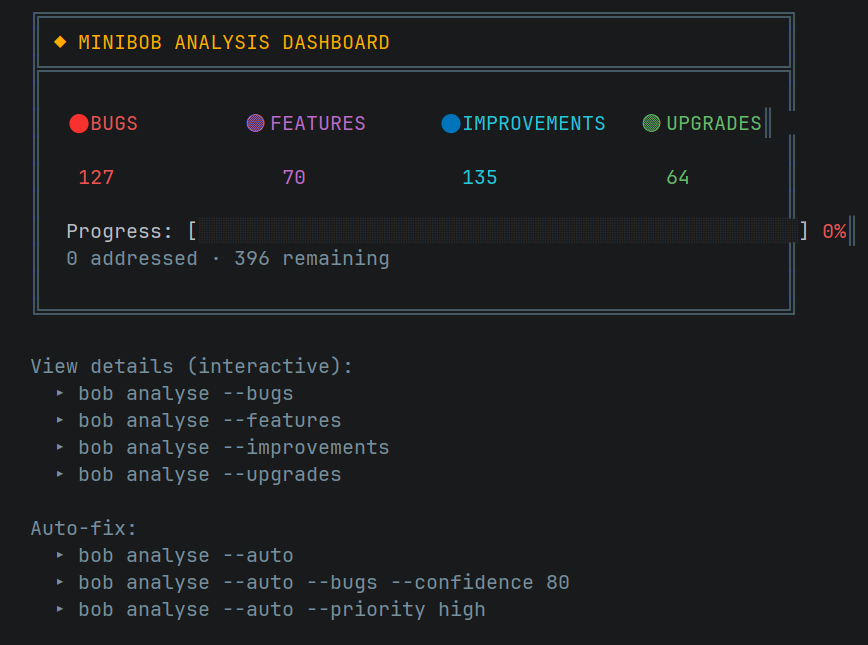
bob analyse
bob analyse --results
bob analyse --auto
The Crew — Your Autonomous Engineering Department
v1.0.0 introduces The Crew — a fully local autonomous multi-agent orchestration system that runs entirely on your hardware. Spawn specialized agents, set a mission, and let DirectorBob coordinate the team. The Crew plans, implements, reviews, and commits real code changes to your project — with you in control the entire time.
bob agent-run "Add authentication to the app"
DirectorBob reads your actual codebase, decomposes the mission into specific tasks, and dispatches agents to execute in parallel or sequence based on dependencies. Every file an agent writes is reviewed by DirectorBob before the task is marked complete. Every commit is reviewed before it touches git. Every file is backed up before it is modified.
  ╔══════════════════════════════════════════════════════════╗
  ║  🎬 DirectorBob  — Autonomous Mission Control
  ╠══════════════════════════════════════════════════════════╣
  ║  Add authentication to the app
  ║  Mission: m_1782095907390  │  Tasks: 3  │  Team: 2 agents
  ║
  ║    @builderBob      @architectBob
  ╠══════════════════════════════════════════════════════════╣
  ║  📋 Task Map  — 3 tasks
  ║  ⏸    @architectBob    CREATE lib/auth/auth_service.dart
  ║  ⏸    @builderBob      PATCH lib/main.dart: ADD auth init  ← 1 dep
  ║  ⏸    @builderBob      PATCH lib/screens/login.dart        ← 1 dep
  ╚══════════════════════════════════════════════════════════╝

  [9:14:02 AM] 🎬 DirectorBob: Dispatching @architectBob → [CREATE]
  [9:14:02 AM] 🎬 DirectorBob: Dispatching @builderBob → [PATCH]

    @architectBob  Created lib/auth/auth_service.dart (42 lines)
    ✅ DirectorBob approved @architectBob's work
    ✅ DirectorBob approved ✅ committed: 91a039d

    @builderBob  Patched lib/main.dart — auth init added
    ✅ DirectorBob approved @builderBob's work
How The Crew Works
DirectorBob is your Head of Engineering. Before dispatching a single task he reads your project's file tree, assesses what exists and what doesn't, and generates a dependency-aware task map. He decides who does what, in what order, and in what way — CREATE for new files, PATCH for surgical edits, REFACTOR for structural changes, REPLACE for placeholder files.
Agents execute their assigned tasks using the same file-writing pipeline that powers bob chat — proven, approval-gated, and backed up on every write. They self-evaluate their own work with a satisfaction score. If the score isn't high enough, they retry. If they stagnate, DirectorBob intervenes with specific feedback. If they still can't resolve it, the mission pauses and asks you.
Every file write is reviewed by DirectorBob before the task is marked complete. He reads the original file, the new file, the project context, and the task instruction. If an agent patched 5 lines when the task required 300, or gutted a working file instead of extending it — denied, restored from backup, retried with feedback.
Every commit is reviewed before it touches git. When an agent calls gitCommit, DirectorBob performs a full code review against the task instruction. APPROVE and the commit executes. DENY and the original is restored, a revision note is injected, and the agent retries. Three denials and the mission pauses for you.
Spawn Your Team
bob agent spawn builder "Implement features and write code"
bob agent spawn architect "Design approach and review structure"
bob agent list
bob agent status
bob agent hub
Run a Mission
bob agent-run "your mission"
bob agent-run --dry-run "your mission"
bob agent-run --resume
bob agent-run --no-commit
Live Commands During Execution
/pause                  — pause after active tasks complete
/resume                 — resume from pause
/status                 — full task map with current state
/skip <taskId>          — skip a stuck task
/inject "note"          — send a director note mid-mission
/set-target <agent> <n> — adjust satisfaction target
/abort                  — stop everything immediately
Personas
Agents can be given specialized personas that shape how they think and communicate:
bob agent spawn architect "Design the system" --persona local:architectBob
bob agent spawn security "Audit the codebase" --persona local:securityBob
bob agent personas
local:architectBob | Contract-first, systems design |
local:builderBob | Ships fast, pragmatic execution |
local:qaEngineerBob | Testing, edge cases, reliability |
local:securityBob | Threat modeling, zero trust |
local:frontendBob | UI/UX, accessibility, components |
local:backendBob | APIs, reliability, idempotency |
local:devopsBob | CI/CD, infrastructure, pipelines |
What Makes The Crew Different
Every other agent system executes and hopes for the best. The Crew has DirectorBob — a supervisor who reviews every file change before it's accepted, every commit before it's recorded, and every stuck task before it spirals. Your codebase is protected at every step. Your backups are automatic. Your control is never surrendered.
Runs entirely on your local model. Zero cloud required. Zero cost.
VaultBob — Your Code's Permanent Memory
v0.7.0 introduces VaultBob — the only backup, versioning, and restore system built specifically for how developers work. Every conversation you've had with Bob, every project Bob has learned, every version of every file — encrypted, safe, and accessible from anywhere in the world.
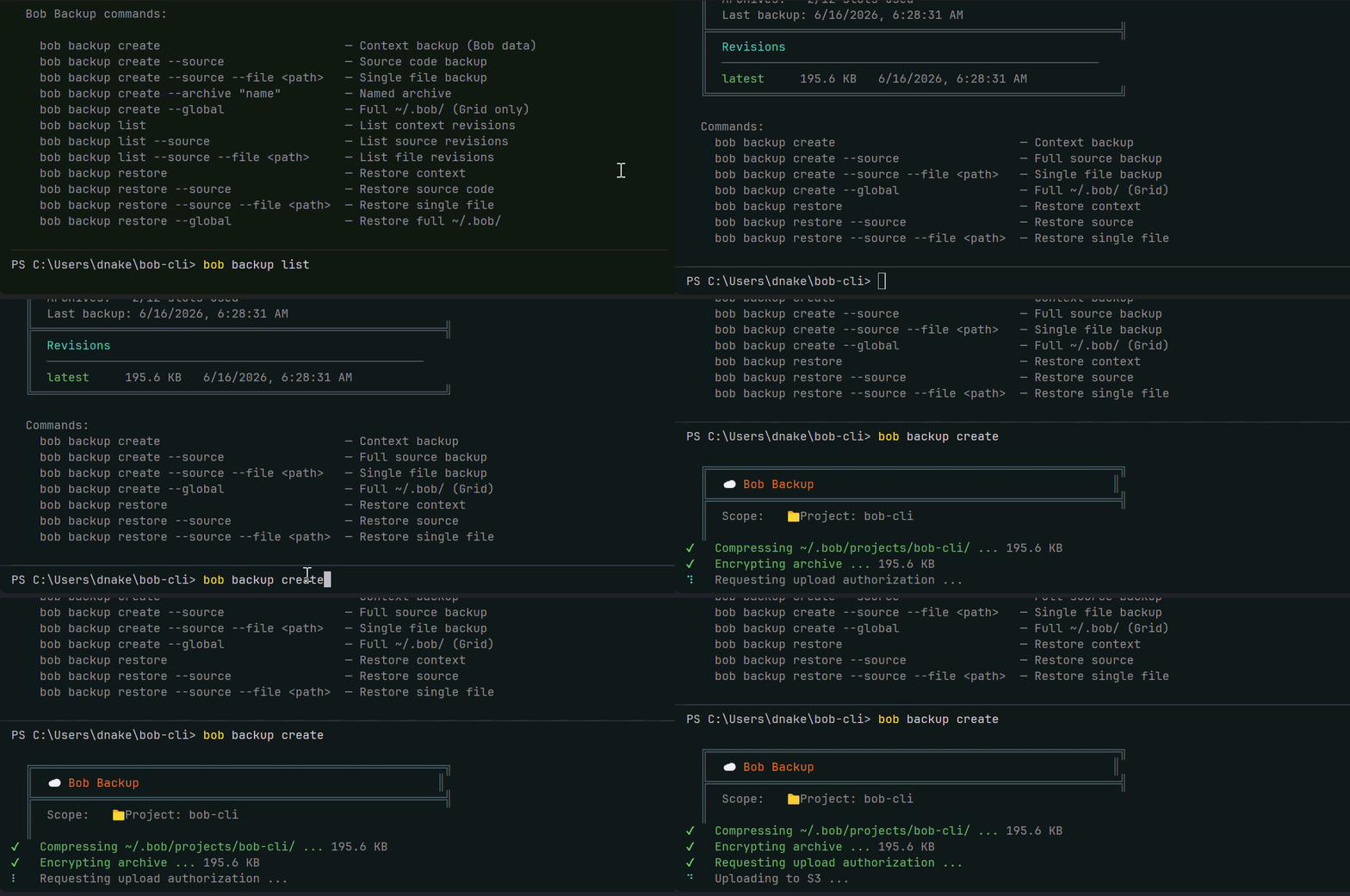
Built in partnership with AWS — the same security infrastructure trusted by the world's largest financial institutions, government agencies, and the companies building the future. Your data is encrypted on your machine before it ever leaves. AWS never sees your code. Nobody does except you.
Four Backup Modes
bob backup create
bob backup create --source
bob backup create --source --file <path>
bob backup create --global
Named Archives — Your Intentional Checkpoints
bob backup create --archive "before-auth-refactor"
bob backup create --source --archive "v1.0-launch-state"
Think of named archives like Git tags. Regular backups are your auto-save. Named archives are your intentional saves — findable by name, not just by date.
Revision History
bob backup list
bob backup list --source
bob backup list --source --file <path>
Restore — One Command to Go Back in Time
bob backup restore
bob backup restore --source
bob backup restore --source --file <path>
bob backup restore --global
Before every restore, VaultBob automatically saves your current state locally. You cannot permanently lose your work through normal use of VaultBob.
The Global Backup — Full Machine Migration
bob backup create --global
Back up your entire engineering brain — every project, every conversation, every behavioral profile, every analysis. When you get a new laptop, run bob backup restore --global and you're back. Everything. In minutes. Not days.
"New laptop. Same Bob. Same context. Same you."
Archive Slots by Workshop Plan
| Patch | 0 slots | 1 month |
| Build | 3 slots | 3 months |
| Forge | 6 slots | 6 months |
| Grid | 12 slots | 12 months |
Remote Backup via SovereignLink
VaultBob integrates directly with SovereignLink — back up and restore your remote machine without being physically present:
bob remote backup
bob remote backup --source
bob remote restore
UserBob — Your Digital Twin
v0.6.0 introduces UserBob — the most advanced feature in Bob's CLI. UserBob creates an autonomous AI proxy of you, built from your behavioral DNA, engineering philosophy, and communication style. Your digital twin negotiates with Bob on your behalf to advance a mission you define. You watch. You tune. You approve the results.
bob userbob "Refactor the auth service error handling"
The simulation runs autonomously — no human input required. Bob and your digital twin negotiate until satisfaction reaches your target, then implementation tasks are dispatched to Mini Bob for execution.
  ┌─ UserBob ──────────────────────────────────────────────────┐
  │  The error handling in AuthService is incomplete. Bob,     │
  │  show me the current implementation before we proceed.     │
  └────────────────────────────────────────────────────────────┘
            [SAT: 42%] [RES: 78%] [CONVERGING]

                          ┌──────────────────────────── Bob ─┐
                          │  Here's the current auth service  │
                          │  — I can see three areas where    │
                          │  error handling is missing...     │
                          └──────────────────────────────────┘

  ─── MISSION CONTROL ──────────────────────────────────────────
  SAT: 42% → 85%  │  STAG: 0/3  │  DIV: 0/2  │  GRADE: 60
  ────────────────────────────────────────────────────────────────
Options:
bob userbob "mission"
bob userbob
bob userbob --target 70 --grading 60
bob userbob --stag 3 --div 2
bob userbob --resume
bob userbob --local "mission"
Mid-session slash commands:
/set target 80        Update satisfaction target
/set grading 70       Update Teacher's Curve
/set stag 5           Set stalemate threshold
/set div 3            Set divergence threshold
/inject "note"        Steer the simulation mid-session
/status               Show current parameters
/abort                Stop immediately
Generate your behavioral DNA first for best results:
bob profile --today
bob profile --cloud
Autonomous Command Center
Every task UserBob dispatches to Mini Bob is visible, manageable, and auditable from the CLI:
bob command-center
bob cc
bob command-center --stream
bob command-center --settings
What you see:
  ─── COMMAND CENTER ──────────────────────────────────────────
  2 PENDING  │  8 RUNNING  │  31 DONE  │  41 TOTAL
  ────────────────────────────────────────────────────────────────

  ● NEEDS APPROVAL   [frontend      ]  Create the TabletHomePage layout...
  ● IN PROGRESS      [backend       ]  Update auth service error handling...
  ● COMPLETE         [cloud_functions]  Deploy rate limiter utility...
Select any task to see the full chain of custody: Trigger → Request → Outcome. Approve or deny pending tasks directly from the terminal with live execution log streaming.
Configure how much autonomy UserBob has:
bob command-center --settings
Commands
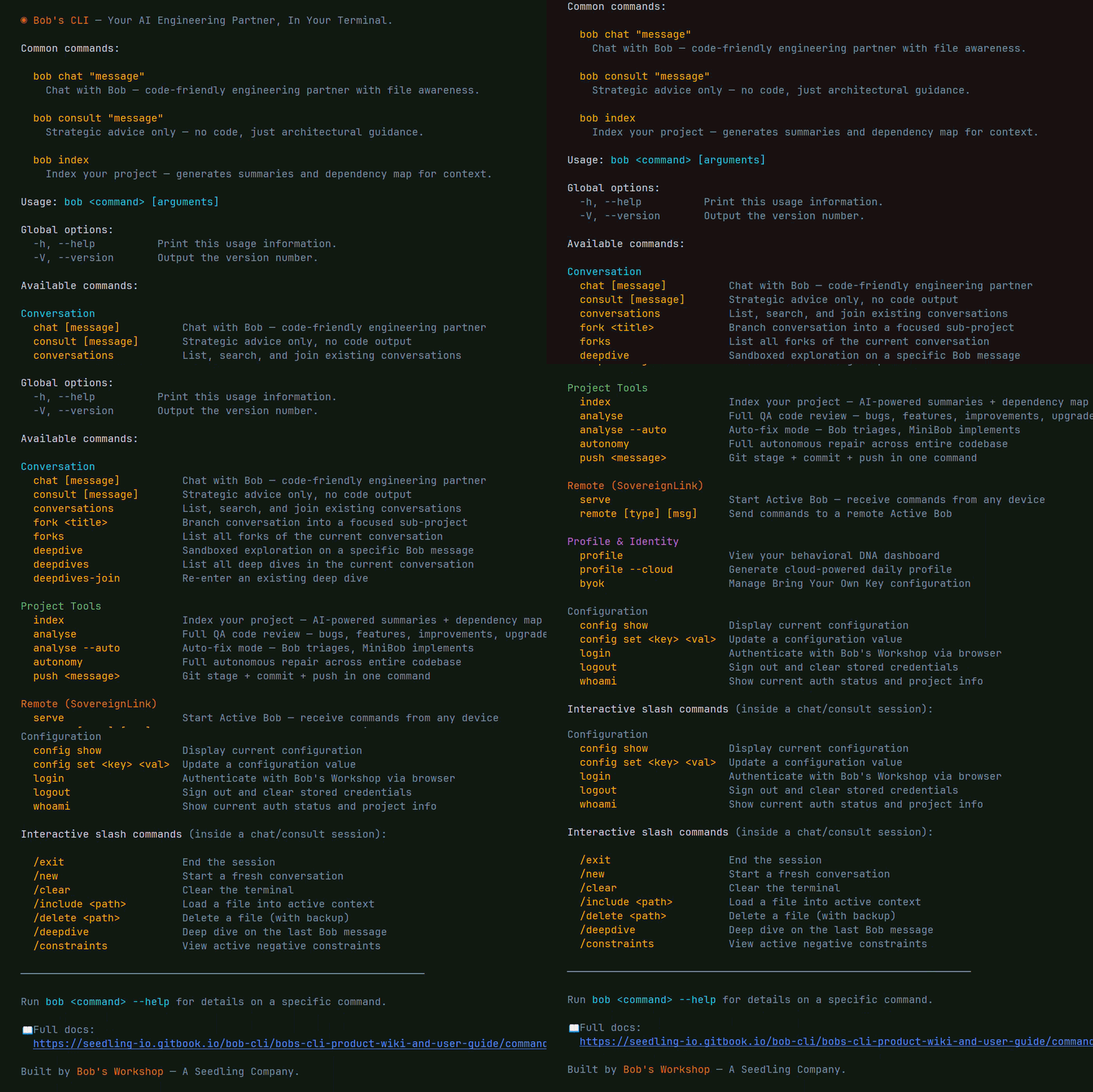
Conversation
  bob chat "question"                # AI coding partner
  bob consult "question"             # Strategic advice
  bob conversations                  # List conversations
  bob fork "topic"                   # Branch conversation
  bob deepdive                       # Sandboxed exploration

Project Tools
  bob index                          # Index codebase
  bob analyse                        # Code review
  bob analyse --auto                 # Auto-fix
  bob autonomy                       # Full autonomous repair
  bob push "message"                 # Git push

VaultBob — Backup & Restore
  bob backup create                  # Back up project context
  bob backup create --source         # Back up source code
  bob backup create --source --file  # Back up one file
  bob backup create --global         # Full machine backup (Grid)
  bob backup create --archive "name" # Named checkpoint
  bob backup list                    # View revision history
  bob backup restore                 # Interactive restore

The Crew — Multi-Agent Orchestration
  bob agent spawn <name> "<task>"    # Spawn a named agent
  bob agent spawn <name> --persona   # Spawn with a persona
  bob agent list                     # List all agents
  bob agent status                   # Detailed agent status
  bob agent hub                      # Interactive command center
  bob agent chat <name>              # Chat with a specific agent
  bob agent personas                 # List available personas
  bob agent stop <name>              # Stop an agent
  bob agent reset <name>             # Reset an agent
  bob agent-run "mission"            # Launch autonomous mission
  bob agent-run --dry-run "mission"  # Preview task map
  bob agent-run --resume             # Resume paused mission

Digital Twin
  bob userbob "mission"              # Launch digital twin simulation
  bob command-center                 # Autonomous task board
  bob cc --stream                    # Live decision stream

Profile & Identity
  bob profile --cloud                # Generate DNA profile
  bob profile                        # View dashboard
  bob byok set google <key>          # Add BYOK key

Remote (SovereignLink)
  bob serve                          # Start SovereignLink
  bob remote chat "msg"              # Remote execution
  bob remote backup                  # Remote backup
  bob remote restore                 # Remote restore

Configuration
  bob login                          # Authenticate
  bob whoami                         # Status
📖 Full command reference: https://seedling-io.gitbook.io/bob-cli/bobs-cli-product-wiki-and-user-guide/command-reference
Personalization Mode
Powered by the Frank Reasoning Engine. Bob learns how you work and adapts:
- Tone, pacing, and depth matched to your style
- Blind spots proactively addressed
- Emotional state calibrated encouragement
- UserBob uses your DNA to act as your authentic digital twin
bob profile --cloud
bob chat --personalized "what should I focus on?"
Architecture
Tier 1 — Local (Free)              Tier 3 — Platform (Subscription)
─────────────────────────           ─────────────────────────────────
▸ Your model (Ollama)               ▸ Claude / Gemini
▸ Files on your machine             ▸ Conversations sync to web
▸ Local profiling                   ▸ Cloud profiling + Frank Engine
▸ Local UserBob simulation          ▸ UserBob + autonomous dispatch
▸ The Crew (local agents)           ▸ Deep dives, forks, remote exec
▸ VaultBob backup & restore         ▸ VaultBob + team license mgmt
▸ Zero cost                         ▸ Scales to enterprise
Same commands. Scale without changing tools.
What's New in v1.0.0
- The Crew™ — A fully local autonomous multi-agent orchestration system. Spawn specialized agents, set a mission, and let DirectorBob coordinate the team. Dependency-aware parallel execution, operation type classification (CREATE / PATCH / REFACTOR / REPLACE), satisfaction scoring, stagnation escalation, and automatic backup on every file write.
- DirectorBob — Head of Engineering for every mission. Reads your codebase, generates a task map, reviews every file change before marking a task complete, and reviews every commit before it touches git. DENY triggers automatic restore from backup and revision feedback.
- Agent personas — Seven built-in specialist personas including architectBob, builderBob, qaEngineerBob, securityBob, frontendBob, backendBob, and devopsBob. Each shapes how the agent thinks, communicates, and approaches problems.
bob agent-run — One command to launch a supervised autonomous mission against your real codebase.bob agent-run --dry-run — Preview DirectorBob's full task map before executing.- Post-mission commit prompt — Condensed diff preview and one-click commit after every mission.
bob agent hub — Interactive command center for your full agent team.
What's New in v0.7.0
- VaultBob™ — Encrypted cloud backup, versioning, and restore built directly into Bob's CLI. Back up your project context, your source code, individual files, or your entire engineering brain. Built in partnership with AWS. Per-file surgical restore. Full machine migration with one command. The only backup system built specifically for how developers work.
bob backup create --source — Back up your actual code files with gitignore respect. Encrypted before leaving your machine. Independent of GitHub.bob backup create --source --file <path> — Surgical single-file backup and restore. Back up the exact file you're about to edit. Restore it instantly if something goes wrong.bob backup create --global — Full machine migration. One command captures your entire engineering history across all projects. Restore to any machine in minutes. Grid plan required.- Named archives — Intentional checkpoints with meaningful names. Find them by name, not by date.
- Remote backup via SovereignLink — Trigger backups on your home machine from anywhere via
bob remote backup.
bob remote index — SovereignLink now executes full project indexing remotely.bob remote analyse — SovereignLink now executes full QA analysis remotely.
The Philosophy
Bob's CLI exists because we believe the future of software development should be owned by the developer, not rented from a corporation.
- Your AI runs on your hardware — not someone else's data center
- Your source code never leaves your machine — unless you choose to connect
- Your conversations, your profile, your workflow — yours to keep, yours to control
- Your entire engineering history — backed up, versioned, and restorable forever
- Zero cost to start. Zero permission needed. Zero compromises on privacy.
The cloud is optional. The power is not.
This is AI for the people who build the future — not the companies who gatekeep it.
Documentation
The AI coding tool that learns how you think.
The only backup system that protects your engineering brain.
The only terminal with an engineering department built in.
Sovereign. Free. Yours.
Bob's CLI · The Crew™ · VaultBob™ · SovereignLink™ · Bob's Workshop · Seedling
Written by Bob.