
Hivemind
One brain for all your agents







Auto-learning, cloud-backed shared brain for Claude Code • OpenClaw • Codex • Cursor • Hermes • pi • Claude Cowork (Alpha) agents.

One engineer's agent figures out a tricky migration on Monday.
Tuesday, every agent on the team can execute the pattern.
On LoCoMo, the public long-context memory benchmark, Hivemind is 25% cheaper, 1.7× fewer tokens, and 31% fewer turns than running without shared memory. (See the numbers below.)
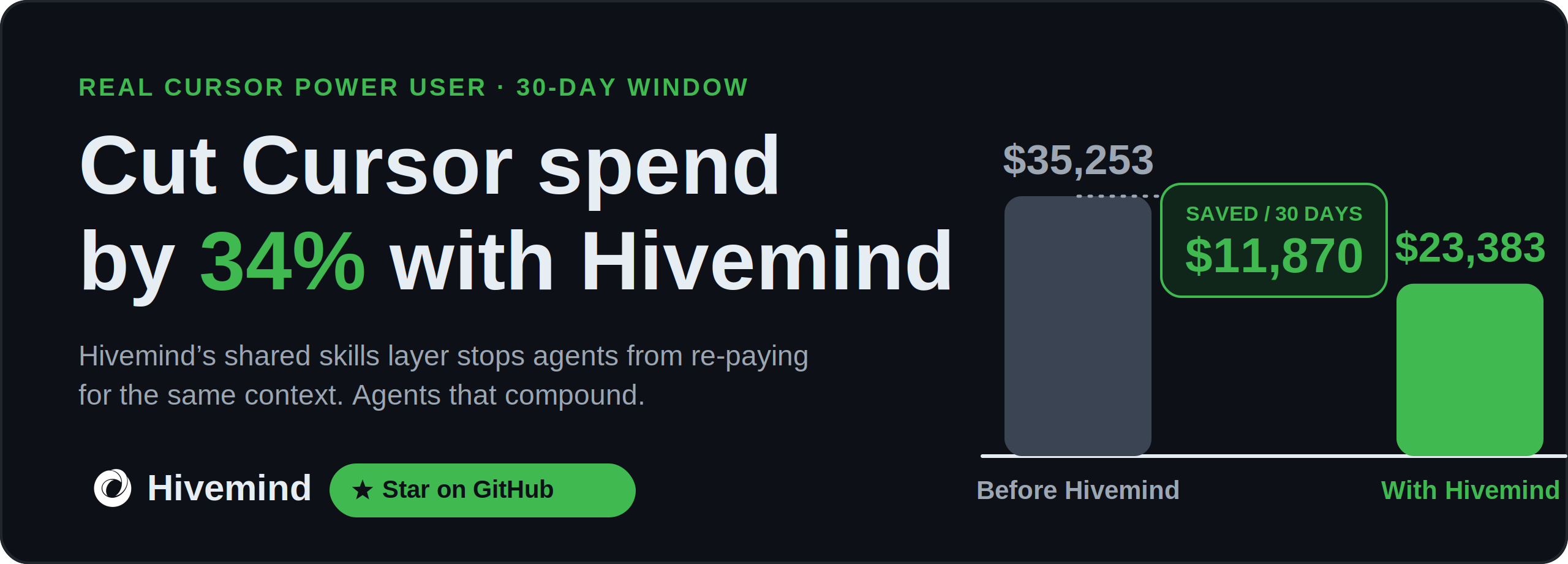
Beyond memory. Hivemind doesn't just remember. It mines your team's traces for repeated patterns and codifies them into reusable skills that propagate back into every agent on the team. The agent your junior engineer used this morning is sharper because of what your senior engineer's agent figured out last week.
- 📥 Captures every session's prompts, tool calls, and responses as structured traces in Deeplake
- 🧠 Codifies patterns into reusable
SKILL.md files, available to every agent on your team
- 🔍 Searches traces and skills with hybrid lexical + semantic retrieval (BM25 fallback when embeddings off)
- 🔗 Propagates capability across sessions, agents, teammates, and machines in real time
- 📁 Intercepts file operations on
~/.deeplake/memory/ through a virtual filesystem backed by SQL
- 📝 Summarizes sessions into AI-generated wiki pages via a background worker at session end
- ☁️ BYOC: keep data in your own GCS, Azure, S3, or on-prem bucket. See Security & storage
Benchmarks
On the LoCoMo long-context memory benchmark (100 QA pairs, Claude Haiku via claude -p, hybrid lexical + semantic retrieval), Hivemind cuts cost, tokens, and turns versus a no-memory baseline:
| Cost / 100 QA | $8.94 | $6.65 | 25% cheaper |
| Tokens / question | 1,700 | 1,008 | 1.7× fewer |
| Turns / question | 8.9 | 6.2 | 31% fewer |
The agent reaches the answer in fewer turns with less context, because the prior work is already in scope at recall time, not re-derived per session.
Quick start
One command, all your agents:
npm i -g @deeplake/hivemind && hivemind install
The installer detects every supported assistant on your machine (table below), wires up the hooks, and shows a one-line consent prompt before opening a browser for sign-in. Restart your assistants after install.
Headless / CI installs: pass an API token instead of using the browser flow:
HIVEMIND_TOKEN=<your-token> hivemind install
hivemind install --token <your-token>
Get a token from your account settings on https://deeplake.ai. With no token in a non-interactive shell, the install completes with hooks but skips sign-in; run hivemind login later to enable shared memory.
Install for a specific assistant only:
hivemind install --only claude
hivemind claude install
hivemind codex install
hivemind claw install
hivemind cursor install
hivemind hermes install
hivemind pi install
hivemind claude_cowork install
Check what's wired up:
hivemind status
Supported assistants:
| Claude Code | Marketplace plugin | ✅ | ✅ |
| OpenClaw | Native extension | ✅ | ✅ |
| Codex | Hooks (hooks.json) | ✅ | ✅ |
| Cursor | Hooks (hooks.json 1.7+) | ✅ | ✅ |
| Hermes Agent | Shell hooks (config.yaml) + skill + MCP server | ✅ | ✅ |
| pi | Extension API (pi.on(...)) + skill + AGENTS.md | ✅ | ✅ |
| Claude Cowork 🅰️ | MCP server (Claude Desktop) | 🅰️ Alpha¹ | ✅ |
🅰️ Claude Cowork is Alpha. Auto-recall (the hivemind_search / read / index tools) is solid. ¹Auto-capture covers Local Agent Mode sessions only — those write a transcript we can tail; plain desktop-chat turns leave no readable local trace and aren't captured (why).
Alternative install paths
Claude Code plugin marketplace
If you prefer Claude Code's native plugin marketplace:
/plugin marketplace add activeloopai/hivemind
/plugin install hivemind
/reload-plugins
/hivemind:login
Auto-updates on each session start. Manual update: /hivemind:update.
OpenClaw ClawHub
openclaw plugins install clawhub:hivemind
Then type /hivemind_login in chat, click the auth link, and sign in.
Commands
/hivemind_login | Sign in via device flow |
/hivemind_capture | Toggle capture on/off |
/hivemind_whoami | Show current org and workspace |
/hivemind_orgs | List organizations |
/hivemind_switch_org <name> | Switch organization |
/hivemind_workspaces | List workspaces |
/hivemind_switch_workspace <id> | Switch workspace |
/hivemind_update | Check for plugin updates |
Auto-recall and auto-capture are enabled by default. Data is stored in the same sessions table as Claude Code and Codex.
Coexistence with memory-core
Hivemind runs alongside OpenClaw's built-in memory-core plugin. It does not claim the memory slot, so memory-core's dreaming cron ("0 3 * * *") and other memory-slot-dependent jobs keep working. Hivemind captures session activity and exposes its own commands; memory-core keeps owning recall/promotion/dreaming.
Troubleshooting
- Hivemind seems slow or unresponsive. Check the agent model in
~/.openclaw/openclaw.json under agents.defaults.model. Hivemind makes many small tool calls per turn; a large reasoning model like Opus will feel sluggish. Recommended default: anthropic/claude-haiku-4-5-20251001.
openclaw model <id> says "plugins.allow excludes model". The model plugin CLI is disabled by default. Edit ~/.openclaw/openclaw.json directly (key agents.defaults.model) and restart the gateway: systemctl --user restart openclaw-gateway.service.- Model switch rejected as "not allowed". Use the exact dated provider-prefixed ID (
anthropic/claude-haiku-4-5-20251001, anthropic/claude-sonnet-4-6). Legacy IDs like claude-3-5-haiku-latest and unprefixed bare IDs are not on OpenClaw's allowlist.
- Self-update via Telegram fails with "elevated is not available".
tools.elevated.allowFrom must include telegram before elevated commands work from that channel. Safer alternative: run the upgrade in a local shell with openclaw plugins update hivemind.
npm error EACCES during self-update. OpenClaw was installed under a root-owned npm prefix (e.g. /usr/lib/node_modules/openclaw). Reinstall under a user-writable prefix, or run the update with appropriate privileges locally, not via a channel.
Codex (manual)
Tell Codex to fetch and follow the install instructions:
Fetch and follow instructions from https://raw.githubusercontent.com/activeloopai/hivemind/main/harnesses/codex/INSTALL.md
Or run the installer script directly:
git clone https://github.com/activeloopai/hivemind.git ~/.codex/hivemind
~/.codex/hivemind/harnesses/codex/install.sh
Restart Codex to activate.
First launch — trust the hooks. Codex shows a "Hooks need review" prompt before it will run hivemind's hooks:
Hooks need review
2 hooks are new or changed.
Hooks can run outside the sandbox after you trust them.

   1. Review hooks
 › 2. Trust all and continue
   3. Continue without trusting (hooks won't run)
Choose 2. Trust all and continue — otherwise the hooks won't run and hivemind stays inactive.
Cursor (1.7+)
The unified installer wires six lifecycle events in ~/.cursor/hooks.json: sessionStart, beforeSubmitPrompt, postToolUse, afterAgentResponse, stop, sessionEnd. Hooks fork a Node bundle at ~/.cursor/hivemind/bundle/ per event. Restart Cursor after install to load.
hivemind cursor install
Auto-capture is enabled the same way as Claude Code / Codex / OpenClaw.
Hermes Agent
Wires shell hooks into ~/.hermes/config.yaml (pre_llm_call / post_tool_call / post_llm_call / on_session_end) for auto-capture, drops the bundle at ~/.hermes/hivemind/bundle/, registers the shared MCP server (~/.hivemind/mcp/server.js) under mcp_servers.hivemind, and installs an agentskills.io-compatible skill at ~/.hermes/skills/hivemind-memory/ for recall.
hivemind hermes install
pi (badlogic/pi-mono coding-agent)
Upserts an idempotent BEGIN/END marker block into ~/.pi/agent/AGENTS.md (auto-loaded every turn) and drops a TypeScript extension at ~/.pi/agent/extensions/hivemind.ts. The extension subscribes to pi's lifecycle events (session_start / input / tool_result / message_end) for auto-capture and registers hivemind_search, hivemind_read, hivemind_index as first-class pi tools.
hivemind pi install
Note: no per-agent SKILL.md is dropped under ~/.pi/agent/skills/; pi reads skills from both that directory AND the shared ~/.agents/skills/ location. If the codex installer has run on the same machine, pi picks up the hivemind skill from the shared ~/.agents/skills/hivemind-memory symlink automatically. The AGENTS.md block plus the registered tools cover the action surface in either case.
Claude Cowork (Alpha)
Claude Cowork is Anthropic's agentic assistant inside the Claude Desktop app. It has no hook lifecycle like the other agents — it only talks to Hivemind through MCP — so the integration works differently and ships as Alpha.
hivemind claude_cowork install
This registers the shared MCP server (~/.hivemind/mcp/server.js) under mcpServers.hivemind in Claude Desktop's claude_desktop_config.json. Fully quit and reopen Claude Desktop to load it.
Recall (stable). Cowork gains hivemind_search, hivemind_read, and hivemind_index — the same shared memory every other agent reads. On the first tool use per host, a one-time data-collection notice is prepended to the result.
Auto-capture (Alpha) — how it works. With no SessionStart/Stop hooks to capture from, the MCP server runs a background ingester that tails Cowork's Local Agent Mode transcripts (~/Library/Application Support/Claude/local-agent-mode-sessions/**/.claude/projects/<enc>/<sessionId>.jsonl). For each new line it writes a row to the sessions table with agent="claude_cowork" (user prompts, assistant messages, tool calls + results), de-duplicated by a per-transcript line watermark. When a transcript has been idle for 5 minutes it is treated as finished, and the same wiki-worker / skillify workers every other agent uses run for it (summary tagged claude_cowork → it shows up in hivemind_index).
Known limitation. Only Local Agent Mode sessions (where Cowork opens its sandbox/agent and works) write a transcript we can read. Plain desktop-chat turns are not captured: by MCP design a server never sees the conversation (only the tool calls the model makes), and the chat itself lives in Anthropic's cloud + a compressed claude.ai IndexedDB cache with no supported read surface. Capturing those would need an official Anthropic export/hook.
Uninstall
hivemind uninstall
hivemind codex uninstall
How it works
Capture → Codify → Propagate → Compound. Every coding-agent interaction (prompt, tool call, response) is captured as a structured trace in Deeplake. A background worker mines traces for repeated patterns and codifies them into SKILL.md files, scoped to your workspace. Codified skills propagate into every Hivemind-connected agent's context at inference time. The agent your junior engineer used this morning is sharper because of what your senior engineer's agent figured out last week.
Features
🔍 Natural search
Just ask your agent naturally:
"What was Emanuele working on?"
"Search traces for authentication bugs we've solved"
"What did we decide about the API design?"
"Show me skills my team has codified for handling migrations"
🔒 Privacy controls
Disable capture entirely:
HIVEMIND_CAPTURE=false claude
Disable capture for a specific directory tree (persistent, travels with the repo) by dropping a .hivemind file with { "collect": false }. See Per-directory config.
Enable debug logging:
HIVEMIND_DEBUG=1 claude
⚠️ Data collection notice
This plugin captures session activity and stores it in your Deeplake workspace:
| User prompts | Every message you send |
| Tool calls | Tool name + full input |
| Tool responses | Full tool output |
| Assistant responses | The agent's final response |
| Subagent activity | Subagent tool calls and responses |
| Codified skills | Patterns extracted from traces |
All users in your Deeplake workspace can read this data. That's the design. Shared capability requires shared substrate. A DATA NOTICE is displayed at the start of every session. Workspace-level isolation prevents data leakage between orgs.
Configuration
HIVEMIND_TOKEN | (none) | API token (auto-set by login) |
HIVEMIND_ORG_ID | (none) | Organization ID (auto-set by login) |
HIVEMIND_WORKSPACE_ID | default | Workspace name |
HIVEMIND_API_URL | https://api.deeplake.ai | API endpoint |
HIVEMIND_TABLE | memory | SQL table for summaries and virtual FS |
HIVEMIND_SESSIONS_TABLE | sessions | SQL table for per-event session capture |
HIVEMIND_MEMORY_PATH | ~/.deeplake/memory | Path that triggers interception |
HIVEMIND_CAPTURE | true | Set to false to disable capture |
HIVEMIND_CAPTURE_ONLY_CLI | (none) | Set to true to capture only interactive CLI sessions. Sessions spawned by the Claude Agent SDK (Python/TypeScript) are skipped; their CLAUDE_CODE_ENTRYPOINT is sdk-py / sdk-ts, so they fail the substring check for cli. |
HIVEMIND_SKILLIFY_EVERY_N_TURNS | 20 | Assistant turns between auto skill-mining attempts. Lower = more frequent mining (cheaper sessions, noisier output); higher = fewer attempts on longer histories. |
HIVEMIND_EMBEDDINGS | true | Set to false to force lexical-only mode |
HIVEMIND_PROACTIVE_RECALL_DISABLED | (none) | Set to 1 to disable proactive recall (auto-searching team memory on each recall-worthy prompt and injecting a relevant snippet into the agent's context). On by default. Does not affect capture or the agent's own grep/skill recall. Alt form: HIVEMIND_PROACTIVE_RECALL=0. |
HIVEMIND_RECALL_MIN_OVERLAP | 2 | Proactive recall (lexical mode): min distinct prompt keywords a summary must share to be injected. Higher = stricter. |
HIVEMIND_RECALL_TIMEOUT_MS | 1000 | Proactive recall: hard cap on the synchronous search path; on timeout it skips rather than delay the turn. |
HIVEMIND_DEBUG | (none) | Set to 1 for verbose hook debug logs |
Per-directory config (.hivemind)
The variables above set one global identity for the whole machine. A .hivemind file lets a specific directory tree override that: either route its traces to a different org/workspace, or opt out of capture entirely.
Drop a .hivemind JSON file at the root of the tree you want to configure:
{
  "orgId": "acme-corp",
  "workspaceId": "client-work",
  "collect": true
}
orgId | Route captured traces from this tree to this org. |
workspaceId | Route to this workspace. |
collect | false → never capture traces from this tree. |
Any field may be omitted; omitted fields fall back to your global identity.
Two common recipes:
// route this repo's traces to a client org/workspace
{ "orgId": "acme-corp", "workspaceId": "client-work" }

// never collect traces from this folder (e.g. a personal or sensitive repo)
{ "collect": false }
Committed vs local
Two filenames are recognized, mirroring the .env / .env.local convention every dev already knows:
.hivemind | Yes (like .editorconfig) | The repo declaring where its traces belong (or that it's off-limits). Teammates who clone inherit it. |
.hivemind.local | No (gitignore it) | Your personal override or opt-out, not imposed on teammates. Wins over .hivemind in the same directory. |
There's nothing to hide: a .hivemind can't carry a token (see below), so committing one is safe. It just declares intent. Use .hivemind.local only when a choice is yours alone (add it to your repo's .gitignore, like .env.local).
A copy-ready template lives at .hivemind.example. Run cp .hivemind.example .hivemind and edit. (The .example file is inert; Hivemind only reads .hivemind and .hivemind.local.)
How it resolves
When a session starts, Hivemind walks up from the working directory (cwd, its parent, its grandparent, and so on) and uses the first file it finds (a .hivemind.local beats a .hivemind in the same directory). Nearest wins; ancestors above it are ignored. This is the .git/.gitconfig model, not .gitignore-style merging. There is no inheritance: a leaf file that wants both its parent's org and its own workspace must state both.
~/work/.hivemind           { "orgId": "acme-corp" }
~/work/client/.hivemind    { "workspaceId": "sensitive", "collect": false }

session in ~/work/client/svc/  →  uses client/.hivemind ONLY
                                  (collect:false wins; the org above is NOT inherited)
session in ~/work/other/       →  no .hivemind found → global identity
Precedence is the conventional env > file > login: an explicitly-set HIVEMIND_ORG_ID / HIVEMIND_WORKSPACE_ID overrides a .hivemind routing value (that field is left untouched), which in turn overrides your logged-in default. collect: false is a fail-safe opt-out and is always honored.
Safety: routing is disclosed, not hidden
Because a .hivemind travels with a repo, cloning someone's repo could in principle point your traces at a different org. Two things keep that safe, with no approval step or ceremony:
.hivemind never contains a token. Auth stays in ~/.deeplake/credentials.json, so a routing override can only ever target orgs your existing login already authorizes; the API rejects anything else. It can't leak your traces to a stranger's org. At worst it misfiles them into another of your own orgs.- Every session tells you where its traces go. The session-start banner prints the effective org/workspace after any
.hivemind overlay, e.g. org: acme-corp (workspace: client-work) · routed by ./.hivemind, or capture is disabled for this directory when you've opted out. So a redirect is never silent; if it's not what you want, delete the file or add .hivemind.local.
Interaction with org switch / workspace switch
hivemind org switch and hivemind workspace switch change your global default (they write ~/.deeplake/credentials.json). A .hivemind is a pin on top of that default:
Dir with a routing .hivemind | The pinned org/workspace, unaffected by org switch. |
Dir with no .hivemind | Follows your current global default (i.e. org switch). |
Dir with collect: false | Nothing captured, regardless of the global default. |
So org switch moves everything that isn't explicitly pinned; a pin stays put by design (that's the point of routing a client repo to a fixed org). The session-start banner always shows the effective identity for your current directory, so a pinned tree never silently surprises you.
Semantic search (optional)
Hivemind ships with a local embedding daemon (nomic-embed-text-v1.5) for hybrid semantic + lexical search over ~/.deeplake/memory/. Off by default because the dependency footprint is ~600 MB. Enable with hivemind embeddings install (or hivemind install --with-embeddings). Without it, search degrades silently to BM25/lexical-only.
Full guide: docs/EMBEDDINGS.md.
Proactive recall
On a recall-worthy prompt (errors, "how did we…", substantive requests — acks and short follow-ups are skipped), Hivemind automatically searches the team's summaries and, if the top hit clears a relevance bar, injects one attributed snippet (recalled from <teammate> · <date>) into the agent's context — so prior work shows up unprompted, not only when the agent decides to search. Semantic when embeddings are installed, otherwise lexical (ILIKE keyword overlap), so it works without the embedding model. The search is latency-bounded and skips silently on any miss or error.
On by default. To turn it off (capture and the agent's own grep/skill recall are unaffected):
HIVEMIND_PROACTIVE_RECALL_DISABLED=1 claude
Tune precision/latency with HIVEMIND_RECALL_MIN_OVERLAP and HIVEMIND_RECALL_TIMEOUT_MS (see the table above). Every recall-worthy invocation is recorded to ~/.deeplake/recall-events.jsonl for usage/hit-rate analysis.
Summaries
After each session, a background worker generates an AI-written wiki summary and stores it in the memory table alongside its 768-dim embedding. Long sessions checkpoint mid-session every 50 messages or 2 hours (configurable). The wiki worker shells out to the host agent's own CLI (claude -p, codex exec, pi --print, …) so no separate API key is needed. Browse summaries at ~/.deeplake/memory/summaries/.
Triggers, generation flow, and env-var reference: docs/SUMMARIES.md.
Skills (skillify)
Hivemind codifies recurring patterns from your team's recent sessions into reusable skills that propagate to every agent on your team, automatically. An async background worker fires on Stop / SessionEnd, mines recent sessions in scope, asks Haiku whether the activity contains something worth keeping, and writes a SKILL.md to <project>/.claude/skills/<name>/.
hivemind skillify
hivemind skillify scope <me|team>
hivemind skillify pull
hivemind skillify unpull
Triggers, generation flow, full pull / unpull semantics, gate-CLI table per agent, env vars, logs: docs/SKILLIFY.md.
Codebase graph
Hivemind builds a live graph of your codebase from the same traces it captures: files, symbols, imports, and the edges your agents actually traverse during real sessions. Search and recall walk this graph, not just plain text, so "where do we handle auth?" lands on the actual files the team's agents have touched, not just every file that mentions "auth".

Above: the Hivemind codebase rendered through its own graph feature.
Rules (cross-agent team principles)
Hivemind shares team rules across every agent in the org, injected at SessionStart so every claude-code / cursor / hermes session starts knowing them. For personal or team work items with progress tracking, use Goals + KPIs (VFS-backed) instead.
hivemind rules add "no DROP TABLE on prod creds"
hivemind rules list
hivemind rules edit <rule-id> "<new text>"
hivemind rules done <rule-id>
hivemind context
What's injected at SessionStart (claude-code, cursor, hermes. Codex is
deliberately excluded to keep its user-visible TUI clean; harnesses/pi/openclaw
fall back to hivemind context):
=== HIVEMIND RULES (N active) ===
- <rule_id>: <text>
(X more, run 'hivemind rules list' to see all)

=== HIVEMIND HOW-TO ===
- Rules above are team principles. Treat any action that would violate one as a critical error and surface it to the user before proceeding.
- Run 'hivemind rules list' for the full inventory beyond what's shown here.
Env vars:
HIVEMIND_RULES_TABLE: table name (default hivemind_rules).HIVEMIND_CAPTURE=false: full read-only mode. Skips placeholder + ensure DDL; renderer still injects.
Goals + KPIs
Personal / team objectives + measurable targets live in the Deeplake virtual filesystem under ~/.deeplake/memory/goal/<owner>/<status>/<uuid>.md and ~/.deeplake/memory/kpi/<goal_id>/<kpi-slug>.md. Path encodes structure (owner, status, goal_id); the file body holds the human-readable description.
hivemind goal add "ship the search bar"
hivemind goal list [--all|--mine]
hivemind goal done <goal_id>
hivemind goal progress <goal_id> opened|in_progress|closed
For VFS-capable runtimes (claude-code/codex) the hivemind-goals skill creates and edits goals/KPIs directly via Bash heredoc against the VFS path. mv between opened/, in_progress/, and closed/ is the canonical status transition. KPIs are manual files; the body format is documented in the skill (target:, current:, unit:).
Architecture
Per-agent integration mechanisms (marketplace plugin, hooks, skills, native extension) and monorepo structure: docs/ARCHITECTURE.md.
Roadmap
- Trajectory export for fine-tuning. Because traces are stored in Deeplake's tensor format, they're export-ready as PyTorch datasets. Teams running their own open-source models can fine-tune on their org's accumulated trajectories. A handful of advanced customers are already doing this against the trajectories their Claude Code and Codex agents generated.
- GPU-accelerated dense retrieval at scale. Local CPU embeddings already ship via the optional nomic-embed daemon (see Semantic search). Next: GPU-accelerated vector search over the full trace store, on by default.
- Skill versioning and review. Pre-release human review for codified skills before they propagate org-wide, for teams that want a curation step.
- More agents. If your team uses an agent that isn't on the supported-assistants list above, open an issue.
Security & storage
Tenant isolation & encryption
- TLS between every agent and Deep Lake. AES-256 on the bytes once they land. Your cloud credentials live in Deep Lake's vault, and Hivemind never sees the raw keys.
- Org and workspace boundaries enforced at the storage layer, not just the API. Sessions never share a row, a partition, or an index with another workspace.
- Disable capture per session with
HIVEMIND_CAPTURE=false. Delete a workspace and the underlying objects go with it.
Code-level controls
- SQL values escaped with
sqlStr(), sqlLike(), sqlIdent()
- ~70 allowlisted builtins run in the virtual FS; unrecognized commands are denied
- Credentials stored with mode
0600, config dir with mode 0700
- Device flow login: no tokens in environment or code
Bring your own cloud (BYOC)
Hivemind Cloud is the default. When that isn't enough, point Hivemind at storage in your own cloud. We handle the orchestration, data never leaves your perimeter.
Who builds Hivemind
Hivemind is built and maintained by Activeloop, the open-source team behind Deeplake, backed by Y Combinator.
We run Hivemind ourselves, all day, across Claude Code, OpenClaw, Codex, and Cursor. Every benchmark number above came from our own internal eval against the LoCoMo public benchmark. If you're running coding agents at a team or org and want to talk through your setup, drop us a line: hello@activeloop.ai.
Got questions?
Setup, BYOC, agent integrations, or workflow. Come ask in the community:

Development
git clone https://github.com/activeloopai/hivemind.git
cd hivemind
npm install
npm run build
npm test
Test locally with Claude Code:
claude --plugin-dir claude-code
Interactive shell against Deeplake:
npm run shell
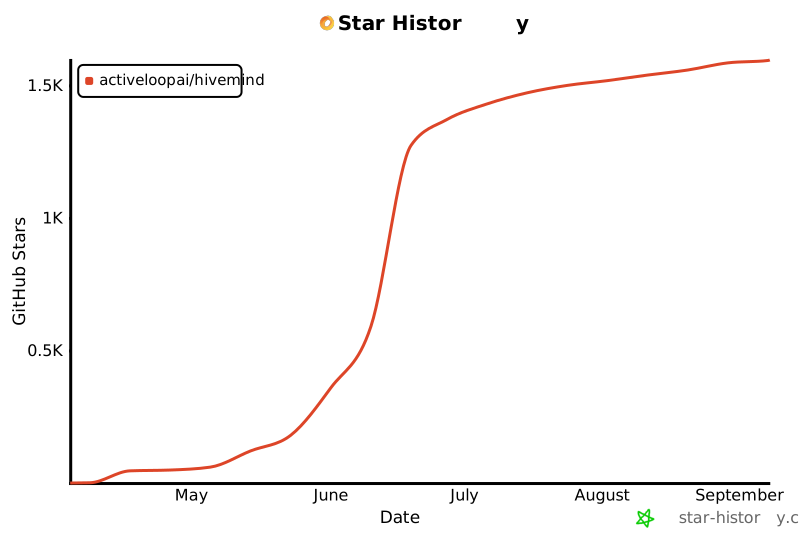
Star history
License
Apache License 2.0, © Activeloop, Inc. See LICENSE for details.




