@uindow/css - The Smarter CSS Selector Generator

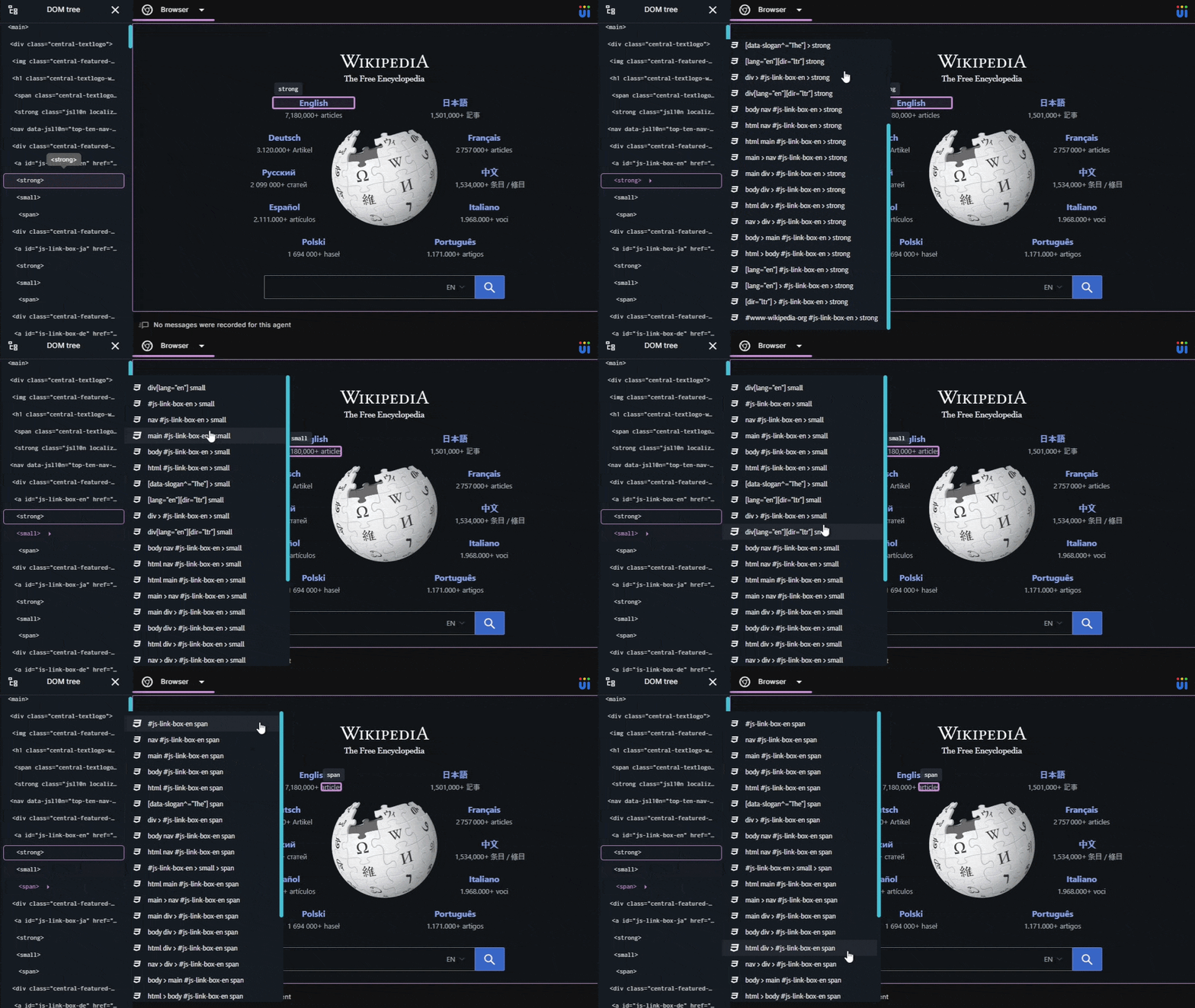
Generate one - or many - unique CSS selectors for any DOM element. Clean, human-readable output. A configurable penalty model that ranks results from most semantic to most specific. Built for performance, designed to stay out of your way.
Works everywhere JavaScript runs: Node.js, browsers, and any environment with a DOM.
Installation
npm
npm install @uindow/css
const { findOne, findAll } = require("@uindow/css");
Browser (standalone)
<script src="https://uindow.github.io/css/selector.js"></script>
<script>
    const { findOne, findAll } = Uindow_CSS;
</script>
Quick start
const { findOne, findAll } = require("@uindow/css");
const { selector, penalty } = findOne(document.querySelector(".hero"));
const results = findAll(document.querySelector(".hero"), { maxResults: 5 });
Why @uindow/css?
Most CSS selector generators treat the problem as a lookup: walk up the DOM, find something unique, done. One selector, take it or leave it.
@uindow/css treats it as a search problem. It explores the space of possible selectors across every ancestor level, scores each candidate against a configurable penalty model, prunes aggressively to stay fast, and surfaces a ranked list of results - so you always get the shortest, most readable, most stable selector first, with fallbacks already computed.
Comparison with @medv/finder
| Custom root element | ✅ Any HTMLElement, Document, or ShadowRoot | ✅ Supported |
| ID filter | ✅ idFilter filter | ✅ idName filter |
| Tag filter | ✅ tagFilter filter | ✅ tagName filter |
| Class filter | ✅ Excludes is-*, has-*, js-*, css-* by default | ⚠️ Less opinionated defaults |
| Attribute filter | ✅ Excludes style, width, height, URLs, values ≥ 32 chars by default | ⚠️ Less opinionated defaults |
| Search timeout | ✅ timeout with graceful fallback | ⚠️ May quit before an exhaustive search |
| Returns multiple selectors | ✅ Up to maxResults, ranked by penalty | ❌ Single selector only |
| Per-type penalty tuning | ✅ idPenalty, tagPenalty, attrPenalty, attrMatchPenalty, classPenalty, nthOfTypePenalty, nthChildPenalty, lengthPenaltyThreshold | ❌ Not configurable |
| Candidate/path caps | ✅ maxCandidatesPerLevel, maxPathsPerLevel, maxPathsTotal | ❌ Not supported |
| Prefix/suffix attribute matching | ✅ [attr^="start"], [attr$="end"] | ❌ Not supported |
| Human-readable attribute selectors | ✅ Always emits [attr="123"] | ❌ Uses CSS.escape() |
| Fuzziness | ✅ Trade exclusivity for shorter selectors (0% to 100%) | ❌ Not supported |
| Effort | ✅ Trade processing time for shorter selectors (0% to 100%) | ❌ Not supported |
| Compound selectors | ✅ Attempts to merge tag, classes, and attributes at each level: input.check[type="checkbox"][value="2"] | ❌ Simple selectors only |
Features
Multiple selectors, ranked by quality
findAll() returns up to maxResults selectors sorted by ascending penalty - from the most semantic to the most specific. Pick the best one programmatically, or hand the whole list to your users.
const { findAll } = require("@uindow/css");

const results = findAll(el, { maxResults: 10 });

results.forEach(({ selector, penalty }) => {
    console.log(`${selector}  (penalty: ${penalty})`);
});
Prefix and suffix attribute matching
When an exact attribute match would be brittle or unavailable, @uindow/css can generate selectors using the CSS ^= (prefix) and $= (suffix) operators. They carry their own separate penalty so they only surface when genuinely useful.
[data-id="42"]
[data-id^="prod-"]
[data-id$="-active"]
Tune how eagerly these appear with attrMatchPenalty (default 1.2).
Clean, human-readable output
Every selector is emitted in the plain [attr="value"] format. No CSS-escaped sequences, no surprises when you read, copy, or paste the result.
[data-id="123"] .nav-item
[data-id="\31 23"] .nav-item
Sensible default filters
Unstable and noisy parts of the DOM are excluded before the search begins:
- Attributes -
style, width, height, URL values, and anything over 32 characters are ignored by default.
- Classes -
is-*, has-*, js-*, and css-* are ignored by default. These are state and behaviour hooks - they change at runtime and make brittle selectors.
- IDs - all IDs are allowed by default. Provide your own
idFilter to exclude auto-generated or dynamic ones.
Every filter is a plain function, so your own rules are one line of code.
Fine-grained penalty model
Each selector type has an independent penalty weight. Lower means it shows up more often in results; higher means it only appears when nothing better is available.
idPenalty | 1 | #id selectors |
tagPenalty | 1.1 | div, span, … |
attrPenalty | 1.25 | [name], [value="1"] |
attrMatchPenalty | 1.2 | [name^="x"], [value$="5"] |
classPenalty | 1.3 | .button, .nav-item, … |
nthOfTypePenalty | 3 | div:nth-of-type(2) |
nthChildPenalty | 6 | :nth-child(3) |
lengthPenaltyThreshold | 32 | Extra penalty for selectors longer than N chars |
Performance controls
For large or deeply nested DOMs, hard caps keep the search bounded:
const { findAll } = require("@uindow/css");
findAll(el, {
maxCandidatesPerLevel: 2500,
maxPathsPerLevel: 50,
maxPathsTotal: 1000,
timeout: 1500,
});
Fuzziness
By default, @uindow/css only returns selectors that match the target element exclusively. Set fuzziness > 0 to allow selectors that match the target first while potentially matching other elements too - trading strict uniqueness for shorter, cleaner output.
findAll(el, { fuzziness: 0 });
findAll(el, { fuzziness: 5 });
findAll(el, { fuzziness: 20 });
findAll(el, { fuzziness: 100 });
Effort
Controls how much effort is spent optimizing partial results before returning the final list. This setting trades speed for result quality: higher values spend more time exploring candidates before producing the final result set.
findAll(el, { effort: 0 });
findAll(el, { effort: 50 });
findAll(el, { effort: 100 });
Compound selectors at every level
Most CSS selector generators pick a single token per ancestor level - a class, or an attribute, or a tag - and move on. This produces selectors that are either fragile (too generic) or bloated (too many levels deep).
@uindow/css builds compound selectors at each level by default, combining the tag, relevant classes, and attributes into a single, precise token:
input.check[type="checkbox"][value="2"]
input
.check
[type="checkbox"]
The result is selectors that are shorter, more stable, and immediately understandable at a glance.
API
findOne(element, options?)
Returns the single best selector for element, or throws if none can be generated.
const { findOne } = require("@uindow/css");
const { selector, penalty } = findOne(document.getElementById("main"));
findAll(element, options?)
Returns up to maxResults selectors sorted by ascending penalty, or throws if none can be generated.
const { findAll } = require("@uindow/css");

const results = findAll(document.getElementById("main"), {
    maxResults: 10,
});
Configuration reference
All configuration items are optional. Any omitted option falls back to its default.
const { findAll } = require("@uindow/css");
findAll(el, {
root: document.querySelector("#app"),
idFilter: (name) => !name.startsWith("auto-"),
tagFilter: (name) => name !== "div",
classFilter: (name) => !name.startsWith("is-"),
attrFilter: (name, value) => name.startsWith("data-") && value.length < 32,
idPenalty: 1,
tagPenalty: 1.1,
attrPenalty: 1.25,
attrMatchPenalty: 1.2,
classPenalty: 1.3,
nthOfTypePenalty: 3,
nthChildPenalty: 6,
lengthPenaltyThreshold: 32,
maxCandidatesPerLevel: 2500,
maxPathsPerLevel: 50,
maxPathsTotal: 1000,
maxResults: 25,
timeout: 1500,
fuzziness: 0,
effort: 50
});
License
MIT © 2026 Uindow™




