click-clack ⌨️
Procedurally synthesized mechanical keyboard acoustics for the web.
Zero audio files, under 2KB minified, powered entirely by the Web Audio API.








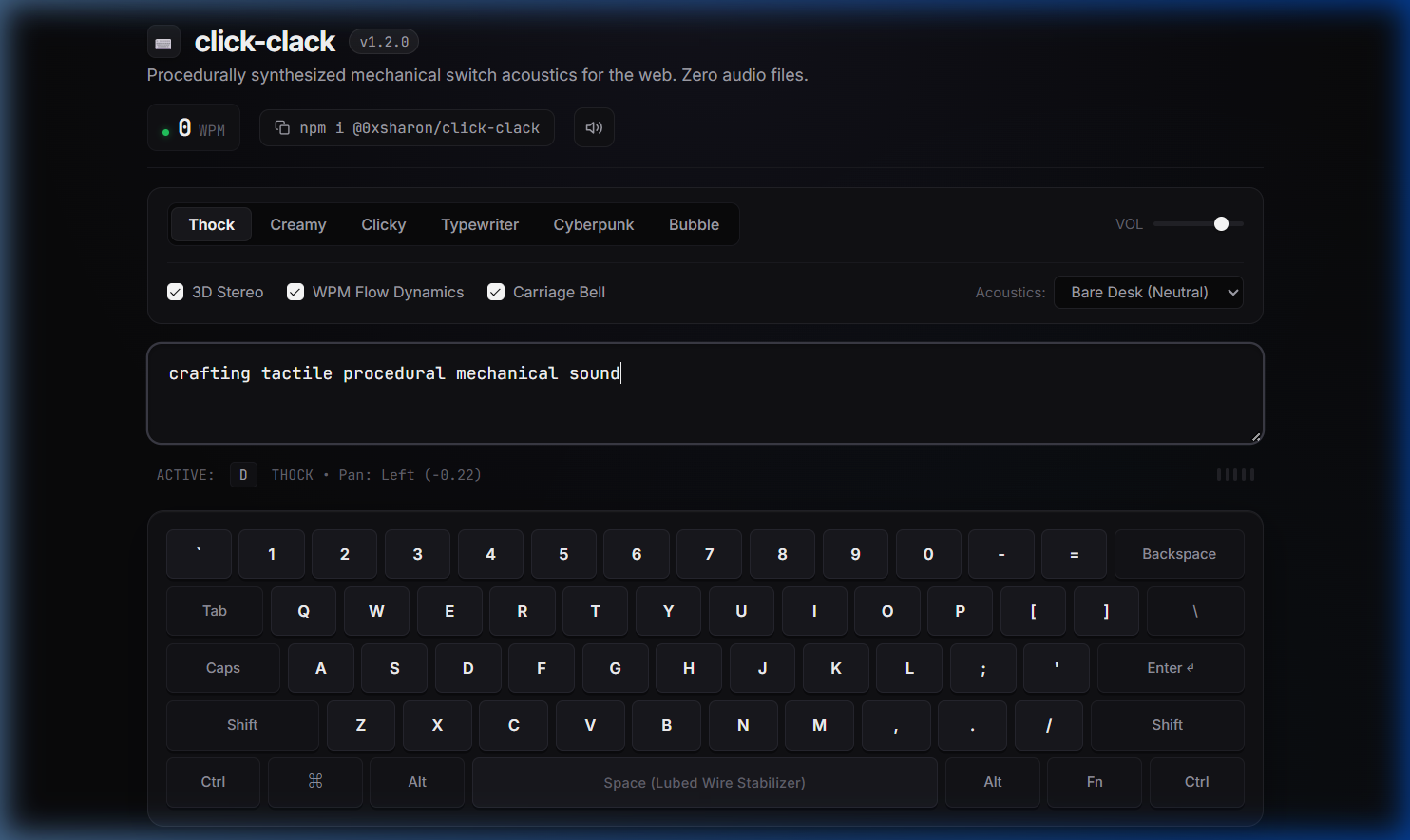
🎧 Interactive Studio Demo
👉 Try the Live Web Demo
Plug in headphones to experience real-time 3D stereo ear-to-ear panning as your fingers move across the physical keyboard.
Why this exists
Tactile micro-feedback makes web applications, code playgrounds, games, and terminal emulators feel responsive and satisfying. But adding mechanical switch audio usually comes with trade-offs:
- Asset Bloat: A standard switch sound pack adds 300KB to 1.5MB of
.mp3 or .wav files to your network payload.
- Playback Latency: Browser audio decoding and standard
<audio> tags create noticeable micro-delays (15–40ms) between a physical keystroke and the sound trigger.
- The "Machine Gun" Effect: Repeatedly firing the identical static audio sample 120 times a minute sounds robotic, repetitive, and unnatural.
click-clack takes an acoustic physics approach. Instead of fetching and playing recorded audio files, it synthesizes the sound of mechanical switches in real time using the browser's native Web Audio API.
- Payload: Under 2KB minified (<1.2KB gzipped).
- Runtime Dependencies: Exactly 0.
- Audio Assets Required: 0 files (no MP3s, WAVs, or base64 audio strings).
- Acoustic Latency: Instantaneous (<1ms).
- Organic Variance: Every keystroke features dynamic pitch and decay jitter (±4%) so typing fast feels organic and alive.
Audio Synthesis Signal Chain
Here is how click-clack transforms a physical key event into tactile acoustics in under a millisecond:
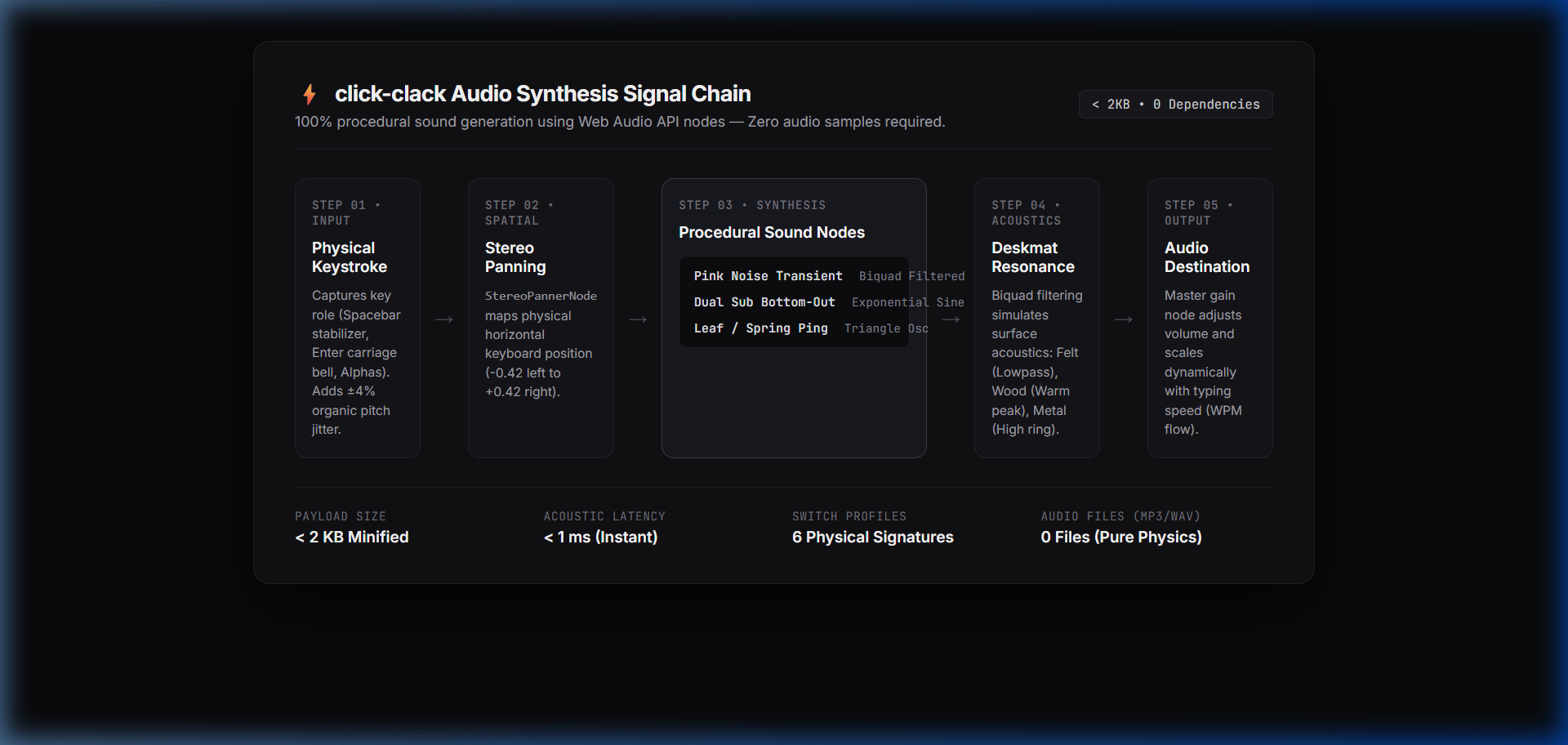
Physical Keystroke / Input Event
              │
      [Key Role Analysis] ─── Spacebar? ─── Heavy sub-bass bottom-out + wire rattle
              │
    [calculateKeyPan] ─────── Maps horizontal coordinate (-0.42 Left to +0.42 Right)
              │
   [Procedural Synthesis Nodes]
   ├── Click Leaf Transient: Bandpass filtered pink noise burst (Q: 3.5, 3.2kHz)
   ├── Bottom-Out Clack:     Dual exponential sine sweep (130Hz → 65Hz)
   └── Spring Resonance:     Triangle oscillator (1100Hz ring)
              │
     [Deskmat Acoustic] ───── BiquadFilter: Lowpass (Felt) / Peaking (Wood/Metal)
              │
    [StereoPannerNode] ────── Ear-to-ear headphone positioning
              │
      [Master Gain] ───────── WPM Flow dynamics scaler (tightens envelope >60 WPM)
              │
      AudioDestination ────── Headphones / Speakers
Switch Profiles
click-clack ships with 6 procedural switch profiles modeled after real mechanical switches and vintage typewriters:
thock | Lubed Holy Panda / Topre | 130Hz → 65Hz Sine | 1.8kHz Lowpass | Deep, rounded bottom-out with dampened housing clack. Heavy 85Hz spacebar wire ping. |
creamy | Lubed Linear (Gateron Oil King) | 380Hz → 160Hz Sine | 3.8kHz Bandpass (Q: 4.5) | High-pitch marbly "pop" with smooth linear glide and minimal housing rattle. |
clicky | Cherry MX Blue / Kailh Box White | 180Hz → 90Hz Sine | 3.2kHz Bandpass (Q: 3.5) | Sharp click-leaf snap followed by high-frequency spring harmonic ping (1.1kHz). |
typewriter | 1940s Underwood / Smith Corona | 140Hz Sawtooth | 2.6kHz Bandpass (Q: 2.0) | Heavy mechanical steel strike, mechanical chassis clunk, and optional carriage bell on Enter. |
cyberpunk | 1980s Sci-Fi CRT Terminal | 440Hz → 220Hz Square | N/A (FM blip) | Digital 8-bit keypress blip with retro synthesizer harmonic overtone. |
bubble | Modern Soft UI Pop | 280Hz → 620Hz Sine | N/A (Liquid envelope) | Gentle, rounded liquid water droplet pop for modern minimalist app interfaces. |
📦 Installation
You can install @0xsharon/click-clack from either npm or GitHub Packages:
Option 1: Via npm (Standard)
npm install @0xsharon/click-clack
Or with your preferred package manager:
pnpm add @0xsharon/click-clack
yarn add @0xsharon/click-clack
bun add @0xsharon/click-clack
Option 2: Via GitHub Packages Registry
@0xsharon/click-clack is also hosted on GitHub Packages:
Dual ESM and CommonJS bundles are included out of the box with zero runtime dependencies and complete TypeScript definitions.
Quick Start
1. Attach to an Input or Textarea
The fastest way to add mechanical audio to an editor or form:
import { attachMechanicalAudio } from '@0xsharon/click-clack';
const inputElement = document.querySelector('textarea');
const detach = attachMechanicalAudio(inputElement, {
profile: 'creamy',
volume: 0.8,
stereoPan: true,
wpmDynamics: true,
deskmat: 'wood',
carriageBell: true,
playRelease: true
});
2. Global Window Binding
To provide subtle mechanical feedback across your entire application:
import { attachMechanicalAudio } from '@0xsharon/click-clack';
const detach = attachMechanicalAudio(window, {
profile: 'thock',
volume: 0.6,
stereoPan: true
});
3. Imperative Manual Trigger
You can also trigger switch sounds imperatively for UI buttons, games, modal confirmations, or calculator keys:
import { playSwitch } from '@0xsharon/click-clack';
submitBtn.addEventListener('click', () => {
playSwitch({
profile: 'creamy',
volume: 0.9,
key: 'Enter'
});
});
playSwitch({ profile: 'thock', key: ' ' });
Framework Integrations
React (@0xsharon/click-clack/react)
Use custom React hooks to attach to refs or the entire window:
import React, { useRef } from 'react';
import { useClickClack, useGlobalClickClack } from '@0xsharon/click-clack/react';
export function NoteEditor() {
const textareaRef = useRef<HTMLTextAreaElement>(null);
useClickClack(textareaRef, {
profile: 'creamy',
stereoPan: true,
wpmDynamics: true,
deskmat: 'felt'
});
return (
<div className="editor-card">
<textarea
ref={textareaRef}
placeholder="Type to feel the switches..."
/>
</div>
);
}
export function App() {
useGlobalClickClack({ profile: 'thock', volume: 0.7 });
return <div id="root">...</div>;
}
Vue 3 (@0xsharon/click-clack/vue)
Use the vClickClack directive:
<script setup lang="ts">
import { vClickClack } from '@0xsharon/click-clack/vue';
</script>

<template>
  <textarea
    v-click-clack="{ profile: 'creamy', stereoPan: true, wpmDynamics: true }"
    placeholder="Vue 3 mechanical switch feedback..."
  />
</template>
Svelte (@0xsharon/click-clack/svelte)
Use the clickClack action:
<script>
  import { clickClack } from '@0xsharon/click-clack/svelte';
</script>

<textarea
  use:clickClack={{ profile: 'creamy', stereoPan: true }}
  placeholder="Svelte mechanical switch feedback..."
/>
Zero-Code HTML Script (@0xsharon/click-clack/auto)
For static blogs, Webflow, Shopify, or documentation sites, simply drop in the auto script and add data-click-clack attributes to your HTML tags:
<body data-click-clack="thock">
<textarea
data-click-clack="creamy"
data-volume="0.8"
data-stereo="true"
data-bell="true"
data-deskmat="wood"
></textarea>
<script type="module" src="https://unpkg.com/@0xsharon/click-clack/dist/auto.mjs"></script>
Built-in Global Mute Hotkey: When using the auto-script, users can press Ctrl + Alt + M (or Cmd + Alt + M) anytime to mute or unmute audio. A clean, non-intrusive on-screen toast is automatically displayed.
Complete API Reference
attachMechanicalAudio(target, options)
Attaches mechanical audio listeners to a DOM element, window, or document.
function attachMechanicalAudio(
  target: EventTarget | HTMLElement | Window,
  options?: AttachOptions
): () => void;
AttachOptions Parameters:
profile | SwitchProfile | 'thock' | Switch signature: 'thock', 'creamy', 'clicky', 'typewriter', 'cyberpunk', 'bubble' |
volume | number | 0.8 | Master output volume between 0.0 (silent) and 1.0 (maximum) |
stereoPan | boolean | true | Positions sounds across the stereo field based on the key's physical horizontal position |
wpmDynamics | boolean | false | Dynamically ramps pitch and tightens envelope decay when typing speed exceeds 60 WPM |
deskmat | DeskmatAcoustic | 'none' | Acoustic resonance filter: 'none' (neutral), 'felt' (damped), 'wood' (warm), 'metal' (bright) |
carriageBell | boolean | false | Plays a vintage mechanical bell chime when the Enter key is pressed |
haptic | boolean | false | Fires a 7ms vibration pulse via navigator.vibrate on supported touchscreen devices |
playRelease | boolean | true | Synthesizes a subtle upstroke reset click when releasing keys (keyup) |
filter | (e: KeyboardEvent) => boolean | undefined | Custom filter predicate to ignore specific keys (e.g., ignoring Escape or modifier keys) |
Returns: A cleanup function () => void that removes all attached event listeners.
playSwitch(options)
Imperatively synthesizes a single switch stroke.
function playSwitch(options?: PlaySwitchOptions): void;
PlaySwitchOptions Parameters:
profile | SwitchProfile | Active Profile | Switch profile used for synthesis |
volume | number | 1.0 | Individual trigger volume |
pitch | number | 1.0 | Pitch scaling multiplier |
pan | number | 0.0 | Stereo pan position (-1.0 hard left to +1.0 hard right) |
key | string | KeyRole | 'standard' | Key identifier (e.g., ' ' for spacebar bottom-out, 'Enter' for carriage return) |
deskmat | DeskmatAcoustic | 'none' | Deskmat surface resonance filter |
carriageBell | boolean | false | Whether to chime the carriage bell on enter |
haptic | boolean | false | Trigger mobile tactile vibration |
isRelease | boolean | false | Whether this trigger represents a key release upstroke |
Global Controls & Mute State
import {
isMuted,
setMuted,
toggleMute,
getMasterVolume,
setMasterVolume,
getMasterProfile,
setMasterProfile
} from '@0xsharon/click-clack';
toggleMute();
setMuted(true);
console.log('Is audio muted?', isMuted());
setMasterVolume(0.5);
setMasterProfile('creamy');
Acoustic Physics & Engine Internals
1. Pink Noise Caching (Zero Garbage Collection)
In real mechanical switches, the high-frequency contact snap is shaped noise rather than a pure tone. Standard Web Audio implementations often generate fresh noise buffers on every keystroke, which triggers JavaScript garbage collector spikes during fast typing.
click-clack pre-calculates a single 1-second pink noise buffer using the Paul Kellet 3-pole filtering algorithm once at initialization:
const bufSize = audioCtx.sampleRate;
const buffer = audioCtx.createBuffer(1, bufSize, audioCtx.sampleRate);
const data = buffer.getChannelData(0);
let b0 = 0, b1 = 0, b2 = 0;
for (let i = 0; i < bufSize; i++) {
const white = Math.random() * 2 - 1;
b0 = 0.99886 * b0 + white * 0.0555179;
b1 = 0.99332 * b1 + white * 0.0750759;
b2 = 0.96900 * b2 + white * 0.1538520;
data[i] = (b0 + b1 + b2 + white * 0.5362) * 0.11;
}
During typing, a lightweight AudioBufferSourceNode references this pre-allocated buffer with a random time offset, ensuring 0 memory allocation per keystroke.
2. 3D Spatial Stereo Panning
When using headphones, typing on a physical keyboard produces sound in distinct physical locations:
- Left keys (
Q, A, Z, Tab, Shift) map to pan -0.42 to -0.22 (Left ear)
- Center keys (
T, G, B, Space) map to pan 0.0 (Center)
- Right keys (
P, L, Enter, Backspace) map to pan +0.22 to +0.42 (Right ear)
This produces an authentic sense of physical keyboard width in headphones without fatiguing the listener.
3. WPM Flow-State Dynamics
When typing speed exceeds 60 WPM, the engine dynamically tightens the decay envelope (from 70ms down to 45ms) and subtly nudges the pitch upward by 2–18%. This prevents acoustic mudding during fast typing and provides a rewarding sense of momentum.
4. Tab Visibility Auto-Sleep
When a user switches browser tabs (document.visibilityState === 'hidden'), the engine automatically suspends the underlying AudioContext, preventing background battery drain and CPU consumption. The context instantly resumes when the tab becomes active again.
Browser Support & Autoplay Policy
click-clack is compatible with all modern browsers:
- Chrome / Chromium 66+
- Firefox 60+
- Safari 14.1+ (macOS & iOS)
- Edge 79+
Modern browsers require a genuine user gesture (mouse click or keystroke) before allowing web audio playback. click-clack handles this automatically: the AudioContext remains idle until the first user interaction, then resumes instantly without throwing autoplay warnings or unhandled promise errors.
Local Development
If you'd like to contribute or experiment with sound profiles locally:
git clone https://github.com/0xSHARON/click-clack.git
cd click-clack
npm install
npm test
npm run build
npm run dev
To run the interactive studio locally, simply open index.html or demo.html in your browser.
🌟 Star History
🤝 Contributors
Contributions of all kinds—submitting new switch acoustics, framework plugins, bug fixes, or documentation improvements—are warmly welcomed!

Please read our Contributing Guide and Security Policy before submitting pull requests.
License
MIT © 0xSHARON



