


Security News
RubyGems Adds Cooldown Feature to Bundler for Newly Published Gems
RubyGems and Bundler 4.0.13 introduced an opt-in cooldown feature that delays newly published gems during dependency resolution.
By Sarah Gooding - Jun 05, 2026
@activewidgets/jquery
Advanced tools



ActiveWidgets is a multi-framework UI component library. This package provides datagrid component for jQuery.
Live demo / Developer guide / API reference
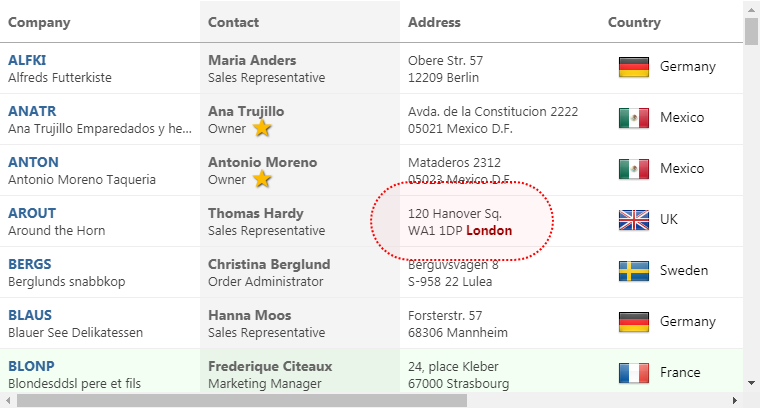
Add @activewidgets/jquery to your project dependencies -
> npm i --save @activewidgets/jquery
Import the library into your app -
import "@activewidgets/jquery";
It will add mount function to jQuery. Now, assuming that you've added a placeholder ax-datagrid tag to the page
<ax-datagrid>Loading...</ax-datagrid>
Assign properties and mount an actual ActiveWidgets component at the placeholder position -
const rows = [
    { message: 'Hello, World!' }
];

$('ax-datagrid')
    .prop('rows', rows)
    .mount();
Live example | Source on github | Edit on Codesandbox
For quick prototyping the package is also available over ActiveWidgets CDN -
<script src="https://cdn.activewidgets.com/jquery"></script>
Live example | Source on github | Edit on Codesandbox
The mount function does not require any arguments - it uses element tagName as a component ID.
<ax-datagrid id="my-grid-1"> ... </ax-datagrid>
You can apply any selector to find the placeholder element (but the tag must be ax-datagrid)
$('#my-grid-1')
    .prop('rows', rows)
    .mount();
You have to provide columns and rows properties to the datagrid to show some data. The properties of each column object define how the data will be rendered -
The style (string|object) or className properties allow to change the styling of the column and cell elements.
const columns = [
  {header: 'Code', field: 'customerID', width: 80, style: 'background:#def', fixed: true},
  {header: 'Company Name', field: 'companyName', width: 160},
  {header: 'Contact', field: 'contactName', width: 120},
  {header: 'Title', field: 'contactTitle', width: 120},
  {header: 'Address', field: 'address', width: 120, align: 'right'}
];

const rows = northwind.customers;

$('ax-datagrid')
    .prop({ columns, rows })  // use $.prop() to assign properties
    .mount();
Live example | Source on github | Edit on Codesandbox
In addition to the standard DOM keyboard and mouse events the datagrid emits composite mouse event which makes it easier to find the elements affected by the user action.
function onMouse({row}){
    alert(`row ${row.key} clicked!`);
}

$('ax-datagrid')
    .prop({ columns, rows })
    .on('mouse', event => onMouse(event.detail))  // pass event.detail to your handler
    .mount();
Live example | Source on github | Edit on Codesandbox
When assigning an event handler, note that the event data is passed in the event.detail property (we are using DOM CustomEvent class).
ActiveWidgets custom events do not bubble, so you should always add an event handler at the component itself, not at some parent element.

FAQs
Datagrid component for jQuery
The npm package @activewidgets/jquery receives a total of 10 weekly downloads. As such, @activewidgets/jquery popularity was classified as not popular.
We found that @activewidgets/jquery demonstrated a not healthy version release cadence and project activity because the last version was released a year ago. It has 1 open source maintainer collaborating on the project.
Did you know?

Socket for GitHub automatically highlights issues in each pull request and monitors the health of all your open source dependencies. Discover the contents of your packages and block harmful activity before you install or update your dependencies.
Security News
RubyGems and Bundler 4.0.13 introduced an opt-in cooldown feature that delays newly published gems during dependency resolution.

Security News
pnpm 11.5 now recognizes npm staged publish approvals in release metadata, preventing those releases from being mistaken for lower-trust package publishes.

Security News
Federal audit finds NIST lacked a plan to clear the NVD backlog, wasted funds on duplicate work, and delayed use of CISA data.