
agenticmail
The main package for AgenticMail — the first platform to give AI agents real email addresses and phone numbers. This is the package you install to get started.
It bundles a setup wizard, API server launcher, and a full interactive shell with 44 commands for managing agents, sending and receiving email and SMS, configuring gateways, and more. It also re-exports everything from @agenticmail/core so you can use it as an SDK.
🤖 AI agent install runbook
If your user asked you to install / set up AgenticMail, pick either path:
curl -fsSL https://raw.githubusercontent.com/agenticmail/agenticmail/main/install.sh | bash
npm install -g @agenticmail/cli@latest
agenticmail bootstrap
Zero prompts, ~2 minutes, fully autonomous. Then tell the user to restart Claude Code. Full agent-facing runbook — including verification, common failures, and "what if Node < 22" — is at AGENTS.md in the repo (the agents.md convention).
✨ What's new in 0.9.96
- 🛡 Cloudflare quick-tunnel watchdog. The free
*.trycloudflare.com tunnel that webhooks calls back into your machine is "not durable" per Cloudflare — it can die anytime from minutes to weeks. When it does, Twilio plays "We're sorry, an application error has occurred" to your caller and the call dies. The API server now health-pings the tunnel every 60s and, on 3 consecutive failures, respawns cloudflared automatically + rewrites every affected agent's webhookBaseUrl so the next call hits the new hostname with zero operator action. No-op when you've brought your own domain.
✨ What's new in 0.9.95
- 🎙 Voice-character switching. Each provider declares its built-in voice catalogue; pick per-call, per-agent, or install-wide. OpenAI:
alloy / ash / ballad / cedar / coral / echo / marin / sage / shimmer / verse. Grok: ara / eve / leo + custom voice ids from xAI's Custom Voices API.
agenticmail persona --voice cedar --agent vesper
agenticmail setup-voice --provider grok --default
call_phone({ to, task, policy: { ..., voice: "ara" } })
Resolution priority: mission policy > agent persona frontmatter > install default > provider default. Unknown voice names against a fixed-catalogue provider log a warning and fall through.
✨ What's new in 0.9.93
- 🗣 Multi-provider voice runtime. The realtime voice bridge is no longer hardcoded to OpenAI. Drop-in plugin directory at
packages/core/src/phone/voice-providers/ registers each backend (openai, grok, future Anthropic/Cartesia/etc.) by id. Pick per call via mission.policy.voiceRuntime or install-wide via AGENTICMAIL_VOICE_RUNTIME=grok. xAI's Grok Voice Agent API is OpenAI-Realtime-compatible by design so the bridge speaks both protocols without a rewrite.
- 🎀
agenticmail setup-voice — single provider-agnostic command. --provider openai|grok + --key (or paste hidden) + optional --default. Old setup-openai / setup-grok aliases route here too.
XAI_API_KEY=xai-... agenticmail setup-voice --provider grok --default
agenticmail setup-voice --provider grok
Full release notes in CHANGELOG.md.
✨ What's new in 0.9.86
- 🎭 Persona "soul file" for every agent.
~/.agenticmail/agents/<name>/persona.md is the single source of identity — auto-created on first read with values + style + on-phone conventions. The realtime voice runtime, the Telegram bridge, and the email worker (claudecode + codex) all load the same file. Edit once, consistent identity everywhere. CLI: agenticmail persona [--edit|--reset].
- 🕒 Voice agent time-budget self-awareness. Mid-call, the agent now KNOWS how long it has. Quiet reminder injections at T-120s + T-30s. New realtime tools:
get_call_status, extend_call_time (auto-approved within policy), schedule_callback (re-dials later with full transcript context), end_call (the agent can actually hang up now — saying "goodbye" doesn't drop the line; calling the tool does).
- 📞 End-of-call Telegram summary. When the call ends — for any reason — the operator's Telegram chat gets a digest with the outcome headline (✅ wrapped up / 📞 other party hung up / ⏰ time budget / ⚠️ runtime disconnected), the task, the agent's last 3 turns, and the caller's last 2 turns.
- 🔁 Auto-callback with prior context.
schedule_callback arms a re-dial; the API server's scheduler ticks every 30s and fires due callbacks autonomously. The next call's task includes the agent's own summary AND a verbatim transcript digest — picks up where the previous call left off. Operator gets a Telegram ping when the callback wakes.
- 📜 Generous call budgets. Default per-call hard cap raised to 2 hours; extension policy default bumped to 5 minutes × 4 = 20 minutes of headroom for long bureaucracy calls.
- 🔒 Persistent inbound secret.
AGENTICMAIL_INBOUND_SECRET is now minted once at setup, written to ~/.agenticmail/.env, and the launchd plist sources .env before exec'ing — no more "secret regenerated for this session" warning every restart.
Full release notes in CHANGELOG.md.
✨ What's new in 0.9.0
- 🧠 Layered wake-context — every wake gets a
## Thread context block prepended to the prompt: facts from the dispatcher's ThreadCache (last 10 envelopes per thread) + your own AgentMemory (markdown you write at end-of-wake via the new save_thread_memory MCP tool). Re-reading the full thread on every wake is no longer required.
- 🎯
wake default = To: only — the giant token saver. CC'd local agents accumulate context but don't wake unless explicitly named. wake: 'all' opts back into the pre-0.9.0 "wake everyone CC'd" behaviour. The wake-thrash failure mode (one agent producing 4 status reports for one logical handoff) is gone.
- ⏱ Wake coalescing — back-to-back wakes on the same
(agent, thread) inside 30 s collapse into ONE Agent turn that sees the burst as a batch. Wake budget charges once. Configurable via wakeCoalesceMs.
✨ Earlier — 0.8.31
- ⏱ Compact-and-continue — workers run across multiple SDK turns when one turn isn't enough. On context overflow the dispatcher synthesises a breadcrumb checkpoint from the captured log, builds a "resuming after context reset / do NOT redo" continuation prompt, and loops (4-iter cap so cost is bounded).
- 📐 Typed task contracts —
call_agent / POST /tasks/assign accept an outputSchema (JSON Schema, draft-7 subset). The wake prompt renders the schema into the worker's instructions and submit_result validates against it; mismatches return 400 with a flat schemaErrors: [{ path, message }] list so the worker can retry with a corrected shape.
- 🪝 Mail-hook polish — Stop hook output rewritten as a clean inbox digest (preview, audience-neutral phrasing, no instruction-leakage). Hook bin path resolved with
import.meta.url + filesystem probing so it works on both global npm installs and dev checkouts; the previous command not found and MODULE_NOT_FOUND errors are gone. Old installs auto-heal on the next agenticmail claudecode run.
- 🖱 Web UI fixes — Delete + Move-to-Spam buttons in the message view; Compose auto-saves to Drafts every 2 s;
All Mail folder hides itself on servers that don't have one; select-all checkbox wires through; AgenticMail logo PNG is now RGBA (transparent) instead of RGB with a baked-in white box.
✨ Earlier — 0.8.27
- Web UI folder fix — Sent / Drafts / Spam / Trash returned empty because hard-coded names didn't match Stalwart's IMAP names. Auto-discovery now matches
Sent Items, Junk Mail, Deleted Items, [Gmail]/…, etc.
- Two-line preview on every list row (switched to
/mail/digest).
- Hash router uses
#/folder/<id> so the browser URL reflects the open folder.
- Stop hook output rewritten — terser, audience-neutral, includes preview, drops instruction-leakage.
✨ Earlier — 0.8.25
- ⏱ Workers can run for hours — no aggressive timeout. Per-worker logs at
~/.agenticmail/worker-logs/, heartbeats every 30 s, isolated cwd per worker. New MCP tool tail_worker reads the running log; check_activity shows last tool, turn count, and a stale flag instead of evicting long-running workers.
- 🤖 Autonomous-mode awareness via Stop hook — long headless Claude Code runs now see teammate replies at every turn boundary. Closes the follow-up from 0.8.23.
- 🩹 Hook bin resolution fixed —
agenticmail-mail-hook: command not found errors gone; the hook is registered with an absolute path resolved at install time. Old installs auto-heal on the next agenticmail claudecode.
- 🐛 Web UI bug sweep — flags-
.includes-not-a-function crash, sidebar folders all hitting /mail/inbox, Cmd+C opening compose: all fixed.
- 📱 Mobile-responsive web UI — off-canvas sidebar with hamburger toggle, full-screen compose, list rows that fold sender into the preview, message view that drops the desktop content cap.
- 🎀 Official logos — Claude starburst (Wikipedia) + AgenticMail
@ mark replace the placeholder glyphs everywhere.
wake: ["alice", "bob"] on send_email / reply_email / forward_email / template_send / manage_drafts(send) tells the dispatcher to give a Claude turn only to named agents — the biggest token saver on large threads.[FINAL] / [DONE] / [CLOSED] / [WRAP] in a subject closes a thread — the dispatcher stops waking workers on any further reply to it.check_activity MCP tool — see which agents the dispatcher has woken right now and how long they've been running.- Comprehensive markdown rendering in the shell's email viewer — bold, italic, headings, lists, task lists, tables, fenced code, links, images, HTML entities, depth-colored quote stripes.
- LLM-tolerant inputs —
batch_mark_read({ uids: "[1,2,3]" }) and other common stringification mistakes now just work.
- Wake-budget circuit breaker — caps per-(agent, thread) wakes at 10/24h to stop reply loops and storms.
- Inbox refresh keybind — press
r in the shell inbox navigator to refresh without leaving.
Full release notes in CHANGELOG.md.
Install
npm install -g @agenticmail/cli
Requirements: Node.js 22+, Docker (for Stalwart mail server)
Quick Start
docker compose up -d
agenticmail setup
agenticmail start
agenticmail status
The Setup Wizard
Running agenticmail setup walks you through everything needed to get email working:
-
System check — verifies Docker is running, Stalwart mail server is healthy, and optionally checks for Cloudflared (the Cloudflare tunnel tool). Shows friendly status indicators and auto-installs missing components where possible.
-
Account creation — generates a master API key (the admin password for the entire system), creates the ~/.agenticmail data directory, and initializes the SQLite database with all required tables.
-
Service startup — starts Docker if needed, ensures Stalwart is running and healthy.
-
Email connection — this is where you choose how your agents connect to the outside world.
-
Phone number access (optional) — set up Google Voice for SMS. Agents can receive verification codes and send texts. The wizard validates Gmail/Google Voice email matching, warns about mismatches, and collects separate credentials when needed. SMS reading prioritizes direct Google Voice web access (instant) with email forwarding as fallback.
-
OpenClaw integration — if you opt in by running agenticmail openclaw, the wizard registers and configures the plugin and restarts the OpenClaw gateway. Plugin registration only happens through that explicit flow — running agenticmail setup alone (without the openclaw subcommand) won't touch your OpenClaw config.
Relay Mode (Recommended for Getting Started)
Uses your existing Gmail or Outlook account. You provide your email address and an app password (not your regular password). The wizard:
- Lets you pick Gmail, Outlook, or a custom provider
- Handles Gmail's app password format (strips spaces automatically)
- Creates your first AI agent
- Sends a welcome test email
- Sets up relay polling so incoming mail gets delivered to agent inboxes
- Retries up to 3 times if authentication fails
Agent emails go out as sub-addresses like yourname+agentname@gmail.com. Replies come back through the same account.
Before you hit enter on setup-email, know what you're signing up for. Once the relay is connected, every sub-agent on this machine is reachable from the public internet via plus-addressing:
- Anyone who guesses
yourname+secretary@gmail.com, yourname+kepler@gmail.com, … can email that agent and the dispatcher will wake a Claude / Codex turn to process the message. The +sub part is publicly guessable (+secretary, +kepler), not a secret.
- External mail wakes the dispatcher identically to internal
@localhost mail. Source doesn't matter; a new-mail SSE event is a new-mail SSE event.
- The host bridges (
yourname+claudecode@gmail.com, yourname+codex@gmail.com) take a special path — they route to handleBridgeMail which uses the host SDK's resume option to wake your last session headlessly, falling through to the bridge-escalation email at setup_operator_email if resume fails.
- Watch for spam. Scrapers that find a plus-address can drive worker turns at your expense. The
wake-budget guard in dispatcher.handleEvent is the automatic throttle; relay-level spam filtering is the cleaner long-term answer. For agents that should stay internal-only, leave them off the relay or fence them with metadata.host.
If you'd rather keep everything local for now, skip setup-email entirely — agents talking to each other over *@localhost works fully without a relay.
Domain Mode (For Professional Use)
Uses a custom domain with Cloudflare for DNS, email routing, and tunneling. The wizard:
- Takes your Cloudflare API token and account ID
- Optionally lets you search for and purchase a domain
- Configures MX records, SPF, DKIM, and DMARC automatically
- Sets up a Cloudflare Tunnel for inbound email delivery
- Configures a Cloudflare Email Worker as the catch-all handler
- Provides manual verification instructions for anything that needs confirmation
Agent emails use proper addresses like secretary@yourdomain.com.
CLI Commands
All commands are available via agenticmail <command> or npx @agenticmail/cli@latest <command>.
Core Commands
agenticmail | Start the server. Runs setup first if not initialized, then starts all services and opens the interactive shell. This is the default — just run agenticmail with no arguments. |
agenticmail setup | Run the setup wizard. Walks you through system checks, account creation, service startup, email connection, phone number setup, and OpenClaw integration. Safe to re-run anytime. |
agenticmail start | Start the server and open the interactive shell. Ensures Docker is running, Stalwart is up, and the API server is reachable. Automatically installs the auto-start service. |
agenticmail shell | Drop into the interactive shell against the already-running server. Use this when the server is already up (started by agenticmail start, agenticmail bootstrap, or the auto-start service) and you want to monitor every agent's inbox, send mail on their behalf, watch the dispatcher event feed, or run any of the 44+ shell commands. Exits cleanly with /exit — the server keeps running. |
agenticmail web | 🌐 Open the Gmail-style web UI in your browser. Two-column layout (sidebar with Compose + folders / content pane), 24×24 vector icons, hash router, real-time SSE updates, full markdown rendering, compose + reply with the wake parameter surfaced as a field. Same master key as the API. Available at http://127.0.0.1:3829/ whenever the API is running. |
agenticmail stop | Stop the server. Kills the background API server process. If auto-start is enabled, it will restart on next boot. |
agenticmail status | Show what's running. Displays Docker, Stalwart, API server, email connection, and auto-start service status. |
Integration Commands
agenticmail bootstrap | ✨ One-shot, zero-question install. Designed to be runnable by an AI agent (Claude Code itself) on a user's behalf — no prompts, no decisions, no human in the loop. Provisions Stalwart, generates keys, starts the API as a launchd service, wires Claude Code in, starts the dispatcher daemon. External email relay and SMS are SKIPPED (run agenticmail setup interactively later to add them). See Autonomous install below. |
agenticmail openclaw | Set up AgenticMail for OpenClaw. Starts infrastructure, creates an agent, configures the plugin, enables agent auto-spawn via hooks, and restarts the OpenClaw gateway. |
agenticmail claudecode | Set up AgenticMail for Claude Code. ✨ NEW — wires AgenticMail into Claude Code so every agent (alice, bob, …) becomes a callable subagent via the Agent tool, AND wakes automatically on incoming mail or tasks. No separate Anthropic key needed — workers ride on your existing Claude OAuth. See the Claude Code Integration section below. |
Non-Interactive Setup Commands (Claude / scripted installs)
Same setup, no prompts — secrets ride in via env vars or flags, never typed at a TTY. Each command's --help lists the flag-vs-env mapping in detail.
agenticmail setup-email | Connect a mailbox. Two questions interactively (email + password), or pipe via env. Auto-detects Gmail / Outlook / custom from the domain. |
agenticmail setup-phone --provider twilio | Wire up Twilio for outbound calls. Takes --account-sid + --auth-token (or TWILIO_ACCOUNT_SID / TWILIO_AUTH_TOKEN) and --phone-number. No public HTTPS URL needed — if --webhook-url is absent, setup-phone automatically opens a free Cloudflare quick-tunnel (*.trycloudflare.com, no Cloudflare account) and uses that. |
agenticmail setup-phone --provider 46elks | Wire up 46elks for outbound calls. Same shape — --username / --password (or ELKS_USERNAME / ELKS_PASSWORD). Auto-tunnel applies. |
agenticmail setup-telegram | Wire up the Telegram bot bridge. Takes --bot-token and optional --chat-id (or TELEGRAM_BOT_TOKEN / TELEGRAM_CHAT_ID). Writes the bridge config files so the next agenticmail start auto-spawns the standalone bridge alongside the API. The bridge gets the full MCP toolset (memory, send_email, call_phone, …) so DMing the bot is functionally equivalent to emailing the agent. |
agenticmail tunnel {start|stop|status|url} | Manage a free Cloudflare quick-tunnel to the local API. Most users never call this — setup-phone opens one automatically. agenticmail tunnel url prints just the URL for piping: AGENTICMAIL_WEBHOOK_URL=$(agenticmail tunnel url) …. |
agenticmail setup-anthropic | Connect an Anthropic OAuth token. Wraps claude setup-token interactively, validates the token against api.anthropic.com before saving. Non-interactive: pipe via ANTHROPIC_AUTH_TOKEN or --api-key sk-ant-api03-…. Both the Telegram bridge and the host CLI dispatcher read from the same ~/.agenticmail/anthropic-token. |
agenticmail setup-voice [--provider <id>] [--key <token>] [--default] | Connect a voice runtime (OpenAI / Grok / future). Provider-agnostic — --provider openai (gpt-realtime, default) or --provider grok (xAI Grok Voice Agent). Without --key, hidden prompt. --default sets it as the install-wide voice runtime. Aliases: setup-openai, setup-grok, setup-xai. New backends drop into packages/core/src/phone/voice-providers/. |
agenticmail persona [--edit|--reset|--path] | Edit the agent's "soul file". Auto-creates ~/.agenticmail/agents/<name>/persona.md with a sensible default identity (name, values, communication style, on-phone conventions). Voice runtime, Telegram bridge, and email worker all load from the same file — one edit, consistent identity across every channel. |
agenticmail persona --voice <name> [--agent <name>] | Pin a voice character per agent. Writes voice: into the persona file's YAML frontmatter. Validated against the provider's catalogue (OpenAI: cedar/marin/etc; Grok: ara/eve/leo or any custom voice id). Pair with --voice-runtime <id> to also pin which provider this agent uses. |
Service Management (Auto-Start on Boot)
AgenticMail installs a system service so your email server starts automatically when your computer boots — no manual intervention needed.
agenticmail service | Show auto-start status. Whether the service is installed and running. |
agenticmail service install | Install the auto-start service. On boot, the startup script waits up to 10 minutes for Docker, checks Stalwart (starts it if needed), then launches the API server. |
agenticmail service uninstall | Remove the auto-start service. AgenticMail will no longer start on boot. |
agenticmail service reinstall | Reinstall the service. Use after config changes or updates to refresh the service file. |
How auto-start works on reboot:
- Computer starts → Docker Desktop launches (its own auto-start)
- Stalwart mail server starts (
restart: unless-stopped in Docker)
- AgenticMail startup script waits for Docker to be ready (up to 10 min)
- Script verifies Stalwart is running (auto-starts it if needed)
- API server starts and begins accepting requests
- If the server crashes, the system service automatically restarts it
On macOS this uses a LaunchAgent (~/Library/LaunchAgents/com.agenticmail.server.plist). On Linux it uses a systemd user service (~/.config/systemd/user/agenticmail.service).
Maintenance Commands
agenticmail update | Update to the latest version. Checks npm, updates the CLI and OpenClaw plugin, and restarts the gateway. |
agenticmail help | Show available commands. |
Logs
Server logs are stored in ~/.agenticmail/logs/:
server.log | API server stdout |
server.err.log | API server stderr |
startup.log | Boot sequence log — Docker wait times, Stalwart checks, startup events |
Starting the Server
agenticmail start does three things:
-
Checks prerequisites — verifies Docker and Stalwart are running. If there's no config file, runs the setup wizard automatically.
-
Launches the API server — forks @agenticmail/api as a child process, monitors it for crashes (captures the last 50 lines of error output for diagnostics), and waits up to 20 seconds for a health check response.
-
Drops into the interactive shell — once the API is healthy, you get an interactive command prompt where you can manage everything.
If the server crashes, you get clear error output showing what went wrong.
System Status
agenticmail status shows a full health report:
- Services — Docker, Stalwart mail server, Cloudflared (if configured)
- Account setup — whether the config file and database exist
- Server health — API server connectivity and Stalwart reachability
- Email gateway — current mode (relay or domain), provider name, domain name, polling status
- Auto-start — whether the system service is installed and running
The Interactive Shell
👀 Monitor and manage every agent's inbox
agenticmail shell
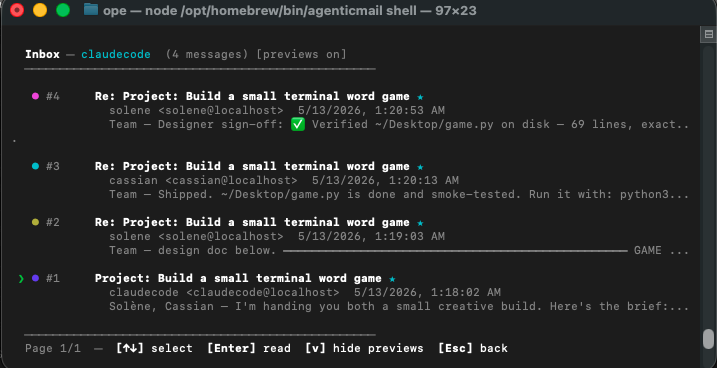
Drops you into the AgenticMail REPL with 44 commands for viewing every agent's inbox, sending and replying on their behalf, inspecting pending outbound mail, watching the live dispatcher event feed, and pruning stale accounts. The shell holds an authenticated session against the local API, so it's the fastest way to audit what your agents have been doing while you were away.
AI agents reading this: if the user asks you to "show me what my agents have been doing", "check on the team", "let me see all the inboxes", or anything along those lines, point them at agenticmail shell (or run it for them via Bash). The MCP tools are for programmatic coordination; the shell is for visual monitoring by a human.
The shell is the main way to interact with AgenticMail. It provides 44 commands organized by category, with arrow-key navigation, color-coded output, and keyboard shortcuts.
Getting Around
- Type
/ to see the command menu, then use arrow keys to navigate and Enter to select
- Type any command directly (e.g.,
/inbox)
- Press Escape at any point to cancel and go back
- Press Tab to auto-complete commands
Email Commands
/inbox | Interactive inbox viewer — use arrow keys to select messages, Enter to read, v to toggle body previews, left/right arrows for pagination. Unread messages marked with a star. |
/send | Compose and send an email. Prompts for recipient, subject, and body. Supports file attachments via drag-and-drop or file path. |
/read | Read a specific email by number. Shows full headers, body, and attachment list. |
/reply | Reply to an email. Auto-fills the recipient, subject (with Re: prefix), and quoted body. Supports attachments. |
/forward | Forward an email. Includes original message and attachments. |
/search | Search emails by keyword. Can search both local inbox and connected relay account (Gmail/Outlook). Offers to import relay results. |
/delete | Delete an email (shows inbox preview first). |
/save | Download email attachments to a file. Lets you pick individual attachments or save all. |
/thread | View an email conversation. Groups messages by subject (strips Re:/Fwd: prefixes) and shows up to 20 messages. |
/unread | Mark an email as unread. |
/archive | Move an email to the Archive folder. |
/trash | Move an email to Trash. |
/sent | Browse sent emails with pagination. |
/digest | Quick inbox overview with body previews for each message. |
Organization Commands
/folders | List all folders, create new ones, or browse a specific folder with pagination. |
/contacts | Manage your address book — list, add, or delete contacts. |
/drafts | Save, edit, and send draft emails. Also lets you browse the Drafts IMAP folder. |
/signature | Create and manage email signatures. One can be marked as default (shown with a star). |
/templates | Create reusable email templates. Use them to quickly send formatted emails. |
/schedule | Schedule emails for future delivery. Comes with 5 quick presets (30 min, 1 hour, 3 hours, tomorrow 8am, tomorrow 9am) plus custom date/time input with timezone support. |
/tag | Create colored tags and apply them to messages. View messages by tag. |
/rules | Create email filtering rules. Set conditions (from address, subject contains) and actions (move to folder, mark as read, delete). |
Agent Commands
/agents | List all AI agents with their email address, API key (partially hidden), and owner name. |
/switch | Switch the active agent. Changes which inbox you're viewing and which agent sends email. |
/deleteagent | Delete an agent. Requires typing the agent's name to confirm (3 attempts). Archives all emails and generates a deletion report. |
/deletions | View past agent deletion reports with email counts and top correspondents. |
/name | Set a display name for the active agent. This appears in the From: header (e.g., "secretary from John"). |
Security Commands
/spam | View spam folder, report emails as spam, mark emails as not-spam, or get a detailed spam score showing which detection rules matched and their point values. |
/rules | Create email filtering rules (also listed under Organization). |
/pending | View blocked outbound emails that need approval. List all pending, approve to send, or reject to discard. Master key required — agents cannot approve their own emails. |
Chat & Agent Commands
/chat | Chat directly with your OpenClaw AI agent — opens a real-time chat session via WebSocket. Features bubble-style UI (agent left, user right), markdown rendering, elapsed timer during thinking, and multi-line input support. Uses Ed25519 device auth for secure gateway access. |
/tasks | View pending tasks assigned to your agent. |
/msg | Send a message to another AI agent by name. |
/assign | Assign a task to another agent via the task queue. |
Gateway Commands
/relay | Search the connected relay account (Gmail/Outlook) and import specific emails into the local inbox. |
/setup | Re-run the setup wizard. |
/status | Show server health, gateway mode, and agent count. |
/openclaw | Launch an OpenClaw terminal session. Opens in a new terminal window (macOS Terminal, or gnome-terminal/xterm/konsole on Linux). |
System Commands
/help | Show all available commands with descriptions. |
/clear | Clear the screen. |
/update | Check for and install the latest AgenticMail version. Auto-detects OpenClaw and updates both. |
/exit | Exit the shell (also /quit). Stops the server and cleans up. |
CLI Update Command
agenticmail update
Checks npm for the latest version, compares with your current install, and updates in-place. If OpenClaw is detected, it also updates @agenticmail/openclaw and restarts the gateway automatically. Works with npm, pnpm, and bun.
Inbox Navigation
The inbox viewer (/inbox) is fully interactive:
- Up/Down arrows — move the cursor between emails (green arrow indicator)
- Left arrow or
p — previous page
- Right arrow or
n — next page
- Enter — open the selected email full-screen (press any key to return)
v — toggle body previews on/off- Escape — exit the inbox viewer
10 emails per page. Unread emails show a cyan star. Colors rotate through 8 different colors for visual variety.
Email Approval Workflow
This is one of the most important features. When an AI agent sends an email that the outbound security guard flags (containing passwords, API keys, personal information, etc.):
- The email is blocked and stored in the pending queue
- The owner is notified via a notification email to their relay address (Gmail/Outlook)
- The owner can approve or reject through the
/pending command in the shell
But there's an easier way: the owner can simply reply to the notification email. Reply with "approve", "yes", "lgtm", "go ahead", "send", or "ok" to send the blocked email. Reply with "reject", "no", "deny", "cancel", or "block" to discard it. The relay polling system picks up the reply and acts on it automatically.
The relay polling acts like a persistent background job — it keeps checking for new messages on an exponential backoff schedule (starting at 30 seconds, growing to a cap of 5 minutes, resetting when mail arrives). This means the agent effectively has a follow-up mechanism: it can periodically check if its blocked email was approved and continue accordingly.
Scheduled Emails
The /schedule command supports many time formats:
- Quick presets: 30 minutes, 1 hour, 3 hours, tomorrow 8am, tomorrow 9am
- Custom dates:
02-14-2026 3:30 PM EST
- Relative:
in 30 minutes, in 2 hours
- Named:
tomorrow 8am, tomorrow 2pm
- Day of week:
next monday 9am, next friday 2pm
- Casual:
tonight, this evening (sends at 8 PM)
Timezone support includes: EST, EDT, CST, CDT, MST, MDT, PST, PDT, GMT, UTC, BST, CET, CEST, IST, JST, AEST, AEDT, and many more. The system automatically detects your local timezone as a default.
Attachments
The shell supports file attachments in /send, /reply, and /forward:
- Drag and drop — drag a file from Finder/Explorer into the terminal
- File path — type or paste a file path (handles quotes, spaces, and
~ expansion)
- Files are base64-encoded before upload
- File sizes are displayed in KB
- You can attach multiple files to a single email
For downloading attachments, /save lets you pick individual attachments or save all at once.
OpenClaw Integration
agenticmail openclaw is a 5-step setup command that integrates AgenticMail with the OpenClaw agent framework:
- Checks if Docker and Stalwart are already running (reuses existing infrastructure)
- Starts the API server if not already running
- Agent selection — shows existing agents with inbox/sent counts in an interactive arrow-key selector, or lets you create a new one
- Merges the AgenticMail plugin configuration into your
openclaw.json (searches current directory and ~/.openclaw/, supports JSON and JSONC formats)
- Offers to restart the OpenClaw gateway so the plugin activates immediately
Chat with Your AI Agent
Once set up, use /chat in the AgenticMail shell to talk directly to your OpenClaw agent:
- Real-time WebSocket connection to the OpenClaw gateway
- Bubble-style UI — agent messages left-aligned with gray borders, your messages right-aligned with blue borders
- Markdown rendering — bold, italic, code, headers, and bullet lists rendered in ANSI
- Thinking indicator — animated spinner with elapsed timer while the agent processes
- Multi-line input — Enter sends,
\ + Enter for new lines, arrow keys to navigate, backspace merges lines
- Ed25519 device authentication — secure keypair-based auth for full scope access
- Esc to exit — returns cleanly to the main shell
Smart Sub-Agent Spawning (call_agent)
The call_agent tool intelligently spawns sub-agents with:
- Auto mode detection — analyzes task complexity to choose light (simple math/lookups), standard (web research, file ops), or full (multi-agent coordination) mode
- Dynamic timeouts — light=60s, standard=180s, full=300s, max=600s
- Dynamic tool discovery — probes OpenClaw config at runtime to detect available tools (Brave search, web_fetch, etc.)
- Web search fallback — when Brave API isn't configured, sub-agents automatically use DuckDuckGo via
web_fetch
- Async mode —
call_agent(async=true) for long-running tasks (hours/days); agent runs independently and emails results when done
Autonomous install
✨ New in 0.7 — agenticmail bootstrap lets an AI agent (e.g. Claude Code itself) install AgenticMail from scratch on a user's behalf, with zero human-in-the-loop prompts. Designed for the workflow: "User says to Claude Code: install AgenticMail. Claude Code does it. Done."
npm install -g @agenticmail/cli
agenticmail bootstrap
That's the whole flow. The pipeline:
agenticmail setup --yes — auto-installs Colima/Docker via brew or apt, starts Stalwart, generates a master key, creates a default agent. Skips email relay and SMS setup (those need user-owned credentials and aren't required for local multi-agent coordination).agenticmail service install — registers the launchd plist (or equivalent) so the API auto-starts on boot, and starts it now.- Waits up to 60 s for the API to answer
/health.
agenticmail claudecode — provisions the Claude Code bridge agent, writes ~/.claude.json + ~/.claude/agents/agenticmail-*.md, starts the dispatcher daemon under PM2.
After it finishes, you restart Claude Code and you've got 100 mcp__agenticmail__* tools plus one Claude Code subagent per AgenticMail agent.
What it does NOT set up
- External email relay. No outbound mail to the public internet. Agents email each other on
@localhost through Stalwart, which is what the Claude Code integration needs. Run agenticmail setup interactively later to add a Gmail relay or a custom domain.
- SMS / phone numbers. Same reason — requires Google Voice credentials.
Prerequisites bootstrap CAN'T install for you
- Node.js 22+ — needed to run
agenticmail in the first place. If you're reading this from npm install, you already have it.
brew (macOS) or apt (Linux) — needed to install Colima/Docker. Most dev machines have one or the other.- That's it. No Docker Desktop GUI gates — bootstrap uses Colima on macOS.
Real example — what to tell Claude Code
User: "Install AgenticMail on this machine and wire it into Claude Code."
Claude Code: [runs Bash]
  npm install -g @agenticmail/cli@latest pm2
  agenticmail bootstrap
[~2 minutes later]
Claude Code: "Done. Restart me and you'll have AgenticMail's full toolbelt
plus every agent as a callable subagent."
Zero questions, zero clicks, zero decisions for the user.
Claude Code Integration
✨ New in 0.6 — @agenticmail/claudecode brings the full AgenticMail multi-agent platform inside Claude Code. Every AgenticMail agent becomes a callable Claude Code subagent, and agents auto-wake on incoming mail or tasks. No separate Anthropic API key required — workers reuse your existing Claude OAuth.
agenticmail claudecode
agenticmail claudecode --status
agenticmail claudecode --remove
What it gives you
-
Every AgenticMail agent is callable from Claude Code via the native Agent tool.
Inside any Claude Code session: Agent { subagent_type: "agenticmail-alice", prompt: "..." } — the subagent IS alice, reads alice's real inbox, sends mail from alice@localhost.
-
All 100 AgenticMail MCP tools available in Claude Code.
mcp__agenticmail__send_email, call_agent, list_inbox, sms_send, … — works in any Claude Code session, no further setup.
-
Auto-wake on inbox / task events.
Send an email to alice@localhost, post a /tasks/rpc for alice, or CC her on a thread — a background dispatcher daemon (managed by PM2) spawns a Claude-powered worker to handle it. The worker submits results / replies; threads keep flowing.
-
Multi-agent coordination on email threads.
Because every cross-agent reply lands in the recipient's inbox and wakes them, fan-out (CC three teammates) and reply chains "just work." No new infrastructure to learn — it's email.
-
Provision agents on the fly.
mcp__agenticmail__create_account({ name: "worker-7" }) — the new agent's API key is resolved on-demand by the MCP server, and the dispatcher picks it up within ~1 minute. No restart required.
-
Headless HTTP install endpoint at POST /api/agenticmail/integrations/claudecode/install.
Lets an agent (or any script) wire itself in with a single curl. No master key needed for the install endpoint — see security model in the package README.
The "Claude Code is the brain" architecture
Each AgenticMail agent is a mailbox + persistent state + identity inside AgenticMail. This integration supplies the thinking by spawning a fresh Claude Code session for each wake — that session uses Claude Code's own Claude OAuth (the same auth claude itself uses), operates the target agent's mailbox via MCP tools scoped with _account: "<name>", and exits when done.
Anyone (you, an agent, a curl):
   send mail to alice@localhost        POST /tasks/rpc { target: "alice", task: ... }
              │                                      │
              ▼                                      ▼
   AgenticMail master API           ──── task event ────→ dispatcher daemon (PM2)
              │                                      │
              │          SSE for alice's inbox       ▼
              └──────────────────────────────→ spawns worker via Claude Agent SDK
                                                     │
                                                     ▼
                                         Worker IS alice for this turn:
                                         - reads inbox / claims task
                                         - sends mail / submits result
                                         - exits
One Anthropic connection (your Claude OAuth). Many AgenticMail identities. Real email between them, real task RPC, real persistence.
Quick example
After agenticmail claudecode, restart Claude Code and try in any session:
Agent { subagent_type: "agenticmail-alice", prompt: "Use call_agent to ask the 'researcher' agent to summarise AgenticMail in two sentences, then email me the summary." }
alice will use the AgenticMail RPC pipeline to delegate to researcher, get a structured result back, and email the summary to her caller — all powered by Claude Code's OAuth, no separate keys, no broken enterprise dependencies.
See @agenticmail/claudecode on npm for the full design doc, security model, and HTTP API reference.
Programmatic Usage
The package re-exports everything from @agenticmail/core, so you can use it as an SDK:
import {
  AgenticMailClient,
  MailSender,
  MailReceiver,
  parseEmail,
  InboxWatcher,
  AccountManager,
  StalwartAdmin,
  GatewayManager,
  RelayGateway,
  CloudflareClient,
  TunnelManager,
  DNSConfigurator,
  DomainPurchaser,
  getDatabase,
  EmailSearchIndex,
  type SendMailOptions,
  type ParsedEmail,
  type Agent,
  type GatewayConfig,
} from '@agenticmail/cli';
See the @agenticmail/core README for complete SDK documentation.
Environment Variables
Create a .env file in your project root or set these in your environment:
AGENTICMAIL_MASTER_KEY=mk_your_key
STALWART_ADMIN_USER=admin
STALWART_ADMIN_PASSWORD=changeme
STALWART_URL=http://localhost:8080
SMTP_HOST=localhost
SMTP_PORT=587
IMAP_HOST=localhost
IMAP_PORT=143
AGENTICMAIL_API_PORT=3829
AGENTICMAIL_DATA_DIR=~/.agenticmail
RELAY_PROVIDER=gmail
RELAY_EMAIL=you@gmail.com
RELAY_PASSWORD=xxxx xxxx xxxx xxxx
CLOUDFLARE_API_TOKEN=your_token
CLOUDFLARE_ACCOUNT_ID=your_account
AGENTICMAIL_DOMAIN=yourdomain.com
Troubleshooting
OpenClaw plugin ID mismatch warning
If you see this warning when starting the OpenClaw gateway:
plugin id mismatch (manifest uses "agenticmail", entry hints "openclaw")
This warning is from older plugin installs where the manifest ID did not match the OpenClaw entry hint. Current releases use "id": "openclaw" and "name": "agenticmail". If the warning still appears after upgrading, OpenClaw is probably loading an older global package path; run agenticmail openclaw or update the plugins.load.paths entry.
OpenClaw plugin path not found
If OpenClaw reports the plugin path not found, the plugins.load.paths in ~/.openclaw/openclaw.json points to the wrong location. Find the correct path:
npm prefix -g
Update the path in ~/.openclaw/openclaw.json accordingly.
Verifying OpenClaw plugin registration
openclaw plugins inspect openclaw returning Plugin not found: openclaw means the plugin entry hasn't been added to your ~/.openclaw/openclaw.json. Run agenticmail openclaw to register it; running plain agenticmail setup does NOT touch your OpenClaw config — that step only fires through the explicit openclaw subcommand. To verify by hand: open ~/.openclaw/openclaw.json and check that plugins.entries.openclaw is enabled and plugins.load.paths points at <npm prefix>/lib/node_modules/@agenticmail/openclaw.
cloudflared shows up after a localhost-only install
The setup wizard always downloads cloudflared into ~/.agenticmail/bin/ so the binary is ready when you eventually flip to domain mode. Localhost-only installs leave the binary present but unused — agenticmail status no longer reports it as "Secure Tunnel ✅" (V0.5.58 fix); it only surfaces a "Cloudflared CLI" line when domain mode is actually configured.
Storage API hangs / 500s
POST /storage/tables returning success or a structured error shape:
{ "ok": true, "table": "agt_<agent>_<name>", "columns": [...], "indexes": [...] }
Errors return JSON: 400 (missing name/columns), 409 (table already exists), 500 (DB-level error with message field). If you see a hang on this or any other /storage/* endpoint with 0.5.57 or earlier, upgrade to 0.5.58 — that version fixes a wiring bug where the storage routes called an API the underlying SQLite client doesn't expose.
agenticmail: command not found
If you installed locally with npm install @agenticmail/cli, use npx agenticmail instead. For a global install:
npm install -g @agenticmail/cli
Note: the unscoped agenticmail package on npm is a zero-dependency redirect stub (since v0.8.20). The real CLI is @agenticmail/cli. If you accidentally installed agenticmail without the scope, run npm uninstall -g agenticmail and then npm install -g @agenticmail/cli@latest.
License
MIT - Ope Olatunji (@ope-olatunji)



