

简体中文 · Quick start · Documentation · Agent setup · Benchmarks
Jev Filter
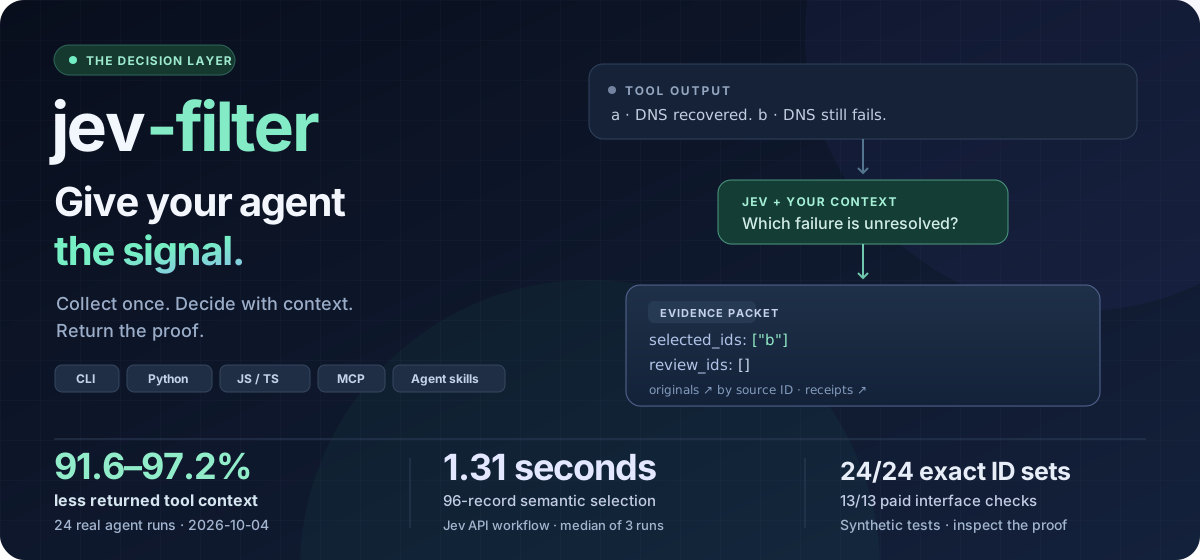
Semantic filtering for AI agent tool results. Turn large tool outputs into compact, typed decisions before they enter your agent's context. Keep source records inside your program, return relevant evidence and unresolved IDs, and recover originals by ID.
- Filter with context. Screen search results, complete code symbols and correlated logs against your task and supplied facts.
- Keep decisions traceable. Return typed answers, source IDs and review items; preserve missing facts and partial failures.
- Verify actions in your program. For short browser and desktop goals, Jev selects observed controls; the program owns execution, safety gates and final-state checks.
An independent MIT project maintained by Apixly. Official npm package: @apixly/jev-filter. What it does and when to use it.
Quick start
Node.js 22+ · macOS / Linux · Python included in the npm distribution. Windows: use WSL or install Python natively. Installation and doctor are offline; inference needs a TypeSafe Jev API key.
npm install -g @apixly/jev-filter
jev-filter doctor
Run this from any directory:
export TYPESAFE_API_KEY='your-key'

jev-filter query --input - --mode choose \
  --task 'Choose the CURRENT unresolved DNS failure' <<'JSON'
[
  {"id":"a","text":"DNS recovered; requests now succeed."},
  {"id":"b","text":"DNS lookup still fails before connection."}
]
JSON
Expected selection, with diagnostics omitted:
{"selected_ids":["b"],"review_ids":[],"complete":true}
For real batches, collect and filter in one call, before raw output reaches the conversation:
jev-filter exec --task 'Find unresolved network failures' \
  --analysis analysis.json -- your-collector --json
Start with the copyable analysis contract. Parse the packet even on exit 2: complete=false and review_ids need attention. Small examples teach the interface; exact paths, IDs, selectors, calculations and short outputs usually belong in native tools. Installation, keys and result handling →
Practical tutorials
Copyable synthetic inputs and analysis contracts are included. Read the tutorials on the documentation site · FAQ.
Measured advantages
Paid live evidence from 2026-10-04, using synthetic inputs. Source hashes, per-run usage, timing and failures are public; each result belongs to its stated scope.
- Returned tool context: 91.6–97.2% less across 24 real agent runs. Filtered completion was 12/12, raw completion 11/12, and all 24/24 ID sets were correct.
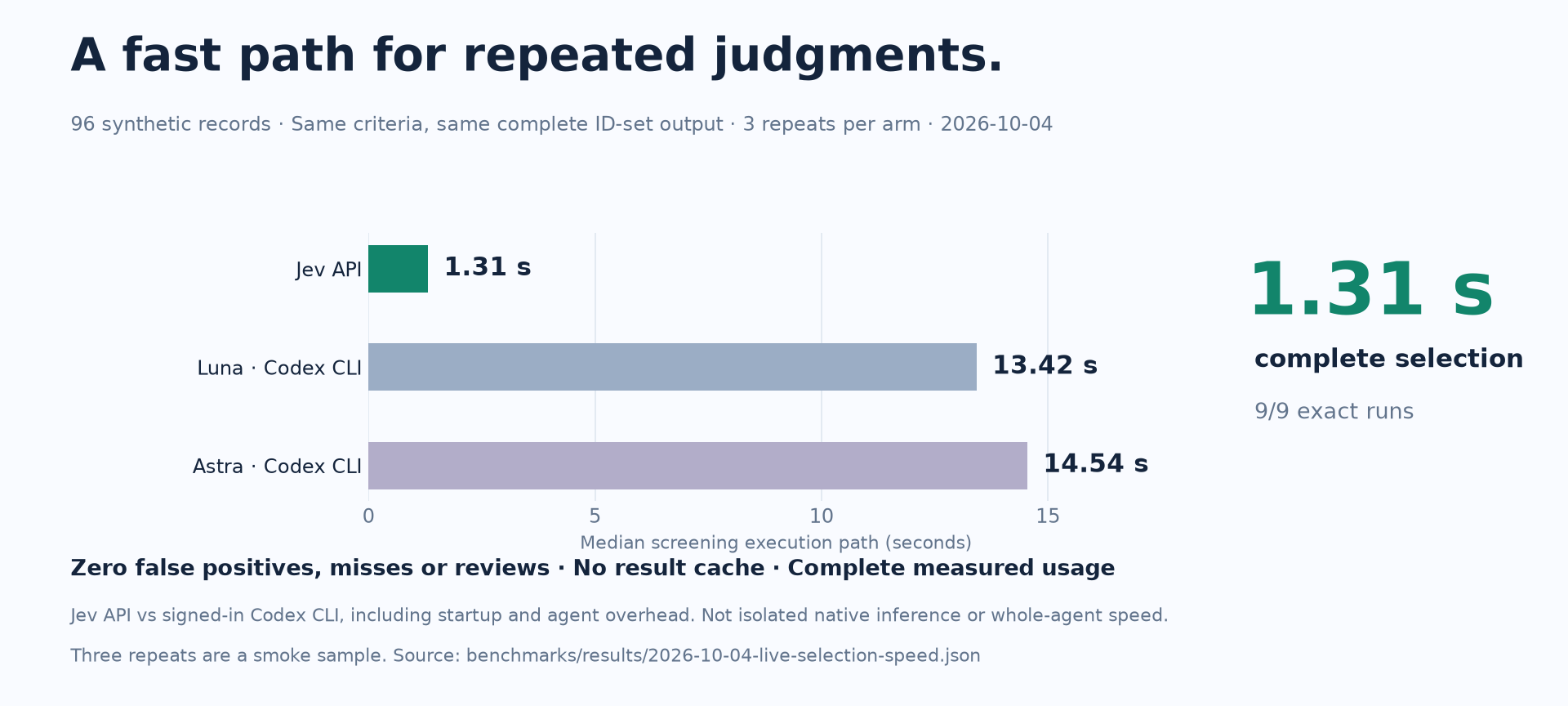
- Same-output selection: Jev's batched API path screened 96 records in a median 1.313 s, versus 13.421 s for Luna and 14.543 s for Astra through signed-in Codex CLI. All 9/9 runs selected the same 48 IDs; CLI startup is included, and no primary-agent continuation follows Jev.
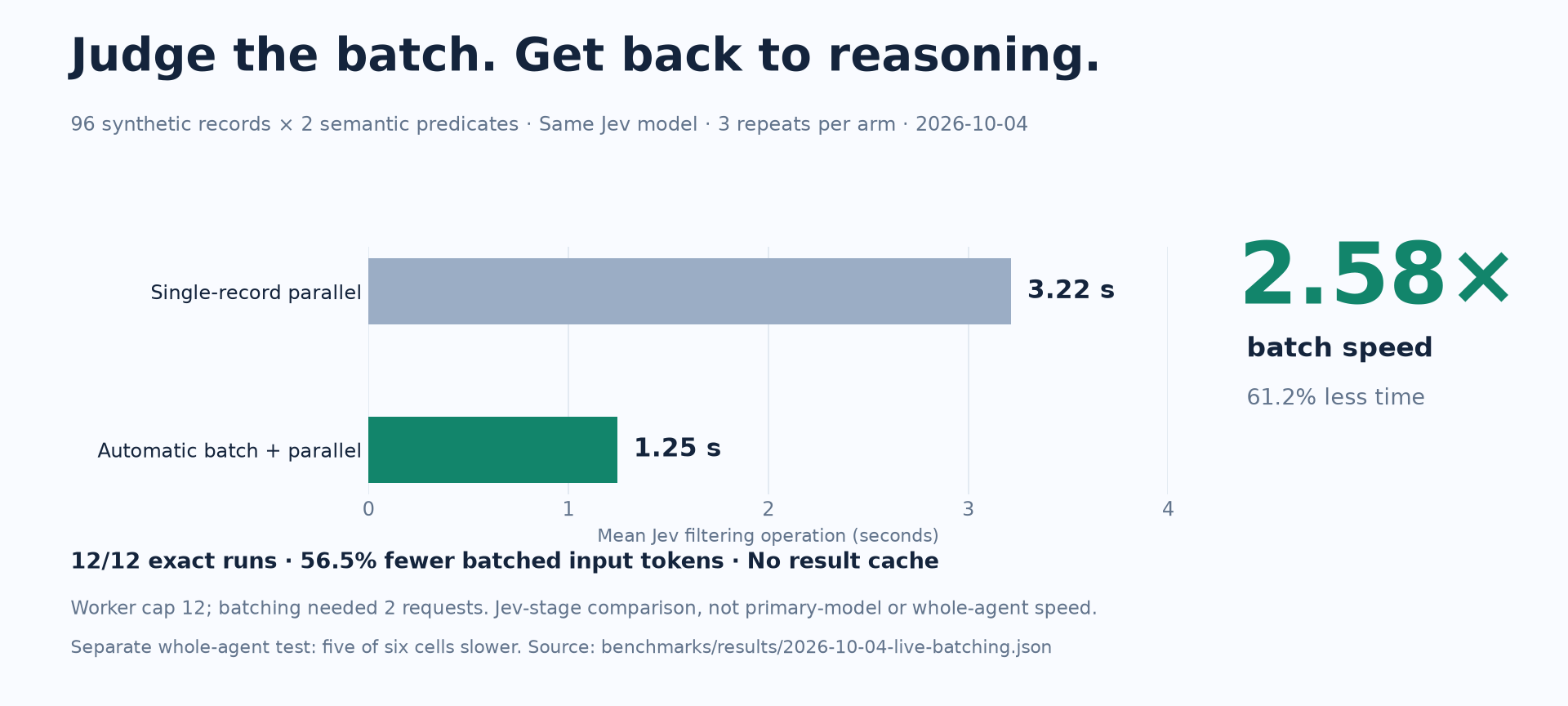
- Jev-stage batching: 2 requests instead of 96, 56.5% fewer input tokens and 2.58× filtering speed versus single-record parallel Jev calls. This measures the Jev stage, not a whole-agent speedup.
Latency and cost vary. Five of six whole-operation cells were slower by 0.1–18.4%; cold API-equivalent cost ranged from 23.2% lower to 1.1% higher. Subscription billing remains unknown. Smaller context does not guarantee lower latency or billing.
Methods, negative results and reproduction · Per-run whole-operation data
Selection paths, measured results and scope
Fast semantic selection, checked against the same expected answer. All paths screened 96 records against two semantic conditions and returned exactly the same 48 matching IDs.
Jev jev-1.13.0 · auto-batched API | 1.313 s | 3/3 |
Luna gpt-5.6-luna · signed-in Codex CLI | 13.421 s | 3/3 |
Astra gpt-6-astra · signed-in Codex CLI | 14.543 s | 3/3 |
This compares available execution paths, including CLI startup and the primary-agent turn; native model latency is not isolated. Primary paths use medium reasoning and no tools. Three repetitions are a smoke sample, not a whole-agent speedup or workload guarantee. Per-run evidence · Method and reproduction
| Get repeated judgments sooner | 2.58× filtering speed: 3.215 → 1.246 s, 61.2% less elapsed time; 56.5% fewer Jev input tokens. | Single-record parallel vs automatic batch-parallel Jev, 96 synthetic records × two predicates, three repetitions per arm; all 12/12 runs exact. Jev stage only, parallel worker cap 12; not a primary-model speed comparison. Data |
| Keep the agent's context focused | 91.6–97.2% less returned tool context; filtered completion 12/12, raw 11/12; all 24/24 ID sets correct. | 24 real agent runs, three synthetic scenarios, two primary models, two repetitions per arm. Five/six cells slower by 0.1–18.4%; cold API-equivalent cost ranged from 23.2% lower to 1.1% higher. Subscription billing remains unknown. Data |
| Recover more relevant code | Correct matches 4/12 → 10/12, zero false positives. | Exact vs opt-in recall, both with native semantic filtering. Returned context grew 5,284 → 9,706 bytes; absent lexical overlap still misses. Data |
| Inspect the change that matters | All 4/4 target changes selected in each repetition; returned context 23.9% lower than retaining every file. | Eight synthetic files, two repetitions. Semantic triage adds model usage and increases median whole-operation time 503 → 1,465 ms. Data |
| Connect real interfaces | 13/13 paid E2E checks pass, including exact MCP evidence recovery and 64/64 survey topic labels. | Python CLI, fresh npm 0.4.0 JS/native package, official MCP, local Chromium extraction and survey. Small synthetic fixtures; resolved model identity is unavailable from these public adapters. Data |
| Reach inside a scroll container | Verified nested-scroll completion 0/3 → 3/3 under the same strict 0.55 / 0.10 policy. | Pinned browser source A/B; program adds observed container evidence. Six ordinary goal runs still need review. More successful work consumes more calls, context and time. Data |
Whole-operation chart and reproduction
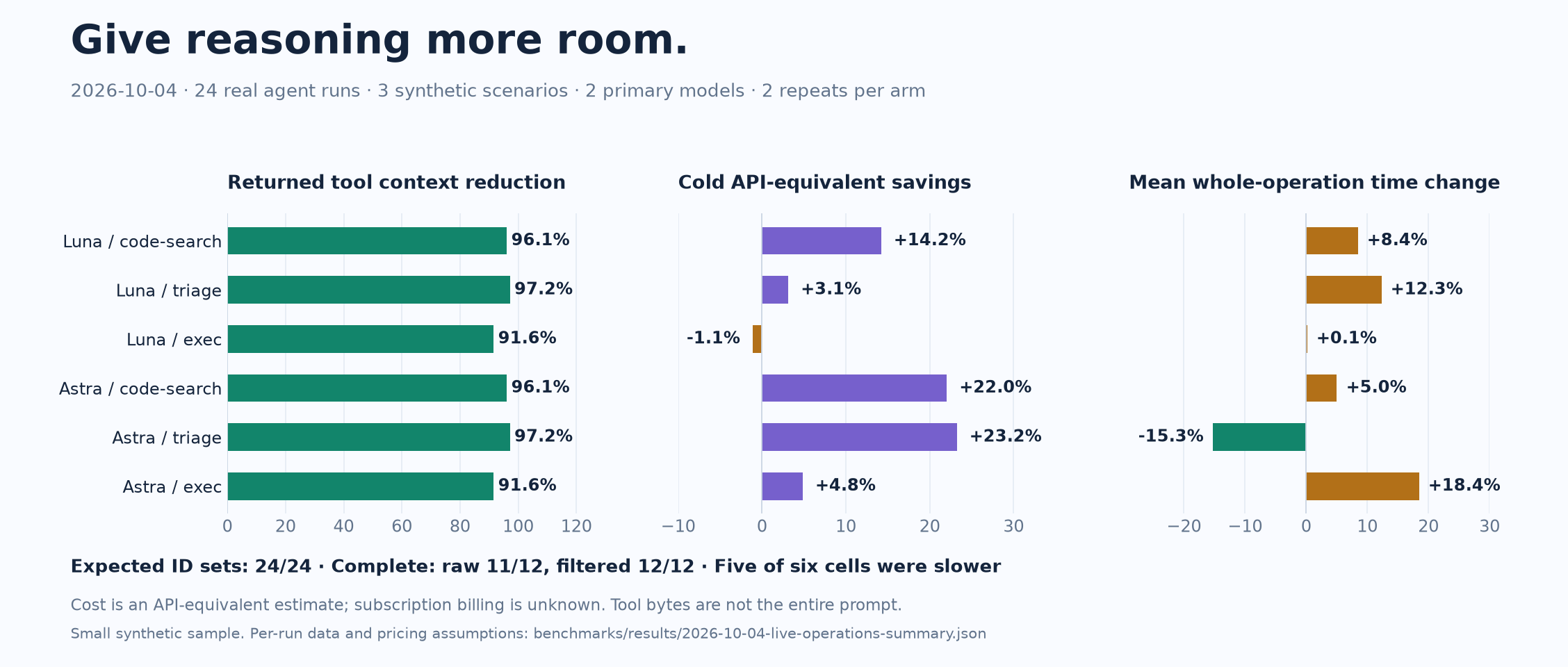
Method and all live results · Per-run JSON · CSV · Reproducible driver
Earlier evidence: offline contracts, batching and open-web limitations
| Offline release contracts · 2026-10-04 | 3/13 → 13/13 expected behaviors; 3 → 0 false fixture actions. | Scripted responses, no model calls; reviews and diagnostic context increase. Data |
| Jev batching · 2026-09-22 | 56.5% fewer input tokens; batch + parallel 32.4% faster than single-record parallel. | 96 synthetic records × two predicates, two repetitions; Jev stage only. Data |
| Historical whole operation · 2026-09-23 | 88–97% less returned tool context. | 48 runs over four synthetic scenarios; cost and latency vary. Data |
| Historical hosted fixtures · 2026-09-30 | Browser 15/15 Camofox, 18/18 CDP; desktop 12/12. | Local fixtures under the then-current planner policy; not a current strict-policy or open-web completion guarantee. Data |
| Public websites · 2026-09-30 | 16/48 read-only goals reached; 16/34 after excluding access walls and provider failures. | 24 goals in one environment. Custom widgets and verification were weak. Data |
Full methods and historical data. The latest browser experiments retain failed pruning variants and unknown provider attempts; they do not turn a safe stop into a completed goal.
Watch the program turn a goal into a verified result
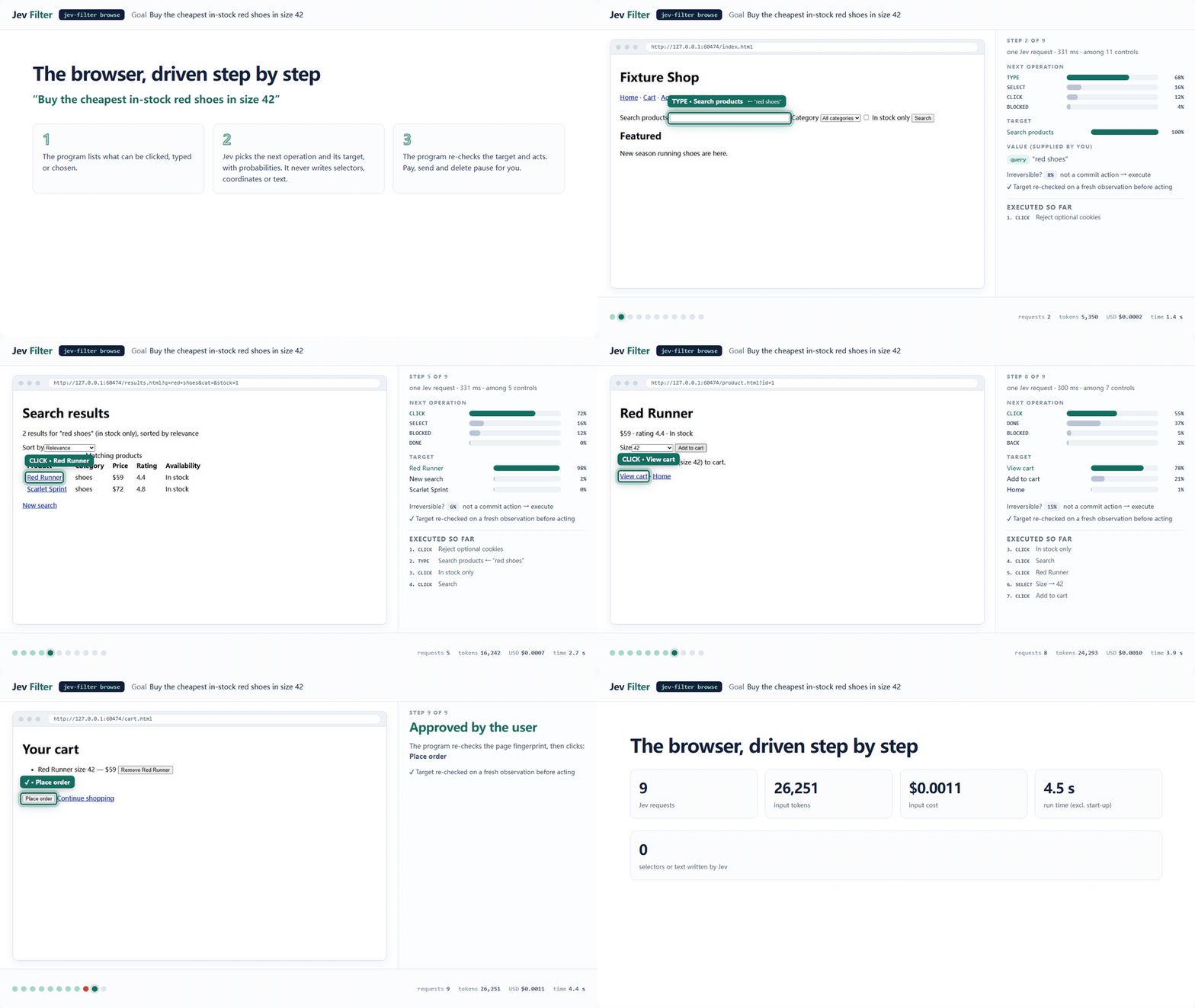
Each step observes the page or window, lets Jev choose from program-enumerated operations and controls, rechecks the target, executes and verifies. Model output never becomes a selector, coordinate, command or unvetted text. Irreversible actions pause for confirmation.
jev-filter browse --url https://shop.example/ \
  --goal 'Find in-stock red shoes in size 42' \
  --value query='red shoes' --verify-text 'Search results'
Replace the example URL with your permitted test page and meaningful verifier. For browse and desktop, require status: done and an independent final-state check; extract and survey require ok and complete. A selected action or model-reported DONE alone is not proof of completion. A separate verified primary-planner reference reached 6/6 expected outcomes after strict review; it adds substantial model time and is not an automatic fallback shipped in the product.
Interactive replay: browser, desktop, survey · Recording method · Safety gates and limitations
One core, your existing agent
CLI · Python · JavaScript / TypeScript · MCP. Use the shell, embed jev_filter.batch.run, import createClient from @apixly/jev-filter, or expose four read-only MCP tools. Each route keeps evidence and partial results in the same core. JavaScript and MCP examples →
Install the supplied skill for Codex, Claude Code or another compatible harness:
mkdir -p ~/.codex/skills
cp -R "$(npm root -g)/@apixly/jev-filter/skills/jev-filter" ~/.codex/skills/
Give the agent one routing rule:
Use jev-filter for many records that need a clear semantic judgment.
Pass the task, scope, exclusions, success criteria and sourced facts.
Keep collection → analysis → compact output inside one tool call.
Inspect unresolved IDs; use native tools for exact or short work.
Do not repeat settled judgments or wrap an existing Jev workflow again.
Jev does not inherit the agent's chat. Put shared facts in context, history on each record, and declare required fields. Keep authorization and execution verification in your host program. Five-minute setup → · Full integration guide →
Find the right entrypoint for your task
Inspectable from input to release
- Bounded, uncached inference. Automatic batching and at most 30 requests in flight; no result cache.
- Local evidence and numeric telemetry. Private archives support original-by-ID recovery. An optional local dashboard shows usage, unknowns and negative net values; input-equivalent estimates are not invoice savings.
- Explicit trust boundaries. Inference inputs go to TypeSafe.
exec runs your trusted command and is not a sandbox. Hosted execution keeps freshness, origin and desktop safety gates. Security policy
- Portable, verifiable releases. Python core, bundled npm platform packages, checksums and build provenance. Distribution and recovery
The legacy jev-context command and Python imports remain compatible. Jev Filter is independently maintained by Apixly / JIA-ss and is not affiliated with TypeSafe.
Contribute
git clone https://github.com/apixly-ai/jev-filter.git
cd jev-filter
python -m venv .venv && . .venv/bin/activate
python -m pip install -e '.[code,dev]'
sh scripts/check.sh
npm test
Contributing · Development and releases · Changelog · Report a bug · MIT license



