简体中文 · Quick start · Agent setup · Benchmarks · Documentation · Releases


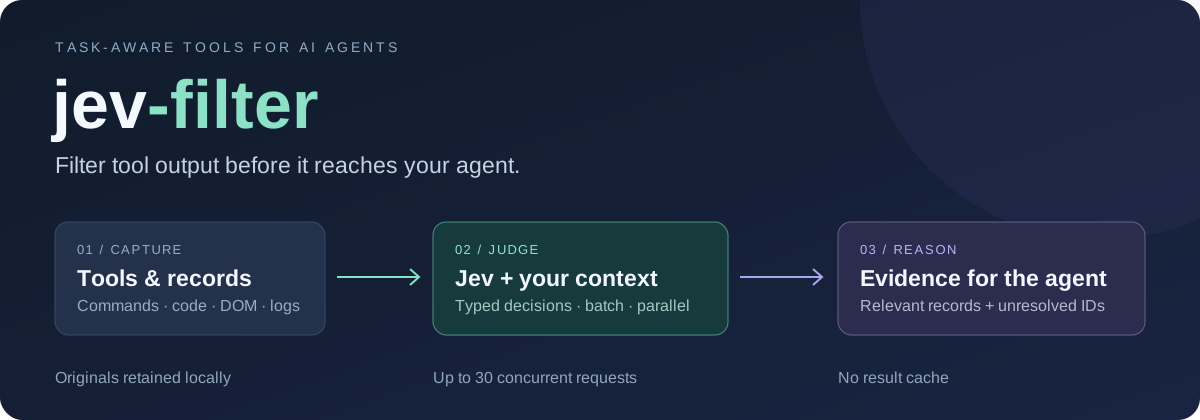
A semantic filter between your tools and your AI agent. Capture command output, search results, browser controls or logs inside the CLI. Let Jev judge them using the agent's task and context. Return relevant evidence and unresolved IDs instead of an entire raw dump.
Local savings dashboard
Configure a numeric-only local ledger, then run jev-filter stats dashboard (automatically selects a free port when 8765 is occupied) to automatically open a local browser dashboard showing estimated input-token reduction, USD input value, Jev cost and net value. Filter by model/date and export JSON or a standalone HTML snapshot. Unknowns and negative values stay visible. These are input-equivalent estimates, not invoice savings. See setup and measurement boundaries.
Why Jev Filter?
- Send less context to the primary agent. Filter before raw output enters the conversation; recover originals by ID. The fresh 48-run benchmark returned 88–97% less tool context. Evidence and trade-offs →
- Spend less on repeated Jev input. Automatic packing plus up to 30 concurrent requests. The public benchmark used 56.5% fewer input tokens and ran 32.4% faster than single-record parallel calls. Reproduce →
- Keep decisions inspectable. The agent controls the context, questions and output; missing facts remain
REVIEW. 8/8 exact fixture runs, plus three installed workflow acceptance checks. Public data · Integration evidence
Use it for many records + repeated semantic judgment + clear criteria. Use native tools for exact paths, IDs, selectors, calculations and short results. Keep open-ended reasoning and writing in your primary model.
Benchmarks
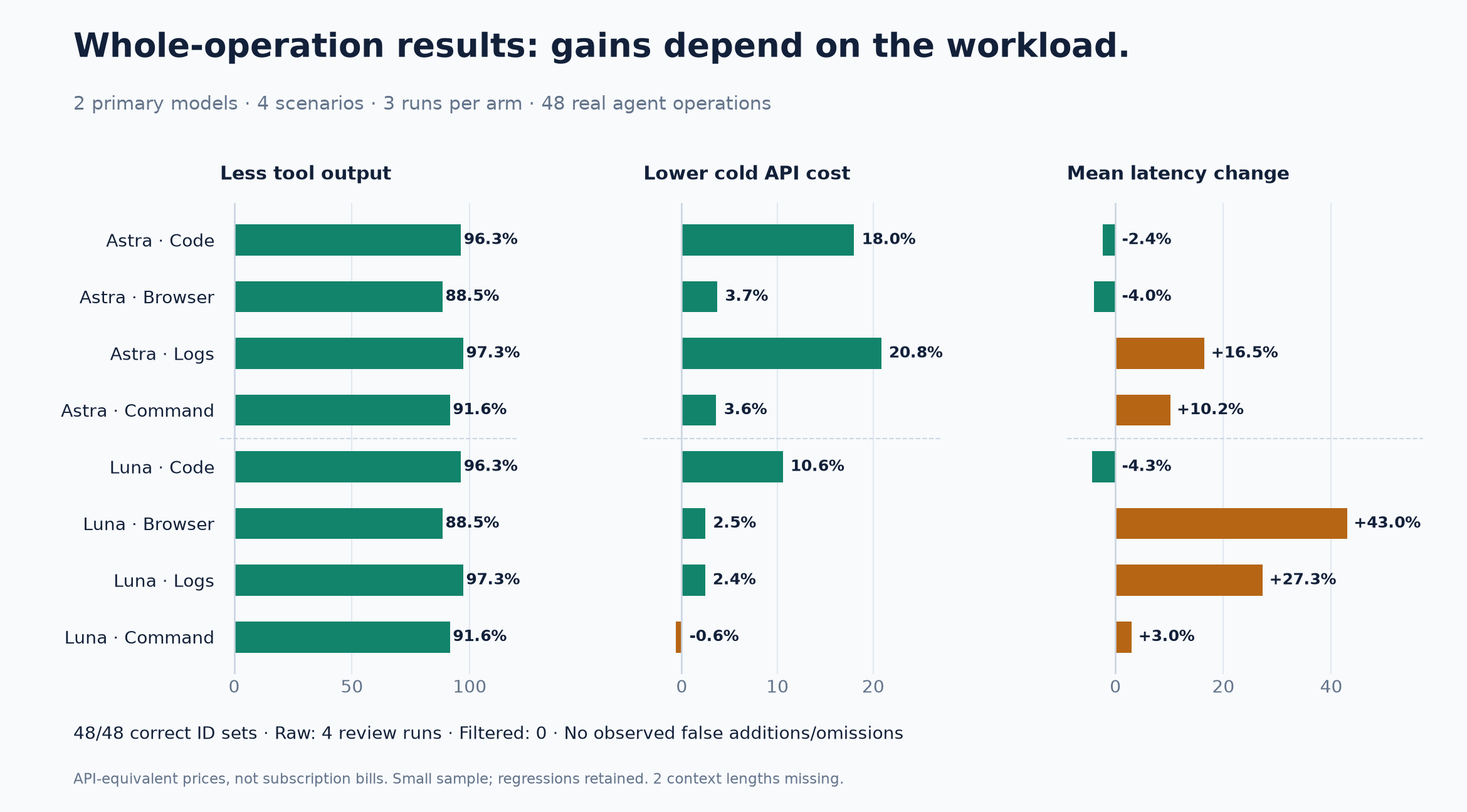
48 real agent runs: Astra and Luna, four scenarios, raw/filtered arms, three repetitions.
All runs selected the expected IDs. Four raw runs requested additional review; no filtered run did.
Returned tool context fell 88–97%. Cold API-equivalent cost ranged from 20.8% lower to 0.6% higher;
latency improved in some cells and regressed in others. These are small synthetic tests, not production guarantees.
Method and all results · Per-run JSON · CSV · Decision evidence
Why automatic batching and concurrency matter
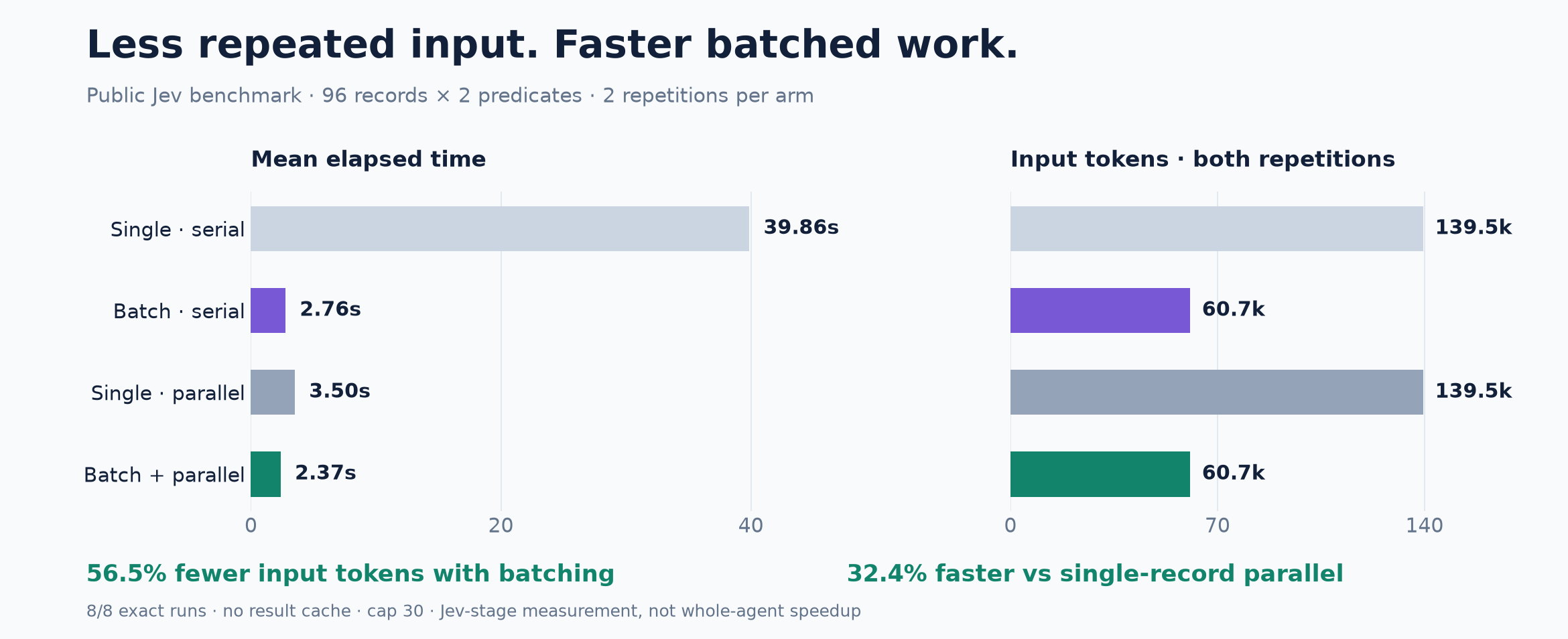
96 synthetic records × two predicates, two runs per arm. Batching used 56.5% fewer Jev input tokens;
batch + parallel was 32.4% faster than single-record parallel. This measures the Jev stage, not a whole agent task.
Raw results · Reproduce
Quick start
Node.js 22+ · macOS or Linux · no separate Python setup for the npm distribution. On Windows use WSL, or install the Python package natively from a GitHub Release wheel or pip install 'jev-filter[code] @ git+https://github.com/apixly-ai/jev-filter.git@v0.2.3' (Python 3.10+; rg on PATH for search; no PyPI package). A TypeSafe Jev API key is needed only for inference.
Install from npm:
npm install -g @apixly/jev-filter
jev-filter doctor
Set your key, then try a self-contained example from any directory:
export TYPESAFE_API_KEY='your-key'

jev-filter query --input - --mode choose \
  --task 'Choose the record showing a CURRENT unresolved DNS failure' <<'JSON'
[
  {"id":"a","text":"The previous DNS failure recovered; requests now succeed."},
  {"id":"b","text":"DNS lookup still fails; no connection can be established."}
]
JSON
Expected selection, with metadata omitted here:
{"selected_ids":["b"],"review_ids":[],"complete":true}
Small examples teach the interface; native tools are usually better for inputs this short. For real workloads, let the CLI collect the data itself:
jev-filter exec --task 'Find unresolved network failures' \
--analysis analysis.json -- your-collector --json
Start from a copyable analysis contract, then replace the collector. exec passes an argument array without an implicit shell. Read output and exit codes →
Connect your agent
The CLI works with any agent that can execute commands. It is not a separate agent or a required MCP server.
1. Install the skill. After a global npm install, for Codex:
mkdir -p ~/.codex/skills
cp -R "$(npm root -g)/@apixly/jev-filter/skills/jev-filter" ~/.codex/skills/
For another agent, copy the same skill into its supported skill directory. Claude Code and generic harness setup →
2. Give the agent this routing rule.
Use jev-filter when many records need a clear semantic judgment.
Pass the task, scope, exclusions, success criteria and sourced facts.
Keep collection → analysis → compact output inside one tool call.
Inspect unresolved IDs; do not repeat settled judgments or wrap an
existing Jev workflow again. Use native tools for exact or short work.
3. Supply context that changes the answer. Jev does not inherit the agent's chat. Put shared facts in context, record history on each record, and declare required fields. The agent controls questions, filtering, ranking and output projection. Complete integration guide → · Context contract →
Choose the right entrypoint
All flags and limits · Original evidence by ID · Architecture
Built for real use
We use Jev Filter in our own environment. Source annotation, Telegram maintenance planning and SRE routing retain their existing contracts and pass synthetic acceptance using real Jev calls. Private identities, credentials and production data are excluded from this repository.
- No result cache. Explicit context, bounded collection, retained failures and reported usage.
- Protected releases. Required CI/security checks, immutable release tags, checksums and build provenance.
- Portable core. Python library plus npm CLI distribution; automatic batching, maximum 30 requests in flight.
- Transparent boundaries. Inputs used for inference are sent to TypeSafe.
exec runs your command and is not a sandbox. Selection does not authorize actions. Security →
After one-time npm package trust setup, successful GitHub Releases automatically publish all five packages through OIDC and verify a fresh registry install. No long-lived npm token is stored. See publication and recovery.
Contribute
git clone https://github.com/apixly-ai/jev-filter.git
cd jev-filter
python -m venv .venv && . .venv/bin/activate
python -m pip install -e '.[code,dev]'
sh scripts/check.sh
npm test
Contributing · Development and releases · Governance · Changelog · Report a bug
Maintained by Apixly / JIA-ss · MIT · Independent of TypeSafe.



