

简体中文 · Quick start · Documentation · Agent setup · Benchmarks · Releases
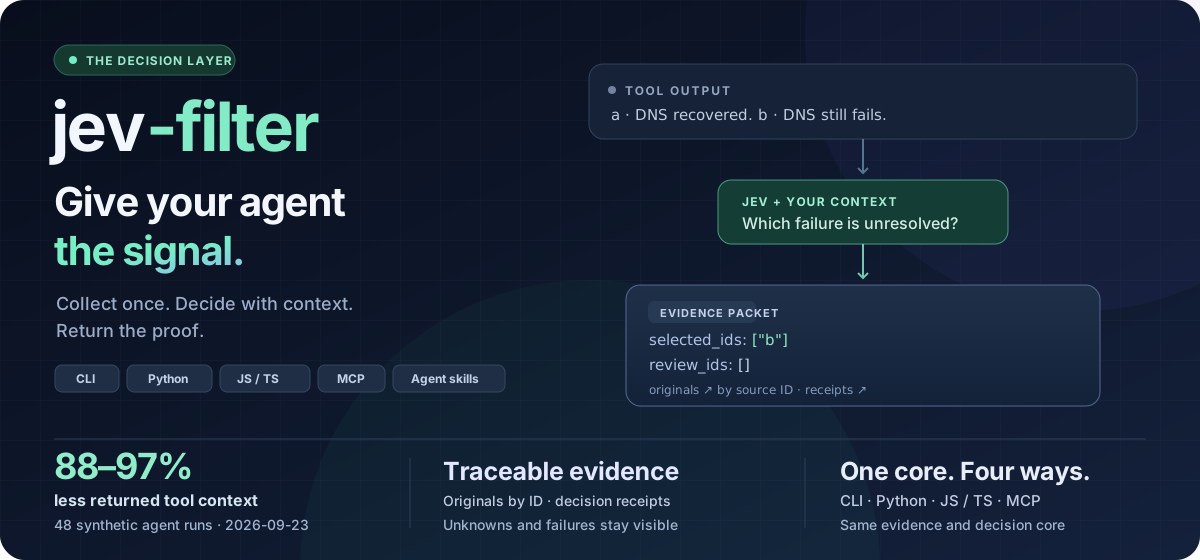
Give your agent the signal. Keep the evidence. Jev Filter turns large tool outputs into compact, typed decisions before they enter your agent's context. Commands, code, logs and page records stay inside the program; your agent receives relevant evidence and the IDs that need its attention.
88–97% less returned tool context in our 48-run whole-operation benchmark. Every original remains recoverable by ID. Dated evidence and trade-offs →
More signal. Less work for your agent.
| Filter large batches against the task and supplied context. The primary model spends its attention on the selected evidence and difficult cases. | Typed answers, source IDs, local originals and receipts. Missing facts, uncertain choices and partial failures stay visible. | For short browser and desktop goals, Jev chooses from observed controls; the program owns execution, safety gates and final-state verification. |
The result is a useful division of labor: programs collect and verify; Jev makes repeated semantic judgments; your agent plans, reasons and writes. Automatic batching reduces repeated input, up to 30 requests run concurrently, and no result cache hides a new observation.
New in 0.4: a stronger decision layer
- Review ambiguity explicitly. Configurable per-question probability, margin and confidence policies route uncertain decisions to review; unknown provider usage stays incomplete.
- Search the behavior, inspect the change. Opt-in hybrid code retrieval combines lexical candidates, symbols and one-hop caller clues.
diff-review collects a bounded Git diff for semantic inspection with source receipts.
- Connect the same core everywhere. A typed JavaScript client and a read-only MCP server reuse the existing CLI and evidence core; partial results stay usable.
- Evaluate before automating. Offline
eval reports error, review and probability diagnostics with grouped holdout checks. Benchmark adapters compare providers without adding a production fallback.
Agent integration examples → · Command reference →
Quick start
Node.js 22+ · macOS / Linux · Python included in the npm distribution. Windows: use WSL or install Python natively. Installation and doctor are offline; inference needs a TypeSafe Jev API key.
npm install -g @apixly/jev-filter
jev-filter doctor
Run this from any directory:
export TYPESAFE_API_KEY='your-key'

jev-filter query --input - --mode choose \
  --task 'Choose the CURRENT unresolved DNS failure' <<'JSON'
[
  {"id":"a","text":"DNS recovered; requests now succeed."},
  {"id":"b","text":"DNS lookup still fails before connection."}
]
JSON
Expected selection, with diagnostics omitted:
{"selected_ids":["b"],"review_ids":[],"complete":true}
For real batches, collect and filter in one call, before raw output reaches the conversation:
jev-filter exec --task 'Find unresolved network failures' \
  --analysis analysis.json -- your-collector --json
Start with the copyable analysis contract. Parse the packet even on exit 2: complete=false and review_ids need attention. Small examples teach the interface; exact paths, IDs, selectors, calculations and short outputs usually belong in native tools. Installation, keys and result handling →
Measured advantages
We publish inputs, methods, per-run data and regressions. Each number belongs to the experiment shown; measure your own task before assuming a speed or cost benefit.
| 0.4 decision contracts · 2026-10-04 | Expected behavior 3/13 → 13/13; false fixture actions 3 → 0. | Offline scripted distributions and failure envelopes, no model requests. Reviews increased 0 → 6 and returned context 4,104 → 7,087 bytes. Data |
| 0.4 browser observation · 2026-10-04 | Local fixture checks 3/15 → 15/15; typed-state recall 20% → 100%. | Program-owned actions, no Jev inference. Operation time and planned context grew; this does not measure model-driven completion. Data |
| 0.4 hybrid code candidates · 2026-10-04 | Mean collector recall 27.8% → 66.7%; precision 66.7% → 47.2%. | Fixed synthetic cases, no semantic inference. Candidate context and collection time grew; retrieval is opt-in and cannot solve absent lexical overlap. Data |
| Whole agent operation · 2026-09-23 | 88–97% less returned tool context; all runs selected the expected IDs. | 48 runs, 2 primary models, 4 synthetic scenarios. Cold API-equivalent cost ranged from 20.8% lower to 0.6% higher; latency improved in some cells and regressed in others. |
| Jev batching · 2026-09-22 | 56.5% fewer input tokens; batch + parallel was 32.4% faster than single-record parallel. | 96 synthetic records × 2 predicates, 2 repetitions per arm. Measures the Jev stage, not whole-agent speed. |
| Hosted browser & desktop fixtures · 2026-09-30 | Browser: 15/15 Camofox, 18/18 CDP. Desktop: 12/12. | Small local synthetic fixtures, 3 repetitions per task, final state checked by the program. |
| Real public websites · 2026-09-30 | 16/48 read-only runs reached the goal; 16/34 after excluding bot checks, sign-in walls and provider failures. | 24 goals in one environment. Custom widgets and verification were weak; this is not an open-web success-rate guarantee. |
See the whole-operation chart and reproducible data
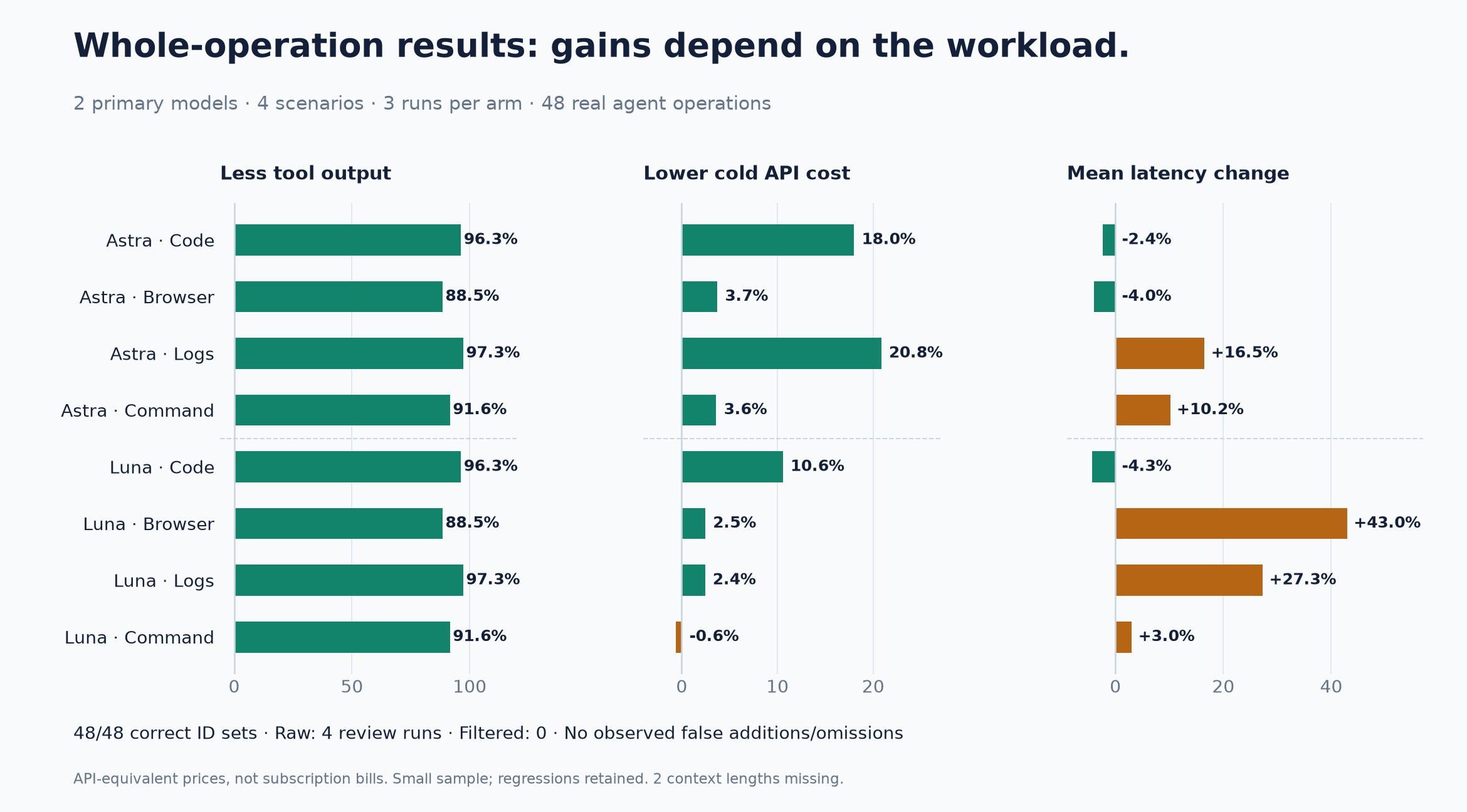
Method and all results · Per-run JSON · CSV · Jev-stage data
Watch the program turn a goal into a verified result
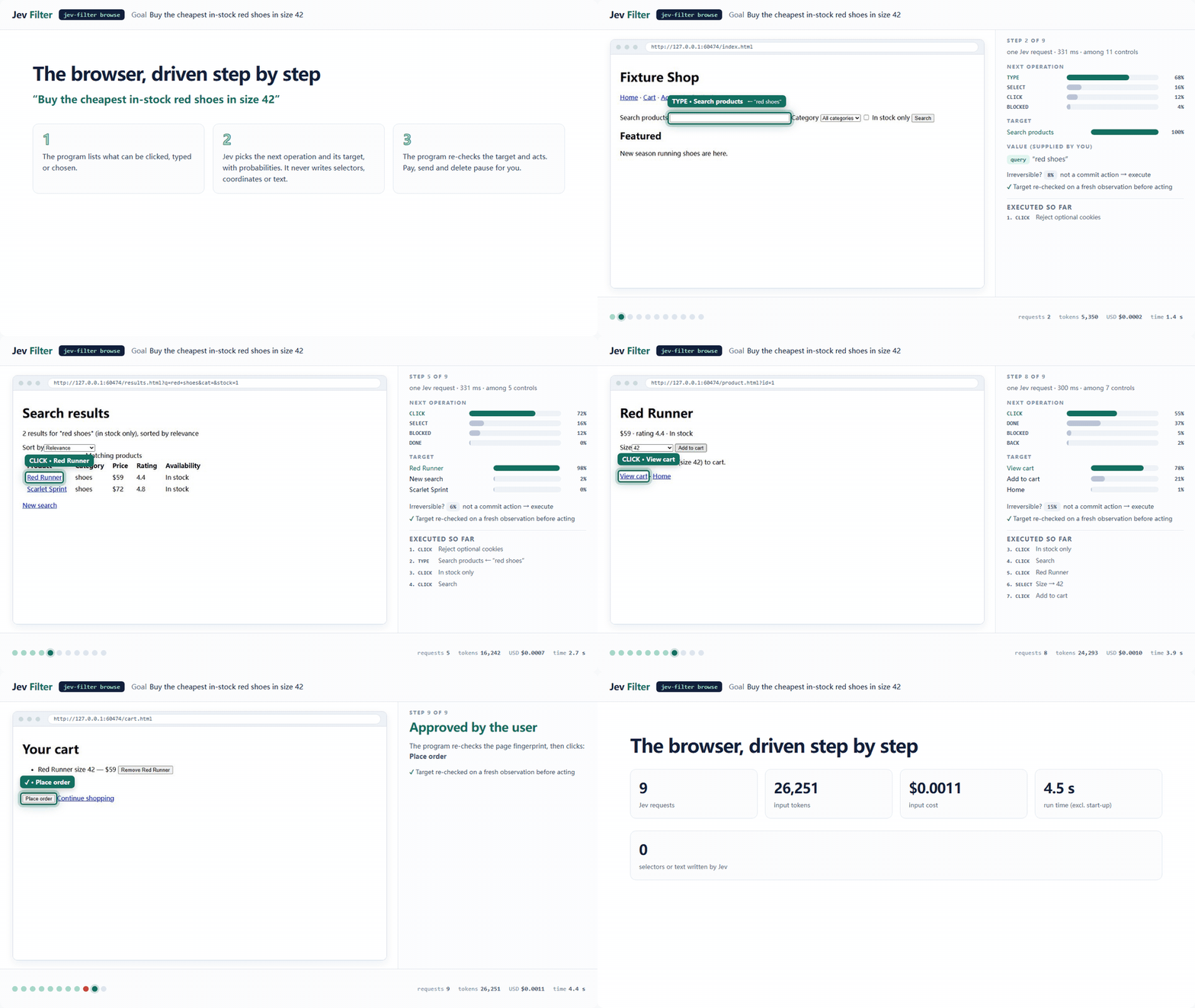
Each step observes the page or window, lets Jev choose from program-enumerated operations and controls, rechecks the target, executes and verifies. Model output never becomes a selector, coordinate, command or unvetted text. Irreversible actions pause for confirmation.
jev-filter browse --url https://shop.example/ \
  --goal 'Find in-stock red shoes in size 42' \
  --value query='red shoes' --verify-text 'Search results'
Replace the example URL with your permitted test page and meaningful verifier. browse and desktop succeed only with status: done; extract and survey require ok and complete. A selected action is not proof of completion.
Interactive replay: browser, desktop, survey · Recording method · Safety gates and limitations
One core, your existing agent
CLI · Python · JavaScript / TypeScript · MCP. Use the shell, embed jev_filter.batch.run, import createClient from @apixly/jev-filter, or expose four read-only MCP tools. Each route keeps evidence and partial results in the same core. JavaScript and MCP examples →
Install the supplied skill for Codex, Claude Code or another compatible harness:
mkdir -p ~/.codex/skills
cp -R "$(npm root -g)/@apixly/jev-filter/skills/jev-filter" ~/.codex/skills/
Give the agent one routing rule:
Use jev-filter for many records that need a clear semantic judgment.
Pass the task, scope, exclusions, success criteria and sourced facts.
Keep collection → analysis → compact output inside one tool call.
Inspect unresolved IDs; use native tools for exact or short work.
Do not repeat settled judgments or wrap an existing Jev workflow again.
Jev does not inherit the agent's chat. Put shared facts in context, history on each record, and declare required fields. Keep authorization and execution verification in your host program. Five-minute setup → · Full integration guide →
Find the right entrypoint for your task
Inspectable from input to release
- Bounded, uncached inference. Automatic batching and at most 30 requests in flight; no result cache.
- Local evidence and numeric telemetry. Private archives support original-by-ID recovery. An optional local dashboard shows usage, unknowns and negative net values; input-equivalent estimates are not invoice savings.
- Explicit trust boundaries. Inference inputs go to TypeSafe.
exec runs your trusted command and is not a sandbox. Hosted execution keeps freshness, origin and desktop safety gates. Security policy
- Portable, verifiable releases. Python core, bundled npm platform packages, checksums and build provenance. Distribution and recovery
The legacy jev-context command and Python imports remain compatible. Jev Filter is independently maintained by Apixly / JIA-ss and is not affiliated with TypeSafe.
Contribute
git clone https://github.com/apixly-ai/jev-filter.git
cd jev-filter
python -m venv .venv && . .venv/bin/activate
python -m pip install -e '.[code,dev]'
sh scripts/check.sh
npm test
Contributing · Development and releases · Changelog · Report a bug · MIT license



