








Setup your local LLM stack effortlessly.
harbor up
harbor up searxng speaches
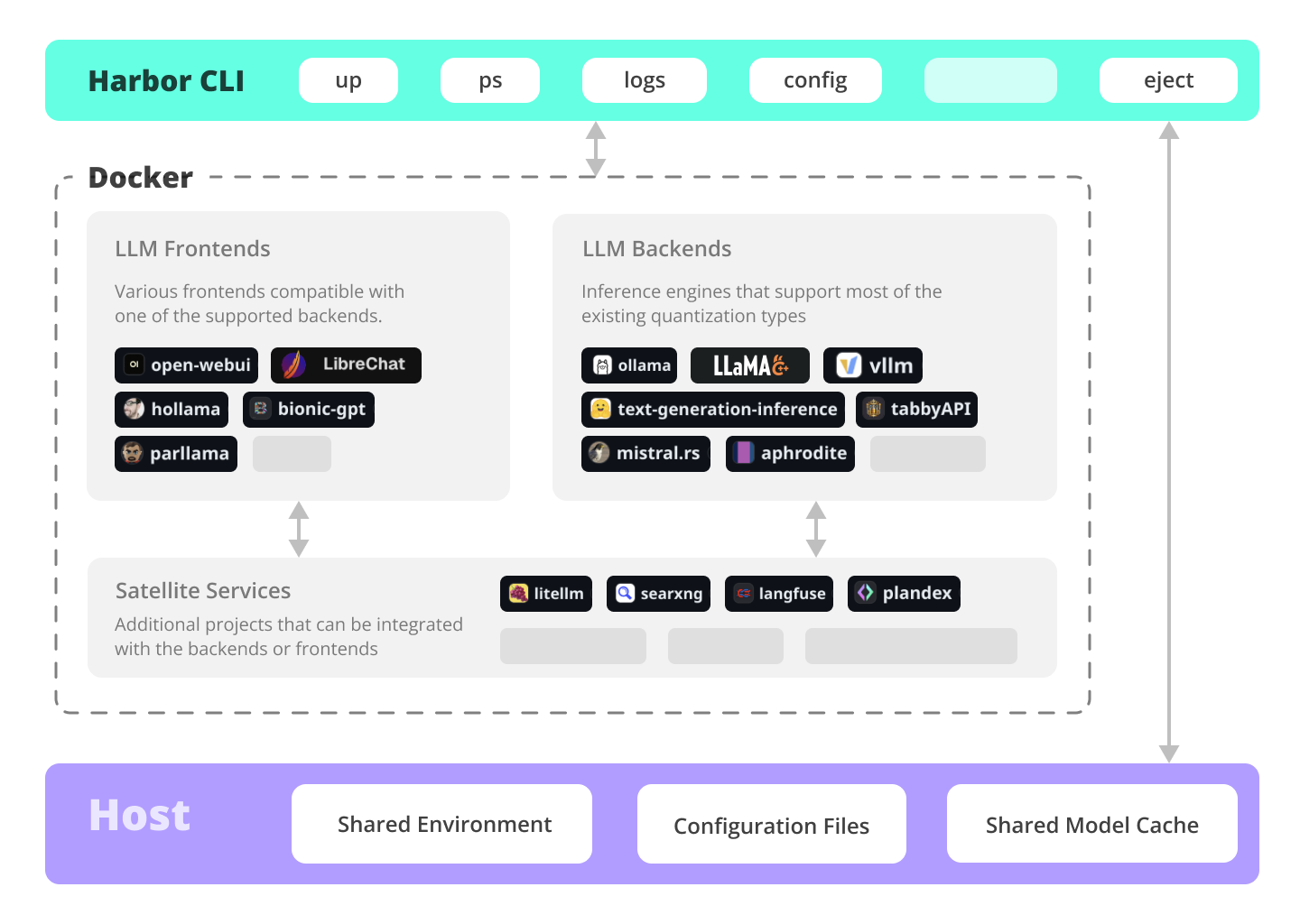
Harbor is a containerized LLM toolkit that allows you to run LLM backends, frontends and related useful services. It consists of a CLI and a companion App.

Documentation
What can Harbor do?
✦ Local LLMs
Run LLMs and related services locally, with no or minimal configuration, typically in a single command or click.
harbor up ollama
harbor up llamacpp
harbor up vllm
harbor llamacpp args -ngl 32
Cutting Edge Inference
Harbor supports most of the major inference engines as well as a few of the lesser-known ones.
harbor up vllm llamacpp tgi litellm tabbyapi aphrodite sglang ktransformers mistralrs airllm
Tool Use
Enjoy the benefits of MCP ecosystem, extend it to your use-cases.
harbor up metamcp
harbor up metamcp mcpo
Generate Images
Harbor includes ComfyUI + Flux + Open WebUI integration.
harbor up comfyui
Local Web RAG / Deep Research
Harbor includes SearXNG that is pre-connected to a lot of services out of the box: Perplexica, ChatUI, Morphic, Local Deep Research and more.
harbor up searxng
harbor up searxng chatui
harbor up searxng morphic
harbor up searxng perplexica
harbor up searxng ldr
LLM Workflows
Harbor includes multiple services for build LLM-based data and chat workflows: Dify, LitLytics, n8n, Open WebUI Pipelines, FloWise, LangFlow
harbor up dify
Talk to your LLM
Setup voice chats with your LLM in a single command. Open WebUI + Speaches
harbor up speaches
Chat from the phone
You can access Harbor services from your phone with a QR code. Easily get links for local, LAN or Docker access.
harbor qr
harbor url webui
Chat from anywhere
Harbor includes a built-in tunneling service to expose your Harbor to the internet.
[!WARN]
Be careful exposing your computer to the Internet, it's not safe.
harbor tunnel
harbor tunnel vllm
harbor up traefik
LLM Scripting
Harbor Boost allows you to easily script workflows and interactions with downstream LLMs.
harbor up boost
Config Profiles
Save and manage configuration profiles for different scenarios. For example - save llama.cpp args for different models and contexts and switch between them easily.
harbor profile save llama4
harbor profile use default
harbor profile use https://example.com/path/to/harbor-profile.env
Command History
Harbor keeps a local-only history of recent commands. Look up and re-run easily, standalone from the system shell history.
harbor history
Eject
Ready to move to your own setup? Harbor will give you a docker-compose file replicating your setup.
harbor eject searxng llamacpp > docker-compose.harbor.yml
Services
UIs
Open WebUI ⦁︎
ComfyUI ⦁︎
LibreChat ⦁︎
HuggingFace ChatUI ⦁︎
Lobe Chat ⦁︎
Hollama ⦁︎
parllama ⦁︎
BionicGPT ⦁︎
AnythingLLM ⦁︎
Chat Nio ⦁︎
mikupad ⦁︎
oterm ⦁︎
omnichain ⦁︎
ol1
Backends
Ollama ⦁︎
llama.cpp ⦁︎
vLLM ⦁︎
TabbyAPI ⦁︎
Aphrodite Engine ⦁︎
mistral.rs ⦁︎
openedai-speech ⦁︎
Speaches ⦁︎
Parler ⦁︎
text-generation-inference ⦁︎
LMDeploy ⦁︎
AirLLM ⦁︎
SGLang ⦁︎
KTransformers ⦁︎
Nexa SDK ⦁︎
KoboldCpp ⦁︎
Modular MAX
Satellites
Harbor Bench ⦁︎
Harbor Boost ⦁︎
SearXNG ⦁︎
Perplexica ⦁︎
Dify ⦁︎
Plandex ⦁︎
LiteLLM ⦁︎
LangFuse ⦁︎
Open Interpreter ⦁
︎cloudflared ⦁︎
cmdh ⦁︎
fabric ⦁︎
txtai RAG ⦁︎
TextGrad ⦁︎
Aider ⦁︎
aichat ⦁︎
autogpt ⦁︎
lm-evaluation-harness ⦁︎
JupyterLab ⦁︎
ol1 ⦁︎
OpenHands ⦁︎
LitLytics ⦁︎
Repopack ⦁︎
n8n ⦁︎
Bolt.new ⦁︎
Open WebUI Pipelines ⦁︎
Qdrant ⦁︎
K6 ⦁︎
Promptfoo ⦁︎
Webtop ⦁︎
OmniParser ⦁︎
Flowise ⦁︎
Langflow ⦁︎
OptiLLM ⦁︎
Morphic ⦁︎
SQL Chat ⦁︎
gptme ⦁︎
traefik ⦁︎
Latent Scope ⦁︎
RAGLite ⦁︎
llama-swap ⦁︎
LibreTranslate ⦁︎
MetaMCP ⦁︎
mcpo ⦁︎
SuperGateway ⦁︎
Local Deep Research ⦁︎
LocalAI ⦁︎
AgentZero ⦁︎
Airweave ⦁︎
Docling ⦁︎
Browser Use ⦁︎
Unsloth ⦁︎
Windmill
See services documentation for a brief overview of each.
CLI Tour
harbor up
harbor up searxng
harbor up speaches
harbor up llamacpp tgi litellm vllm tabbyapi aphrodite sglang ktransformers
harbor up librechat chatui bionicgpt hollama
harbor up boost
harbor up comfyui
harbor llamacpp model https://huggingface.co/user/repo/model.gguf
harbor hf scan-cache
harbor hf download google/gemma-2-2b-it
harbor ollama list
harbor hf find gguf gemma-2
harbor hf dl -m google/gemma-2-2b-it -c 10 -s ./hf
harbor hf download google/gemma-2-2b-it
harbor tgi model google/gemma-2-2b-it
harbor vllm model google/gemma-2-2b-it
harbor aphrodite model google/gemma-2-2b-it
harbor tabbyapi model google/gemma-2-2b-it-exl2
harbor mistralrs model google/gemma-2-2b-it
harbor opint model google/gemma-2-2b-it
harbor sglang model google/gemma-2-2b-it
harbor logs llamacpp
harbor exec llamacpp ./scripts/llama-bench --help
harbor shell vllm
harbor opint
harbor aider
harbor aichat
harbor cmdh
cat ./file.md | harbor fabric --pattern extract_extraordinary_claims | grep "LK99"
harbor open webui
harbor open llamacpp
harbor qr
harbor tunnel
harbor config list
harbor config set webui.host.port 8080
harbor profile save l370b
harbor profile use default
harbor profile use https://example.com/path/to/harbor-profile.env
harbor history
harbor eject searxng llamacpp > docker-compose.harbor.yml
harbor bench run
harbor model vllm
harbor vllm model
harbor config get webui.name
harbor get config webui_name
harbor tabbyapi shell
harbor shell tabbyapi
harbor how to ping ollama container from the webui?
Harbor App Demo
https://github.com/user-attachments/assets/a5cd2ef1-3208-400a-8866-7abd85808503
In the demo, Harbor App is used to launch a default stack with Ollama and Open WebUI services. Later, SearXNG is also started, and WebUI can connect to it for the Web RAG right out of the box. After that, Harbor Boost is also started and connected to the WebUI automatically to induce more creative outputs. As a final step, Harbor config is adjusted in the App for the klmbr module in the Harbor Boost, which makes the output unparsable for the LLM (yet still undetstandable for humans).
Why?
- If you're comfortable with Docker and Linux administration - you likely don't need Harbor to manage your local LLM environment. However, while growing it - you're also likely to eventually arrive to a similar solution. I know this for a fact, since that's exactly how Harbor came to be.
- Harbor is not designed as a deployment solution, but rather as a helper for the local LLM development environment. It's a good starting point for experimenting with LLMs and related services.
- Workflow/setup centralisation - you can be sure where to find a specific config or service, logs, data and configuration files.
- Convenience factor - single CLI with a lot of services and features, accessible from anywhere on your host.
Supporters





