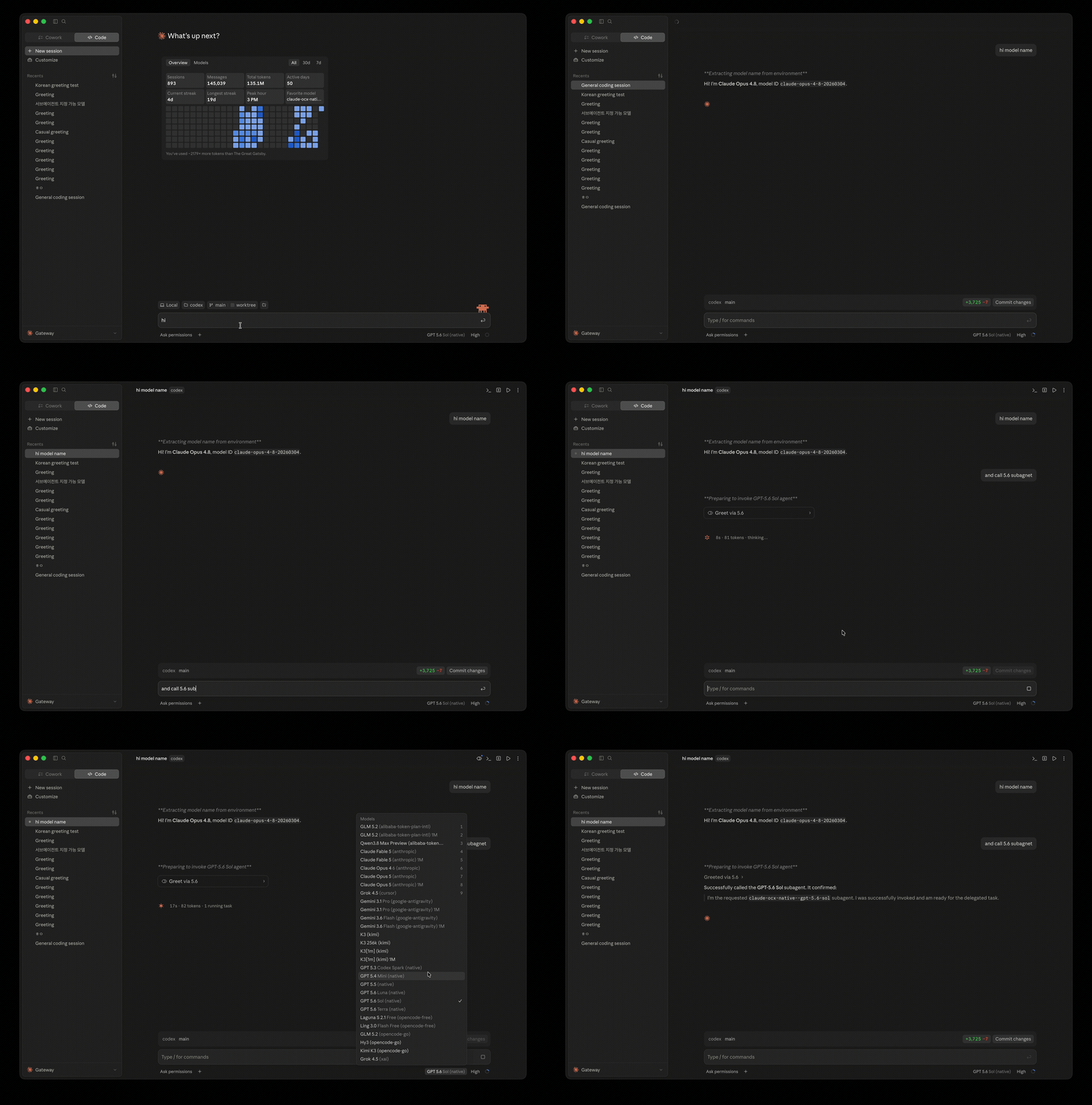
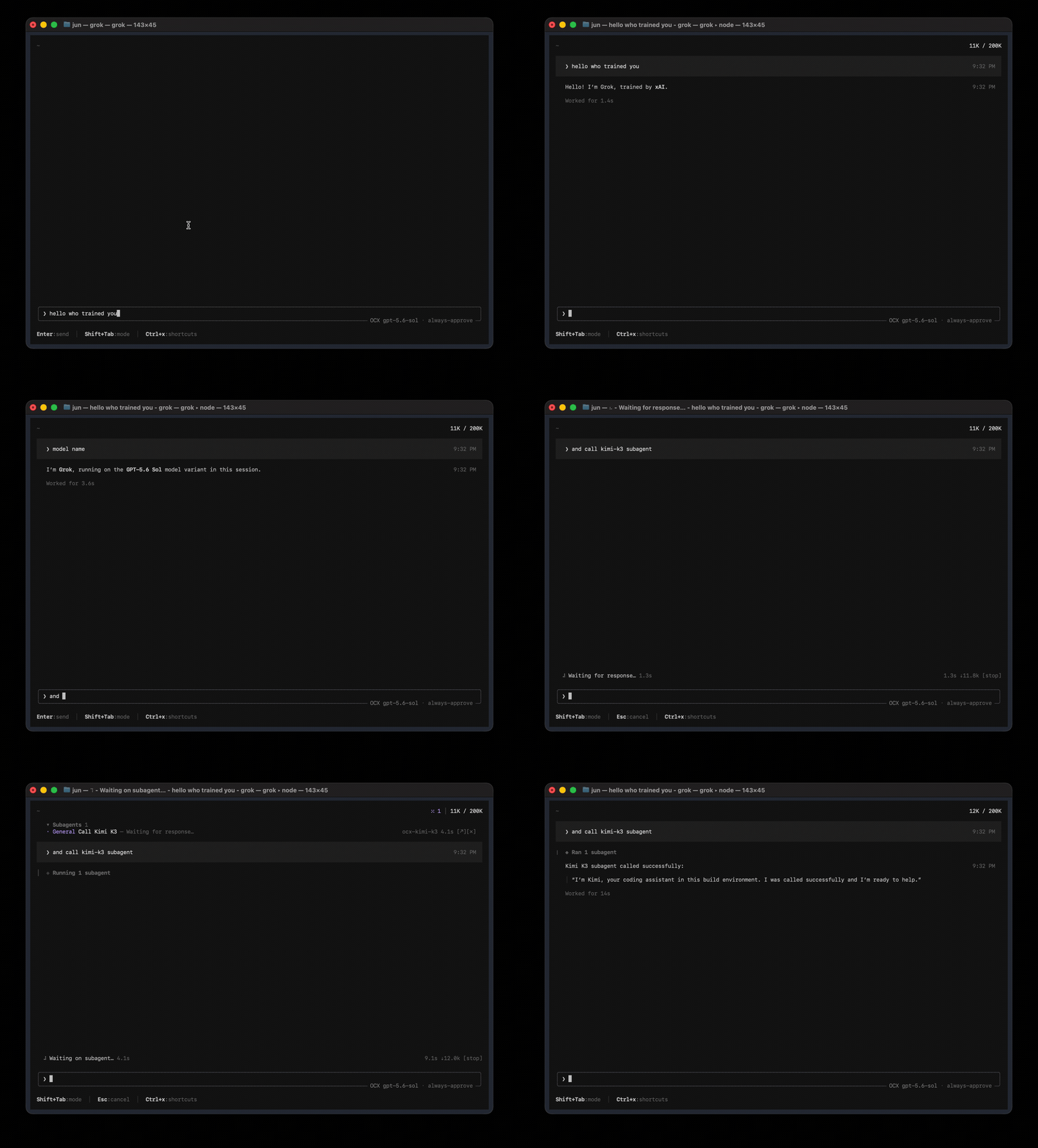
opencodex is a lightweight local proxy that translates Codex's Responses API into whatever your
provider speaks — streaming, tool calls, reasoning tokens, images, in both directions. Use Claude,
Gemini, Grok, GLM, DeepSeek, Kimi, Qwen, Ollama, or any other LLM with Codex, Claude Code, Claude
Desktop, and Grok Build. It can also manage a ChatGPT account pool for Codex auth: add accounts,
refresh their quotas in the dashboard, and let new sessions auto-route to the lowest-usage healthy
account while existing threads stay pinned to the account that started them.
Quick start
Personal install (CLI)
npm install -g @bitkyc08/opencodex   # Node 18+; the Bun runtime is bundled automatically
ocx start                         # proxy + dashboard on localhost:10100
Use ocx service to run it in the background.
Open http://localhost:10100 and configure everything in the web dashboard — add providers
(40+ built-ins, or any OpenAI-compatible endpoint), pick models, manage accounts. ocx gui
re-opens the dashboard at any time.
Desktop app (beta)
The desktop app is the same proxy and dashboard in a native window, with a tray and bundled ocx.
It attaches to a proxy that is already running, or starts its bundled one, and the dashboard stays
on the proxy port (http://localhost:10100 unless you configured another). Pick the file for your
platform from the latest release:
Platform
File
Notes
macOS 13+ (Apple Silicon and Intel)
OpenCodex-<version>-macos.dmg
Universal build, signed with a Developer ID and notarized
Windows (x64)
OpenCodex-<version>-windows-x64.msi
Not code-signed yet: SmartScreen asks once, choose More info → Run anyway
Linux (x86_64)
OpenCodex-<version>-linux-x86_64.AppImage or -linux-amd64.deb
The tray needs an AppIndicator-capable desktop
Every file has a .sha256 next to it on the release page. On macOS 14+ the app also ships a
WidgetKit extension that shows proxy status, today's usage and provider quotas; the snapshot model
it renders lives in app/ (MenuBarCore). To build the app yourself, run
bun install && bun run build:gui at the repository root, then in desktop/ run
bun install && bun run prepare-sidecar && bun run prepare-widget && bun run build:local on macOS,
or bun install && bun run prepare-sidecar && bun run build:local on Windows and Linux (the widget
step needs macOS). The Desktop App guide and the
macOS Menu Bar App guide cover first launch, and
AGENTS_INSTALL.md lists everything written to disk.
ChatGPT account pool
opencodex can also manage a ChatGPT account pool for Codex auth. Add multiple ChatGPT / Codex accounts,
refresh their 5h / weekly / 30d quota in the dashboard. Under quota routing, new sessions can use
the lowest-usage healthy account; round-robin and fill-first use their own policies. Existing Codex
threads normally retain affinity to the account that started them, so long SSH, tmux, or
mobile-connected sessions do not jump accounts mid-conversation — but quota re-evaluation, failover,
account exclusion, affinity expiry, or 401/403 and 429 recovery can rebind them. Give the accounts a
selection order when one of them — usually your Codex Desktop login — should only be reached for
once the others are drained.
Sponsors
Sponsors keep opencodex maintained across every upstream protocol change. Interested?
See SPONSORS.md.
Thanks to OrcaRouter for sponsoring this project! OrcaRouter is one OpenAI-compatible AI gateway for production AI: adaptive routing that grades every prompt and sends it to the model that clears your bar, automatic failover, routing rules as code, zero-markup provider pricing with prompt caching, and guardrails, an agent firewall, and request logs on every call across 200+ models. Pick OrcaRouter in the Add provider picker or run ocx provider add orcarouter; orcarouter/auto is the adaptive router.
Thanks to PackyCode for sponsoring this project! PackyCode is a stable, high-performance API relay provider, offering relay services for Claude Code, Codex, Gemini, and more. With automatic failover, smart routing, and unlimited concurrency, it turns AI into a real productivity tool. Register via this link and get started! Pick PackyCode in the Add provider picker or run ocx provider add packycode. PackyCode 是一家稳定、高效的 API 中转服务商,提供 Claude Code、Codex、Gemini 等多种中转服务。具备自动故障转移、智能路由和无限并发等多种功能,让 AI 编程成为真正的生产力工具。点此链接注册,立即开始使用!
Thanks to TokenLab for sponsoring this project! TokenLab gives coding agents one API key for leading models, supporting OpenAI Responses and Chat Completions, Anthropic Messages, and Gemini's native API formats, with streaming and tool calling. It also provides an MCP server and agent Skills for easy integration. Choose your delivery mode and pay as you go. Pick TokenLab in the Add provider picker or run ocx provider add tokenlab. TokenLab 为编程智能体提供统一的多模型 API,一枚 API Key 即可接入主流模型,支持 OpenAI Responses、Chat Completions、Anthropic Messages 和 Gemini 原生 API 格式,以及流式输出和工具调用。同时提供 MCP 服务器和 Agent Skills,方便接入现有工作流;交付模式可选,按量付费。
Docker Compose
The repository ships a digest-pinned, non-root Compose build. The build generates and verifies the
canonical compatibility manifest from the selected Git snapshot. A local clone needs Git and
Docker Compose; a remote Git context needs Docker Compose. Neither path needs host Bun or a
preparation step. Initialize the data-plane token once through stdin and start the hub:
git clone https://github.com/lidge-jun/opencodex.git
cd opencodex
docker compose build
openssl rand -hex 32 | docker compose run --rm -T hub bun run docker/bootstrap-token.ts
docker compose up -d
curl --fail --silent http://127.0.0.1:10100/healthz
curl --fail --silent http://127.0.0.1:10100/readyz
The default host binding is 127.0.0.1:10100. Remote exposure requires explicit
OPENCODEX_BIND_ADDRESS=<LAN-or-Tailscale-IP> docker compose up -d; 0.0.0.0 opts into
all host interfaces. Restrict access with a firewall and an authenticated TLS/tailnet frontend.
The generated JSON stays untracked. The build context admits only .git/index and .git/HEAD — the
inventory git ls-files reads, about 1 MB rather than the full object store — and they are visible
only to the build-only manifest stage through a read-only mount, so no COPY includes .git. An existing host-generated manifest
is still accepted only after validation; otherwise the build generates one itself. The build rejects
stale manifests, missing or mismatched files, extra source files, and symlinks.
It checks every recorded SHA-256 against the build context and copied runtime files, including
package.json, bun.lock, and the specifically included scripts/model-metadata.source.json.
A remote Git context needs BuildKit to retain Git metadata. This Compose build fragment selects the
remote snapshot and passes the required built-in argument:
The token and mutable state stay in the ocx-state named volume; no credential is placed in the
image, Compose file, environment, or shell arguments. See the
Remote Hub deployment guide for provider
setup, authenticated acceptance checks, remote management, and rollback.
Install from source (latest dev)
macOS / Linux:
curl -fsSL https://bun.sh/install | bash
git clone -b dev https://github.com/lidge-jun/opencodex.git
cd opencodex && ~/.bun/bin/bun install
~/.bun/bin/bun run build:gui
~/.bun/bin/bun run src/cli/index.ts start
Windows (PowerShell):
irm bun.sh/install.ps1 | iex
git clone -b dev https://github.com/lidge-jun/opencodex.git
cd opencodex; bun install
bun run build:gui
bun run src/cli/index.ts start
Source install runs the latest dev branch. Memory ownership
patches, runtime GC improvements, and unreleased fixes are available here before
they reach the npm package.
For agents
npm install -g @bitkyc08/opencodex
ocx start     # or `ocx service`
ocx init      # interactive setup: writes ~/.opencodex/config.json and wires Codex
ocx init never starts the proxy; start it first (or after — either order works, but headless
commands like ocx provider add and ocx combo set talk to the live proxy and exit nonzero
when it is unreachable). ocx status / ocx doctor / ocx health report the running state.
Agents installing or running opencodex: read
AGENTS_INSTALL.md. An interactive ocx start may ask once whether to
star this repository — that is the user's decision, never an agent's. The CLI suppresses the
prompt for agent-driven runs and the API refuses them with 403 agent_consent_required.
Supported platforms
OS
Status
Service manager
Desktop app (beta)
macOS (arm64 / x64)
Fully supported
launchd
Universal .dmg
Linux (x64 / arm64)
Fully supported
systemd (user unit)
x86_64 .AppImage / .deb
Windows (x64)
Fully supported
Task Scheduler (hidden) / opt-in native service (--native, WinSW)
x64 .msi
The CLI install requires Node 18+; the desktop app needs neither Node nor Bun. The Bun runtime is bundled on npm install — no separate
Bun install needed, no WSL needed on Windows. If npm blocked the bundled runtime's install scripts,
see the installation docs.
Highlights
Use any LLM with Codex, Claude Code, Claude Desktop, and Grok Build — 40+ providers out of
the box, each keeping its own native UI.
Pool ChatGPT accounts — thread affinity, quota-aware auto-switching, cooldown and
fail-closed auth handling.
Provider-policy note: Account pooling is for routing and operational resilience only; it does
not guarantee protection from provider rate limits, enforcement, suspension, or other account
actions. OpenCodex does not endorse using additional accounts to circumvent provider limits or
sharing account credentials between people. You are responsible for complying with each
provider's current terms. See the
Codex Auth account-pool guidance
and OpenAI's current Terms of Use.
Combos — one virtual model id with failover or weighted round-robin across providers. See
the combo guide.
Sub-agents on any model — feature routed models in Codex's sub-agent picker, with v1/v2
surface control and fallback chains. See the
sub-agent guide.
Log in once, skip the API key — OAuth for xAI, Anthropic, and Kimi; or forward
codex login, paste a key, or use ${ENV_VAR} references.
Web search & vision sidecars — non-OpenAI models get real web search and image understanding
through a sidecar over your ChatGPT login.
See what's happening — the dashboard shows providers, OAuth status, model selection, and a
live request log with cache token counts.
Clean exit, zero residue — ocx stop restores Codex to its original configuration.
Bounded memory ownership — every long-lived cache, ring buffer, and protocol-translation
store has a finite cap, byte budget, or active reconciliation. No unbounded Map or Set
survives a config reload.
Memory ownership details
OpenCodex tracks process-retained state in the categories below. Each has a documented bound:
14 retained stores (request log, debug rings, image cache, model cache, vision
descriptions, cursor blobs, responses continuation, etc.) are byte-accounted and
evicted by the app-owned memory budget (default 256 MiB), except the native control replay
store, which is pinned and never evicted.
4 observed buffers (translator accumulators, image/OAuth/Grok tails) are
monitored for in-flight byte pressure without eviction.
28 state-store registrations handle expiry sweeps (60 s interval) and
config-generation reconciliation so stale provider/account keys are removed.
Path and fingerprint memos (workspace metadata, hardened identities, installation
salts, mode-hint capabilities) use insertion-order LRU caps (8–128 entries).
Model-cache generation tombstones are deleted after reconciliation; a global
generation increment prevents stale in-flight discoveries from repopulating removed
providers.
Lab event-id deduplication runs under a ledger lock from disk, with no
process-level RAM index.
Run GET /api/system/memory (with the admin token) to inspect live retained bytes,
eviction counters, and watchdog samples.
Model routing
Target any configured provider and model with the provider/model syntax:
codex -m "anthropic/claude-opus-5""Explain this stack trace"
codex -m "google/gemini-3-pro""Write unit tests for auth.ts"
codex -m "ollama/llama3""Refactor this function"
Omit the provider/ prefix to use the default provider or auto-match by model name pattern.
Provider model ids containing / are exposed with inner slashes aliased to -; the raw
full-slash form keeps working too. Details: model routing docs.
JEV Auto routing (optional)
TypeSafe JEV can choose the first model and reasoning effort for an opt-in Combo while the normal
model picker and every direct route stay unchanged. Add the credential with ocx login jev, from
Providers → TypeSafe JEV → Add API key, or through TYPESAFE_API_KEY/JEV_API_KEY. Then open
Models → Combos → Create JEV Auto, choose the allowed target models, and check the exact efforts
JEV may select for each target. Leaving a target's effort setting untouched allows all efforts that
model currently advertises.
JEV is consulted only for jev-auto and only once per logical model call. Missing credentials,
network failures, or invalid decisions fail open to the first currently eligible target; caller
cancellation still cancels the request. Automated tests use a mocked TypeSafe endpoint and do not
validate a live JEV account.
Providers & adapters
OpenAI (ChatGPT login or API key), Anthropic, Google Gemini, xAI, Kimi, Azure OpenAI, Ollama
(local + Cloud), Cursor (experimental), and every OpenAI-compatible endpoint — plus DeepSeek,
Groq, OpenRouter, Together, Fireworks, Cerebras, Mistral, Hugging Face, NVIDIA NIM, MiniMax,
Qwen Cloud, Qoder Global and CN (official PAT + CLI), SiliconFlow, and more. Full list: ocx init or the
provider docs.
CLI
ocx init                       # interactive setup (writes config, wires Codex, offers the shim)
ocx start [--port 10100] [--socks5 [host:port] | --socks5-off]  # SOCKS5 defaults to socks5://127.0.0.1:10808
ocx stop                       # stop + restore native Codex
ocx service [install|repair|restart|start|stop|status|uninstall|remove]  # background service
ocx codex-shim install         # start the proxy on demand whenever `codex` launches
ocx health [--json]            # check immediate proxy liveness
ocx ready [--json] [--wait [--timeout <seconds>]]  # check post-sync readiness
ocx status                     # is the proxy running?
ocx gui                        # open the web dashboard
ocx provider <...>             # manage providers (list/add/edit/test/remove)
ocx account <...>              # manage ChatGPT accounts & API-key pools
ocx combo <...>                # manage failover / round-robin combos
ocx v2 <...>                   # multi-agent v1/v2 surface controls
ocx update [--tag preview]     # update opencodex
A start whose preferred port is busy stops and names the holder instead of moving to another port,
so it can never leave a second proxy running beside the first. Free the port, or name a different
one with --port. Full reference: CLI docs.
Health and readiness
GET /healthz reports immediate proxy liveness. The unauthenticated GET /readyz endpoint reports
post-sync readiness with the sanitized JSON identity {service, version, uptime, pid, port, status}.
It returns 200 when status is ready; pending and terminal failed return 503 with
Retry-After: 1.
ocx ready [--json] [--wait [--timeout <seconds>]] performs one probe by default. --wait polls
for up to 45 seconds by default, but exits immediately when it observes terminal failed;
--timeout <seconds> sets a 1–300 second limit, requires --wait, and accepts only positive integers. CLI --json output is
{ready, status, pid, port}, where status is ready, pending, failed, or unreachable.
Exit
Result
0
Ready
1
Not ready: pending, failed, timeout, or unreachable
64
Invalid arguments
An older proxy without /readyz fails closed as unreachable with exit 1, while ocx health
remains compatible.
Autostart: service vs shim
Use the service (ocx service) for an always-on proxy that restarts on crash. Use the
shim (ocx codex-shim install) for lightweight, on-demand startup without a background
daemon. Remove them with ocx service uninstall / ocx codex-shim uninstall.
Uninstall
ocx uninstall                  # stop, remove service/shim, restore native Codex, clean up state
npm uninstall -g @bitkyc08/opencodex
Remote access
By default opencodex binds to 127.0.0.1 and needs no extra authentication. Binding beyond
loopback ("hostname": "0.0.0.0") requires a bearer token — the proxy refuses to start
without OPENCODEX_API_AUTH_TOKEN, and every client request must carry it as
x-opencodex-api-key. Details: configuration reference.
Documentation
The public docs — install, providers, routing, combos, sub-agents, sidecars, integrations, and
the CLI/config/management-API references — are built from docs-site/ and
published to opencodex.me.
Maintainer source-of-truth notes live under structure/, contributor setup in
CONTRIBUTING.md, and security reporting in SECURITY.md.
Report undisclosed vulnerabilities privately through
GitHub private vulnerability reporting,
not a public issue.
That form is the only technical channel — there is no security email. Follow-ups stay in the
private report itself; a public issue may carry coordination only, never vulnerability details.
Acknowledging a report is not the same as triaging it, and no first-response target is promised.
Development
Source development requires the bun CLI on your PATH. This is separate from the published npm
package's bundled Bun runtime, which is used only by installed ocx commands.
git clone https://github.com/lidge-jun/opencodex.git
cd opencodex
bun install
bun run typecheck
bun run test
Contributor work that landed through a maintainer carry or reimplementation,
where the commit does not name its original author, is recorded in
CREDITS.md.
Disclaimer
opencodex is an independent, community-maintained project and is not affiliated with or endorsed by OpenAI, Anthropic, or any other provider.
Some providers — notably Anthropic (Claude) — may suspend or restrict accounts that route API traffic through third-party proxies. Use at your own risk (UAYOR). Before connecting a provider, review its Terms of Service to confirm that proxy-based access is permitted. The opencodex maintainers are not responsible for any account actions taken by upstream providers.
Universal provider proxy for OpenAI Codex & Claude Code — use any LLM with Codex CLI/App/SDK and Claude Code
The npm package @bitkyc08/opencodex receives a total of 17,322 weekly downloads. As such, @bitkyc08/opencodex popularity was classified as popular.
We found that @bitkyc08/opencodex demonstrated a healthy version release cadence and project activity because the last version was released less than a year ago.It has 1 open source maintainer collaborating on the project.
GPT-6 Astra tried to plant malicious code in simulated open source projects using fake GitHub accounts and deceptive PRs during an assigned CTF challenge.