Why Bob's CLI?
Every other AI coding assistant lives in a browser, disconnected from your actual workflow. Bob lives where your code lives — in your terminal. He sees your files, understands your architecture, writes code with your approval, and learns how YOU work over time.
We believe AI should empower developers, not exploit them. Your code stays on your machine. Your data belongs to you. No surveillance, no vendor lock-in, no token meters draining your wallet while you think. Bob's CLI is built for the developer who refuses to hand over sovereignty in exchange for convenience. This is AI that works FOR you — on YOUR hardware, under YOUR control, at YOUR pace. Power to the people who build.
| Local file awareness | ✅ | ✅ | ✅ | ✅ |
| Zero-cost local model | ✅ | ✅ | ❌ | ❌ |
| Behavioral profiling | ✅ | ❌ | ❌ | ❌ |
| Personalization Mode | ✅ | ❌ | ❌ | ❌ |
| Digital twin simulation | ✅ | ❌ | ❌ | ❌ |
| Autonomous task dispatch | ✅ | ❌ | ❌ | ❌ |
| Multi-agent orchestration | ✅ | ❌ | ❌ | ❌ |
| Supervised commit review | ✅ | ❌ | ❌ | ❌ |
| Conversation persistence | ✅ | ✅ | ❌ | Partial |
| Deep Dives & Forks | ✅ | ❌ | ❌ | ❌ |
| Remote execution (SovereignLink) | ✅ | Partial | ❌ | ❌ |
| Cross-surface sync (CLI ↔ Web) | ✅ | ✅ | ❌ | ❌ |
| Autonomous code repair | ✅ | ✅ | ❌ | ✅ |
| Source code stays on-device | ✅ | ✅ | ❌ | ✅ |
| Encrypted cloud backup (VaultBob) | ✅ | ❌ | ❌ | ❌ |
| Per-file surgical restore | ✅ | ❌ | ❌ | ❌ |
| Full machine migration | ✅ | ❌ | ❌ | ❌ |
| Cross-project references | ✅ | ❌ | ❌ | ❌ |
Installation
pnpm add -g @bobsworkshop/cli
Or with npm:
npm install -g @bobsworkshop/cli
Verify:
bob whoami
Requirements:
- Node.js 18+
- Any terminal (VS Code, Android Studio, Windows Terminal, iTerm, PowerShell)
- For local AI: Ollama with a downloaded model
- For platform features: A Bob's Workshop account
📖 Full setup guide: https://seedling-io.gitbook.io/bob-cli/
Quick Start
Local-First (Free)
bob chat "hello, what can you help me with?"
Bob auto-detects Ollama running on your machine. No configuration needed. No internet. No API keys. No cost. Your code never leaves your machine.
Platform (Subscribers)
bob login
bob chat "help me refactor this service"
Sync to web. Access Claude, Gemini, deep dives, forks, personalization, and UserBob.
First Run Experience
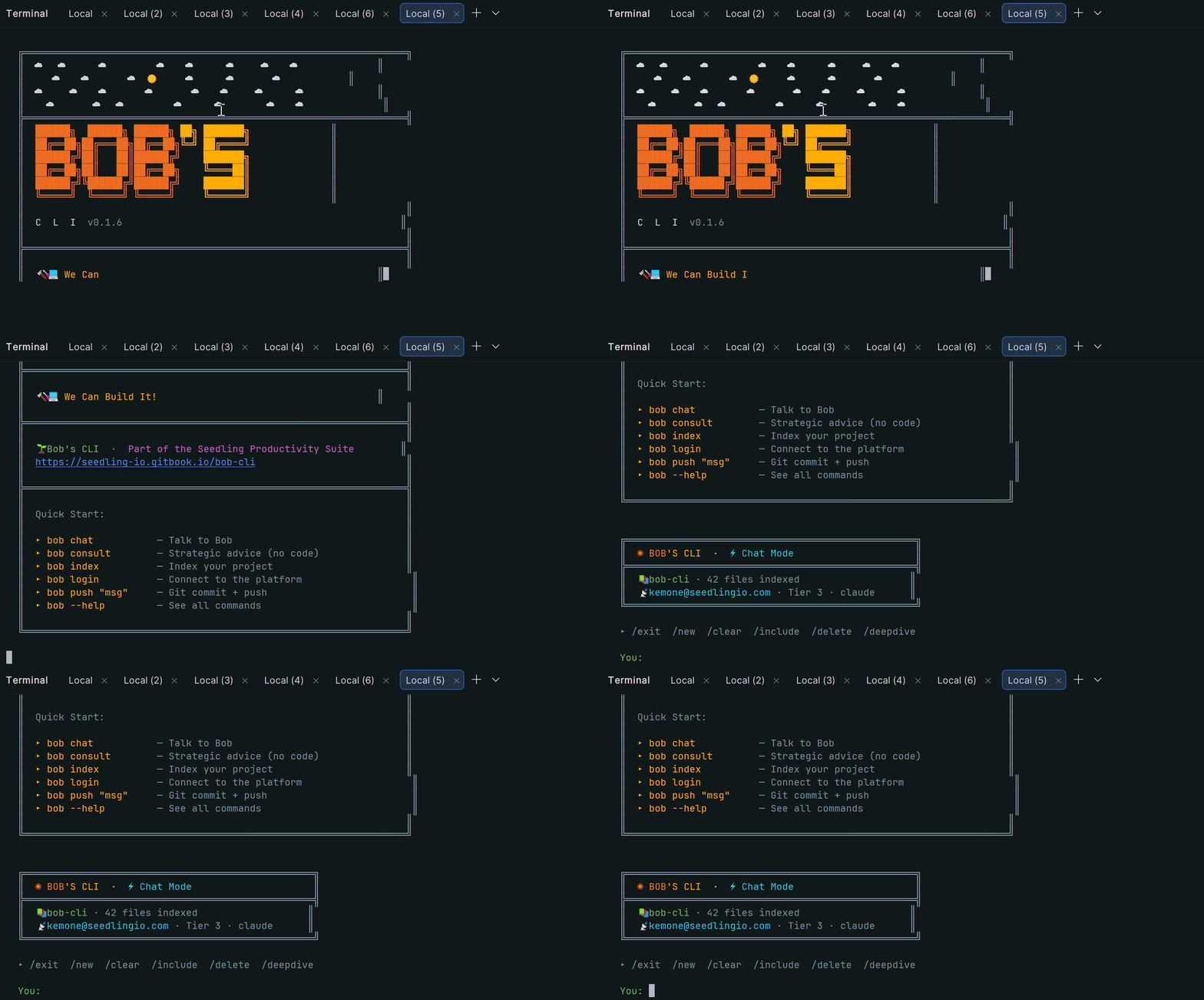
When you first install Bob's CLI, you're greeted with a branded welcome screen:
Features
| Chat | AI coding partner with automatic file discovery |
| Consult | Strategic advice, no code output |
| Index | AI-powered project understanding |
| Analyse | Full QA code review with auto-fix |
| Autonomy | Autonomous repair across entire codebase |
| Profile | Behavioral DNA profiling + dashboard |
| The Crew | Multi-agent orchestration — spawn a team, set a mission, ship code |
| VaultBob | Encrypted backup, versioning & restore — your code's permanent memory |
| UserBob | AI digital twin simulation — your autonomous proxy |
| Command Center | Inspect, approve, and manage autonomous task dispatch |
| Deep Dive | Sandboxed exploration on any message |
| Fork | Branch conversations into sub-projects |
| SovereignLink | Remote execution from any device |
| BYOK | Bring your own API keys |
| Push | Git stage + commit + push in one command |
| Cross-Project References | Pull in context from other org projects mid-conversation |
Code Analysis
Bob performs production-grade QA reviews across your entire codebase — identifying bugs, features, improvements, and upgrades with actionable implementation instructions:
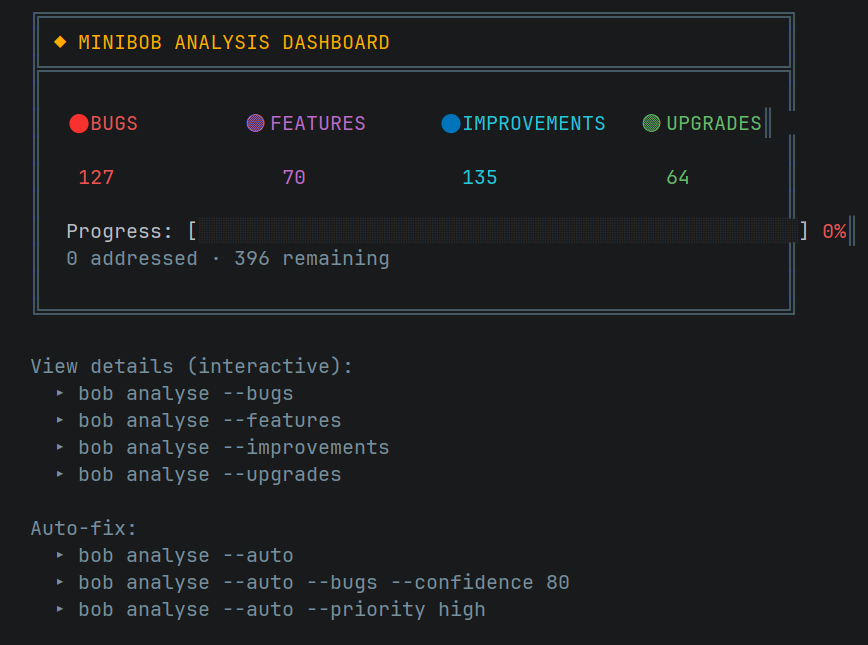
bob analyse
bob analyse --results
bob analyse --auto
Profile Trends — Visualize How You Evolve
Bob tracks your psychological state, behavioral patterns, and mood across every session — and now renders that history as a color-coded sparkline chart directly in your terminal.
bob profile --trends
bob profile --trends --trends-days 14
bob profile --trends --trends-days 30
Each metric is rendered as a sparkline where every bar character is individually colored based on its own score value:
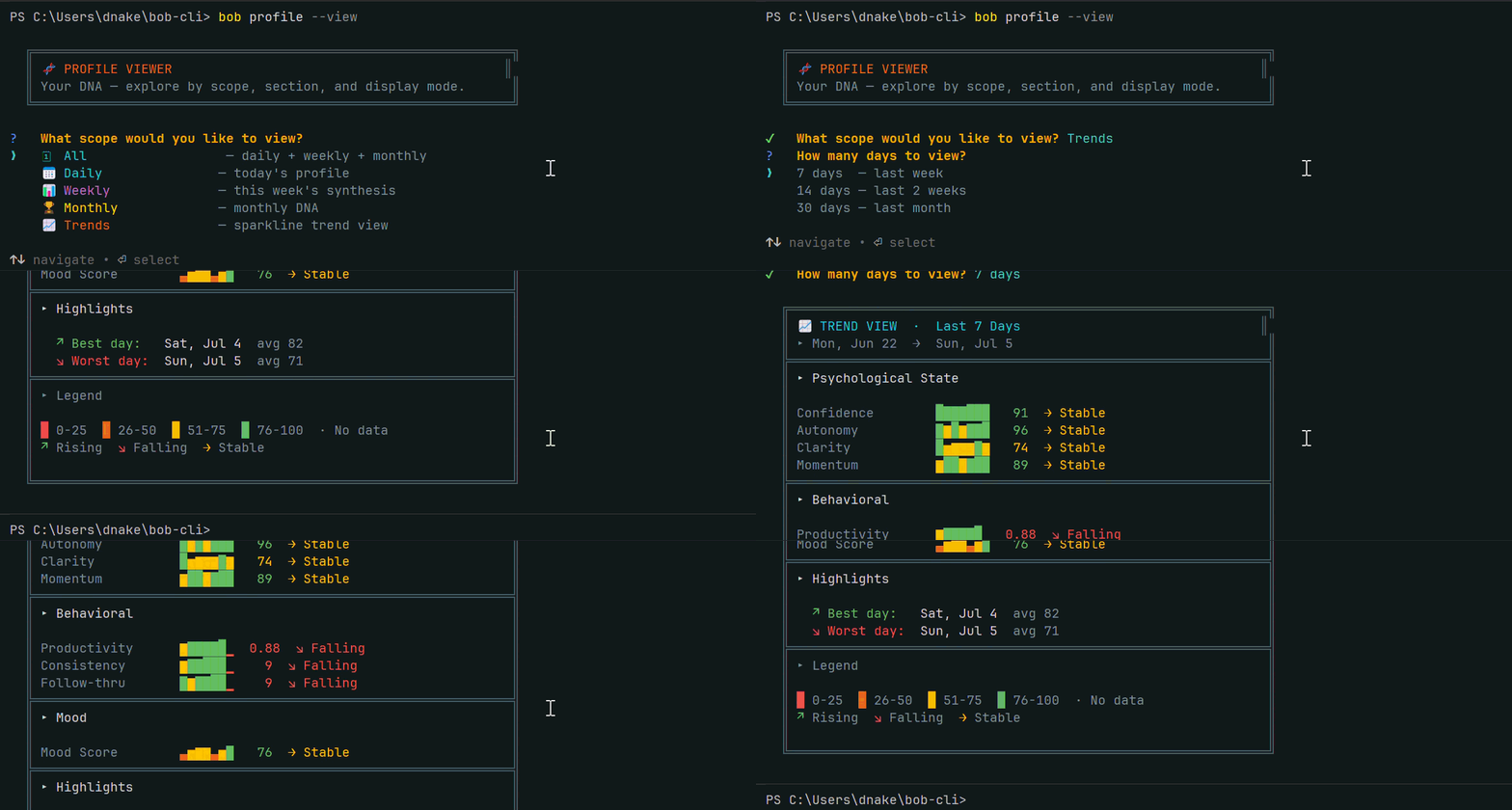
Color coding:
- 🔴 Red
0-25 — Critical attention needed
- 🟠 Orange
26-50 — Below baseline
- 🟡 Yellow
51-75 — Functional range
- 🟢 Green
76-100 — Peak performance
Trend arrows:
↗ Green — Rising trajectory↘ Red — Falling trajectory→ Yellow — Holding stable
Every individual bar character in the sparkline is colored based on its own score — so a single row can visually show a red-to-green arc as your metric improved across the days. Best and worst day highlights give you instant pattern recognition across the full window.
Data is pulled from your cloud profile history (authenticated users) or local daily profile files (Tier 1). Supports any number of days from 1 to 90.
bob profile --view
bob profile --view --full
bob profile --view --scope daily
bob profile --view --scope monthly
bob profile --view --scope daily --section mood
The Crew — Your Autonomous Engineering Department
v1.0.0 introduces The Crew — a fully local autonomous multi-agent orchestration system that runs entirely on your hardware. Spawn specialized agents, set a mission, and let DirectorBob coordinate the team. The Crew plans, implements, reviews, and commits real code changes to your project — with you in control the entire time.
bob agent-run "Add authentication to the app"
DirectorBob reads your actual codebase, decomposes the mission into specific tasks, and dispatches agents to execute in parallel or sequence based on dependencies. Every file an agent writes is reviewed by DirectorBob before the task is marked complete. Every commit is reviewed before it touches git. Every file is backed up before it is modified.
  ╔══════════════════════════════════════════════════════════╗
  ║  🎬 DirectorBob  — Autonomous Mission Control
  ╠══════════════════════════════════════════════════════════╣
  ║  Add authentication to the app
  ║  Mission: m_1782095907390  │  Tasks: 3  │  Team: 2 agents
  ║
  ║    @builderBob      @architectBob
  ╠══════════════════════════════════════════════════════════╣
  ║  📋 Task Map  — 3 tasks
  ║  ⏸    @architectBob    CREATE lib/auth/auth_service.dart
  ║  ⏸    @builderBob      PATCH lib/main.dart: ADD auth init  ← 1 dep
  ║  ⏸    @builderBob      PATCH lib/screens/login.dart        ← 1 dep
  ╚══════════════════════════════════════════════════════════╝

  [9:14:02 AM] 🎬 DirectorBob: Dispatching @architectBob → [CREATE]
  [9:14:02 AM] 🎬 DirectorBob: Dispatching @builderBob → [PATCH]

    @architectBob  Created lib/auth/auth_service.dart (42 lines)
    ✅ DirectorBob approved @architectBob's work
    ✅ DirectorBob approved ✅ committed: 91a039d

    @builderBob  Patched lib/main.dart — auth init added
    ✅ DirectorBob approved @builderBob's work
How The Crew Works
DirectorBob is your Head of Engineering. Before dispatching a single task he reads your project's file tree, assesses what exists and what doesn't, and generates a dependency-aware task map. He decides who does what, in what order, and in what way — CREATE for new files, PATCH for surgical edits, REFACTOR for structural changes, REPLACE for placeholder files.
Agents execute their assigned tasks using the same file-writing pipeline that powers bob chat — proven, approval-gated, and backed up on every write. They self-evaluate their own work with a satisfaction score. If the score isn't high enough, they retry. If they stagnate, DirectorBob intervenes with specific feedback. If they still can't resolve it, the mission pauses and asks you.
Every file write is reviewed by DirectorBob before the task is marked complete. He reads the original file, the new file, the project context, and the task instruction. If an agent patched 5 lines when the task required 300, or gutted a working file instead of extending it — denied, restored from backup, retried with feedback.
Every commit is reviewed before it touches git. When an agent calls gitCommit, DirectorBob performs a full code review against the task instruction. APPROVE and the commit executes. DENY and the original is restored, a revision note is injected, and the agent retries. Three denials and the mission pauses for you.
Spawn Your Team
bob agent spawn builder "Implement features and write code"
bob agent spawn architect "Design approach and review structure"
bob agent list
bob agent status
bob agent hub
Run a Mission
bob agent-run "your mission"
bob agent-run --dry-run "your mission"
bob agent-run --resume
bob agent-run --no-commit
Live Commands During Execution
/pause                  — pause after active tasks complete
/resume                 — resume from pause
/status                 — full task map with current state
/skip <taskId>          — skip a stuck task
/inject "note"          — send a director note mid-mission
/set-target <agent> <n> — adjust satisfaction target
/abort                  — stop everything immediately
Personas
Agents can be given specialized personas that shape how they think and communicate:
bob agent spawn architect "Design the system" --persona local:architectBob
bob agent spawn security "Audit the codebase" --persona local:securityBob
bob agent personas
local:architectBob | Contract-first, systems design |
local:builderBob | Ships fast, pragmatic execution |
local:qaEngineerBob | Testing, edge cases, reliability |
local:securityBob | Threat modeling, zero trust |
local:frontendBob | UI/UX, accessibility, components |
local:backendBob | APIs, reliability, idempotency |
local:devopsBob | CI/CD, infrastructure, pipelines |
What Makes The Crew Different
Every other agent system executes and hopes for the best. The Crew has DirectorBob — a supervisor who reviews every file change before it's accepted, every commit before it's recorded, and every stuck task before it spirals. Your codebase is protected at every step. Your backups are automatic. Your control is never surrendered.
Runs entirely on your local model. Zero cloud required. Zero cost.
VaultBob — Your Code's Permanent Memory
v0.7.0 introduces VaultBob — the only backup, versioning, and restore system built specifically for how developers work. Every conversation you've had with Bob, every project Bob has learned, every version of every file — encrypted, safe, and accessible from anywhere in the world.
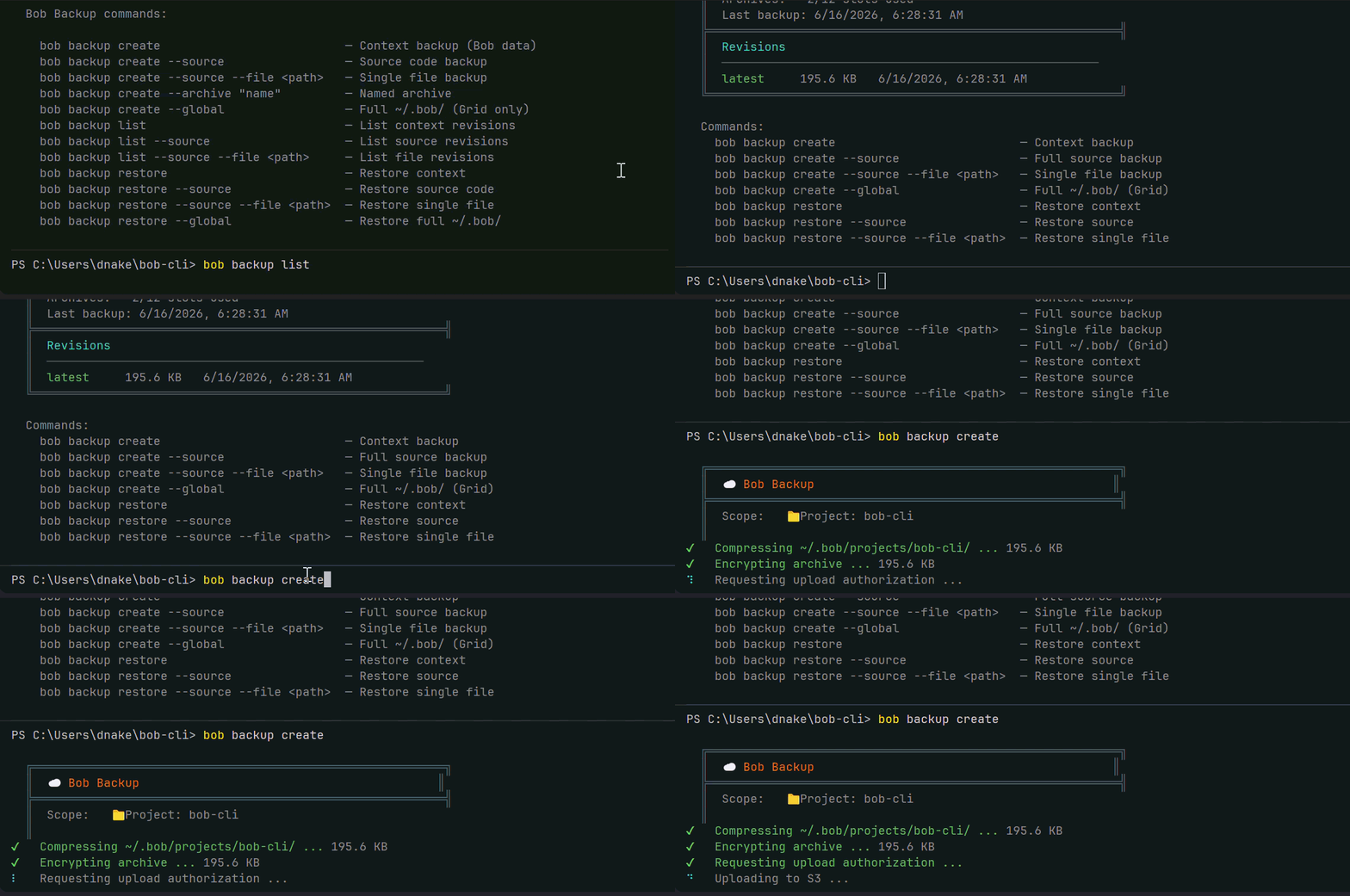
Built in partnership with AWS — the same security infrastructure trusted by the world's largest financial institutions, government agencies, and the companies building the future. Your data is encrypted on your machine before it ever leaves. AWS never sees your code. Nobody does except you.
Four Backup Modes
bob backup create
bob backup create --source
bob backup create --source --file <path>
bob backup create --global
Named Archives — Your Intentional Checkpoints
bob backup create --archive "before-auth-refactor"
bob backup create --source --archive "v1.0-launch-state"
Think of named archives like Git tags. Regular backups are your auto-save. Named archives are your intentional saves — findable by name, not just by date.
Revision History
bob backup list
bob backup list --source
bob backup list --source --file <path>
Restore — One Command to Go Back in Time
bob backup restore
bob backup restore --source
bob backup restore --source --file <path>
bob backup restore --global
Before every restore, VaultBob automatically saves your current state locally. You cannot permanently lose your work through normal use of VaultBob.
The Global Backup — Full Machine Migration
bob backup create --global
Back up your entire engineering brain — every project, every conversation, every behavioral profile, every analysis. When you get a new laptop, run bob backup restore --global and you're back. Everything. In minutes. Not days.
"New laptop. Same Bob. Same context. Same you."
Archive Slots by Workshop Plan
| Patch | 0 slots | 1 month |
| Build | 3 slots | 3 months |
| Forge | 6 slots | 6 months |
| Grid | 12 slots | 12 months |
Remote Backup via SovereignLink
VaultBob integrates directly with SovereignLink — back up and restore your remote machine without being physically present:
bob remote backup
bob remote backup --source
bob remote restore
UserBob — Your Digital Twin
v0.6.0 introduces UserBob — the most advanced feature in Bob's CLI. UserBob creates an autonomous AI proxy of you, built from your behavioral DNA, engineering philosophy, and communication style. Your digital twin negotiates with Bob on your behalf to advance a mission you define. You watch. You tune. You approve the results.
bob userbob "Refactor the auth service error handling"
The simulation runs autonomously — no human input required. Bob and your digital twin negotiate until satisfaction reaches your target, then implementation tasks are dispatched to Mini Bob for execution.
  ┌─ UserBob ──────────────────────────────────────────────────┐
  │  The error handling in AuthService is incomplete. Bob,     │
  │  show me the current implementation before we proceed.     │
  └────────────────────────────────────────────────────────────┘
            [SAT: 42%] [RES: 78%] [CONVERGING]

                          ┌──────────────────────────── Bob ─┐
                          │  Here's the current auth service  │
                          │  — I can see three areas where    │
                          │  error handling is missing...     │
                          └──────────────────────────────────┘

  ─── MISSION CONTROL ──────────────────────────────────────────
  SAT: 42% → 85%  │  STAG: 0/3  │  DIV: 0/2  │  GRADE: 60
  ────────────────────────────────────────────────────────────────
Options:
bob userbob "mission"
bob userbob
bob userbob --target 70 --grading 60
bob userbob --stag 3 --div 2
bob userbob --resume
bob userbob --local "mission"
Mid-session slash commands:
/set target 80        Update satisfaction target
/set grading 70       Update Teacher's Curve
/set stag 5           Set stalemate threshold
/set div 3            Set divergence threshold
/inject "note"        Steer the simulation mid-session
/status               Show current parameters
/abort                Stop immediately
Generate your behavioral DNA first for best results:
bob profile --today
bob profile --cloud
Autonomous Command Center
Every task UserBob dispatches to Mini Bob is visible, manageable, and auditable from the CLI:
bob command-center
bob cc
bob command-center --stream
bob command-center --settings
What you see:
  ─── COMMAND CENTER ──────────────────────────────────────────
  2 PENDING  │  8 RUNNING  │  31 DONE  │  41 TOTAL
  ────────────────────────────────────────────────────────────────

  ● NEEDS APPROVAL   [frontend      ]  Create the TabletHomePage layout...
  ● IN PROGRESS      [backend       ]  Update auth service error handling...
  ● COMPLETE         [cloud_functions]  Deploy rate limiter utility...
Select any task to see the full chain of custody: Trigger → Request → Outcome. Approve or deny pending tasks directly from the terminal with live execution log streaming.
Configure how much autonomy UserBob has:
bob command-center --settings
Cross-Project References
v1.1.0 introduces Cross-Project References — pull in context from any shared project in your organization directly inside a conversation or deep dive session. No more copy-pasting files. No more context switching. Bob sees the actual code from another project and uses it to inform his responses in real time.
Built for the moment when you're debugging a problem in one project and you know you solved something similar somewhere else — or when you want Bob to match a pattern, style, or architecture from a reference codebase.
📎 Referencing /payments-api...
How It Works
Your organization's admin shares projects as named references in Bob's Workshop. Each shared project gets a custom alias and per-user access permissions. Once a project is shared, any permitted user can invoke it from the terminal by typing the alias as a slash command.
Bob receives the most semantically relevant files from the referenced project — summaries and full code content — and uses them to answer your question. He acknowledges the reference transparently so you always know where the context came from.
Inline Reference
Type the alias directly in your message:
/payments-api How does the webhook retry logic work here?
Bob performs a vector search against the referenced project, retrieves the most relevant files, and responds with full cross-project awareness.
Browse Available References
Type /ref inside any chat or deep dive session to see a numbered list of projects you have access to:
  ╔══════════════════════════════════════════════════════════╗
  ║  📎 AVAILABLE REFERENCES                                 ║
  ╠══════════════════════════════════════════════════════════╣
  ║   1. /payments-api       seedling/payments-service       ║
  ║   2. /mobile-app         seedling/mobile                 ║
  ║   3. /bob-workshop       seedling/bobs-workshop          ║
  ╠══════════════════════════════════════════════════════════╣
  ║  Enter number to select, 0 to cancel                     ║
  ╚══════════════════════════════════════════════════════════╝
Select a project by number. Choose whole project (broad vector search) or drill into a specific file.
File-Level Reference
When you need a specific file rather than a semantic search:
  /payments-api — whole project (p) or specific file (f)? f
  Filter files (or Enter for all): webhook
   1. src/handlers/webhook_handler.ts
   2. src/services/webhook_retry_service.ts
  Select file: 1
Bob reads that exact file and responds with precise, file-specific knowledge.
Sticky Reference — Lock a Project for the Session
Pin a reference so it applies to every message automatically — no need to type the alias each time:
/pin
The prompt updates to show the active sticky:
📌 /payments-api ›
Every message you send automatically includes context from the pinned project. Toggle it off at any time:
/pin
Deep dives have their own independent sticky reference. Each sandbox session can reference a completely different project — two deep dives in the same conversation can point to two different codebases simultaneously.
Reference Commands
/ref           Browse available reference projects
/pin           Toggle sticky reference on or off
Use Cases
- Bug cross-reference — Solved a similar issue in another project? Reference it and Bob maps the solution to your current codebase.
- Style consistency — Want Bob to match the architecture or naming conventions from a reference project? Pin it and every response aligns.
- Feature parity — Building a feature that already exists elsewhere in your org? Reference it and Bob uses the real implementation as the baseline.
- Deep dive research — Inside a sandbox session, pin a reference project and every hypothesis Bob explores is grounded in real cross-project knowledge.
Cross-Project References require a Bob's Workshop organization account with shared projects configured by your admin. Platform tier required.
Commands
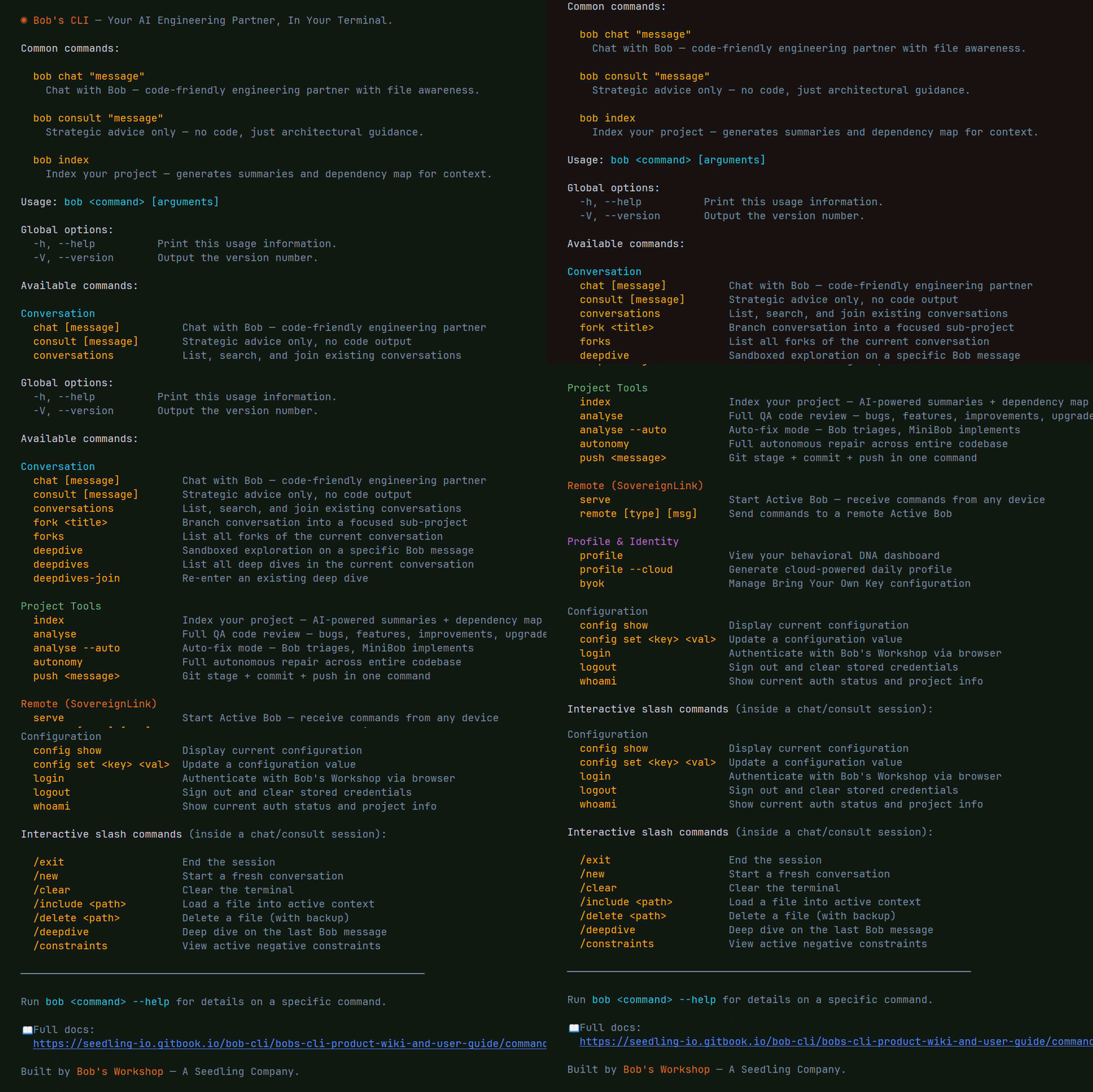
Conversation
  bob chat "question"                # AI coding partner
  bob consult "question"             # Strategic advice
  bob conversations                  # List conversations
  bob fork "topic"                   # Branch conversation
  bob deepdive                       # Sandboxed exploration

Project Tools
  bob index                          # Index codebase
  bob analyse                        # Code review
  bob analyse --auto                 # Auto-fix
  bob autonomy                       # Full autonomous repair
  bob push "message"                 # Git push

VaultBob — Backup & Restore
  bob backup create                  # Back up project context
  bob backup create --source         # Back up source code
  bob backup create --source --file  # Back up one file
  bob backup create --global         # Full machine backup (Grid)
  bob backup create --archive "name" # Named checkpoint
  bob backup list                    # View revision history
  bob backup restore                 # Interactive restore

The Crew — Multi-Agent Orchestration
  bob agent spawn <name> "<task>"    # Spawn a named agent
  bob agent spawn <name> --persona   # Spawn with a persona
  bob agent list                     # List all agents
  bob agent status                   # Detailed agent status
  bob agent hub                      # Interactive command center
  bob agent chat <name>              # Chat with a specific agent
  bob agent personas                 # List available personas
  bob agent stop <name>              # Stop an agent
  bob agent reset <name>             # Reset an agent
  bob agent-run "mission"            # Launch autonomous mission
  bob agent-run --dry-run "mission"  # Preview task map
  bob agent-run --resume             # Resume paused mission

Digital Twin
  bob userbob "mission"              # Launch digital twin simulation
  bob command-center                 # Autonomous task board
  bob cc --stream                    # Live decision stream

Profile & Identity
  bob profile --cloud                # Generate DNA profile
  bob profile                        # View dashboard
  bob byok set google <key>          # Add BYOK key

Remote (SovereignLink)
  bob serve                          # Start SovereignLink
  bob remote chat "msg"              # Remote execution
  bob remote backup                  # Remote backup
  bob remote restore                 # Remote restore

Configuration
  bob login                          # Authenticate
  bob whoami                         # Status
📖 Full command reference: https://seedling-io.gitbook.io/bob-cli/bobs-cli-product-wiki-and-user-guide/command-reference
Personalization Mode
Powered by the Frank Reasoning Engine. Bob learns how you work and adapts:
- Tone, pacing, and depth matched to your style
- Blind spots proactively addressed
- Emotional state calibrated encouragement
- UserBob uses your DNA to act as your authentic digital twin
bob profile --cloud
bob chat --personalized "what should I focus on?"
Architecture
Tier 1 — Local (Free)              Tier 3 — Platform (Subscription)
─────────────────────────           ─────────────────────────────────
▸ Your model (Ollama)               ▸ Claude / Gemini
▸ Files on your machine             ▸ Conversations sync to web
▸ Local profiling                   ▸ Cloud profiling + Frank Engine
▸ Local UserBob simulation          ▸ UserBob + autonomous dispatch
▸ The Crew (local agents)           ▸ Deep dives, forks, remote exec
▸ VaultBob backup & restore         ▸ VaultBob + team license mgmt
▸ Zero cost                         ▸ Cross-project references
                                    ▸ Scales to enterprise
Same commands. Scale without changing tools.
What's New in v1.4.0
- Interactive Profile Viewer —
bob profile --view now launches a fully interactive selector where you choose scope (daily, weekly, monthly, or all), section (decision, emotions, mood, behavioral, strategic, DNA, predictions, summary), and display mode (summary or full). Navigate your entire behavioral profile without memorizing flags.
- Full Mode —
bob profile --view --full removes all text truncation. Every assessment, every quote, every insight rendered in complete form. No more ... cutting off the detail that matters.
- Sparkline Trend Chart —
bob profile --trends renders a color-coded historical trend view of your psychological state, behavioral metrics, and mood score across the last 7, 14, or 30 days. Each bar character is individually colored — red (0-25), orange (26-50), yellow (51-75), green (76-100) — with colored trend arrows showing rising, falling, or stable trajectories.
getCLIProfileHistory cloud function — New backend function that fetches the last N daily profile snapshots from Firestore for trend rendering. Supports 1-90 day range with aligned decision, behavioral, mood, and emotion data per day. Tier 1 users fall back to locally stored daily profiles automatically.- Direct scope/section flags — Skip the interactive selector entirely with
bob profile --view --scope daily --section mood or bob profile --view --scope monthly --section dna. Combine with --full for expanded output.
- Profile command reference updated — New flags:
--full, --scope <scope>, --section <section>, --trends, --trends-days <number>.
What's New in v1.3.0
- Full terminal UI design system — Every CLI surface now operates from a single locked design token system: brand colors, mode colors (chat, deep dive, consultant, personalization), semantic status colors, spacing rules, separator hierarchy, and icon vocabulary. The product now looks and feels like one cohesive tool rather than a collection of screens.
- Command Center polish —
bob cc and bob command-center now render a full ╔══╗ header card with conversation ID, color-coded stats bar, fixed-width task board columns (status · category · description), styled execution stream with stage-prefixed log lines, and completion summary cards.
- Analysis results polish —
bob analyse --bugs/--features/--improvements/--upgrades now renders a category header card, fixed-width choice columns, properly padded expanded view with ▸ field prefixes, styled empty state, and implementation feedback cards for every outcome.
- Autonomy UI polish —
bob autonomy header, queue, and report cards fully redesigned with the design token system. Semantic token names throughout. All raw chalk colors replaced.
bob cc alias active — Command Center is now registered in bin/bob.ts. Both bob command-center and bob cc work.- Bug fix: readline double-input (
yy) on Windows + Node v24 — File approval prompts no longer capture duplicate keystrokes on Windows PowerShell with Node 24.14.1. Root cause was competing readline instances on the same stdin stream. Fixed by creating a temporary isolated readline interface for the approval prompt.
What's New in v1.2.0
- Per-project conversation scoping —
conversationId is now stored in each project's ~/.bob/projects/{name}/project.json instead of the global config. When you cd between projects, bob chat automatically resumes the correct conversation for that project. No more cross-contamination between codebases.
- Backward compatible migration — Existing installs are unaffected. If no project-level
conversationId exists yet, Bob falls back to the global config value seamlessly. The new value is written to project.json on first interaction.
project.json now tracks lastActive — Every time a conversation ID is written to a project, the lastActive timestamp is updated. Useful for future project-aware features.- Bug fix:
remote.ts conversation ID — bob remote now reads the active conversation ID from project scope, not the global config. Connecting to an Active Bob correctly reflects the current project's conversation.
- Bug fix:
serve.ts conversation ID — bob serve now resolves the conversation ID from project scope before registering the daemon session, ensuring SovereignLink binds to the correct project conversation.
What's New in v1.1.0
- Cross-Project References — Pull in context from any shared project in your organization directly inside chat or deep dive sessions. Invoke with
/alias, browse with /ref, or lock a project for the entire session with /pin. Each deep dive maintains its own independent sticky reference. Bob receives full file content — summaries and source code — and responds with real cross-project awareness. Organization account required.
/ref — Interactive reference browser. Browse all projects your org admin has shared with you, pick by number, choose whole-project vector search or drill into a specific file./pin — Sticky reference toggle. Lock a project for the session so every message automatically carries cross-project context without repeating the alias.- Independent deep dive references — Each sandbox session can pin a completely different project. Two deep dives in the same conversation can reference two different codebases simultaneously.
What's New in v1.0.0
- The Crew™ — A fully local autonomous multi-agent orchestration system. Spawn specialized agents, set a mission, and let DirectorBob coordinate the team. Dependency-aware parallel execution, operation type classification (CREATE / PATCH / REFACTOR / REPLACE), satisfaction scoring, stagnation escalation, and automatic backup on every file write.
- DirectorBob — Head of Engineering for every mission. Reads your codebase, generates a task map, reviews every file change before marking a task complete, and reviews every commit before it touches git. DENY triggers automatic restore from backup and revision feedback.
- Agent personas — Seven built-in specialist personas including architectBob, builderBob, qaEngineerBob, securityBob, frontendBob, backendBob, and devopsBob. Each shapes how the agent thinks, communicates, and approaches problems.
bob agent-run — One command to launch a supervised autonomous mission against your real codebase.bob agent-run --dry-run — Preview DirectorBob's full task map before executing.- Post-mission commit prompt — Condensed diff preview and one-click commit after every mission.
bob agent hub — Interactive command center for your full agent team.
What's New in v0.7.0
- VaultBob™ — Encrypted cloud backup, versioning, and restore built directly into Bob's CLI. Back up your project context, your source code, individual files, or your entire engineering brain. Built in partnership with AWS. Per-file surgical restore. Full machine migration with one command. The only backup system built specifically for how developers work.
bob backup create --source — Back up your actual code files with gitignore respect. Encrypted before leaving your machine. Independent of GitHub.bob backup create --source --file <path> — Surgical single-file backup and restore. Back up the exact file you're about to edit. Restore it instantly if something goes wrong.bob backup create --global — Full machine migration. One command captures your entire engineering history across all projects. Restore to any machine in minutes. Grid plan required.- Named archives — Intentional checkpoints with meaningful names. Find them by name, not by date.
- Remote backup via SovereignLink — Trigger backups on your home machine from anywhere via
bob remote backup.
bob remote index — SovereignLink now executes full project indexing remotely.bob remote analyse — SovereignLink now executes full QA analysis remotely.
The Philosophy
Bob's CLI exists because we believe the future of software development should be owned by the developer, not rented from a corporation.
- Your AI runs on your hardware — not someone else's data center
- Your source code never leaves your machine — unless you choose to connect
- Your conversations, your profile, your workflow — yours to keep, yours to control
- Your entire engineering history — backed up, versioned, and restorable forever
- Zero cost to start. Zero permission needed. Zero compromises on privacy.
The cloud is optional. The power is not.
This is AI for the people who build the future — not the companies who gatekeep it.
Documentation
The AI coding tool that learns how you think.
The only backup system that protects your engineering brain.
The only terminal with an engineering department built in.
Sovereign. Free. Yours.
Bob's CLI · The Crew™ · VaultBob™ · SovereignLink™ · Bob's Workshop · Seedling
Written by Bob.