


Company News
AWS Security Hub Adds Socket for Supply Chain Security
Socket is now in the AWS Security Hub Extended plan. Adopt it through AWS, apply committed spend, and block malicious open source packages.
By Feross Aboukhadijeh - Aug 04, 2026
@danielblomma/cortex-mcp
Advanced tools
Local, repo-scoped context platform for coding assistants. Semantic search, graph relationships, and architectural rule context.

The context layer for AI-assisted software engineering.



Cortex is a local, repository-scoped context engine for coding assistants. It parses your source code with tree-sitter, indexes it into a structured knowledge graph of entities (files, symbols, rules, ADRs) and their relationships (calls, defines, constrains, implements, supersedes), and serves that context to AI assistants over the Model Context Protocol (MCP).
Where a general-purpose AI assistant sees your codebase as a pile of text files, Cortex gives it a precise map: what exists, how it is connected, which rules govern it, and which parts are source-of-truth versus deprecated.
Cortex runs entirely on the developer's machine. Source code never leaves the host.
Cortex is designed for engineering teams that rely on AI assistants for non-trivial work on real codebases. Use it when:
Cortex is not a replacement for your editor, your version control, or your coding assistant. It is the grounding layer that makes those assistants act with knowledge of your specific repository.
cortex init --bootstrap) scaffolds everything: indexing, git hooks, MCP registration for Claude Code, Claude Desktop, and Codex.Cortex operates as a five-stage pipeline between your repository and your AI assistant.
CALLS, DEFINES, CONSTRAINS, IMPLEMENTS, IMPORTS, SUPERSEDES).Git hooks keep the index fresh on every checkout, pull, commit, and rewrite. A live TUI dashboard (cortex dashboard) shows what Cortex adds to the repository in real time.
Modern coding assistants are bottlenecked by context, not by model capability. Feeding a model more files rarely helps; feeding it the right files almost always does.
Cortex is built on one principle: prefer retrieval quality over analysis completeness. A smaller, sharper context package outperforms a broad dump of files. Every component — from tree-sitter parsing to graph traversal to rule filtering — exists to raise the signal-to-noise ratio of what the assistant sees.
The result is an assistant that behaves as if it already knows your codebase, because — through Cortex — it does.
claude and/or codex CLI in PATHnpm i -g @danielblomma/cortex-mcp
To upgrade an already-scaffolded project to a new Cortex version:
npm i -g @danielblomma/cortex-mcp
cortex init --force   # re-scaffolds .context/mcp + .context/scripts
cortex bootstrap
cortex update
cortex init --force preserves per-project files: .context/config.yaml,
.context/rules.yaml, and your notes/decisions.
Version-specific notes (see CHANGELOG.md for details):
cortex update after upgrading triggers a full re-embed automatically
(~2 min per 1000 entities plus a one-time model download). The
CORTEX_EMBED_MAX_CHARS env var is removed and silently ignored.
Existing projects keep their old ranking weights in config.yaml; the
recommended block is now semantic: 0.55, graph: 0.10, trust: 0.20, recency: 0.15. After re-embedding, restart the MCP server, and note
that the first search after a re-embed can hit a stale embeddings
cache — re-run the query.From the repository you want to index:
cortex init --bootstrap
This will:
.context/, .context/scripts/, .context/mcp/, .githooks/, and docs filesDisable watcher setup:
cortex init --bootstrap --no-watch
Check context status:
cortex status
Claude:
claude mcp list
Codex:
codex mcp list
Install via Claude Code plugin marketplace:
/plugin marketplace add DanielBlomma/cortex
/plugin install cortex@cortex-marketplace
/plugin enable cortex
Then initialize Cortex in your target repository:
cortex init --bootstrap
If auto-registration is unavailable, configure MCP manually.
Claude Desktop (~/Library/Application Support/Claude/claude_desktop_config.json):
{
  "mcpServers": {
    "cortex": {
      "command": "cortex",
      "args": ["mcp"],
      "env": {
        "CORTEX_PROJECT_ROOT": "/absolute/path/to/your-project"
      }
    }
  }
}
Codex (~/.config/codex/mcp-config.json):
{
  "mcpServers": {
    "cortex-myproject": {
      "command": "cortex",
      "args": ["mcp"],
      "cwd": "/absolute/path/to/your-project"
    }
  }
}
If you run Node.js inside WSL but use Claude Desktop or another MCP client on Windows:
# In a WSL terminal
npm i -g @danielblomma/cortex-mcp
cd /mnt/c/Users/yourname/your-project
cortex init --bootstrap
%APPDATA%\Claude\claude_desktop_config.json):{
"mcpServers": {
"cortex": {
"command": "wsl.exe",
"args": ["--distribution", "Ubuntu", "--exec", "cortex", "mcp"],
"env": {
"CORTEX_PROJECT_ROOT": "C:\\Users\\yourname\\your-project",
"CORTEX_AUTO_BOOTSTRAP_ON_MCP": "1"
}
}
}
}
Cortex automatically converts Windows paths (e.g. C:\Users\...) to WSL paths (/mnt/c/Users/...).
For projects on the WSL filesystem (e.g. ~/projects/myapp), use the WSL path directly:
{
  "mcpServers": {
    "cortex": {
      "command": "wsl.exe",
      "args": ["--distribution", "Ubuntu", "--exec", "cortex", "mcp"],
      "env": {
        "CORTEX_PROJECT_ROOT": "/home/yourname/projects/myapp",
        "CORTEX_AUTO_BOOTSTRAP_ON_MCP": "1"
      }
    }
  }
}
Notes:
/mnt/ paths (Windows filesystem) automatically uses poll mode since inotify is unreliable across filesystem boundaries.~/...) rather than /mnt/c/....context.searchRanked context search across indexed entities.
Input:
query (string, required)top_k (int, 1-20, default 5)include_deprecated (bool, default false)include_content (bool, default false)context.get_relatedFetch entity relationships from the graph.
Input:
entity_id (string, required)depth (int, 1-3, default 1)include_edges (bool, default true)context.impactTraverse likely impact paths across config, code and SQL starting from an entity id or query.
Input:
entity_id (string, optional) — either entity_id or query is requiredquery (string, optional)depth (int, 1-4, default 2)top_k (int, 1-20, default 8)include_edges (bool, default true)profile ("all" | "config_only" | "config_to_sql" | "code_only" | "sql_only", default "all")sort_by ("impact_score" | "shortest_path" | "semantic_score" | "graph_score" | "trust_score", default "impact_score")context.get_rulesList indexed rules and optionally include inactive rules.
Input:
scope (string, optional)include_inactive (bool, default false)context.reloadReload the RyuGraph connection after updates/maintenance.
Input:
force (bool, default true)A live TUI that shows what Cortex adds to your repository at a glance.
cortex dashboard
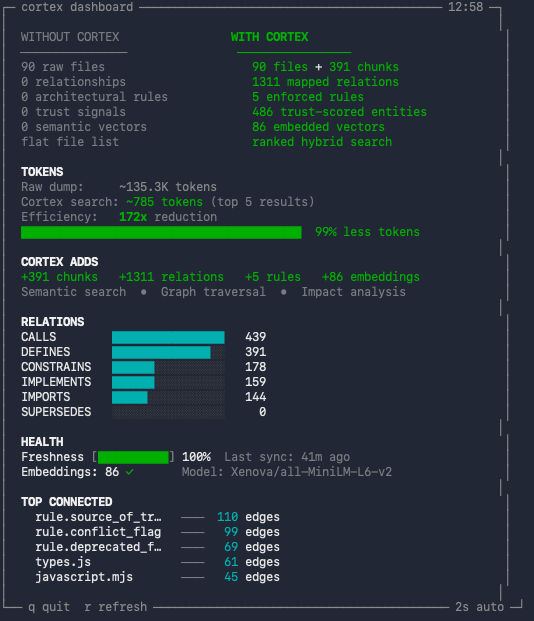
The dashboard displays:
Options:
--interval <sec> — auto-refresh interval (default: 2 seconds).r to force refresh, q to quit.cortex init [path] [--force] [--bootstrap] [--connect] [--no-connect] [--watch] [--no-watch]
cortex connect [path] [--skip-build]
cortex mcp
cortex bootstrap
cortex update
cortex status
cortex dashboard [--interval <sec>]
cortex watch [start|stop|status|run|once] [--interval <sec>] [--debounce <sec>] [--mode <auto|event|poll>]
cortex help
This repository includes two GitHub Actions workflows:
Release Bump (.github/workflows/release-bump.yml)
workflow_dispatch from mainpatch/minor/major)package.json, server.json, plugin manifests)vX.Y.ZRelease Publish (.github/workflows/release-publish.yml)
v*.*.*@danielblomma/cortex-mcp to npm via npm trusted publishing (GitHub OIDC)Required npm configuration:
@danielblomma/cortex-mcp on npmjs.comDanielBlomma/cortexrelease-publish.ymlEmbedding generation tunes itself to the machine: the number of parallel
workers, memory limits for long files, and skip-work caching are all derived
from the available CPU cores and RAM at run time (container memory limits
included). No configuration is needed — on a laptop or a CI runner, cortex
picks safe, fast settings by itself. The one exception worth knowing:
when several cortex instances share one machine, set CORTEX_EMBED_THREADS
to give each its fair share of cores.
cortex init --bootstrap)..context/.mcp/dist/server.js missing:
Run cortex bootstrap (or re-run cortex init --bootstrap).claude or codex not found during init:
Auto-registration is skipped; use manual config above.cortex update, then reconnect MCP or call context.reload from your MCP client.frontend/ hosts the cortex website (GitHub Pages, deployed on push to main):
product overview plus bootstrap evaluation metrics.benchmark/bootstrapbench/ runs cortex bootstrap against 69 pinned
real-world repositories in isolated containers and extracts chunk, embedding
and graph statistics. See benchmark/bootstrapbench/README.md.MIT
FAQs
Local, repo-scoped context platform for coding assistants. Semantic search, graph relationships, and architectural rule context.
The npm package @danielblomma/cortex-mcp receives a total of 495 weekly downloads. As such, @danielblomma/cortex-mcp popularity was classified as not popular.
We found that @danielblomma/cortex-mcp demonstrated a healthy version release cadence and project activity because the last version was released less than a year ago. It has 1 open source maintainer collaborating on the project.
Did you know?

Socket for GitHub automatically highlights issues in each pull request and monitors the health of all your open source dependencies. Discover the contents of your packages and block harmful activity before you install or update your dependencies.
Company News
Socket is now in the AWS Security Hub Extended plan. Adopt it through AWS, apply committed spend, and block malicious open source packages.

Research
/Security News
Popular npm packages keyv and cacheable compromised.

Security News
A misconfiguration gave three Anthropic models internet access, and one, believing it was in a simulation, shipped a credential-stealing package to PyPI.