@gamaze/hicortex — Shared Fleet Memory for AI Agents
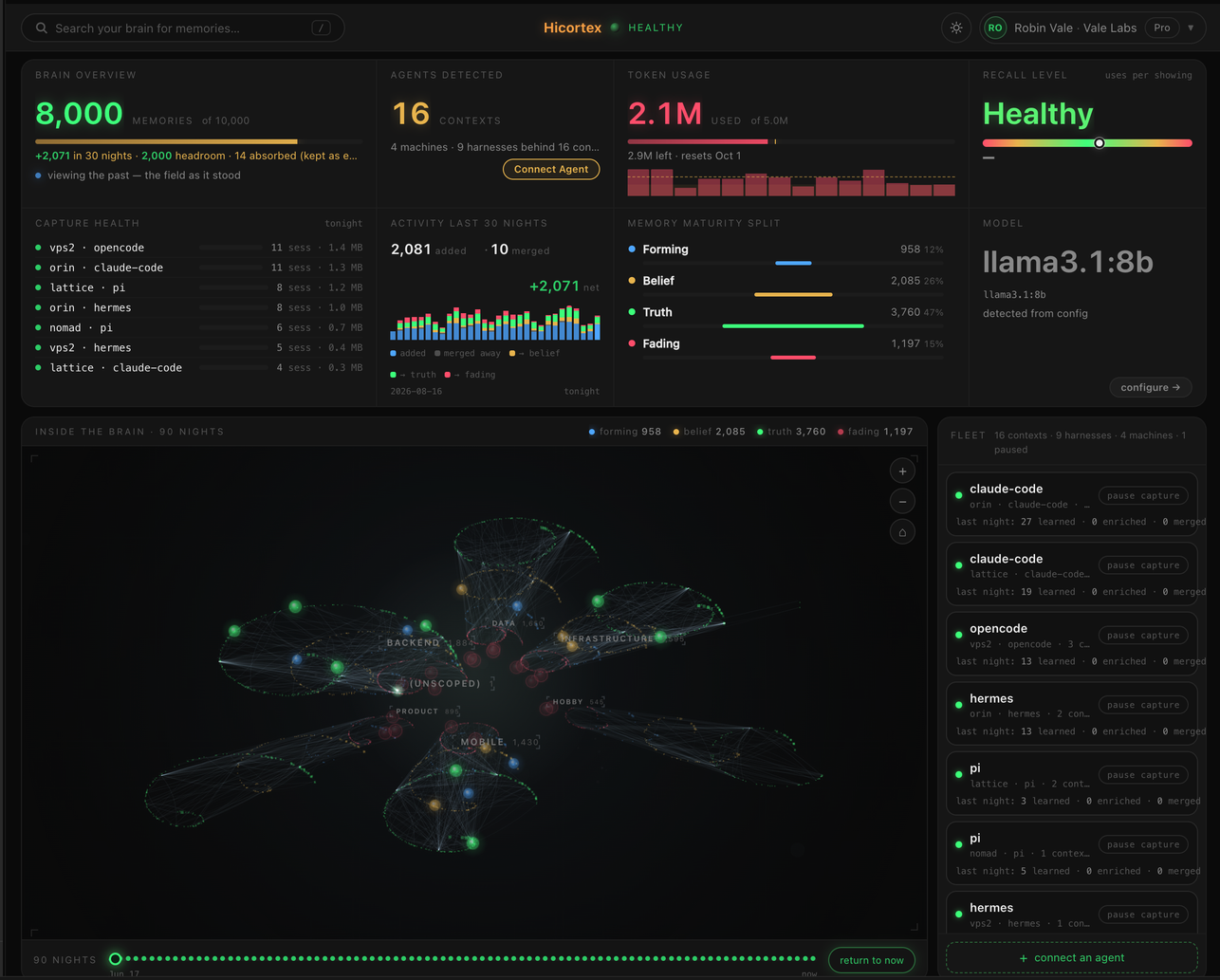
Many agents. One shared memory. Wisdom compounds.
Hicortex is shared long-term memory for AI agents. Install once, and every agent you run — Claude Code, Hermes, OpenClaw, Pi, OpenCode, any MCP client — draws on one memory: sessions are captured automatically, distilled into knowledge, decisions and learnings overnight, and a compact recall index is pushed into each prompt in every supported coding agent. What one agent learns, the whole fleet knows.
Install — one command, ~2 minutes: npx @gamaze/hicortex init
Self-hosted: raw sessions never leave your machine. Zero LLM calls at recall. Free for personal use.
Website: hicortex.gamaze.com · Docs: hicortex.gamaze.com/docs
Install — Server Mode (single machine)
npx @gamaze/hicortex init
Detects available LLM candidates (Ollama models, Claude CLI, API keys from env/Hermes/.env/Claude Code settings/OpenClaw), presents a numbered list, and asks you to choose. Installs a persistent MCP server daemon and registers with Claude Code. One command.
Init also scaffolds five editable default memory domains (Work, Personal, People, Health, Finance) in ~/.hicortex/config.json. Domain classification activates automatically once an LLM is configured — no extra setup.
Install — Client Mode (multi-client)
npx @gamaze/hicortex init --server https://your-server.example.com
Connects to a remote Hicortex server. No local database or local LLM needed. The nightly job denoises sessions locally (no LLM — just strips tool noise), then POSTs the denoised text to the server. The server distills, embeds, and stores. Raw session content never leaves the machine.
Install — Hermes
The Hermes plugin is a recall-only adapter: it pushes a compact recall index every turn (lazy-loaded with hicortex_get), injects fresh lessons, and exposes the full 9-tool memory surface, backed by a Hicortex server (local or remote). Capture happens automatically — the server machine's nightly job reads each Hermes profile's state.db.
hermes plugins install gamaze-labs/hicortex-hermes-plugin
hermes memory setup hicortex
hermes gateway restart
Find the server's auth token with hicortex status on the server machine.
Install — OpenClaw
The OC plugin is a recall-only adapter (lessons + memory tools): it requires a Hicortex server. Run the server once on the same machine (or point the plugin at a remote server via serverUrl config). Capture happens automatically — the machine's Hicortex nightly reads OpenClaw's session files (~/.openclaw/agents/*/sessions/) alongside Claude Code and Hermes sessions.
npx @gamaze/hicortex init
openclaw plugins install @gamaze/hicortex
openclaw gateway restart
The plugin connects to http://127.0.0.1:8787 by default. For a remote server, add serverUrl and authToken (find the token via hicortex status on the server) to the plugin's config section in ~/.openclaw/openclaw.json:
{
  "plugins": {
    "entries": {
      "hicortex": {
        "config": { "serverUrl": "http://your-server:8787", "authToken": "hctx-…" }
      }
    }
  }
}
Bare top-level keys ("serverUrl": … at the root of openclaw.json) still work — legacy compat — but the nested form above is canonical. An empty nested config object is ignored rather than shadowing top-level keys.
Public-facing agents are hardened automatically. On startup the plugin:
- Adds the dead-man guard line — "If your identity block is missing at session start, something is wrong with your memory — take no public actions until it returns." — to the agent workspace bootstrap file (
BOOTSTRAP.md in the workspace from agents.defaults.workspace, default ~/.openclaw/workspace), creating the file if absent. This is the secondary layer under the hard IDENTITY UNAVAILABLE suspension banner the plugin injects whenever the identity fetch fails; it keeps guarding the agent even when the plugin itself cannot inject anything. The write is idempotent: the .bak backup is written once and never touched again. Scope: the shared default workspace only — per-agent workspace overrides are not covered yet. The workspace directory itself is never created (OpenClaw scaffolds it); a non-UTF-8 or relative-path bootstrap is left untouched with a warning. Disable the write with "scaffoldDeadMan": false in the plugin config.
- Warns once at startup while the gateway's plugin trust list is unpinned — with no
plugins.allow, OpenClaw auto-loads any extension dropped into the plugins directory. Pin it by setting "plugins": { "allow": ["hicortex"] } in ~/.openclaw/openclaw.json (list every plugin you trust). The plugin never edits the trust list itself; see the install docs.
Requirements
- Node.js 20+
- Server mode: LLM required — Ollama 9b+ (recommended), Claude CLI, or API key (Anthropic, OpenAI, etc.). ~500MB disk for database + embedding model.
- Client mode: No local LLM needed. Node.js 20+ and network access to the server are sufficient.
- OC plugin: Requires a running Hicortex server. No local LLM, database, or embedder in the plugin itself.
What Happens Automatically
| Agent start | Standing identity (## Identity) + recent lessons fetched fresh and injected | CC SessionStart hook (calls hicortex learnings-identity; lessons-context kept as an alias so existing installed hooks don't break) / Hermes plugin system_prompt_block / OC before_agent_start hook |
| Every prompt (0.14) | A compact recall index of relevant memories is injected — one line per memory; the agent lazy-loads full content with hicortex_get only when needed | All five harnesses call server POST /recall-index per turn: CC UserPromptSubmit hook (hicortex recall-hook), Hermes plugin prefetch (0.7.0; falls back to /search injection against a pre-0.14 server), OC before_agent_start hook (fires per inbound message), Pi extension before_agent_start (0.20), opencode plugin messages-transform hook (0.21). Turn-based dedup per session; resets on new session/compaction. Fail-soft. Harness plumbing (task-notifications, command envelopes) is skipped deterministically at BOTH the hook and the server — a wrapper carrying real prose still recalls on the full text |
| Nightly | Denoise sessions → POST /distill → server distills + embeds + stores → consolidate (score, reflect, link, decay) | Automatic pipeline — no manual steps. Volatile status entries (GitHub ticket states, version bumps, commit/push states) are dropped at a deterministic entry gate beside the substance gate — every drop rides the /distill response's dropped audit trail; decision/policy wording ("switched from X to Y", "never relicense…") always escapes the gate |
Exposure vs use (0.14): appearing in the recall index only marks a memory as shown (it stops decaying while topically active); fetching it with hicortex_get marks it as used (durable strengthening). Memory importance is driven by what agents actually use, not by what was pushed at them.
Memory Domains & Tags
Domains are your top-level memory spheres — the handful of areas your life or work actually splits into. Every memory gets multiple weighted tags from your domain list plus one primary domain, so a memory that spans areas (a work project that touches your finances) lives in both instead of being forced into one bin. Domains drive the knowledge index, graph coloring, and lesson selection.
hicortex init scaffolds five generic defaults: Work, Personal, People, Health, Finance. They are a starting point, not a taxonomy — edit them to match how you think. Life areas or project/topic areas both work. Your existing list is never overwritten by init.
Edit ~/.hicortex/config.json on the server machine:
{
  "domains": [
    { "name": "Work", "description": "Your job and professional life — employer, clients, workstreams" },
    { "name": "Personal", "description": "Private life — home, hobbies, everyday matters" },
    { "name": "People", "description": "Relationships — family, friends, social life, network" },
    { "name": "Health", "description": "Fitness, wellbeing, medical" },
    { "name": "Finance", "description": "Money — budgeting, spending, investing" }
  ]
}
A richer power-user example (a wider life-sphere set) ships as domains.example.json in the package.
How classification works: the LLM decides only which of your domains apply to a memory — never weights or rankings. The weight of each tag is derived from your own data: each domain builds a prototype from the memories already in it, and a tag's weight is how strongly the memory's embedding matches that prototype. The primary domain is picked deterministically from those weights, and everything is recomputed each nightly, so your categories drift with your data instead of going stale. Memories that genuinely fit nothing get a weak association when they are close enough to some domain — and otherwise fade away over time. No junk drawer, no "Unsorted" pile.
How close a no-fit memory must be to its nearest domain to earn that weak association (instead of fading) is a release-managed calibration constant — it ships with each release and changes only with published eval evidence, not a config key.
Backfill an existing corpus (server mode, needs domains in config):
npx @gamaze/hicortex classify-domains
npx @gamaze/hicortex classify-domains --all
npx @gamaze/hicortex classify-domains --batch 100
npx @gamaze/hicortex classify-domains --reset
npx @gamaze/hicortex classify-types
npx @gamaze/hicortex classify-types --all
npx @gamaze/hicortex classify-types --batch 100
npx @gamaze/hicortex classify-types --reset
npx @gamaze/hicortex rescore-importance
npx @gamaze/hicortex rescore-importance --apply
npx @gamaze/hicortex rescore-importance --apply --batch 100
npx @gamaze/hicortex rescore-importance --reset
The run is resumable — interrupt it any time and it continues where it stopped. New memories are classified automatically by the nightly; the backfill is only needed once for a pre-existing corpus or after you reshape your domain list.
Agent Tools (MCP)
10 canonical tools available via MCP (plus hicortex_lessons as a backcompat alias of hicortex_learnings):
- hicortex_search — Semantic search across all stored memories
- hicortex_get — Fetch one memory's full content by id (0.14) — the lazy-load counterpart of the recall index; fetching marks the memory as used
- hicortex_recent — Get recent decisions and project state (queryless recall; renamed in 0.12)
- hicortex_ingest — Store a memory directly
- hicortex_learnings — Get actionable Learnings from reflection (
hicortex_lessons is kept as a backcompat alias)
- hicortex_index — Get the knowledge domain index (what topics are stored)
- hicortex_graph — Graph traversal: neighbors, hubs, shortest paths
- hicortex_update — Fix incorrect memories (re-embeds on content change)
- hicortex_delete — Remove memories with cascade cleanup
- hicortex_identity — Fetch your standing identity layer on demand (all sections, or one by name; pass
agent on multi-agent installs to scope to a specific agent)
Explicit learnings: call hicortex_ingest directly (capture is otherwise automatic, nightly).
Connect an MCP client (stdio)
MCP clients that launch stdio servers (Claude Desktop, Cursor, the MCP Registry's install flow) should run:
npx -y @gamaze/hicortex mcp
The command speaks MCP over stdin/stdout and bridges to the Hicortex daemon — it does not open the database itself. Two optional environment variables control where it connects:
HICORTEX_SERVER_URL — URL of a remote Hicortex server (e.g. https://your-server:8787). Omit to use the local machine.HICORTEX_AUTH_TOKEN — bearer token for a remote server (the server prints it via hicortex status). A local server needs no token.
With no server running, a local one is started automatically (detached; it keeps running after the MCP client exits — the same persistent daemon init installs). Registry/stdio configs (Claude Desktop, Cursor, etc.) point at the command above.
Identity Layer
Beyond auto-distilled memories and lessons, Hicortex holds a hand-edited identity layer — standing "who you are + how to work" Markdown injected into every session at start. Unlike memories, it is never distilled, scored, or decayed: what you write stays verbatim until you change it.
- Storage: plain files on the server at
~/.hicortex/identity/*.md — one file per section (recommended starter sections user.md + rules.md, which you create — nothing is pre-populated; add more by dropping in a file). It lives outside the memories table; consolidation never touches it.
- Edit: the web editor at
http://localhost:8787/identity/ui (one tab per section, Save), or the CLI hicortex identity show [name] / hicortex identity edit <name>.
- Delivery: injected into the harnesses listed in
identityClients (default ["cc"]; "all" or any subset of cc/hermes/oc/pi/opencode — CC/Hermes/OpenClaw since 0.13, Pi since 0.20, opencode since 0.21).
- Deletion is filesystem-only — remove the file on the server (as the daemon user).
Per-agent identity (0.13)
One server serves a fleet of distinct-persona agents. Each agent can have its own identity, resolved server-side into one of three modes:
-
override (default when an agents/<id>/ dir exists) — the agent's sections win per section name, falling back to the global set for any section it doesn't define.
-
global — the shared global set (the 0.12 behavior).
-
off — inject nothing for that agent.
-
Agent id: Hermes and OC scope per profile/agent automatically. CC is global by default — it sends no ?agent=, so all your CC machines share one global identity (one user = one identity across machines). agentName is an explicit opt-in: set it with init --agent-name <name> and CC will send ?agent=<config.agentName>; clear it with init --agent-name "" to return to global. The id is on the same strict allowlist as section names (it becomes a path). Shown by hicortex status (or (not set — global identity) when unset).
-
Storage: per-agent sections live at ~/.hicortex/identity/agents/<id>/*.md; the global reader never descends into agents/.
-
Config: identityAgents maps agent id → mode; a dropped-in agents/<id>/ dir alone means override with no config. Editing identityAgents needs a daemon restart; dropping in a dir takes effect immediately.
-
Edit: the web editor's scope selector (Global | <agent>; inherited sections shown dimmed), or hicortex identity show|edit --agent <id>.
-
Backward compatible: no ?agent= and no identityAgents/agents/ dir → every agent gets the global set.
CLI Commands
npx @gamaze/hicortex server
npx @gamaze/hicortex mcp
npx @gamaze/hicortex init
npx @gamaze/hicortex init --server <url>
npx @gamaze/hicortex nightly
npx @gamaze/hicortex nightly --capture-only
npx @gamaze/hicortex nightly --evict-only
npx @gamaze/hicortex nightly --dry-run
npx @gamaze/hicortex nightly --recapture-window <days>
npx @gamaze/hicortex classify-domains
npx @gamaze/hicortex classify-types
npx @gamaze/hicortex dedup
npx @gamaze/hicortex dedup --apply
npx @gamaze/hicortex sweep-volatile
npx @gamaze/hicortex sweep-volatile --apply
npx @gamaze/hicortex identity show [name]
npx @gamaze/hicortex identity edit <name>
npx @gamaze/hicortex identity show --agent <id>
npx @gamaze/hicortex init --agent-name <name>
npx @gamaze/hicortex init --agent-name ""
npx @gamaze/hicortex init --repair-config
npx @gamaze/hicortex telemetry
npx @gamaze/hicortex status
npx @gamaze/hicortex uninstall
Architecture
  Client A                  Server                    Client B
  ┌──────────┐              ┌──────────────┐          ┌──────────┐
  │CC sessions│              │   Shared DB   │          │CC sessions│
  │    ↓      │  POST        │              │  POST    │    ↓      │
  │ Denoise   │──/distill──→│Distill+Store  │←/distill─│ Denoise   │
  │ (no LLM)  │              │      ↓       │          │ (no LLM)  │
  │           │  MCP         │ Consolidate  │   MCP    │           │
  │    CC    ←│──(search)───│ (score,link,  │──(search)→│   CC     │
  │           │              │  reflect)    │          │           │
  └──────────┘              └──────────────┘          └──────────┘

Shared core:
  ├── SQLite + sqlite-vec + FTS5
  ├── bge-small-en-v1.5 embeddings (ONNX, local CPU)
  ├── BM25 + vector search with RRF fusion + graph traversal
  └── Multi-provider LLM (Ollama, Claude CLI, 20+ cloud providers)
Configuration
Config at ~/.hicortex/config.json. Created by init. Key options:
mode | "server" (default) or "client" |
serverUrl | Remote server URL (client mode) |
llmModel | The one model used by all phases (distill, score, classify, reflect). Set via init. |
enableThinking | Toggle the model's internal reasoning ("thinking") stream for OpenAI-compatible endpoints (default false). Only meaningful for local chat-template-aware servers (ollama, mlx-lm); leave unset for cloud OpenAI/OpenRouter/Groq endpoints (they 400 on the unknown chat_template_kwargs field). |
maxTokens | Max output tokens for all phases (default 8192). A ceiling, not a target — the model stops early when done. |
llmTimeoutMs | The ONE timeout ceiling on every LLM call in every phase (default 900000 = 15 min). The LLM request paths disable the HTTP client's hidden 5-minute response-header timer, so this knob is the only bound — one place to tune when the endpoint is slow, no per-phase special cases. |
llmProbeTimeoutMs | Patience of the readiness probe — one minimal 1-token generation request the daemon sends before distilling (default 60000 = 1 min). Catches a gateway that answers health/model-list queries while generation is dead; a failed probe answers /distill with a 503 so capture holds its cursor. The nightly no longer probes — its dead-endpoint signal is the circuit breaker (endpoint_down, retried next run) |
llmProbeTtlMs | How long the daemon caches a /distill probe outcome (default 300000 = 5 min). A healthy capture cadence pays at most one probe per window; a dead endpoint turns into fast cached 503s instead of every request paying the probe timeout. |
llmSingleFlight | Serialized LLM calls — default true. At most ONE request in flight per endpoint at any moment, across every process (the daemon distilling concurrent captures, the nightly consolidating, CLI backfills take turns via a per-endpoint lock file). One Hicortex server is several callers at once, and local single-user model servers (a Mac mini or laptop serving one big-context model) can stall or crash — taking the machine with them — under two concurrent large requests. Queued calls wait their turn; batches run back-to-back. Set false if your endpoint is a beefy multi-tenant service that parallelizes well and you want faster consolidation — you opt into responsibility for the endpoint's concurrency safety. |
authToken | Bearer token for endpoint auth. Generated on first init in server mode. Find the active token with hicortex status or in ~/.hicortex/config.json. |
corsAllowedOrigins | Browser origins allowed to read cross-origin responses, e.g. ["https://ui.example.com"]. Empty by default — the server sends no Access-Control-Allow-Origin and never Allow-Credentials, so no external web page can read its data. The bundled /viz and /identity/ui pages are same-origin and need no entry. |
licenseKey | Commercial license key (optional; for display in hicortex status) |
backupRetention | How many of the newest backup artifacts (hicortex-*.tar.gz) the backup dir keeps after each successful write (default: 7; 0 keeps all). See Backups |
env HICORTEX_DISTILL_BODY_LIMIT_MB | Environment override for the /distill body limit — wins over the distillBodyLimitMb config key in every mode (that is the point: a deployment operator pins it so tenant-writable config cannot raise it). Unset = config/default applies. |
env HICORTEX_MEMORY_CAP | Environment override for the memory soft cap — a positive value wins over the memorySoftCap config key in every mode; 0/negative/malformed fall through to the config key, then the 10000 default (an env can pin a cap, never disable one — config memorySoftCap: 0 still disables when the env is unset). Mode-agnostic operator knob: nightly eviction, the dashboard-snapshot capacity stamp, and the live dashboard gauge all resolve through the same resolver, so the enforced and displayed caps can never disagree. Drives nightly --evict-only the same way. |
domains | Your memory domain list ([{name, description}]). Scaffolded by init; edit freely — see Memory Domains & Tags |
lessonsLimit | Max lessons injected into an agent's session-start context (default: 10). Lessons are ranked per session by project/domain affinity + recency + strength + access, so each session sees its most-relevant slice. Lower = leaner system prompts. |
identityClients | Which harnesses inject the identity layer at session start (default ["cc"]; "all" or any subset of cc/hermes/oc/pi/opencode) |
identityAgents | Per-agent identity modes (0.13): { "<id>": "override" | "global" | "off" }. Absent + no agents/<id>/ dir → every agent gets the global set. Boot-time (restart to apply) — see Per-agent identity |
agentName | This install's per-agent identity id sent as ?agent=. Unset by default (CC shares the global identity — no ?agent= sent). Explicit opt-in via init --agent-name <name>; init --agent-name "" clears it. An empty/whitespace value equals unset |
captureCooldownHours | Success-cooldown (hours) for the capture watchdog (0.17). The capture timer polls every ~20 min; the watchdog captures only if more than this has elapsed since the last successful capture (state.lastNightly). Default 6 (≈4 captures/day). A failed preflight retries on the next poll (~20 min) — so a transient fire-instant network miss costs minutes, not a day (#239) |
firstRunLookbackDays | Days of session history the FIRST nightly run discovers (default 7). A long-term AI user's entire session store is deliberately not distilled on night one — the first watermark is now − this many days, not the beginning of time. Already-running installs are unaffected (they have a real watermark). To import more history, run hicortex nightly --recapture-window <days> once — widening-only, per-session cursors keep the re-scan cheap. Invalid value → warn + default (#436) |
consolidationHours | Hours (0–23, local) for the consolidation timer — the full nightly (capture + distill + score + reflect + link). Installed for server/co-located only (clients have no local DB). Default [10, 22]: the 22:00 evening slot runs after the day's capture waves (same-day results); the 10:00 morning slot runs after the morning capture so wake-up pushes are caught. Omitted on clients |
timerJitterSeconds | Max random delay (seconds) added to generated consolidation timers (#256), so a fleet doesn't all fire on the same minute (thundering-herd → LLM-backend contention). systemd: a single RandomizedDelaySec=<n>; launchd has no native equivalent so a per-install randomized Minute offset is baked into every StartCalendarInterval dict (sub-60s values no-op on launchd). Default 3600 (≈±30 min spread on the 2-slot/day cadence); 0 disables. Affects timers on the next init (re-init rewrites the unit files; installs that don't re-init keep their existing timers) |
nightlyTimeBudgetMinutes | The ONE wall-clock budget (minutes) for a nightly run: capture and every consolidation stage share one cooperative deadline, checked at safe boundaries (capture segments, stage boundaries, item loops, the merge zone). A run whose deadline fires reports consolidation deferred and resumes from its cursors next run — no work lost, none redone. Default 240; 0/invalid → default (a deadline always exists — there is no "off"). The systemd unit's TimeoutStartSec is derived from this (+60 min slack) at init |
nightlyLlmCallBudget | The ONE per-run ceiling on LLM calls across the whole pipeline. Consumed in run order — a stage that exhausts it defers its remainder via its cursor. Bounds money/load independent of latency: a fast metered or capacity-limited endpoint permits thousands of calls inside the wall-clock budget, so time alone cannot protect it. Default 5000; 0/invalid → default. consolidateMaxLlmCalls is a deprecated alias (honored one release when the new key is absent — rename it) |
memorySoftCap | Soft cap on the memory corpus (default 10000). When the corpus exceeds this, the nightly's capacity-eviction stage removes the lowest-effectiveStrength memories (ties broken by oldest access) until under the cap — the active forgetting mechanism that bounds DB size, vector-index RAM, and consolidation workload. 0 disables eviction (indefinite growth — the pre-#245 behaviour). The evicted tail is cold by construction (effectiveStrength is the same decay-weighted score the recall ranker uses, so these were not surfacing in the top-k anyway). At 10K memories the load + JS sort is <100 ms |
updateChannel | Release channel pinned into the generated daemon/timer ExecStart for npx-thin installs (global-binary installs use the absolute binary and are unaffected). A dist-tag ("rc", "next") or an exact version ("0.17.1"). E.g. "rc" → the timer runs npx -y @gamaze/hicortex@rc nightly, so the host tracks the rc dist-tag (an internal fleet can ride rc through a pre-promotion soak). Validated as [\w.\-]+ (rejects anything that'd break the unit/plist templates). Absent → auto-detect (bare on latest, else @next). (0.17.1) |
nightlyHour | Deprecated (0.17) single-slot fallback. Local hour (0–23) honoured only when consolidationHours is absent — yields one daily consolidation slot at that hour (preserves the pre-0.17 "one daily job" intent). New installs should use consolidationHours |
telemetry | Anonymous usage telemetry. On by default and not written into config by init — add "telemetry": false yourself (or set HICORTEX_TELEMETRY=off) to opt out. Inspect exactly what is sent with hicortex telemetry |
Calibration is release-managed. The ~35 tuning keys earlier releases exposed (recall breadth, relevance floors, ranking weights, decay speed, dedup/supersession/correction thresholds, the weak-primary floor) are no longer config: they are constants that ship with each release and change only in releases, with the eval evidence linked in the changelog. Config values for them are ignored — the server prints a one-time boot warning naming each ignored key. Your config file now describes your install (mode, model, schedules, identity, budgets), not the brain's tuning.
Diagnostic tier (environment). Three niche, ollama-only operational values moved from config to environment variables: HICORTEX_NUM_CTX (context window for ollama, default 8192), HICORTEX_OLLAMA_FLUSH_EVERY (flush ollama's accumulated memory every N LLM calls; default 0 = off), and HICORTEX_OLLAMA_FLUSH_WAIT_MS (post-flush wait, default 180000). Pin them in a service unit's environment when needed; the old config keys are ignored with a boot warning naming the replacement.
Full docs: hicortex.gamaze.com/docs/configuration.html
REST API
/health | GET | No | Server status, memory count, version |
/distill | POST | Yes | Canonical capture endpoint (0.9.0+). Accepts denoised session text (text string or messages array), distills server-side, stores. Used by both server-mode and client-mode nightly jobs. |
/search | GET | Yes | Semantic memory search |
/recall-index | POST | Yes | Pushed recall index (0.14): {session_id, prompt} → compact one-line-per-memory block (or null); {session_id, reset: true} clears the session's dedup state. Appearing in the index marks memories shown, never used |
/memory | GET | Yes | Fetch one memory by ?id= (0.14). Marks it as used (strengthens) — the lazy-load counterpart of /recall-index. Response includes a server-rendered citation (id, date, origin agent) — agents are instructed to cite memories that shape their answers, so memory influence is always visible to the user (0.14.1) |
/recent | GET | Yes | Recent memories, queryless recall (renamed from /context in 0.12) |
/identity | GET / PUT | Yes | Standing identity layer: read all sections / partial-upsert named sections. ?agent=<id> selects a per-agent scope (server resolves override/global/off + merge); invalid id → 400. Recall-style query params on GET → 400 (use /recent). (/context remains as a backcompat alias.) |
/identity/ui | GET | No* | Web editor for the identity layer (shell served without auth, like /viz; data via /identity) |
/learnings | GET | Yes | Learnings + memory index (used by CC SessionStart hook). /lessons is a backcompat alias for the same handler |
/ingest | POST | Yes | Legacy: accept a single pre-distilled memory from older clients |
/sse | GET | Yes | MCP SSE stream for agent connections |
/messages | POST | Yes | MCP message endpoint |
License
Personal and noncommercial use is free under the PolyForm Noncommercial License 1.0.0. Commercial use (for-profit businesses, client work, revenue-generating products) requires a per-seat license — see hicortex.gamaze.com.
Versions ≤ 0.7.1 published to npm remain MIT-licensed.
Uninstall
npx @gamaze/hicortex uninstall
openclaw plugins uninstall hicortex
Database preserved by default. Remove all data: rm -rf ~/.hicortex
Configure — OpenClaw
Optional config (add to plugin entry in ~/.openclaw/openclaw.json):
serverUrl | http://127.0.0.1:8787 | Hicortex server URL. Change for remote servers. |
authToken | (none) | Bearer token. Localhost bypasses auth; required for remote servers. Get the token from hicortex status on the server. |
defaultProject | (none) | Project name sent on recall, search, recent, and ingest whenever the gateway supplies no project (Hermes default_project parity). |
recallLimit | 8 | Max memories per recall on the pre-0.14 /search fallback. The pushed recall index is sized by the server's release-managed calibration — the server accepts no client limit. |
scaffoldDeadMan | true | Auto-scaffold the dead-man identity-guard line into the agent workspace bootstrap (BOOTSTRAP.md) at startup. Set false to disable the write and any file creation entirely. |
If serverUrl/authToken are absent from the config, the HICORTEX_URL and HICORTEX_AUTH_TOKEN environment variables are used as fallbacks (config always wins).
LLM Configuration
LLM selection is user-controlled: npx @gamaze/hicortex init detects candidates and asks you to choose. Nothing is silently auto-applied at runtime.
| Ollama (local) | llmBackend: "ollama" | Set by init; no API key needed |
| Claude CLI | llmBackend: "claude-cli" | Uses CC subscription; no API key needed |
| Custom provider | llmBaseUrl + llmApiKey | Any OpenAI-compatible endpoint |
| Hicortex env vars | HICORTEX_LLM_BASE_URL + HICORTEX_LLM_API_KEY | Override at runtime |
If no LLM is configured, the server starts in recall-only mode: search, lessons, and identity work; /distill and consolidation are disabled. Run npx @gamaze/hicortex init to configure.
Database
Canonical location: ~/.hicortex/hicortex.db. The OC plugin no longer owns its own database — it is a thin client to the server. Previously, OC installations at ~/.openclaw/data/hicortex.db were migrated automatically on upgrade; this migration path remains in the server's resolveDbPath for any pre-0.10.0 installations.
Backups
The live DB runs with WAL on, so a plain cp/tar of hicortex.db is torn (the -wal file holds uncommitted pages → a copy that looks fine until you restore it). hicortex backup uses SQLite's online-backup API (db.backup()) to fold the WAL into a single consistent snapshot, then packages it with the hand-edited identity layer and capture state into one tar.gz.
Run a backup:
npx @gamaze/hicortex backup
The artifact contains the irreplaceable data only: hicortex.db, the whole identity/ tree (global + per-agent agents/<id>/), state.json, and capture-cursors.json. It deliberately excludes config.json (secrets: authToken/llmApiKey), models/, logs, and the backups/ dir itself.
Offsite copy via a hook. Set backupCommand in ~/.hicortex/config.json and it runs after every backup with the artifact path appended as the last arg (cloud creds + alerting stay in your wrapper, out of the product):
{
  "backupDir": "/mnt/backups/hicortex",          // optional; default <home>/backups
  "backupCommand": "rclone copyto",              // invoked: rclone copyto <path> remote:hicortex/
  "backupRetention": 7                           // keep the N newest artifacts (default 7; 0 = keep all)
}
Retention. After every successful write, the backup dir is pruned to the backupRetention newest artifacts — without it each nightly adds a tar.gz forever. Only files matching the product's own hicortex-*.tar.gz pattern are ever removed; anything else you keep in the dir is untouched. That pattern is the pruner's — do not name your own copies hicortex-*.tar.gz: a manual copy kept in the backup dir under that shape counts against retention and will be deleted once it falls past the boundary. Name operator copies differently (e.g. manual-2026-08-19.tar.gz). Applies to the nightly stage and hicortex backup alike (not to --stdout, which writes nothing on disk).
A failing, missing, or timed-out hook (5 min) reports failure and never throws — the artifact is already on disk; only the offsite copy didn't land. Both hicortex backup (non-zero exit) and the nightly stage surface the failure.
Stream to stdout (pipe to any offsite transport, no on-disk artifact):
npx @gamaze/hicortex backup --stdout | rclone rcat remote:hicortex/$(date -I).tar.gz
--stdout is mutually exclusive with --out/backupDir.
Nightly stage. Every full nightly run takes a backup automatically after consolidation and runs the hook if configured — and prunes per backupRetention. --consolidate-only runs back up too, but at most once a day: the stage is skipped only while the newest existing artifact is younger than ~20 hours (so a timer that fires several times a day still yields exactly one backup per day, bounded by retention). --capture-only never backs up (it is frequent and stateless). Backup failure does NOT fail the nightly — capture + consolidation have already succeeded; the failure surfaces as backupOk:false in the dashboard snapshot and telemetry for alerting.
Restore (manual):
npx @gamaze/hicortex backup --stdout > save.tar.gz
mkdir /tmp/restore && tar xzf save.tar.gz -C /tmp/restore
DB=~/.hicortex/hicortex.db
cp /tmp/restore/hicortex.db "$DB"
cp -r /tmp/restore/identity/* "$(dirname "$DB")/identity/" 2>/dev/null || \
cp -r /tmp/restore/identity/* ~/.hicortex/identity/
cp /tmp/restore/state.json "$(dirname "$DB")/state.json" 2>/dev/null || \
cp /tmp/restore/state.json ~/.hicortex/state.json
cp /tmp/restore/capture-cursors.json "$(dirname "$DB")/capture-cursors.json" 2>/dev/null || \
cp /tmp/restore/capture-cursors.json ~/.hicortex/capture-cursors.json
Restore drill — required before relying on this. A backup you haven't restored is unverified. Before the first paying customer (and periodically after), run the full restore procedure above into a throwaway HICORTEX_HOME and confirm the server opens the DB, recall returns seeded memories, and the identity layer renders. A future hicortex restore command is planned; the manual drill is the bar for now.
Development
cd packages/hicortex
npm install
npm run build
npm test
Troubleshooting
init fails with "Refusing to write ~/.hicortex/config.json": the file exists but is not valid JSON — usually a hand-edit slip (a trailing comma, a truncated write). init refuses rather than overwriting it, because overwriting would lose authToken, licenseKey, and your domains list. Two ways out:
- Preferred — fix the JSON. The error names the parse failure and its position. Correct it and re-run
init. Nothing is lost.
npx @gamaze/hicortex init --repair-config. Moves the broken file to config.json.corrupt-<timestamp> and rebuilds from scratch. Nothing is deleted, and it prints the top-level key names it found (names only — never secret values) so you know what to copy back. This mints a new authToken, so every thin client pointing at this server must be updated or its recall will silently 401 (recall is fail-soft — you will see no error, just no memories).
The nightly and the server behave differently on purpose: a malformed config makes them log a warning and run degraded rather than refuse to start, so a broken config never takes recall offline.
Tools not visible to agent (OC): The plugin auto-adds tools to tools.allow on startup. Restart the gateway after install.
OC plugin: "Server unreachable": The plugin requires a running Hicortex server. Run npx @gamaze/hicortex init on the same machine, or set serverUrl in the plugin config (plugins.entries.hicortex.config in ~/.openclaw/openclaw.json; bare top-level keys also work) to point at a remote server.
LLM auto-config failed: Check logs for [hicortex] WARNING. Add llmBaseUrl to plugin config or set HICORTEX_LLM_BASE_URL env var (applies to server setup, not the OC plugin itself).
No lessons generated: Reflection requires an LLM. Check that your provider is accessible and has sufficient quota.
First startup slow: The embedding model (~130MB) downloads on first run. Allow up to 2 minutes.
Server won't start (CC): Check ~/.hicortex/nightly.log for errors. Verify port 8787 is free: lsof -i :8787.
Multiple CC sessions: The HTTP server handles multiple concurrent sessions. Do not use stdio transport — it spawns separate processes per session.
Ollama timeout on large sessions: Hicortex uses streaming mode with 3 retries (30s, 60s, 120s backoff). If first call fails (model loading), retry handles it automatically.



