CloudEval CLI
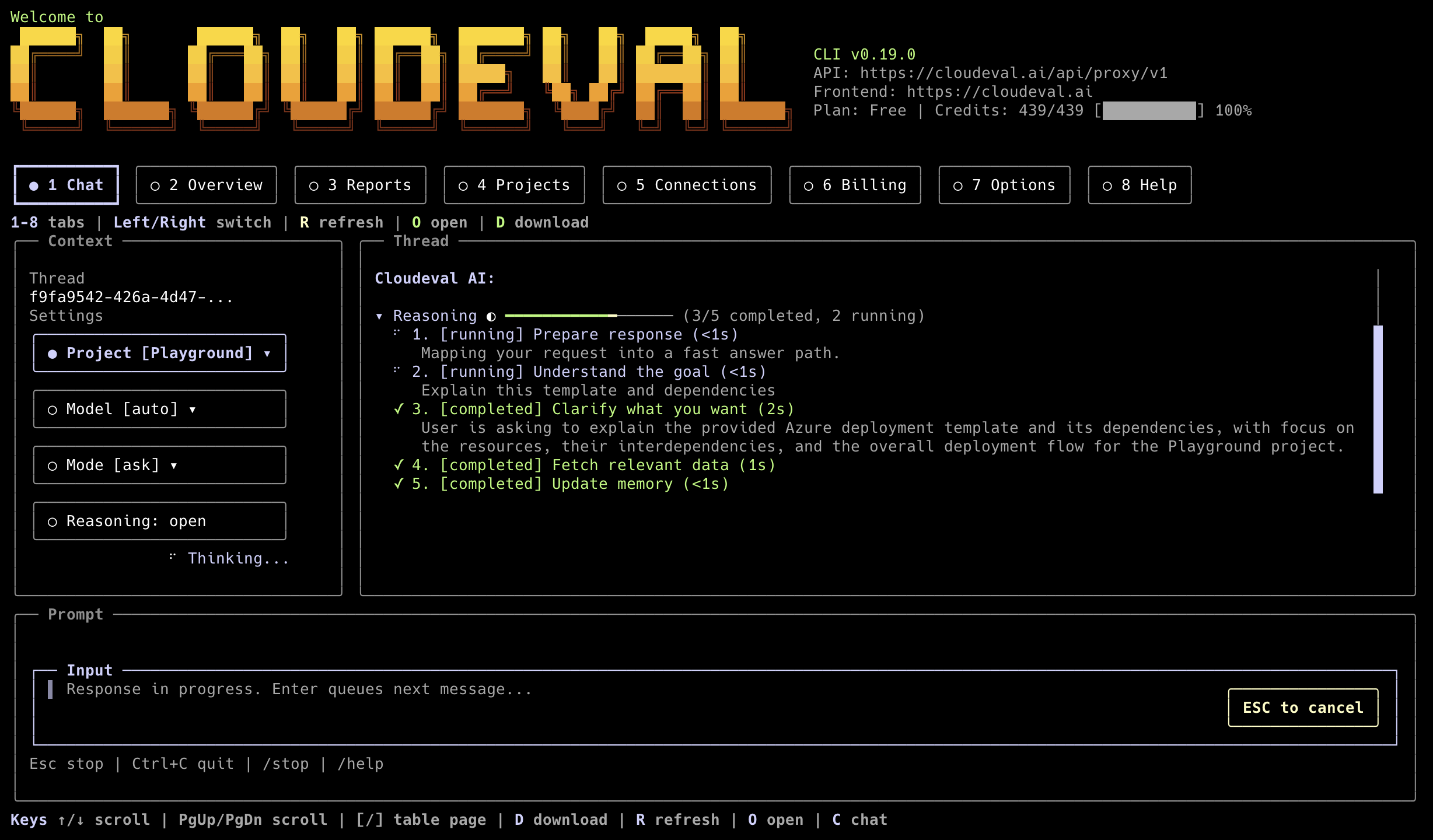








CloudEval CLI brings CloudEval into your terminal, scripts, and agent tools. It
supports cloud chat, Agent mode, Agent Profiles, project and report inspection,
template validation, recipes, local hooks, MCP server workflows, and local
thread switching in the Terminal UI.
CloudEval | Docs | GitHub | Discord | Issues | Releases
Install
npm install -g @ganakailabs/cloudeval-cli
cloudeval --help
The npm package requires Node.js 20 or newer and installs these command aliases:
For standalone macOS, Linux, and Windows binaries, use the GitHub releases or
the installers:
curl -fsSL https://cli.cloudeval.ai/install.sh | bash
irm https://cli.cloudeval.ai/install.ps1 | iex
The shell installer can detect Codex, Claude Desktop, Cursor, and VS Code,
skip clients where CloudEval MCP is already configured, and offer setup only
for missing clients that can be configured automatically. Manual-only clients
are summarized with a follow-up command instead of forcing another prompt.
It also asks whether to share limited CLI telemetry, defaulting to yes; decline
or set CLOUDEVAL_TELEMETRY=0 to write telemetry.enabled=false.
When a CLI update exposes new MCP capabilities, restart or reload your MCP
client when you are ready; CloudEval never restarts those apps automatically.
npm install -g does not run that installer wizard. After installing from npm,
use cloudeval login for first-run auth, cloudeval mcp setup <client> to
configure MCP in your editor, or cloudeval update (TTY) to rerun the shell
installer and optionally accept agent/MCP setup prompts.
Common Commands
cloudeval
cloudeval login
cloudeval status
cloudeval ask "Summarize my cloud risk" --format json
cloudeval agent "Find cost and architecture risks" --format json
cloudeval agents list
cloudeval agents run cost --project <project-id> --format json
cloudeval projects list
cloudeval reports list
cloudeval mcp serve --toolset readonly
cloudeval capabilities --format json
Telemetry
Telemetry is default-on and uses curated Azure Application Insights custom
events only. CloudEval records command family, success, duration, safe option
enums, CLI/runtime versions, OS major version, architecture, install source,
update/install outcomes, MCP tool names, TUI metadata, a W3C traceId, and a
per-command requestId for backend correlation. After login, events may include
a hashed internal user ID only.
Telemetry does not include prompts, command output, tokens, local paths, project
or resource IDs, raw email/name fields, account/session/tenant IDs, stack
traces, raw error messages, command arguments, cwd, file paths, or cloud
resource names.
cloudeval config set telemetry.enabled false
cloudeval config get telemetry.enabled --format json
cloudeval config set telemetry.enabled true
cloudeval config unset telemetry.enabled
For one run, use CLOUDEVAL_TELEMETRY=0 or CLOUDEVAL_TELEMETRY=1.
Uninstall
To remove local installer-owned artifacts while keeping CloudEval config,
sessions, and auth:
cloudeval uninstall --yes
To preview cleanup first:
cloudeval uninstall --dry-run
To remove local config and session state too:
cloudeval uninstall --yes --remove-config
If you installed through npm, remove the npm package as the final step:
npm uninstall -g @ganakailabs/cloudeval-cli
What It Covers
- Terminal UI for chat, Agent mode, Agent Profile selection, recent thread
switching, projects, reports, billing, context rail, task ledger, artifact
chips, and a docked composer.
- Scriptable commands with
json, ndjson, markdown, and text output.
- Agent Profiles:
architecture, cost, triage, and remediation.
- MCP tools for Codex, Cursor, Claude, VS Code, and other stdio JSON-RPC hosts.
- Project graph, report, recipe, rules, and validation workflows.
- Local opt-in hooks for CLI and Agent Profile events.
In the Terminal UI, use the Thread control or /thread to choose open chat
sessions, recent CloudEval chat threads, and local CLI sessions. /thread new
starts another independent open session, and /open opens the matching
CloudEval web chat thread when the active session has a thread id. Roomy
terminals show a context rail with project, thread, model, mode, profile, report
artifact chips; narrower terminals
keep the chat first and expose the same controls through the docked composer and
slash commands. Typing / opens a bottom command completion strip; use Tab or
Up/Down to move, Right to accept the ghost text, and Enter to choose the
highlighted command. Streaming work appears as a task ledger in the thread.
Grounded answers show numbered citations and a Sources section instead of raw
[S_tool_...] tags, with citation numbers highlighted inline; /copy copies
the latest assistant response and /download writes a Markdown transcript with
the same references. Project and Connection tabs include selected-item detail
panes for backend fields, report coverage, sync state, and linked records; use
J/K or Up/Down on Projects and Connections to move the selected row, then
Enter to confirm it. The billing header separates credits left from observed
credits used so usage does not look like the current budget. Use the Profile
control or /profile architecture|cost|triage|remediation to choose an Agent
Profile for the next chat stream. Selecting a profile switches to Agent mode;
selecting Ask mode clears the profile back to the default chat flow. Starter
prompts stay hidden until you run /starter. Press Esc from the prompt to
leave text editing so tab, arrow, and number shortcuts move through controls
and tabs; type again to resume editing. Busy loaders and the input cursor animate
unless you pass --no-anim. The
banner details include the logged-in user. Focused controls and the active top
tab use the shared warm banner-yellow accent, with the active tab filled across
its full button interior.
Authentication
Use cloudeval login for local development. For CI or hosted agents, create a
scoped CloudEval access key in the app or with cloudeval credentials create,
then provide it as CLOUDEVAL_ACCESS_KEY.
Stored device-login sessions are refreshed automatically before authenticated
requests. If a long-running terminal session receives an expired-token response
from the chat stream, the CLI refreshes the stored session and retries the
request once. If the refresh token is revoked or expired, run cloudeval login
again.
Documentation
License And Notices
CloudEval CLI first-party code is provided under the
CloudEval CLI License.
Production third-party package attribution is published in
THIRD_PARTY_NOTICES.md,
and the release SBOM is published as
sbom.spdx.json.
Installer releases also place these notice files under
~/.local/share/cloudeval/licenses.



