
Aktar CLI
Upload files to your own S3, Cloudflare R2 or Backblaze B2 bucket from the terminal, and get the link.


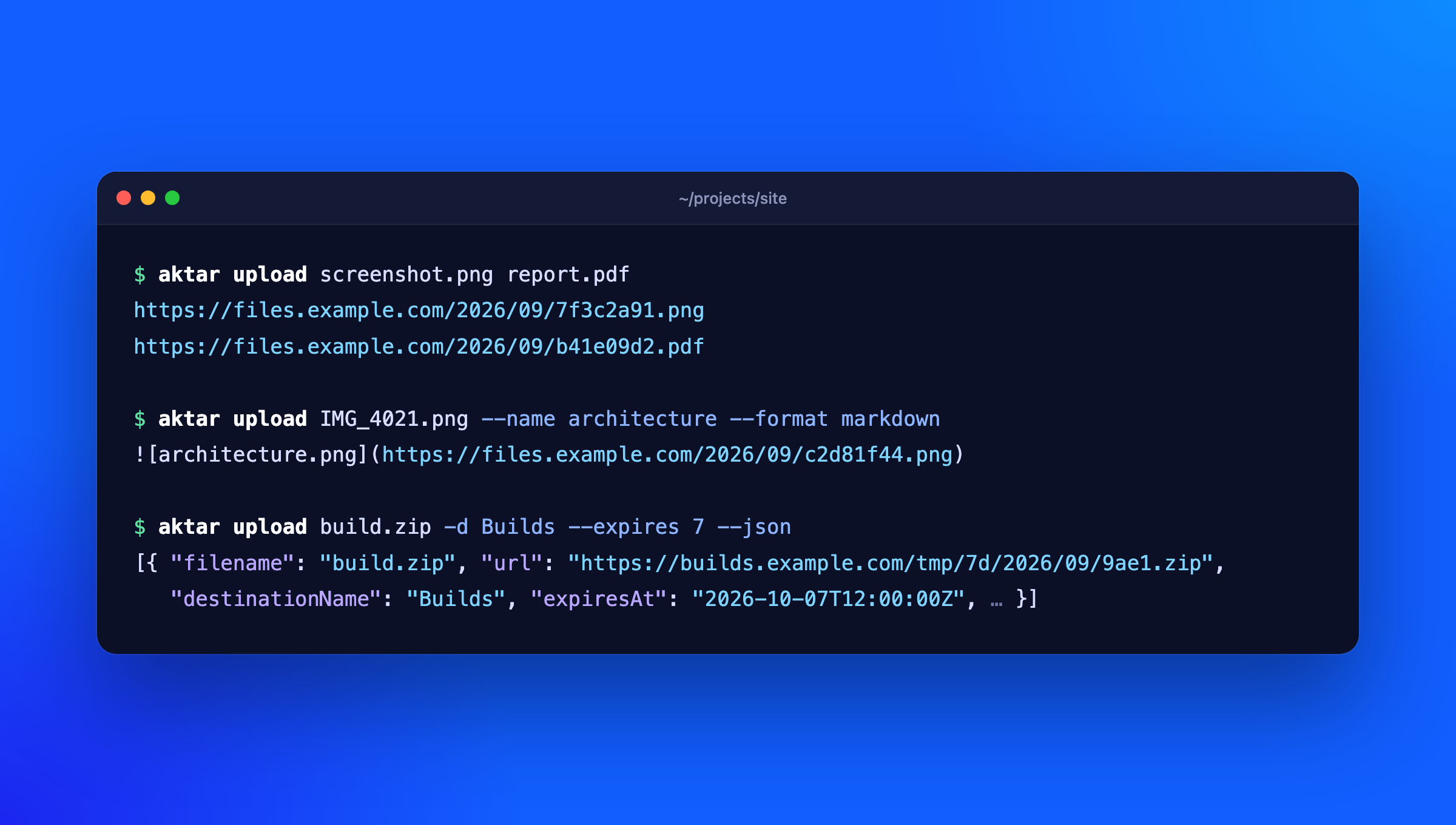
The aktar command talks to the Aktar app on your Mac or Windows PC, so it uses the destinations, keys, path templates and link settings you already set up there. Your storage keys never leave the app.
$ aktar upload screenshot.png
https://files.example.com/2026/09/7f3c2a91.png
Install
npm install -g @getaktar/cli
brew install getaktar/tap/aktar-cli
Or run it without installing: npx @getaktar/cli upload file.png.
Requires Node.js 18 or later and Aktar for Mac 0.4.0 or later, or Aktar for Windows.
Connect to Aktar
- In Aktar, open Settings > Integrations and turn on Allow local connections.
- Copy the token shown there.
- Run:
aktar login
and paste the token when asked. It's checked against Aktar and saved to ~/.config/aktar/cli.json (%APPDATA%\aktar\cli.json on Windows), readable only by you. You can also pipe it in (pbpaste | aktar login) or set AKTAR_TOKEN (and AKTAR_PORT if you changed the port) instead.
Usage
aktar upload report.pdf
aktar upload *.png -f markdown
aktar upload build.zip -d Builds
aktar upload notes.txt --folder docs/2026
aktar upload IMG_4021.jpg --name cover
aktar upload log.txt --expires 7
aktar upload --clipboard
aktar upload demo.mp4 --qr
aktar upload talk.pdf --short
aktar upload photo.jpg --json
aktar status
aktar destinations
aktar history invoice -n 5
aktar replace 0B6C2F8E-3D1A-4C55-9E2B-7A41D0C3E9F1 v2.png
aktar replace docs/guide.pdf guide.pdf -d Docs
aktar qr https://example.com
aktar qr 0B6C2F8E-3D1A-4C55-9E2B-7A41D0C3E9F1
aktar short 0B6C2F8E-3D1A-4C55-9E2B-7A41D0C3E9F1
Without -d, files go to the destination selected in Aktar's menu bar. Uploads show up in Aktar's history like any other.
--format chooses what's printed: url (default), markdown, html, or custom (your template from Aktar). --expires takes 1, 7, 14 or 30 days and needs Aktar's auto-delete rules on that destination; without it, files are kept.
--name uploads a single file under another name: it's what {filename} and {ext} in the destination's path template become, and what Aktar's history shows. If the name has no extension, the file's own is added (--name cover uploads IMG_4021.jpg as cover.jpg); if it has one, it's used as given. With --folder, it's the name inside the folder.
If the same file (same contents, destination and expiry) is already in the bucket, Aktar doesn't upload it again and gives you the existing link. aktar prints the link as usual and notes it on stderr (aktar: photo.jpg: already uploaded, reused the existing link), so scripts reading stdout still get one link per file. This needs Aktar for Mac 0.10.0 or Windows 0.3.0.
Short links
If a destination has a link shortener set up in Aktar (Shlink, YOURLS, Kutt, Dub, Short.io or your own), Aktar shortens its links following that destination's rules, and aktar prints the short link. --format uses it too: the Markdown, HTML and custom formats come from Aktar with the short link in them.
--short makes a short link for this upload even if the destination's "Only shorten links longer than" rule would skip it. It fails if the destination has no link shortener.--no-short makes none this time.
If Aktar can't make the short link (the shortener is down, say), the upload still goes through: aktar prints the original link and notes it on stderr (aktar: talk.pdf: couldn't make a short link, printed the original link: ...).
aktar short <upload-id|link> makes a short link for an upload already in history, found by its ID, link or short link, and prints it. If it already has one, that's the one printed. --json prints the short link's details (provider, status, clicks when the shortener counts them), --qr adds its QR code. aktar history shows each upload's short link after its link.
Older versions of Aktar, and Aktar for Windows until it has short links, ignore --short and --no-short.
QR codes
aktar upload --qr prints a QR code under each link, so you can open it on your phone. The QR code is always of the link itself (the short link, if there is one), whatever --format prints. It's drawn black on white in the terminal, whatever its theme; when the output isn't a terminal, or NO_COLOR is set, it's drawn without colors (light modules as blocks), which phone cameras read on a light or dark background. --qr can't be combined with --json.
aktar qr <text> shows the QR code of any link or text; quote text with spaces. Given an upload ID from aktar history --json, it shows that upload's link (its short link, if it has one) and its QR code. --png <file> saves the QR code as a PNG instead:
aktar qr https://files.example.com/2026/09/7f3c2a91.png --png link.png
What Aktar does for you
The app does the work per destination, so the CLI needs nothing extra for it:
- Converting images to WebP or AVIF, if the destination is set to
{md5} and {sha256} in path templates, to name files by their contents- Big files: past 5 GB, Aktar uploads in parts and resumes after a dropped connection.
aktar streams the file to the app, so its size doesn't matter
The link aktar prints is the one for the file as stored, after any conversion.
JSON output
aktar upload --json prints an array with one entry per uploaded file:
[
  {
    "id": "0B6C…",
    "filename": "photo.jpg",
    "objectKey": "2026/09/7f3c2a91.jpg",
    "url": "https://files.example.com/2026/09/7f3c2a91.jpg",
    "shortUrl": null,
    "destinationId": "5D1A…",
    "destinationName": "Screenshots",
    "mimeType": "image/jpeg",
    "size": 482113,
    "createdAt": "2026-09-30T12:00:00Z",
    "expiresAt": null,
    "formats": { "url": "…", "markdown": "…", "html": "…", "custom": "…" },
    "reused": false
  }
]
reused is true when nothing was uploaded because the file was already there; older versions of Aktar leave it out. shortUrl is the upload's short link, or null when it has none; formats already use it. When Aktar couldn't make the short link, shortLinkError says why. aktar history --json has shortUrl too.
Exit codes
| 0 | Everything worked |
| 1 | At least one upload or request failed (the others still went through) |
| 2 | Bad arguments, or a file that doesn't exist (nothing was uploaded) |
| 3 | Not logged in, Aktar isn't running, its local API is off, or the token is wrong |
AI agents (MCP and skill)
MCP server
aktar mcp runs a Model Context Protocol server, so Claude, Cursor, VS Code, Codex and other agents can upload through Aktar, find past uploads and make links. Connect Aktar first (aktar login), then add it to your agent:
claude mcp add aktar -- aktar mcp
codex mcp add aktar -- aktar mcp
For Claude Desktop, Cursor, VS Code and others that take a JSON config:
{
  "mcpServers": {
    "aktar": { "command": "aktar", "args": ["mcp"] }
  }
}
Without a global install, use "command": "npx", "args": ["-y", "@getaktar/cli", "mcp"].
upload_file | Upload a file (destination, name, folder, expiry, short link optional) and return its link, Markdown and HTML |
upload_clipboard | Upload what's on the clipboard |
replace_file | Write a new file over an upload, keeping its link (Mac 0.14.0 / Windows 0.7.0) |
create_short_link | A short link for an upload, from its destination's link shortener |
search_uploads | Search upload history (with each upload's short link) |
list_destinations | Destinations and what file types each is used for |
list_bucket | Browse a bucket's folders and files |
create_temporary_link | A link that stops working after a while (presigned URL) |
get_thumbnail | A preview image of an upload (Mac 0.13.0 / Windows 0.6.0) |
list_watched_folders | Watched folders and their status |
get_status | Check the connection |
delete_upload | Delete an upload from its bucket (only with --allow-delete) |
Uploading publishes a file, so keep an eye on what your agent sends. Your agent asks before calling a tool unless you allow it, and these options narrow what the server can do:
--root <folder>: only upload files from this folder (repeat for more). Paths are resolved, symlinks included, before they're checked.--read-only: only the tools that change nothing (search, list, links, thumbnails).--allow-delete: also offer delete_upload, which is left out by default.
claude mcp add aktar -- aktar mcp --root ~/Projects --root ~/Desktop
The server speaks both the current per-request protocol (2026-07-28) and the earlier initialize versions (2024-11-05 to 2025-11-25).
Agent skill
Agents that use skills but not MCP can use the CLI directly. aktar skill prints a SKILL.md that teaches them how:
mkdir -p ~/.claude/skills/aktar && aktar skill > ~/.claude/skills/aktar/SKILL.md
Typora
In Typora, open Settings > Image > Image Upload, choose Custom Command and enter:
aktar upload
Typora passes the image paths and reads one link per line. Click Test Uploader to check it.
Links
License
MIT



