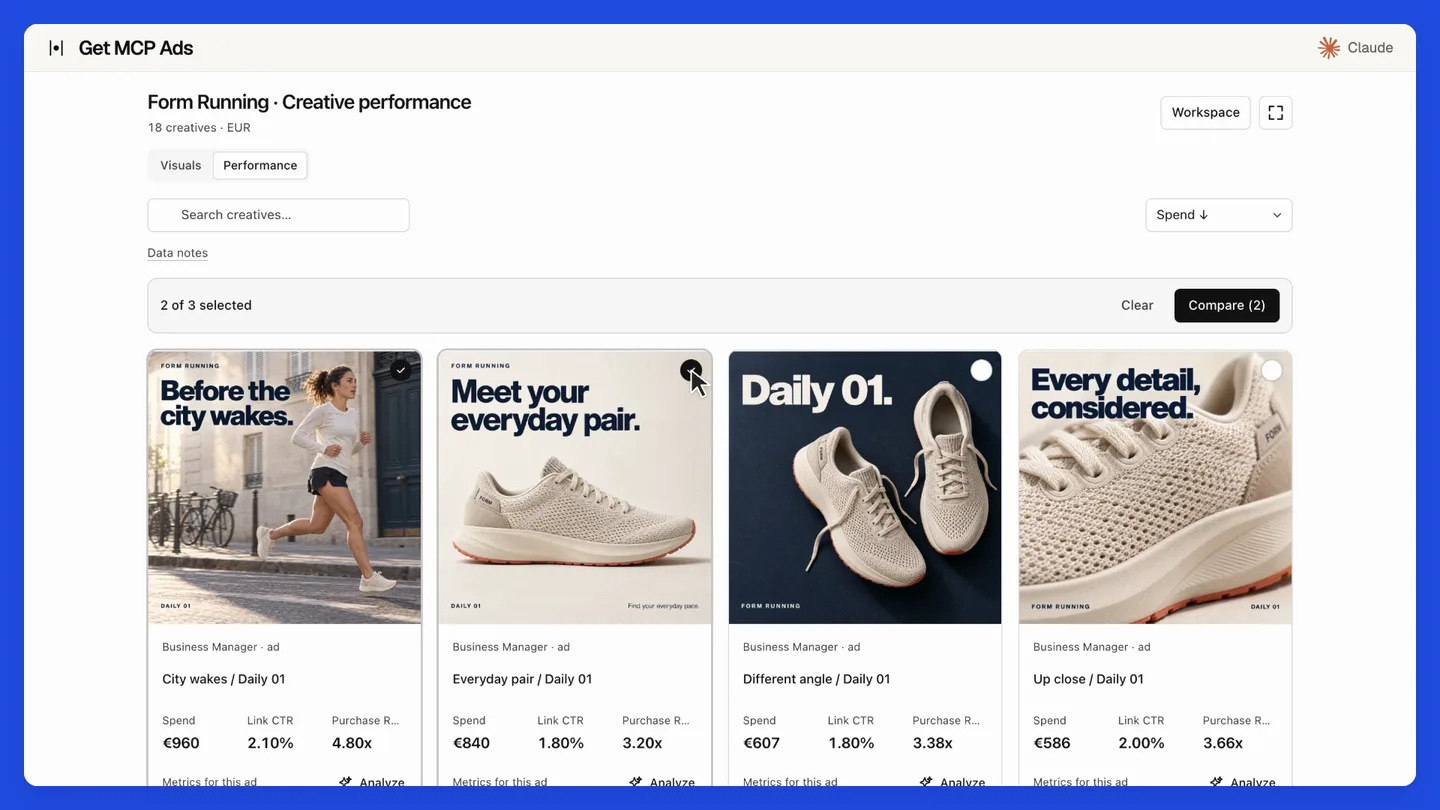
The film demonstrates hosted getmcpads with staged data. Its creative galleries and MCP Apps interface belong to the hosted product. This repository provides the standalone native API tools.
35 read tools · 10 write tools, disabled by default.
Run locally with your own platform credentials and a client that supports stdio MCP, such as Claude Desktop, Claude Code or Cursor. Your requests go directly to the platform. For managed connections, including supported ChatGPT setups, use the hosted option.
What's new
v2.0.1: Native tools and security update · September 20, 2026
- Add descending image/video asset pagination.
- Add account-scoped upload processing reads and return the native upload ID.
- Retain API v25, standalone MCC discovery and credential redirect protection.
- Require Node.js 22.12 or newer and check Node 22/24 in CI.
- Update vulnerable dependencies and regenerate the MCP catalog.
Full changelog · Source synchronization details · All releases
Upgrade notes
Requires Node.js 22.12 or newer. CI covers Node 22 and 24. Version 2.0.1 drops Node 18 and 20 support. Read the current tool schemas before reusing saved arguments. Writes remain optional and require explicit confirmation. Hosted creative integrations and MCP Apps UI are outside this release.
Install this release
This is a GitHub source release. npm and MCP Registry versions are published separately. The commands below select this exact version; unpinned npx examples later in this document select the version currently available on npm.
git clone --branch v2.0.1 --depth 1 https://github.com/get-mcp-ads/google-ads-mcp-server.git
cd google-ads-mcp-server
npm ci
npm run build
Configure your MCP client to run node with the absolute path to dist/cli.js and the platform credentials documented below.
Prefer a managed connection? Use Google Ads with hosted getmcpads. Connect your account, select the data your assistant may access and use the hosted MCP connection. See the site for current features and plans.
What you get
| 35 read tools | Campaigns, ad groups, budgets, bidding strategies, search terms, landing pages, Performance Max assets and placements, Shopping, recommendations, change history |
| 10 write tools | Off by default. Status, budgets, bids, schedules, renames, campaign creation. Each one previews before it applies |
| Full Keyword Planner | Keyword ideas, historical metrics, forecasts, ad group themes, geo target suggestions |
| 130 metrics, 84 dimensions | With a compatibility matrix that catches invalid combinations before they hit the API |
| 5 resources | Live catalogues the model can read: metrics, dimensions, compatibility rules, 11 workflow recipes |
| GAQL and beyond | google_ads_run_gaql for raw queries, and google_ads_run_readonly_rpc for the services GAQL cannot reach |
You do not need to know GAQL
The Google Ads API is queried with GAQL, its own query language, and most of its surface is
only reachable that way. This server carries the metric and dimension catalogues, so the model
asks for cost and conversions by name and the server writes the query.
google_ads_validate_query lets it check a combination before spending a call on it, and
google_ads_run_gaql is still there when you want to write GAQL yourself.
Keyword Planner is not in GAQL
Keyword ideas, historical volumes and forecasts live in a separate RPC service that GAQL
cannot reach at all. Same for Reach Planner, audience insights and benchmarks. This server
covers them through google_ads_run_readonly_rpc and dedicated tools.
Getting credentials
This is the heaviest setup of any advertising platform. Four values are needed, and one of
them requires a review by Google. Budget an hour the first time.
1. Developer token
From a manager (MCC) account, open Tools → API Center and apply for a token.
It starts at Test Account level, which only reaches test accounts. Apply for
Basic Access to reach live accounts. Google reviews the application, which can take a
few days.
📖 Developer token documentation
2. OAuth client
In a Google Cloud project, enable the Google Ads API,
then create an OAuth client under APIs & Services → Credentials. Choose Desktop app
for local use. Note the client ID and client secret.
3. Refresh token
Run the OAuth consent flow once, signed in as the Google account that can see your ad
accounts, and keep the refresh token it returns. Google's own helper script does this in
one command.
📖 OAuth desktop flow
The refresh token does not expire. It is the sensitive value here: anyone holding it can
mint access tokens indefinitely. Treat it like a password, and use an OAuth client dedicated
to this server so you can revoke it on its own.
4. Login customer ID, if you use a manager account
If the accounts you query sit under an MCC, set GOOGLE_ADS_LOGIN_CUSTOMER_ID to the manager
account ID. Dashes are accepted and stripped. Skip it for a standalone account.
You can also leave it unset. Google refuses any request against a managed account unless the
call names its manager, with a USER_PERMISSION_DENIED that mentions neither the account nor
the manager, so it reads as missing access rather than as a missing header. When the variable
is unset and the account you query is not directly accessible, the server asks the managers it
can reach which accounts they hold, and announces the one that holds yours. The answer is
resolved once and kept for the life of the process.
Setting the variable is still faster: it skips that discovery entirely, and it is the right
choice when every account you query sits under the same MCC.
Run google_ads_health_check as your first call. It verifies all four credentials, lists
the accounts you can actually reach, and reports what is missing, without printing any secret.
Setup
Claude Desktop
~/Library/Application Support/Claude/claude_desktop_config.json (macOS)
or %APPDATA%\Claude\claude_desktop_config.json (Windows):
{
  "mcpServers": {
    "google-ads": {
      "command": "npx",
      "args": ["-y", "@getmcpads/google-ads-mcp-server"],
      "env": {
        "GOOGLE_ADS_DEVELOPER_TOKEN": "your-developer-token",
        "GOOGLE_ADS_CLIENT_ID": "your-client-id",
        "GOOGLE_ADS_CLIENT_SECRET": "your-client-secret",
        "GOOGLE_ADS_REFRESH_TOKEN": "your-refresh-token"
      }
    }
  }
}
Restart Claude Desktop. Ask it: "list my Google Ads accounts".
Claude Code
claude mcp add google-ads --env GOOGLE_ADS_DEVELOPER_TOKEN=... --env GOOGLE_ADS_CLIENT_ID=... --env GOOGLE_ADS_CLIENT_SECRET=... --env GOOGLE_ADS_REFRESH_TOKEN=... -- npx -y @getmcpads/google-ads-mcp-server
Cursor
.cursor/mcp.json in your project, same shape as the Claude Desktop config above.
From source
git clone https://github.com/get-mcp-ads/google-ads-mcp-server.git
cd google-ads-mcp-server
npm install && npm run build
cp .env.example .env
npm start
Configuration
GOOGLE_ADS_DEVELOPER_TOKEN | none | Required. From the API Center, Basic Access or above |
GOOGLE_ADS_CLIENT_ID | none | Required. OAuth client ID |
GOOGLE_ADS_CLIENT_SECRET | none | Required. OAuth client secret |
GOOGLE_ADS_REFRESH_TOKEN | none | Required. From the consent flow |
GOOGLE_ADS_LOGIN_CUSTOMER_ID | none | Optional. Manager (MCC) account ID. Resolved automatically when unset |
GOOGLE_ADS_ENABLE_WRITES | unset | Set to 1 to register the 10 write tools |
LOG_LEVEL | info | debug, info, warn, error |
Check your setup at any time:
npm run doctor
Writes, and why they preview first
Write tools are disabled by default. Enable them with GOOGLE_ADS_ENABLE_WRITES=1.
Google's own server has none at all, so this is the part to read carefully.
When enabled, every write tool returns a preview and changes nothing:
// google_ads_update_campaign_budget { customerId: "123-456-7890", budgetId: "555", dailyAmount: 50 }
{
  "applied": false,
  "action": "google_ads_update_campaign_budget",
  "change": { "customer": "1234567890", "budget": "555",
              "newDailyBudget": 50, "inMicros": 50000000 },
  "message": "Preview only, nothing was changed. Repeat the same call with confirm: true to apply this change to the live account."
}
Only a second call carrying confirm: true touches the live account.
This is deliberate. An assistant composes these calls, and it can pick the wrong customer, the
wrong campaign, or the wrong order of magnitude on a budget. A mandatory preview makes the
mistake visible before it costs money, and gives a human the stopping point the protocol does
not guarantee on its own.
Two further guardrails:
google_ads_create_campaign always creates the campaign PAUSED. There is no option to
create it active. Someone has to look at it before it spends.- Amounts are converted to micros for you. Google holds money in millionths, so 12.50 in
the account currency is
12500000. The preview shows both, so a factor-of-a-thousand
mistake is visible before it applies.
google_ads_update_campaign_status / google_ads_update_adgroup_status | Pause, re-enable or remove |
google_ads_update_campaign_budget | Daily budget |
google_ads_update_adgroup_bid | Default CPC bid |
google_ads_update_campaign_schedule | Start and end dates |
google_ads_rename_campaign | Name only |
google_ads_create_campaign | Creates a budget, then a campaign, always PAUSED |
Tools
Every tool is listed below. See server-card.json for complete parameter and output schemas.
35 read tools
google_ads_list_accounts | List Google Ads customer accounts accessible with the current credentials. |
google_ads_get_account_details | Get detailed information for a specific Google Ads customer account. |
google_ads_run_gaql | Execute a raw GAQL (Google Ads Query Language) query. |
google_ads_get_insights | Query Google Ads performance insights with intelligent query planning. |
google_ads_get_campaigns | List campaigns for a Google Ads account with status, budget, channel type, and bidding strategy. |
google_ads_get_adgroups | List ad groups for a Google Ads account, optionally filtered by campaign. |
google_ads_get_keyword_performance | Get keyword-level performance data from keyword_view resource. |
google_ads_validate_query | Validate metric/dimension/resource compatibility BEFORE executing a query. |
google_ads_health_check | Read-only connectivity check. |
google_ads_get_account_hierarchy | List accessible customers and, where possible, manager/client relationships from GAQL customer_client. |
google_ads_get_conversion_actions | List conversion actions with status, type, category, primary/include-in-conversions flags, owner customer, and last activity dates when supported. |
google_ads_get_change_events | Fetch recent change_event rows. |
google_ads_get_recommendations | List Google Ads recommendations with type, resource, campaign/ad group links, dismissed state, and impact when supported. |
google_ads_get_budgets | List campaign budgets with amount, status, delivery method, and recommended budget fields when supported. |
google_ads_get_bidding_strategies | List portfolio bidding strategies. |
google_ads_get_search_terms | Fetch search term performance from search_term_view or campaign_search_term_insight depending on reportType. |
google_ads_get_landing_pages | Fetch landing_page_view performance with final URL, campaign/ad group context, traffic, conversion, and landing-page quality metrics when supported. |
google_ads_get_pmax_assets | List Performance Max asset group assets from asset_group_asset with asset group/campaign context and optional date-range performance metrics. |
google_ads_get_simulations | Read-only planning/forecast query for campaign, ad group, or portfolio bidding simulations. |
google_ads_get_paid_organic_search_terms | Read-only paid/organic search terms report. |
google_ads_get_shopping_products | Read-only Merchant Center product catalog/eligibility report via shopping_product. |
google_ads_get_shopping_performance | Read-only Shopping performance report keyed by Merchant Center product dimensions. |
google_ads_get_pmax_placements | Read-only Performance Max placement diagnostics from performance_max_placement_view. |
google_ads_get_pmax_asset_diagnostics | Read-only Performance Max asset group diagnostics. |
google_ads_list_image_assets | List the account's image asset library (FROM asset) with stable, publicly served full-size URLs on tpc.googlesyndication.com, dimensions, file size, and mime type. |
google_ads_list_video_assets | List the account's YouTube video assets (FROM asset) with derived watch, embed, and public thumbnail URLs. |
google_ads_get_demand_gen_assets | List Demand Gen ads (video responsive, multi-asset, carousel) with their referenced creatives resolved: stable image URLs and YouTube video IDs with embed and thumbnail URLs. |
google_ads_generate_keyword_historical_metrics | Get Keyword Planner search-volume history for supplied keywords. |
google_ads_generate_keyword_ideas | Discover Keyword Planner ideas from up to 20 seed keywords, a URL, keywords plus URL, or a whole site. |
google_ads_generate_keyword_forecast_metrics | Forecast impressions, clicks, CTR, CPC, cost, conversions, and CPA for a temporary keyword campaign. |
google_ads_search_fields | Search Google's live GoogleAdsField catalog. |
google_ads_suggest_geo_targets | Resolve up to 25 location names or geo target IDs to Google Ads geoTargetConstants. |
google_ads_generate_ad_group_themes | Organize supplied keywords into existing Google Ads ad groups. |
google_ads_run_readonly_rpc | Advanced read-only escape hatch for allowlisted Google Ads services outside GAQL: Audience Insights, Reach Planner, benchmarks, creator/trending insights, targeting suggestions, Smart Campaign suggestions, identity verification, invoices, and payments accounts. |
google_ads_get_video_upload | Read the processing state and YouTube video ID of one Google Ads upload in the selected customer. |
10 write tools
Disabled by default. Calls preview unless explicitly confirmed. Check the configuration and exact schema before use.
google_ads_upload_video | Upload MP4/WebM/QuickTime bytes (max 16 MiB) to the Google-managed YouTube channel for the selected ad account. |
google_ads_remove_video_upload | Remove a video upload owned by the selected ad account. |
google_ads_apply_plan | Preview, validate and atomically apply a Google Ads v25 build/change plan: campaigns, budgets, ad groups, RSA/Display/Demand Gen ads, image/text/YouTube assets, PMax asset groups and links, keywords, geographic/language targeting listing groups and conversion action configuration (no conversion event uploads). |
google_ads_update_campaign_status | Pause, re-enable or remove a Google Ads campaign. |
google_ads_create_campaign | Create a Google Ads campaign. |
google_ads_update_campaign_budget | Change the daily budget of a Google Ads campaign. |
google_ads_rename_campaign | Rename a Google Ads campaign. |
google_ads_update_campaign_schedule | Change the start or end date of a Google Ads campaign. |
google_ads_update_adgroup_status | Pause, re-enable or remove a Google Ads ad group. |
google_ads_update_adgroup_bid | Change the default CPC bid of a Google Ads ad group. |
5 resources
google-ads://manifest | What this server exposes, and which tool to run first |
google-ads://metrics | All 130 metrics with categories and formats |
google-ads://dimensions | All 84 dimensions and where they are valid |
google-ads://compatibility | The compatibility matrix |
google-ads://recipes | 11 step-by-step workflows |
Security
This server holds a refresh token that never expires, a client secret and a developer token.
Concretely:
- None of the four credentials is ever logged, at any log level, or written to disk.
- The access token is cached in memory until a minute before expiry, rather than
re-requested on every call.
- Two hosts are contacted, and only two:
googleads.googleapis.com and
oauth2.googleapis.com. A test fails the build if a third host appears in the source.
- No fetch follows a redirect. Every outbound call sets
redirect: "error", so a redirect
cannot forward a bearer token or client secret to another host. A test fails the build if
any fetch omits this.
- No telemetry. The server makes no network call other than to Google.
Full policy and reporting instructions: SECURITY.md.
Looking for a managed, multi-platform version?
Try hosted Google Ads if you want to use this source without operating a local server.
getmcpads also connects advertising, Search Console and GA4 through one MCP URL.
Source availability and plan limits are listed on the site; connecting an account is still required.
- Follow the Google Ads connection guide.
- Select the account or property your assistant may read.
- Connect Claude,
ChatGPT or
Codex.
- Try a read-only review: “Compare campaign spend and conversions across equal periods. State missing data and do not change anything.”
See the current hosted tool catalogue
and pricing before choosing a paid plan.
This Apache 2.0 adapter remains independently useful with your own credentials.
Contributing
Issues and pull requests are welcome. See CONTRIBUTING.md.
Please read SECURITY.md before reporting anything security-related.
Licence
Apache License 2.0. See also NOTICE.
Google, Google Ads and the Google Ads API are trademarks of Google LLC.
This project is not affiliated with, endorsed by, or sponsored by Google LLC.
It is an independent client of a public API.
MCP contracts and desktop bundle
Every tool declares read/write annotations, parameter descriptions and a structured output schema. Successful calls expose the payload as structuredContent.result; errors retain isError: true. The generated server card contains definitions only.
Run npm run bundle -- /path/to/output to build a .mcpb desktop bundle from the current catalog. Credentials are entered locally during installation. Write tools remain disabled unless explicitly enabled.
More from getmcpads
Meta Ads · Google Analytics 4 · Google Search Console · TikTok Ads · Pinterest Ads · X Ads
Maintained by Emmanuel at getmcpads. Questions: hello@getmcpads.com.