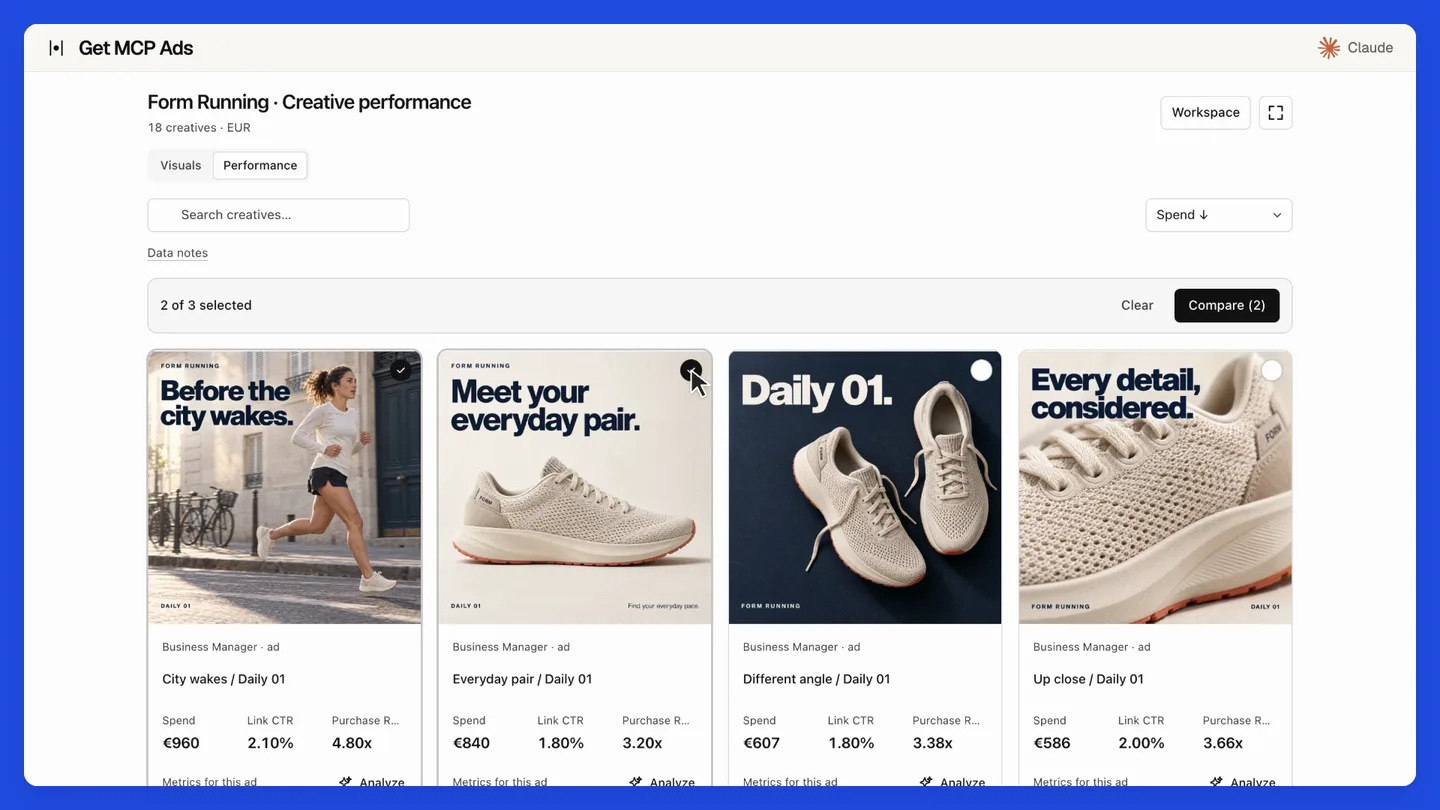
The film demonstrates hosted getmcpads with staged data. Its creative galleries and MCP Apps interface belong to the hosted product. This repository provides the standalone native API tools.
41 read tools · 23 write tools, disabled by default.
Run locally with your own platform credentials and a client that supports stdio MCP, such as Claude Desktop, Claude Code or Cursor. Your requests go directly to the platform. For managed connections, including supported ChatGPT setups, use the hosted option.
What's new
v2.0.0: Native tools and security update · September 20, 2026
- Use account-scoped creative reads compatible with Graph v26, including bounded historical fallback and ownership verification.
- Add exact entity configuration and uploaded-video readiness reads.
- Update campaign creation, budget ownership, schedule validation and post-write verification.
- Require Node.js 22.12 or newer and check Node 22/24 in CI.
- Update vulnerable dependencies and regenerate the MCP catalog.
Full changelog · Source synchronization details · All releases
Upgrade notes
Requires Node.js 22.12 or newer. CI covers Node 22 and 24. Version 2.0.0 drops Node 18 and 20 support. Read the current tool schemas before reusing saved arguments. Writes remain optional and require explicit confirmation. Hosted creative integrations and MCP Apps UI are outside this release.
Install this release
This is a GitHub source release. npm and MCP Registry versions are published separately. The commands below select this exact version; unpinned npx examples later in this document select the version currently available on npm.
git clone --branch v2.0.0 --depth 1 https://github.com/getmcpads-com/meta-ads-mcp-server.git
cd meta-ads-mcp-server
npm ci
npm run build
Configure your MCP client to run node with the absolute path to dist/cli.js and the platform credentials documented below.
Prefer a managed connection? Use Meta Ads with hosted getmcpads. Connect your account, select the data your assistant may access and use the hosted MCP connection. See the site for current features and plans.
What you get
| 41 read tools | Campaigns, ad sets, ads, creatives, audiences, pixels, catalogs, Pages, Instagram, activity logs, A/B tests and lift studies |
| 23 write tools | Off by default. Status, budgets, schedules, renames, campaign creation. Each one previews before it applies |
| 190 metrics | Including derived ones computed client-side (ROAS, CPA, frequency, hook rate, attribution-window views) |
| 56 breakdowns · 90 dimensions | With a compatibility matrix that catches invalid combinations before they hit the API |
| 7 resources | Live catalogues the model can read: metrics, breakdowns, compatibility rules, 11 workflow recipes |
| Forward-compatible reads | meta_get_node_fields, meta_list_edge_raw, meta_get_insights_raw reach Graph fields this server doesn't model yet |
The query planner
Meta rejects many metric/breakdown combinations, and the error messages rarely say why.
This server encodes the compatibility matrix, so it splits an impossible request into
several valid API calls and merges the results instead of failing.
meta_validate_query lets the model check a combination before spending a call on it.
That is the difference between an assistant that reports "the API returned error 100" and
one that returns your numbers.
Getting a token
This is the one step that takes real effort, and it's worth doing properly.
You need a Meta access token with ads_read. There are three ways to get one; the
second is the one we recommend.
Recommended: System User token (does not expire)
A System User belongs to your Business, not to a person. Its token survives password
changes and staff departures, and needs no App Review to access ad accounts your
Business already owns.
- Go to Business Settings → Users → System Users
- Add a system user. Give it the Employee role unless you need more.
- Assign Assets → select your ad accounts → grant View performance (add
Manage campaigns only if you plan to enable writes).
- Generate New Token → pick your app → select scope
ads_read
(add ads_management only for writes).
- Set the expiry to Never.
- Copy the token. Meta shows it once.
📖 Meta's System User documentation
Quick test: Graph API Explorer (expires in ~1 hour)
Fine for trying the server out, useless for daily work.
Graph API Explorer → select your app →
add ads_read → Generate Access Token.
Long-lived user token (~60 days)
Exchange a short-lived token for a 60-day one. You will have to redo this every two months.
📖 Long-lived tokens
Which permissions?
ads_read | Always. Campaigns, insights, everything read-only |
ads_management | Only if you set META_ENABLE_WRITES=1 |
business_management | Optional. Business Manager asset discovery |
pages_show_list, pages_read_engagement | Optional. Page posts and organic enrichment |
instagram_basic | Optional. Linked Instagram accounts |
catalog_management | Optional. Product catalog reads |
Run meta_health_check as your first call: it reports which scopes you actually have
and which ones are missing for the tools you tried to use, without printing your token.
Setup
Claude Desktop
~/Library/Application Support/Claude/claude_desktop_config.json (macOS)
or %APPDATA%\Claude\claude_desktop_config.json (Windows):
{
  "mcpServers": {
    "meta-ads": {
      "command": "npx",
      "args": ["-y", "@getmcpads/meta-ads-mcp-server"],
      "env": {
        "META_ACCESS_TOKEN": "your-token-here"
      }
    }
  }
}
Restart Claude Desktop. Ask it: "list my Meta ad accounts".
Claude Code
claude mcp add meta-ads --env META_ACCESS_TOKEN=your-token-here -- npx -y @getmcpads/meta-ads-mcp-server
Cursor
.cursor/mcp.json in your project, same shape as the Claude Desktop config above.
From source
git clone https://github.com/getmcpads-com/meta-ads-mcp-server.git
cd meta-ads-mcp-server
npm install && npm run build
cp .env.example .env
npm start
Configuration
META_ACCESS_TOKEN | none | Required. Your Meta access token |
META_ENABLE_WRITES | unset | Set to 1 to register the 23 write tools |
META_API_VERSION | v26.0 | Graph API version. Override to pin another |
LOG_LEVEL | info | debug, info, warn, error |
Check your setup at any time:
npm run doctor
Writes, and why they preview first
Write tools are disabled by default. Enable them with META_ENABLE_WRITES=1.
When enabled, every write tool returns a preview and changes nothing:
// meta_update_adset_budget { adSetId: "123", currency: "EUR", dailyBudget: 50 }
{
  "applied": false,
  "action": "meta_update_adset_budget",
  "change": { "adSet": "123", "field": "daily_budget", "amount": 50,
              "currency": "EUR", "inMinorUnits": 5000 },
  "message": "Preview only, nothing was changed. Repeat the same call with confirm: true to apply this change to the live account."
}
Only a second call carrying confirm: true touches the live account.
This is deliberate. An assistant composes these calls, and it can pick the wrong account,
the wrong campaign, or the wrong order of magnitude on a budget. A mandatory preview makes
the mistake visible before it costs money, and gives a human the stopping point the
protocol does not guarantee on its own.
Two further guardrails:
meta_create_campaign always creates the campaign PAUSED. There is no option to
create it active.- Budgets are converted to minor units per currency. The yen, the won and the CFA franc
have no subunit, so sending 1250 for ¥12.50 would multiply the spend by a hundred. The
server knows the zero-decimal currencies.
meta_update_campaign_status / _adset_status / _ad_status | Pause or reactivate |
meta_update_campaign_budget / _adset_budget | Daily or lifetime budget |
meta_update_adset_schedule | Start and end time |
meta_rename_campaign / _adset / _ad | Name only |
meta_create_campaign | Creates a campaign, always PAUSED |
Tools
Every tool is listed below. See server-card.json for complete parameter and output schemas.
41 read tools
meta_health_check | Agent-ready read-only health check: validates token metadata, lists accessible ad accounts, and warns about missing read scopes without exposing the access token. |
meta_get_business_assets | Discover accessible Meta Business assets read-only: businesses, pages, Instagram accounts, pixels, and datasets when permissions allow. |
meta_get_pages | List accessible Facebook Pages with id, name, category, tasks, picture, and linked Instagram account references when available. |
meta_get_instagram_accounts | List Instagram accounts linked to accessible Pages, Business Manager assets, or an ad account when permissions allow. |
meta_get_pixels | List pixels and datasets from an ad account or Business Manager when accessible, returning actionable warnings for permission-limited edges. |
meta_get_ad_activity | Read ad account activity logs from /{ad_account_id}/activities with object, event, actor, timestamp, and extra_data fields. |
meta_get_delivery_diagnostics | Aggregate read-only delivery diagnostics across campaigns, ad sets, and ads using status/effective_status/issues_info where available plus simple delivery insights. |
meta_get_creative_assets | Return ad-linked creative media with actual ad names, collection covers, all carousel/flexible components, resolved image hashes and video URLs. |
meta_get_audience_details | Read detailed custom, saved, and lookalike audiences with pagination and rich fields where permissions allow. |
meta_get_catalog_products | Read Product Catalogs and Product Items when catalog access is available. |
meta_join_product_insights | Query product-breakdown insights and enrich rows with Product Catalog metadata when catalog access is available. |
meta_get_brand_safety_controls | Read brand safety, suitability, placement, and context-control signals from ad account/ad set targeting and optional block-list edges. |
meta_interpret_experiment_results | Read and interpret A/B test or conversion lift study results with confidence guardrails, cells, objectives, and optional cell entities. |
meta_get_organic_content_enrichment | Read Facebook Page posts and Instagram media with URLs, native periods and optional insights. |
meta_list_ad_accounts | List all Meta ad accounts accessible with the current token. |
meta_get_account_details | Get detailed information for a specific Meta ad account: name, currency, timezone, spend cap, status, business info. |
meta_get_campaigns | List campaigns for a Meta ad account. |
meta_get_adsets | List ad sets for a Meta ad account, optionally filtered by campaign. |
meta_get_ads | List ads for a Meta ad account, optionally filtered by ad set. |
meta_get_insights | Query Meta Ads performance insights. |
meta_get_campaign_structure | Get hierarchical campaign structure: campaigns -> ad sets -> ads. |
meta_get_creatives | Get ad creative content: text, images, videos, links, call-to-action. |
meta_get_audiences | List custom, saved, and lookalike audiences for a Meta ad account. |
meta_get_ad_studies | List conversion lift studies and A/B tests (Ad Studies) for an ad account. |
meta_get_study_results | Get detailed results for a conversion lift or A/B test study. |
meta_validate_query | Validate a metric/breakdown combination BEFORE executing. |
meta_get_page_posts | Read published Facebook Page posts using a Page token resolved from the connected user. |
meta_debug_token | Check the current access token validity, expiration, and granted scopes. |
meta_search_entities | Search campaigns, ad sets, or ads by name within an ad account. |
meta_get_node_fields | Read arbitrary flat fields from one Meta Graph node. |
meta_list_edge_raw | List an allowlisted read-only Meta Graph edge with caller-selected flat fields, filters, and cursor pagination. |
meta_get_insights_raw | Query the Meta Insights edge with validated native field names, breakdowns, action breakdowns, attribution windows, filters, sort, summary, and pagination. |
meta_search_targeting_options | Search Meta's read-only targeting metadata for interests, validated interests, geographies, locales, countries, cities, regions, markets, or postal codes. |
meta_get_ad_preview | Get the read-only preview markup for an existing Meta ad in a requested placement format. |
meta_list_ad_images | List the ad account image library (/adimages): hash, name, dimensions, status, a permanent publicly served display URL (permalink_url), short-lived CDN URLs, and optionally the creatives using each image. |
meta_list_ad_videos | List the ad account video library (/advideos): title, duration, processing status, and publicly served thumbnails (preferred and largest sizes). |
meta_get_video_sources | Resolve fresh download URLs (source) and thumbnails for specific ad videos. |
meta_get_entity_configuration | Read a specific entity in its ad account for reconciliation. |
meta_get_uploaded_video | Check video processing and membership in the selected account library. |
meta_get_adset_configuration | Read an existing ad set, its parent campaign budget/objective and account currency before preparing an edit. |
meta_get_catalog_batch_status | Read the completion and per-item errors for a catalog batch handle. |
23 write tools
Disabled by default. Calls preview unless explicitly confirmed. Check the configuration and exact schema before use.
meta_create_campaign | Create a PAUSED Meta campaign with either ad set budgets (omit campaign budget), a daily campaign budget, or a lifetime campaign budget. |
meta_update_adset_budget | Change an ad set daily or lifetime budget after checking its parent budget and existing schedule. |
meta_update_adset_schedule | Change start and/or end time using ISO 8601 with an explicit offset. |
meta_update_campaign_budget | Change an existing campaign-owned budget after verifying currency and ownership. |
meta_create_adset | Create a PAUSED Meta ad set with explicit targeting, optimization, placements, attribution, bidding and schedule. |
meta_update_adset_configuration | Update targeting, optimization, placements, attribution, bidding, budget or schedule. |
meta_duplicate_adset | Duplicate a known-good ad set within the selected account, preserving complex native configuration. |
meta_create_adcreative | Create an ad creative from an existing post or an explicit object_story_spec and optional asset_feed_spec. |
meta_create_ad | Create a PAUSED ad using an existing ad set and creative from the selected account. |
meta_update_ad_creative | Replace an ad’s creative with another existing creative from the same account. |
meta_upload_ad_image | Upload an image into the selected ad account using base64 bytes (up to 5 MiB decoded). |
meta_upload_ad_video | Import a video from a publicly reachable HTTPS URL or base64 MP4 bytes (up to 5 MiB decoded). |
meta_create_custom_audience | Create a website, engagement, customer-list container or lookalike audience. |
meta_update_custom_audience | Update an existing custom audience name, description, retention or complete rule. |
meta_create_product_set | Create a filtered product set in a catalog owned by the same Business as the selected ad account. |
meta_update_product_set | Replace a product set filter or rename it. |
meta_batch_catalog_items | Create or update up to 50 catalog products by retailer_id. |
meta_update_campaign_status | Pause or reactivate a Meta campaign. |
meta_update_adset_status | Pause or reactivate a Meta ad set. |
meta_update_ad_status | Pause or reactivate a Meta ad. |
meta_rename_campaign | Rename a Meta campaign. |
meta_rename_adset | Rename a Meta ad set. |
meta_rename_ad | Rename a Meta ad. |
7 resources
meta://manifest | What this server exposes, and which tool to run first |
meta://metrics | All 190 metrics with categories and formats |
meta://breakdowns | All 56 breakdowns and where they are valid |
meta://compatibility | The compatibility matrix, 90 dimensions |
meta://recipes | 11 step-by-step workflows |
meta://p2-readonly | Read-only scope guidance |
meta://app-review | Scope positioning for a Meta App Review submission |
Security
The server holds a credential that can read live ad accounts, and modify them when writes
are enabled.
Concretely:
- The token is never logged, at any log level, and never written to disk.
- Requests go only to
graph.facebook.com on the pinned version. Any other host is
refused rather than called. Covered by tests.
- Redirects are refused once a token is attached, so a redirect cannot forward your
credential elsewhere. Covered by tests.
- No telemetry. The server makes no network call other than to the Graph API. There is
no analytics, no phone-home, and no usage reporting. You can verify this by grepping
the source for
fetch.
Full policy and reporting instructions: SECURITY.md.
Looking for a managed, multi-platform version?
Try hosted Meta Ads if you want to use this source without operating a local server.
getmcpads also connects advertising, Search Console and GA4 through one MCP URL.
Source availability and plan limits are listed on the site; connecting an account is still required.
- Follow the Meta Ads connection guide.
- Select the account or property your assistant may read.
- Connect Claude,
ChatGPT or
Codex.
- Try a read-only review: “Compare campaign results and investigate frequency alongside CTR. State missing data and do not change anything.”
See the current hosted tool catalogue
and pricing before choosing a paid plan.
This Apache 2.0 adapter remains independently useful with your own credentials.
Contributing
Issues and pull requests are welcome. See CONTRIBUTING.md.
Please read SECURITY.md before reporting anything security-related.
Licence
Apache License 2.0. See also NOTICE.
Facebook, Meta, Instagram and the Meta Marketing API are trademarks of Meta Platforms, Inc.
This project is not affiliated with, endorsed by, or sponsored by Meta Platforms, Inc.
It is an independent client of a public API.
MCP contracts and desktop bundle
Every tool declares read/write annotations, parameter descriptions and a structured output schema. Successful calls expose the payload as structuredContent.result; errors retain isError: true. The generated server card contains definitions only.
Run npm run bundle -- /path/to/output to build a .mcpb desktop bundle from the current catalog. Credentials are entered locally during installation. Write tools remain disabled unless explicitly enabled.
More from getmcpads
Google Ads · Google Analytics 4 · Google Search Console · TikTok Ads · Pinterest Ads · X Ads
Maintained by Emmanuel at getmcpads. Questions: hello@getmcpads.com.