@ghostpaw/codex







Agent memory as beliefs with a source, a certainty and a revision history.
ghostpaw-codex --help
Local, evidence-backed memory for agents. One SQLite file, zero runtime
dependencies.
Codex stores what an agent believes as claims with a source, a certainty,
evidence counts, decay and an honest revision history. Agents search before
they remember, confirm or correct instead of appending, and see which beliefs
are stale, fading or weakly evidenced. It runs as a TypeScript library, an MCP
server, a CLI and an Agent Skill, all generated from the same seven tools.
Website: codex.ghostpaw.dev
The release binary includes its runtime. npm and library use require Node.js 24+.
Install
Release binary (default)
Each line downloads the latest release asset, checks it against the release's SHA256SUMS and installs ghostpaw-codex into ~/.local/bin. On Linux and macOS the trailing export puts that folder on PATH for the current shell only: neither the line nor install.sh edits ~/.profile or any other shell startup file. The Windows script adds its folder to the user PATH (open a new terminal afterwards).
linux-x64:
curl -fsSL https://raw.githubusercontent.com/GhostPawJS/codex/main/install.sh | sh -s -- --target linux-x64 && export PATH="$HOME/.local/bin:$PATH"
linux-arm64:
curl -fsSL https://raw.githubusercontent.com/GhostPawJS/codex/main/install.sh | sh -s -- --target linux-arm64 && export PATH="$HOME/.local/bin:$PATH"
darwin-arm64:
curl -fsSL https://raw.githubusercontent.com/GhostPawJS/codex/main/install.sh | sh -s -- --target darwin-arm64 && export PATH="$HOME/.local/bin:$PATH"
darwin-x64:
curl -fsSL https://raw.githubusercontent.com/GhostPawJS/codex/main/install.sh | sh -s -- --target darwin-x64 && export PATH="$HOME/.local/bin:$PATH"
windows-x64 (PowerShell):
irm https://raw.githubusercontent.com/GhostPawJS/codex/main/install.ps1 | iex
To keep ~/.local/bin on PATH in new shells, append it to ~/.profile once (this is the only step that edits a startup file):
echo 'export PATH="$HOME/.local/bin:$PATH"' >> ~/.profile
To pin a release instead of taking the latest, pass --version:
curl -fsSL https://raw.githubusercontent.com/GhostPawJS/codex/main/install.sh | sh -s -- --target linux-x64 --version 0.6.0 && export PATH="$HOME/.local/bin:$PATH"
$ ghostpaw-codex --version
ghostpaw-codex 0.6.0 (binary, linux-x64)
$ ghostpaw-codex --version --short
0.6.0
$ ghostpaw-codex --version --json
{"name":"ghostpaw-codex","version":"0.6.0","variant":"binary","target":"linux-x64"}
variant is binary, npm or library; target is null outside the release binary.
A session with the 0.5.2 linux-x64 binary against a small database of five beliefs:
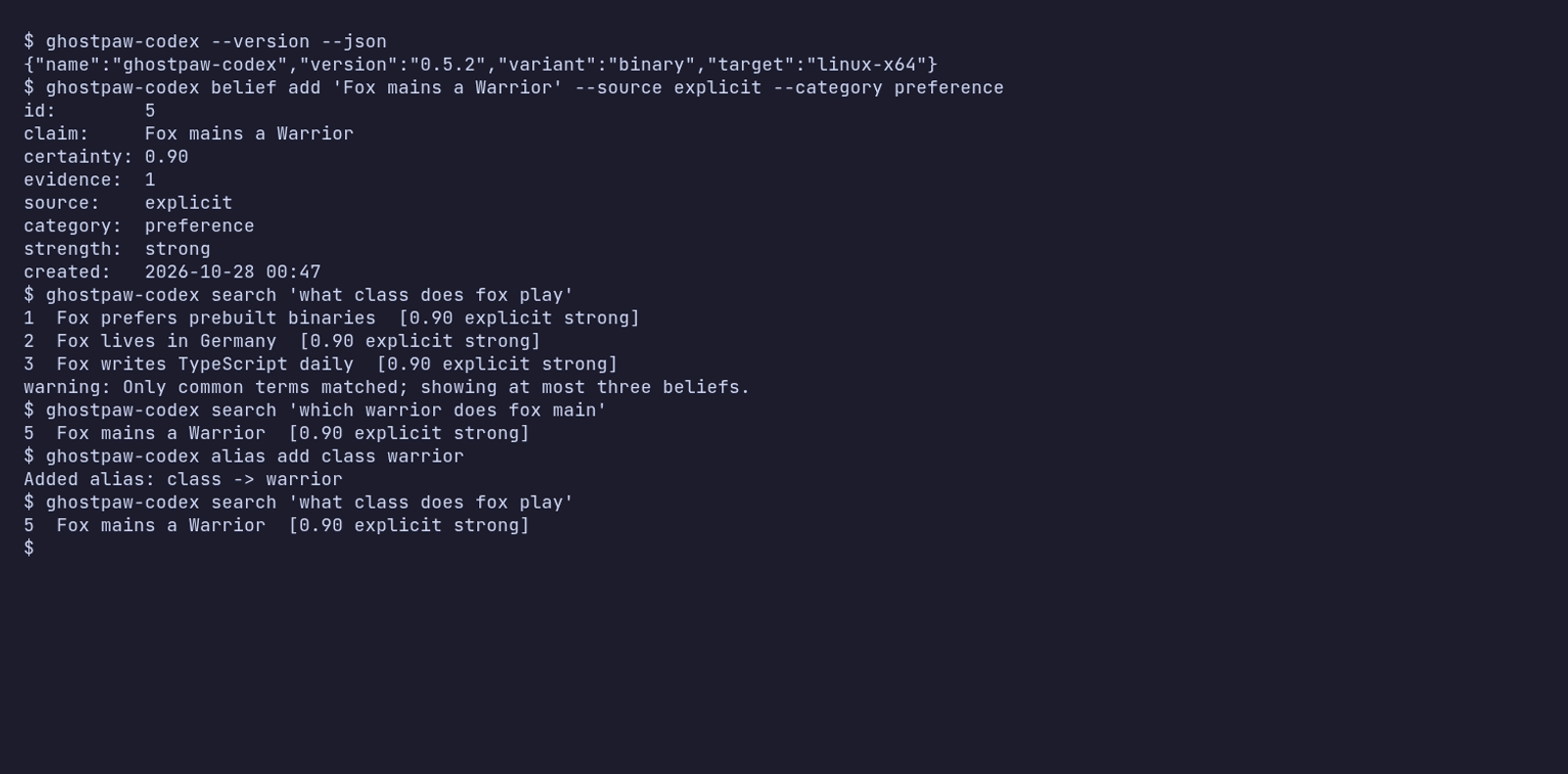
The same session as an animated GIF.
Other release installers:
mise use -g github:GhostPawJS/codex
ubi --project GhostPawJS/codex --exe ghostpaw-codex --in ~/.local/bin
eget GhostPawJS/codex
For aqua, define a
github_release package in aqua.yaml:
registries:
  - name: codex
    type: local
    path: codex-registry.yaml
packages:
  - name: GhostPawJS/codex@v0.6.0
    registry: codex
codex-registry.yaml:
packages:
  - type: github_release
    repo_owner: GhostPawJS
    repo_name: codex
    asset: ghostpaw-codex-{{trimV .Version}}-{{.OS}}-{{.Arch}}.tar.gz
    format: tar.gz
    replacements: { amd64: x64 }
    overrides:
      - goos: windows
        asset: ghostpaw-codex-{{trimV .Version}}-windows-{{.Arch}}.zip
        format: zip
    files:
      - name: ghostpaw-codex
Install scripts verify SHA256SUMS. To verify a downloaded archive's
build attestation:
gh attestation verify <archive> -R GhostPawJS/codex
Set GHOSTPAW_VERIFY=attestation for attestation verification in install.sh.
Binaries are unsigned; macOS binaries carry an ad-hoc signature. For a browser
download on macOS, remove quarantine with
xattr -d com.apple.quarantine /path/to/ghostpaw-codex.
Linux binaries require glibc 2.28+; use npx on Alpine.
See the binary build workflow.
Approximate sizes for 0.5.2 (Node 26.12.1 inside each binary):
| linux-x64 | 41.7 MB tar.gz | 117.4 MB |
| linux-arm64 | 41.2 MB tar.gz | 115.2 MB |
| darwin-arm64 | 44.8 MB tar.gz | 146.7 MB |
| darwin-x64 | 46.4 MB tar.gz | 149.5 MB |
| windows-x64 | 38.4 MB zip | 105.6 MB |
The npm package is about 920 KB unpacked and needs Node 24+. Every release is
installed and run on ubuntu-24.04, macos-15 and windows-2025 by the
install check.
npx / npm (for npm-based environments)
The npm package requires Node 24+:
npm install -g @ghostpaw/codex
npx -y @ghostpaw/codex --help
Library (for harnesses embedding it in code)
Requires Node 24+:
npm install @ghostpaw/codex
import { initCodexTables, read, write } from '@ghostpaw/codex';
See Library usage.
30-second quickstart
MCP server
Every client below starts the same stdio server: ghostpaw-codex mcp.
Use the full executable path if its folder is not on PATH.
For npm-based environments, use npx -y @ghostpaw/codex mcp.
Beliefs live in ~/.ghostpaw/codex.db unless the GHOSTPAW_CODEX_DB
environment variable (absolute path) or --db <path> says otherwise.
Claude Code
claude mcp add ghostpaw-codex -- ghostpaw-codex mcp
or as a plugin, which also installs the skill:
/plugin marketplace add GhostPawJS/codex
/plugin install ghostpaw-codex@ghostpaw-codex
Codex CLI (~/.codex/config.toml)
[mcp_servers.ghostpaw-codex]
command = "ghostpaw-codex"
args = ["mcp"]
Cursor (.cursor/mcp.json), Claude Desktop (claude_desktop_config.json)
or a project .mcp.json:
{
  "mcpServers": {
    "ghostpaw-codex": {
      "command": "ghostpaw-codex",
      "args": ["mcp"]
    }
  }
}
Cline (MCP Servers → Configure MCP Servers, cline_mcp_settings.json).
VS Code often starts without ~/.local/bin on PATH, so use the absolute path
that echo "$HOME/.local/bin/ghostpaw-codex" prints (PowerShell:
"$env:LOCALAPPDATA\Programs\ghostpaw\bin\ghostpaw-codex.exe"). Merge the
entry into the existing mcpServers. Settings file locations, the
cline mcp add form and a test call: llms-install.md.
{
  "mcpServers": {
    "ghostpaw-codex": {
      "command": "/absolute/path/to/ghostpaw-codex",
      "args": ["mcp"],
      "env": { "GHOSTPAW_CODEX_DB": "/absolute/path/to/.ghostpaw/codex.db" }
    }
  }
}
Claude Desktop users can also install server.mcpb from the
latest GitHub release.
A Dockerfile is included for container hosts:
docker build -t ghostpaw-codex . && docker run -i --rm -v codex:/data ghostpaw-codex.
The server speaks MCP 2026-07-28 (stateless, server/discover) and the
initialize-based revisions 2025-11-25, 2025-06-18, 2025-03-26 and 2024-11-05.
CLI
ghostpaw-codex search <query> [--limit N --min-score N --category C --source S]
ghostpaw-codex review <flags|status|log|trends> [--limit N --now N]
ghostpaw-codex belief add <claim> --source S --category C [--certainty N --provenance P]
ghostpaw-codex belief show <beliefId>
ghostpaw-codex belief retire <beliefId>
ghostpaw-codex belief confirm|correct|forget|defer <beliefId> [flags]
ghostpaw-codex belief merge <beliefIds...> [flags]
ghostpaw-codex proximity dismiss <beliefA> <beliefB>
ghostpaw-codex mcp|skill|tools|describe|call|completions|version|help
Global flags can appear anywhere: --db <path>, --json, --quiet,
--compact, --help/-h, --version/-V/-v, --no-color.
NO_COLOR is accepted; output uses no terminal colors.
Noun-verb commands print short text by default, including when stdout is piped.
Search and review lists show one belief per line: id claim [certainty source strength].
Flags append reason codes; the log shows id type claim. Add, show, correct and
merge show aligned detail fields and nearby beliefs. Status and trends show
aligned key: value lines. --json prints the full tool result and --compact
removes JSON indentation. Legacy tool invocation keeps its JSON output.
--quiet prints only result ids for search, review flags and log, and the affected
belief id for writes; status, trends and version print nothing.
Use help belief, belief --help or belief correct --help for schema-derived
help. Each revision verb accepts only the flags it uses. Correction takes
--claim; forgetting also accepts --successor-id. Deferral accepts
--deferred-until as YYYY-MM-DD, DD.MM.YYYY, today, tomorrow, +3d, an ISO
date-time with timezone, or epoch milliseconds. Calendar dates resolve to local
end of day and must be in the future.
Array flags repeat, kebab-case flags map to schema properties, and values are literal, including leading @. Use JSON stdin (-) for long input. -- ends flags. A positional -, or piped stdin
with no arguments, reads a JSON object; explicit flags override its fields.
Database selection uses --db, GHOSTPAW_CODEX_DB, then ~/.ghostpaw/codex.db.
Top-level help shows the resolved path. Version output starts with
ghostpaw-codex and identifies binary target, npm or library execution.
ghostpaw-codex skill prints the full skill reference. Use
ghostpaw-codex skill --list to list workflow guides and
ghostpaw-codex skill capture-beliefs-well to read a guide. skill --help
shows these forms; unknown guide names include a suggestion.
| 0 | Success, including no_op |
| 1 | Tool error |
| 2 | Usage or schema error |
| 3 | Clarification needed or not found |
| 4 | Conflict or version mismatch |
| 70 | Internal error |
Errors and recovery hints go to stderr. Clarification prints the question and missing flags to stderr. With --json, usage and internal errors also print
{ok:false,error:{code,message}} to stdout. Tool results retain their full
shape. Legacy tools [--json], describe <tool>, call <tool> [JSON|-]
and <tool_name> --parameter value keep their existing exit codes.
completions bash, completions zsh and completions fish print shell scripts.
ghostpaw-codex belief add "Deploys go out on Tuesdays" --source explicit --category procedure
ghostpaw-codex search "when do we deploy" --json | jq '.data.results'
printf '%s' '{"beliefId":1}' | ghostpaw-codex belief show - --json
Agent Skill
SKILL.md (repo root) and skills/codex/SKILL.md follow the
Agent Skills format and ship in the npm package.
Copy skills/codex/ into your agent's skills folder, or print it:
ghostpaw-codex skill > SKILL.md
Library
npm install @ghostpaw/codex
import { DatabaseSync } from 'node:sqlite';
import { initCodexTables, read, write } from '@ghostpaw/codex';
const db = new DatabaseSync('codex.db');
initCodexTables(db);
const { id } = write.remember(db, {
claim: 'The API uses GraphQL with a REST fallback.',
source: 'explicit',
category: 'fact',
});
write.confirmBelief(db, id);
write.correctBelief(db, id, {
claim: 'The API uses GraphQL exclusively; REST was retired.',
source: 'observed',
category: 'fact',
});
read.recall(db, 'graphql api');
read.listFlags(db);
Wire the same tools into any LLM SDK. Each tool carries a JSON Schema:
import { tools } from '@ghostpaw/codex';
for (const tool of tools.codexTools) {
}
Or embed the MCP server in your own process:
import { createCodexMcpServer } from '@ghostpaw/codex/mcp';
const server = createCodexMcpServer({ dbPath: './codex.db' });
Docs
The live demo runs the library in your browser against an in-memory SQLite database. Each view below opens a different part of it:
- Dashboard: integrity score and recent beliefs
- Capture: record a belief and see close matches you already hold
- Flags: beliefs flagged for review: confirm, correct or forget
- Activity Log: activity log of every write
Why not MEMORY.md?
A markdown memory file works until it doesn't:
- It only grows. Agents append, rarely delete, and the file ends up in
every prompt. Codex returns the few beliefs that match a query
(FTS5 bm25 plus hashed character-trigram similarity, IDF-weighted with a 55% relative cutoff).
- Contradictions pile up. "We use REST" and "REST was retired" sit side by
side. Codex detects near-duplicates on every write, and corrections
supersede the old belief while keeping the lineage.
- Everything looks equally true. A guess and a confirmed fact read the
same in prose. Codex tracks source (explicit, observed, distilled,
inferred), certainty and evidence count, and flags what is stale or weakly
supported.
- No time. Codex decays freshness, so old beliefs surface for review
instead of quietly steering behaviour.
- Concurrent edits. Two agents writing one file clobber each other. Codex
is a SQLite database in WAL mode.
It stays local: one file you can copy, back up or inspect with any SQLite tool.
No server, no API key, no network.
Tools
search_codex | Lexical recall with FTS5 bm25 and character-trigram similarity |
review_codex | Dashboards: flags, status, trends, log |
inspect_codex_item | One belief in full: metrics, lineage, nearby beliefs |
remember_belief | Capture a claim with source, category and provenance |
revise_belief | Confirm, correct, forget, defer or merge |
retire_belief | Hard-delete for privacy or cleanup |
dismiss_proximity | Mark two nearby beliefs as intentionally distinct |
Results are structured (outcome: success | no_op | needs_clarification | error) with entities, next-step hints and recovery advice. The MCP server,
CLI, SKILL.md and plugin manifests are generated from this registry
(npm run surfaces) and drift-checked in CI.
Performance
Measured with npm run bench on Node 24.14.0, Linux, Intel Xeon (shared
cloud vCPU), 10,000 beliefs in a file-backed database:
search_codex (tool) | 3.6 ms | 5.0 ms |
MCP tools/call search, stdio framing included | 3.8 ms | 4.2 ms |
read.recall | 3.7 ms | 4.8 ms |
inspect_codex_item | 3.5 ms | 3.8 ms |
write.remember (includes proximity scan) | 4.5 ms | 5.6 ms |
review_codex | 11.7 ms | 13.2 ms |
Cold start (process spawn to first response, median): --version 26 ms,
MCP server/discover 24 ms, first search against the 10,000-belief file
53 ms. Seeding 10,000 beliefs takes 2.2 s on disk.
Gzip sizes and cold-start medians are budgeted in budgets.json and enforced
by npm run check.
The model
| Belief | A claim held with certainty, evidence, provenance, decay and revision lineage |
| Dismissal | A record that two beliefs close by character-trigram vectors are intentionally distinct |
| Flag | A derived attention signal: stale, fading, low-trust, single-evidence or gap |
| Proximity | Lexical nearness between beliefs (character-trigram vectors), detected on write |
| Lineage | The revision chain from corrections and supersessions, with version diffs |
State is derived, never toggled: freshness, strength, review priority and flags
are computed at read time.
Package surface
@ghostpaw/codex | initCodexTables, read, write, tools, skills, soul, all types |
@ghostpaw/codex/mcp | createCodexMcpServer, serveCodexMcp, generic MCP server helpers |
ghostpaw-codex (bin) | Noun-verb CLI, legacy tool forms, mcp, skill, shell completions |
dist/mcp-server.js | Standalone stdio MCP server entry (used by the MCP Bundle and the Dockerfile) |
SKILL.md, skills/codex/ | Agent Skill with 17 workflow references |
ESM and CommonJS, with type declarations for both.
Documentation
Development
npm install
npm run check
npm run bench
npm run surfaces
npm run check is the single gate, locally and in CI. Size budgets
(budgets.json) and the public API snapshot (api-surface.json) can only
grow with an explicit approval tag in the commit message. The repo is pinned
to Node 24.14.0 via .nvmrc.
Support
If this package helps your project, consider sponsoring its maintenance:

Anonyfox • MIT License
Query aliases
Search is lexical: FTS5 bm25 plus hashed character-trigram similarity, with
IDF-like token weighting and a 55% relative cutoff. It does not provide semantic
understanding. In corpora of at least 20 active beliefs, queries matching only common terms return at most three results
with a partial_match warning.
Aliases are off by default (the table starts empty). Add directed, one-hop aliases
when query vocabulary differs from stored claims:
ghostpaw-codex alias add class warrior
ghostpaw-codex alias list
ghostpaw-codex alias remove class warrior
The library equivalents are write.addQueryAlias(db, term, alias, options?),
write.removeQueryAlias(db, term, alias) (returns whether removed), and
read.listQueryAliases(db) (sorted { term, alias, createdAt } records).
Both words are normalized with normalizeClaim and must be distinct single words.
Adding an existing pair preserves its creation time; options.now sets the time
on first insertion. Expansion is deduplicated and never follows alias chains;
the query vector uses the original query.
Provenance and revision compatibility
Belief records include provenanceSources, an append-only list of distinct origin
references. Every write with --provenance adds a reference, including duplicate
adds and unchanged corrections. Corrections and merges carry all sources forward.
The legacy provenance field remains readable with its existing single-value
behavior; use provenanceSources for the complete history.
Superseded-belief errors and belief show identify the current active successor.
Library details also expose activeSuccessorId, while supersededBy retains the
immediate lineage link. Correcting to the same normalized claim and metadata
returns no_op. A merge into --successor-id can omit --claim.
belief --help lists belief verbs. review flags --now +8d and
review flags --now 2026-11-10 accept the same date formats as deferral, including
historical dates and epoch milliseconds. Calendar dates use local end of day.
New CLI and MCP database files use mode 0600; newly created parent directories
use 0700. Existing permissions are preserved. On first upgrade, legacy active
normalized duplicates consolidate into the oldest id, preserving summed evidence,
source references and lineage. Later --allow-duplicate additions remain separate.
Merge fan-in alone does not trigger unstable; repeated corrections still do.