@ghostpaw/questlog







Agent tasks as quests that finish only with a written outcome.
curl -fsSL https://raw.githubusercontent.com/GhostPawJS/questlog/main/install.sh | sh
A unified task and calendar model for Node.js, built on SQLite.
Questlog treats tasks, events, deadlines, recurring commitments, and loose intake as one coherent data model instead of separate systems. It ships as a single prebundled blob with zero runtime dependencies, designed for two audiences at once: human developers working directly in code, and LLM agents operating through a structured tool facade.
MCP server
Every client below starts the same stdio server: ghostpaw-questlog mcp.
For npm-based environments, use npx -y @ghostpaw/questlog mcp (Node 24+).
Data lives in ~/.ghostpaw/questlog.db unless the GHOSTPAW_QUESTLOG_DB
environment variable (absolute path) or --db <path> says otherwise.
Claude Code
claude mcp add ghostpaw-questlog -- ghostpaw-questlog mcp
or as a plugin, which also installs the skill:
/plugin marketplace add GhostPawJS/questlog
/plugin install ghostpaw-questlog@ghostpaw-questlog
Codex CLI (~/.codex/config.toml)
[mcp_servers.ghostpaw-questlog]
command = "ghostpaw-questlog"
args = ["mcp"]
Cursor (.cursor/mcp.json), Claude Desktop (claude_desktop_config.json)
or a project .mcp.json:
{
  "mcpServers": {
    "ghostpaw-questlog": {
      "command": "ghostpaw-questlog",
      "args": ["mcp"]
    }
  }
}
Claude Desktop users can also install server.mcpb from the
latest GitHub release.
A Dockerfile is included for container hosts:
docker build -t ghostpaw-questlog . && docker run -i --rm -v questlog:/data ghostpaw-questlog.
The server speaks MCP 2026-07-28 (stateless, server/discover) and the
initialize-based revisions 2025-11-25, 2025-06-18, 2025-03-26 and 2024-11-05.
CLI
Install the release binary for ghostpaw-questlog (questlog is an alias).
questlog add "Review release notes" --tag release --due 2030-01-02
questlog list --limit 10
questlog search release notes --limit 5
questlog show 1
questlog done 1 --outcome "Reviewed changes"
questlog list --view quests.resolved --json
add accepts comma-separated tags (--tag a,b) and repeated --tag flags, --objective (defaults to the title),
--questline <id>, and --due as YYYY-MM-DD, DD.MM.YYYY, today, tomorrow,
+3d, an ISO date-time with timezone, or milliseconds since epoch. Date-only
values use local end of day.
--objective is the one flag that reads a file: @path, @- for stdin, and
@@text for a literal @text (help marks it (@file, @- stdin, @@ literal @)). Every
other value, including titles, --outcome and per-tool flags, is literal.
list defaults to available quests; list --help lists all supported views.
Its --limit caps text output; JSON preserves the full review tool result.
search --limit caps matches in both formats. show prints full quest detail.
Lists show local due dates, overdue markers, and recorded outcomes. Plain JSON
adds ISO UTC siblings for numeric timestamp fields ending in At.
done stores --outcome with the finished quest; without it the command asks for one and exits 3.
Commands print text by default, including hooks, delivery views and each watch tick; call and direct tool commands return the raw tool result as JSON. Use --json for the full tool result
and --compact for compact JSON. --db path works before or after the command.
Each command accepts --help. Exit codes are 0 for success, 1 for invalid input
or a tool error, 2 for usage errors, and 3 when clarification is needed or hook remove/hook test addresses a missing target.
Missing quests and deliveries exit 1. hook label names the database, not an individual target.
questlog skill --short prints the compact cheat sheet; questlog skill --list lists guides.
ISO date-times without a zone (for example 2026-10-29T09:00) use the local time zone.
The call command and the per-tool form still reach every tool and parameter:
questlog tools
questlog call capture_rumor '{"title":"Review release notes"}'
questlog search_questlog --query "release notes"
questlog mcp starts the stdio server.
The default database is ~/.ghostpaw/questlog.db. Override it with --db <path>
or GHOSTPAW_QUESTLOG_DB; top-level help shows the selected path. New database
files are reported on stderr. The npm entry requires Node 24+ and exits 2 with
an installation hint on older Node versions, including for help and version.
Agent Skill
SKILL.md (repo root) and skills/questlog/SKILL.md follow the
Agent Skills format and ship in the npm package.
Copy skills/questlog/ into your agent's skills folder, or print it:
ghostpaw-questlog skill > SKILL.md
Install
Release binary (default)
Each line downloads the latest release asset, checks it against the release’s SHA256SUMS and installs it on the PATH (~/.local/bin on Linux/macOS; the Windows script adds its folder to the user PATH).
These lines never edit ~/.profile or other shell startup files: export PATH applies to the current shell only. To keep it in new shells, use the ~/.profile line below.
linux-x64:
curl -fsSL https://raw.githubusercontent.com/GhostPawJS/questlog/main/install.sh | sh -s -- --target linux-x64 && export PATH="$HOME/.local/bin:$PATH"
linux-arm64:
curl -fsSL https://raw.githubusercontent.com/GhostPawJS/questlog/main/install.sh | sh -s -- --target linux-arm64 && export PATH="$HOME/.local/bin:$PATH"
darwin-arm64:
curl -fsSL https://raw.githubusercontent.com/GhostPawJS/questlog/main/install.sh | sh -s -- --target darwin-arm64 && export PATH="$HOME/.local/bin:$PATH"
darwin-x64:
curl -fsSL https://raw.githubusercontent.com/GhostPawJS/questlog/main/install.sh | sh -s -- --target darwin-x64 && export PATH="$HOME/.local/bin:$PATH"
windows-x64 (PowerShell; persistently adds its folder to the user PATH):
irm https://raw.githubusercontent.com/GhostPawJS/questlog/main/install.ps1 | iex
Pinned to a release:
curl -fsSL https://raw.githubusercontent.com/GhostPawJS/questlog/main/install.sh | sh -s -- --target linux-x64 --version 0.11.1 && export PATH="$HOME/.local/bin:$PATH"
Also adding ~/.local/bin to ~/.profile (edits ~/.profile once; skipped if it already mentions ~/.local/bin; zsh login shells read ~/.zprofile instead, so use that file name there):
curl -fsSL https://raw.githubusercontent.com/GhostPawJS/questlog/main/install.sh | sh -s -- --target linux-x64 && { grep -qs '.local/bin' ~/.profile || echo 'export PATH="$HOME/.local/bin:$PATH"' >> ~/.profile; } && export PATH="$HOME/.local/bin:$PATH"
To skip the persistent Windows user PATH edit (the installer still installs and prints the folder to add):
$env:GHOSTPAW_NO_MODIFY_PATH=1; irm https://raw.githubusercontent.com/GhostPawJS/questlog/main/install.ps1 | iex
$ ghostpaw-questlog --version
questlog 0.11.1 (binary, linux-x64)
Scripts that compare versions should use --version --short or --version --json.
Standalone binaries are available from GitHub Releases.
A session with the 0.9.1 linux-x64 binary against a fresh database:
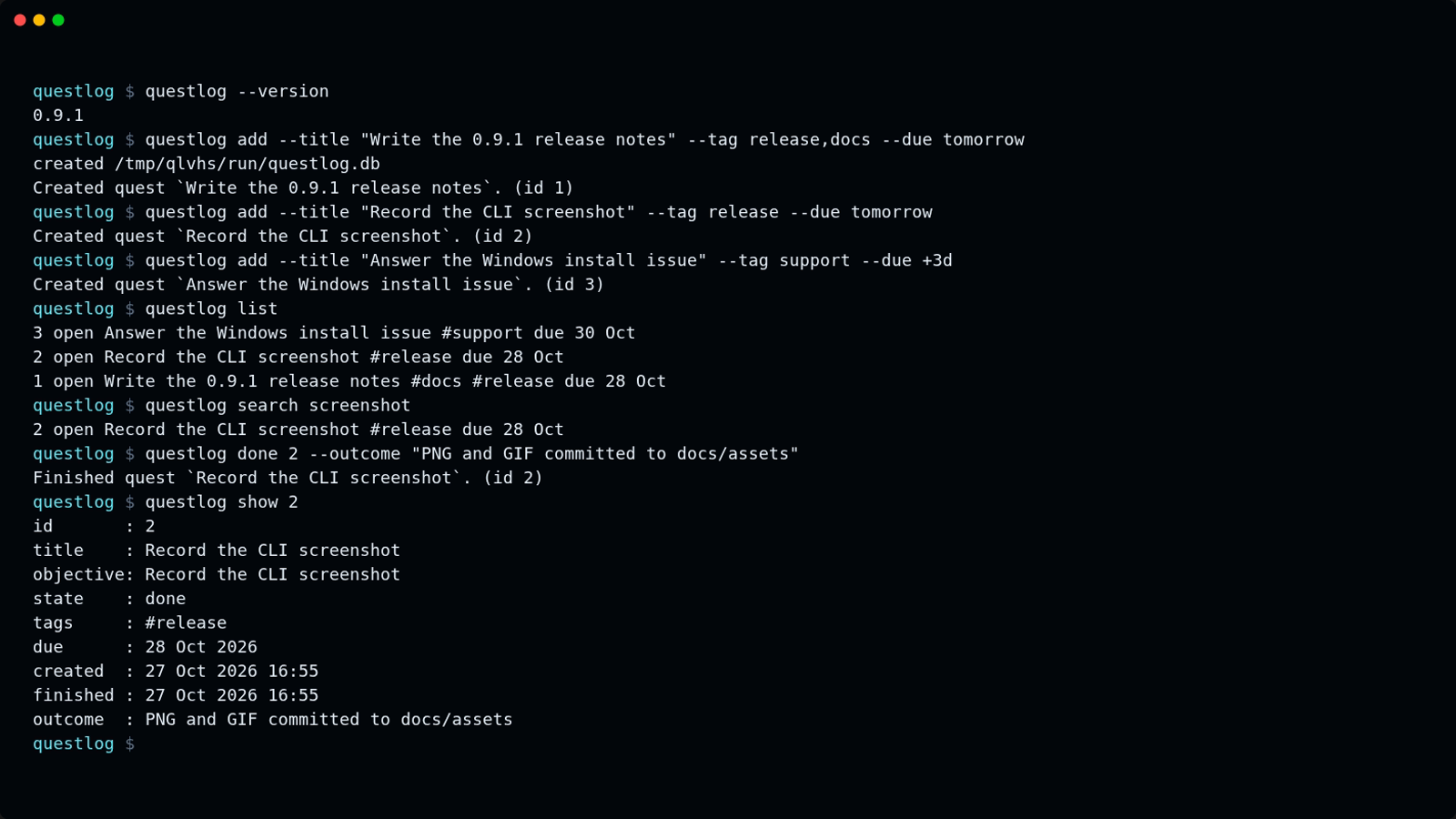
The same session as an animated GIF.
Other release installers:
mise use -g github:GhostPawJS/questlog
ubi --project GhostPawJS/questlog --exe ghostpaw-questlog --in ~/.local/bin
eget GhostPawJS/questlog
For aqua, define a
github_release package in aqua.yaml:
registries:
  - name: questlog
    type: local
    path: questlog-registry.yaml
packages:
  - name: GhostPawJS/questlog@v0.8.0
    registry: questlog
questlog-registry.yaml:
packages:
  - type: github_release
    repo_owner: GhostPawJS
    repo_name: questlog
    asset: ghostpaw-questlog-{{trimV .Version}}-{{.OS}}-{{.Arch}}.tar.gz
    format: tar.gz
    replacements: { amd64: x64 }
    overrides:
      - goos: windows
        asset: ghostpaw-questlog-{{trimV .Version}}-windows-{{.Arch}}.zip
        format: zip
    files:
      - name: ghostpaw-questlog
Install scripts verify SHA256SUMS. To verify a downloaded archive's
build attestation:
gh attestation verify <archive> -R GhostPawJS/questlog
Set GHOSTPAW_VERIFY=attestation for attestation verification in install.sh.
Binaries are unsigned; macOS binaries carry an ad-hoc signature. For a browser
download on macOS, remove quarantine with
xattr -d com.apple.quarantine /path/to/ghostpaw-questlog.
Linux binaries require glibc 2.28+; use npx on Alpine.
See the binary build workflow.
npx / npm (for npm-based environments)
The npm package requires Node 24+:
npx -y @ghostpaw/questlog --help
npm install -g @ghostpaw/questlog
Library (for harnesses embedding it in code)
npm install @ghostpaw/questlog
import { initQuestlogTables, read, write } from '@ghostpaw/questlog';
See library usage. The library uses built-in node:sqlite with zero runtime dependencies.
Quick Start
import { DatabaseSync } from 'node:sqlite';
import { initQuestlogTables, read, write } from '@ghostpaw/questlog';
const db = new DatabaseSync(':memory:');
initQuestlogTables(db);
const rumor = write.captureRumor(db, {
title: 'Legal says the vendor terms changed',
details: 'Need to understand pricing delta and termination clause.',
});
write.settleRumor(db, rumor.id, {
settledAt: Date.now(),
questline: {
title: 'Vendor Renewal',
description: 'Commercial, legal, and approval work.',
},
quests: [
{ title: 'Collect redlines', objective: 'Obtain the latest legal markup.' },
{ title: 'Review pricing delta', objective: 'Compare current vs. proposed cost.' },
],
});
const available = read.listAvailableQuests(db);
const dueSoon = read.listDueSoonQuests(db, 7 * 24 * 60 * 60 * 1000);
const results = read.searchQuestlog(db, 'vendor');
Docs
The live demo runs the library in your browser against an in-memory SQLite database. Each view below opens a different part of it:
- Dashboard: open, available, overdue and pending work
- Intake: capture rumors and triage them into quests
- Quests: start, block and finish quests with an outcome
- Planning: questlines and scheduling
- Search: full-text search across the log
The Model
Seven concepts, strict separation of concerns:
| Rumor | Incoming signal that may or may not become real work |
| Questline | Shared context and rollup for a group of related quests |
| Quest | One concrete commitment with lifecycle, timing, and outcome |
| Repeatable Quest | Recurring template that spawns fresh quests on a schedule |
| Unlock | Hard prerequisite: quest B stays blocked until quest A succeeds |
| Reward | Descriptive outcome attached to completed work, with a claim lifecycle |
| Tag | Cross-cutting label for filtering and reporting |
The unified model means one entity type covers every temporal intention:
| A todo item | A quest with no temporal metadata |
| A deadline | A quest with dueAt |
| A calendar event | A quest with scheduledStartAt and scheduledEndAt |
| A recurring commitment | A repeatable quest with an RRULE |
| A completed action | A quest resolved via finishQuest |
State is derived, not toggled. A quest's availability comes from its lifecycle, timing fields, and unlock graph — computed at read time, never stored as a status flag.
Lifecycle at a glance
Questlog computes WoW-style markers on every read. They change as work moves through its lifecycle:
Intake
| $\color{Goldenrod}{\textsf{❗}}$ | Legal says the vendor terms changed | rumor · open |
| ↓ settle into questline + quests | |
Quest progression
| $\color{Goldenrod}{\textsf{❗}}$ | Review pricing delta | open · available |
| $\color{Gray}{\textsf{❓}}$ | Review pricing delta | in progress |
| $\color{Goldenrod}{\textsf{❓}}$ | Review pricing delta | done · reward unclaimed |
| ✓ | Review pricing delta | done · reward claimed |
Other markers
| $\color{CornflowerBlue}{\textsf{❗}}$ | Weekly standup notes | repeatable · due |
| $\color{Gray}{\textsf{❗}}$ | Plan Q3 roadmap | open · deferred |
| $\color{Gray}{\textsf{❓}}$ | Obtain finance approval | open · blocked |
Marker IDs are semantic strings (attention.available, progress.complete, ...) computed at read time, never stored. The markers namespace maps each to its symbol, color, label, and CSS class for consistent rendering across HTML, TTY, and plain text.
Two Audiences
Human developers
Use the read and write namespaces for direct-code access to every domain operation:
import { read, write } from '@ghostpaw/questlog';

write.createQuest(db, { title: 'Ship release notes', objective: 'Draft and publish.' });
write.startQuest(db, questId);
write.finishQuest(db, questId, 'Published to blog and changelog.');

const blocked = read.listBlockedQuests(db);
const overdue = read.listOverdueQuests(db);
See HUMAN.md for the full human-facing guide with worked examples.
LLM agents
Use the tools, skills, and soul namespaces for a structured runtime surface designed to minimize LLM cognitive load:
import { tools, skills, soul } from '@ghostpaw/questlog';
const allTools = tools.questlogTools;
const searchTool = tools.getQuestlogToolByName('search_questlog')!;
const result = searchTool.handler(db, { query: 'vendor', mode: 'browse' });
const allSkills = skills.questlogSkills;
const prompt = soul.renderQuestlogSoulPromptFoundation();
Every tool returns a discriminated result with outcome: 'success' | 'no_op' | 'needs_clarification' | 'error', structured entities, next-step hints, and actionable recovery advice. No thrown exceptions to parse, no ambiguous prose.
See LLM.md for the full AI-facing guide covering soul, tools, and skills.
Tools
Twelve tools shaped around operator intent, not raw storage operations:
search_questlog | Cross-entity full-text search |
review_questlog | Filtered list views (available, overdue, due soon, ...) |
inspect_questlog_item | Detailed inspection of any single entity |
capture_rumor | Record incoming work before committing to shape |
shape_work | Create quests, questlines, settle rumors into structure |
plan_quest | Set timing: due dates, defer dates, scheduled windows |
run_quest | Start, finish, abandon, log effort |
organize_work | Move quests between questlines, manage questline lifecycle |
manage_repeatable | Create and maintain recurring quest templates |
tag_work | Classify quests and repeatables with tags |
reward_work | Attach, update, claim, or remove rewards |
retire_work | Soft-delete or archive things that should leave the active surface |
Each tool exports runtime metadata — name, description, JSON Schema, input descriptions, side-effect level — so agent harnesses can wire them without reading docs.
The run_quest tool refuses to start a quest with unmet unlock prerequisites and returns the blocking quests with inspection hints. Set force: true to start anyway with a warning. The library startQuest function remains permissive.
Key Properties
- Zero runtime dependencies. Only
node:sqlite (built into Node 24+).
- Single prebundled blob. One ESM + one CJS entry in
dist/. No subpath exports, no code splitting.
- Pure SQLite storage. FTS5 full-text search, CHECK-constrained state transitions, trigger-maintained indexes. Bring your own
DatabaseSync instance.
- Derived state. Availability, blocking, deferral, overdue, and markers are computed at read time from fields and relationships, never stored as flags.
- Intention-shaped writes.
captureRumor, settleRumor, startQuest, finishQuest, abandonQuest — operations that say what happened, not generic CRUD.
- RFC 5545 recurrence. Standard RRULE strings for recurring work. No custom recurrence format.
- WoW-style markers. Semantic marker IDs (
attention.available, progress.complete, ...) computed on every read, renderable to any channel.
- Colocated tests. Every non-type module has a colocated
.test.ts file. The behavior described in docs is backed by executable coverage.
Performance
Measured with npm run bench on Node 24.14.0, Linux, Intel Xeon (shared
cloud vCPU), 10,000 quests in a file-backed database:
search_questlog (tool) | 0.06 ms | 0.07 ms |
MCP tools/call search, stdio framing included | 0.07 ms | 0.08 ms |
read.searchQuestlog, one matching quest | 0.07 ms | 0.08 ms |
read.searchQuestlog, all 10,000 quests matching | 26.6 ms | 41.9 ms |
write.createQuest | 0.22 ms | 0.69 ms |
The library search returns every match with a highlighted snippet, so a query
that matches the whole log pays for building all of those rows. Cold start
(process spawn to first response, median) is about 30 ms for --version and
the MCP server.
Package Surface
import {
initQuestlogTables,
read,
write,
tools,
skills,
soul,
markers,
} from '@ghostpaw/questlog';
All domain types are also available at the root for TypeScript consumers:
import type {
  QuestlogDb,
  QuestState,
  QuestDetail,
  CreateQuestInput,
  QuestlogSearchResult,
  QuestlogToolDefinition,
  QuestlogSkill,
  QuestlogSoul,
} from '@ghostpaw/questlog';
Documentation
| HUMAN.md | Human developers using the low-level read/write API |
| LLM.md | Agent builders wiring tools, skills, and soul into LLM systems |
| docs/README.md | Architecture overview: model, invariants, lifecycle, markers |
| docs/entities/ | Per-entity manuals with exact public API listings |
Development
npm install
npm test
npm run typecheck
npm run lint
npm run build
The repo is pinned to Node 24.14.0 via .nvmrc / .node-version / .tool-versions / mise.toml / Volta. Use whichever version manager you prefer.
Support
If this package helps your project, consider sponsoring its maintenance:

Anonyfox • MIT License
Webhooks
Configure opt-in outbound wakes with the release binary. No server or scheduler is started.
With no targets, tick makes no network calls. Targets and retry state live in the database.
questlog hook add https://example.org/wake --min-gap 60
questlog hook add https://example.org/team --tag work --events quest.due,quest.overdue --secret-stdin
questlog hook label work
questlog hook list
questlog tick --dry-run
questlog tick
questlog watch --interval 60
questlog hook test 1
questlog review deliveries
questlog show 12
questlog hook remove 1
Save the signing secret printed once by hook add (including its --json result).
--secret-stdin reads a supplied secret from standard input; there is no secret flag.
Secrets and custom header values are stored in the database. On POSIX, new database files
and their WAL/SHM siblings use mode 0600, and directories created for them use 0700.
Existing database permissions are preserved; Windows uses its existing access controls.
Add repeatable custom headers with --header "Authorization: Bearer value" or
--header-stdin (one Name: value line per header, keeping values out of shell history).
For example: questlog hook add https://example.org/wake --header "X-Key: value".
Headers accompany every delivery and test. Header names are shown with values replaced by
***; values are never included in list, show, test, tick, watch, or tool output.
Names must be HTTP tokens; host, content-length, content-type, and x-questlog-*
are reserved (case insensitive). To change headers, remove the hook and add it again.
Use separate invocations for --header-stdin and --secret-stdin.
URL userinfo is rejected; use a custom header or query key instead.
questlog show d_… prints delivery status, attempts, HTTP status, next attempt,
redacted target URL, and event ids; add --json for JSON.
List output redacts URL userinfo and query strings. Removal deletes the target and its deliveries.
A target covers the database unless --tag restricts it to quests with that tag;
rumors have no tags and reach database targets only. --events defaults to all five events.
The label defaults to the database filename without directory or extension (questlog for memory).
Only use labels suitable for disclosure to the receiver.
For cron:
* * * * * questlog tick
Cron's PATH may need $HOME/.local/bin/questlog tick --db /path/to/quests.db.
watch repeats tick (default 60 seconds, minimum 5), finishing its current tick on SIGINT/SIGTERM.
Tick exits 0 after running even when deliveries need retrying. Dry runs roll back all changes,
including repeatable materialization, and make no network calls.
Events are detected from the model at tick time:
quest.due: an unresolved, undeleted quest reaches its effective due time (own due_at, otherwise its undeleted questline's due time).quest.overdue: that effective deadline is strictly earlier than now and the quest remains unresolved.quest.unblocked: an unresolved quest is available, all active prerequisites have succeeded or been deleted, and at least one prerequisite succeeded after its unlock was installed. Occurrence time is the latest active prerequisite success or not-before time, whichever is later.repeatable.spawned: a concrete repeatable instance was created; occurrence time is its creation time. Tick first materializes due anchors through the existing spawn operation.rumor.captured: an undeleted rumor was created; occurrence time is its creation time, even if subsequently settled or dismissed.
Each type, entity and occurrence timestamp has a persistent unique event key. Repeated ticks
and restarts do not create another occurrence. Changes removed before any tick cannot be
reconstructed. Occurrences earlier than target creation are excluded, preventing backlog floods.
Tags are evaluated when assigning an event. Already assigned events retain their batch membership.
One POST batch per target per tick contains only identifiers, types, timestamps, and the DB label:
{"type":"questlog.events","db":"work","deliveryId":"d_…","sentAt":"2026-10-28T10:00:00.000Z","events":[{"id":"e_…","type":"quest.due","questId":12,"occurredAt":"2026-10-28T09:59:00.000Z"}]}
Headers are content-type: application/json, user-agent: questlog/<version>,
x-questlog-delivery: <deliveryId>, x-questlog-timestamp: <unix seconds>, and
x-questlog-signature: sha256=<hex HMAC-SHA256(secret, timestamp + "." + rawBody)>.
No titles, objectives, details, or tag text are sent. hook test sends a logged hook.test
event immediately, ignoring the min gap. Add and test are CLI-only in the tool facade;
manage_hooks supports list, remove, tick (with dry_run), and deliveries.
2xx delivers the batch. Requests time out after 5 seconds. Other responses, timeouts, and
network errors retry after 30 seconds, 1 minute, 2 minutes, 4 minutes, and so on, capped
at 1 hour, plus less than 1 second jitter. The target's min gap also applies to retries.
Eight unsuccessful attempts mark a delivery failed. Retries retain the delivery id and events.
Pending batches wait behind retries. Only the last 500 delivered entries per target are kept;
pending and failed entries are retained. Transactions and two-minute leases prevent overlapping
ticks from claiming the same delivery. A crash after receipt but before recording success can
cause another request: receivers must dedupe by delivery id.
Verifying a delivery
Compute HMAC-SHA256 over timestamp + "." + rawBody with the secret and compare in constant
time. Reject timestamps older than 5 minutes (and timestamps too far in the future), then
dedupe on x-questlog-delivery. Use durable deduplication storage in a production receiver.
This 15-line Node example uses an in-memory set:
import { createHmac, timingSafeEqual } from 'node:crypto';
import { createServer } from 'node:http';
const secret = process.env.WEBHOOK_SECRET, seen = new Set();
createServer(async (req, res) => {
  const chunks = []; for await (const chunk of req) chunks.push(chunk);
  const rawBody = Buffer.concat(chunks), h = req.headers;
  const timestamp = h['x-questlog-timestamp'], id = h['x-questlog-delivery'];
  const age = Date.now() / 1000 - Number(timestamp);
  const expected = createHmac('sha256', secret).update(timestamp + '.').update(rawBody).digest();
  const signature = String(h['x-questlog-signature'] || '');
  const actual = Buffer.from(signature.slice(7), 'hex');
  if (!id || !/^\d+$/.test(timestamp) || age > 300 || age < -300 || !/^sha256=[a-f0-9]{64}$/.test(signature) || actual.length !== expected.length || !timingSafeEqual(actual, expected)) { res.writeHead(401).end(); return; }
  if (!seen.has(id)) { seen.add(id); console.log(JSON.parse(rawBody)); }
  res.writeHead(204).end();
}).listen(8080, '127.0.0.1');