@ghostpaw/telegram







Agent Telegram bots: every update mirrored into SQLite before your handler runs.
ghostpaw-telegram --help
Telegram bot channel engine — fetch transport with zero runtime dependencies, SQLite message mirror with FTS5 full-text search, eager file BLOB storage, markdown rendering, and a structured LLM tool facade.
Every incoming update is mirrored into a local SQLite database before your handler runs, giving you a persistent, queryable record of everything the bot sees — including the raw bytes of every photo, document, voice message, and video, which are downloaded in the background after the update is stored and kept once per SHA-256 hash. A failed download leaves the file row without a checksum, so you can retry it with write.downloadFile. It ships as a single prebundled blob designed for two audiences at once: human developers building bot backends in code, and LLM agents operating through a structured tool facade.
MCP server
Every client below starts the same stdio server: ghostpaw-telegram mcp.
For npm-based environments, use npx -y @ghostpaw/telegram mcp.
Messages live in ~/.ghostpaw/telegram.db unless the GHOSTPAW_TELEGRAM_DB
environment variable (absolute path) or --db <path> says otherwise.
Claude Code
claude mcp add ghostpaw-telegram -- ghostpaw-telegram mcp
or as a plugin, which also installs the skill:
/plugin marketplace add GhostPawJS/telegram
/plugin install ghostpaw-telegram@ghostpaw-telegram
Codex CLI (~/.telegram/config.toml)
[mcp_servers.ghostpaw-telegram]
command = "ghostpaw-telegram"
args = ["mcp"]
Cursor (.cursor/mcp.json), Claude Desktop (claude_desktop_config.json)
or a project .mcp.json:
{
  "mcpServers": {
    "ghostpaw-telegram": {
      "command": "ghostpaw-telegram",
      "args": ["mcp"]
    }
  }
}
Claude Desktop users can also install server.mcpb from the
latest GitHub release.
A Dockerfile is included for container hosts:
docker build -t ghostpaw-telegram . && docker run -i --rm -v telegram:/data ghostpaw-telegram.
The server speaks MCP 2026-07-28 (stateless, server/discover) and the
initialize-based revisions 2025-11-25, 2025-06-18, 2025-03-26 and 2024-11-05.
Set TELEGRAM_BOT_TOKEN in the server environment to execute send and moderation actions.
Without a token, these tools return plans; local reads and tool discovery work offline.
The .mcp.json token placeholder must be supplied by the client environment.
The server reads the mirror populated by your library transport; it does not poll for updates.
Noun-verb CLI
The 27 command paths derive from the 4 tool schemas:
bot stats | state <key> | chats
mirror message <chatId> <messageId>
mirror messages <chatId> | search <chatId> <query>
mirror chat <chatId> | chats | user <userId> | users
mirror reactions <chatId> <messageId>
mirror replies <chatId> <messageId> | edits <chatId> <messageId>
message send <chatId> <text> | edit <chatId> <messageId> <text>
message delete <chatId> <messageId> | pin <chatId> <messageId> | unpin <chatId> <messageId>
message typing <chatId> | forward <fromChatId> <messageId> <toChatId>
member ban <chatId> <userId> | unban <chatId> <userId> | restrict <chatId> <userId>
member promote <chatId> <userId> | kick <chatId> <userId> | show <chatId> <userId>
member list <chatId>
Use help <noun> or <noun> <verb> --help for schema flags. Fields accept
kebab-case flags, such as --can-send-messages true and --is-admin false.
Objects accept JSON or @file; arrays accept repeated flags or JSON.
A single - reads stdin JSON; explicit flags override stdin fields.
-- ends option parsing.
Global flags: --db <path>, --json, --quiet, --compact, --help/-h,
--version/-V/-v, --no-color. Piped output defaults to JSON;
--quiet suppresses stdout. completions bash|zsh|fish prints completion
setup and version prints the package version and installation variant.
| 0 | Success or no-op |
| 1 | Tool error |
| 2 | Usage or schema error |
| 3 | Clarification needed or not found |
| 4 | Conflict or version mismatch |
| 70 | Unexpected internal error |
Existing tools [--json], describe <tool>, call <tool> [JSON|-], flat
tg_<tool> --parameter value, mcp and skill forms keep their behavior.
The noun-verb send and moderation commands always return plans, including
when TELEGRAM_BOT_TOKEN is set. Execution remains available through
createTelegramToolFacade({ client, execute: true }); the existing tool-level
CLI and MCP forms execute when TELEGRAM_BOT_TOKEN is set.
Local mirror reads and plans work offline without credentials.
GHOSTPAW_TELEGRAM_DB sets the default database, otherwise
~/.ghostpaw/telegram.db is used; --db overrides both.
Offline examples:
ghostpaw-telegram mirror chats --db /tmp/telegram-port-example.db --json
ghostpaw-telegram message send 123 'Offline plan' --db /tmp/telegram-port-example.db --json
ghostpaw-telegram mirror messages 123 --db /tmp/telegram-port-example.db --json
The empty mirror returns no chats or messages. The send returns an action
descriptor without sending a Telegram message.
CLI
ghostpaw-telegram tools
ghostpaw-telegram call tg_read '{"subcommand":"list_chats"}'
ghostpaw-telegram --db :memory: call tg_send '{"subcommand":"send_message","chatId":123,"text":"Hello"}'
The send example returns a plan unless TELEGRAM_BOT_TOKEN is set.
Agent Skill
SKILL.md and skills/telegram/ ship in the package. Print the skill with
ghostpaw-telegram skill or copy skills/telegram/ into your skills folder.
Install
Release binary (default)
Each line downloads the latest release asset, checks it against the release's SHA256SUMS and installs it on the PATH (~/.local/bin on Linux/macOS; the Windows script adds its folder to the user PATH).
These lines never edit ~/.profile or other shell startup files: export PATH applies to the current shell only. To keep it, add export PATH="$HOME/.local/bin:$PATH" to your shell profile yourself.
linux-x64:
curl -fsSL https://raw.githubusercontent.com/GhostPawJS/telegram/main/install.sh | sh -s -- --target linux-x64 && export PATH="$HOME/.local/bin:$PATH"
linux-arm64:
curl -fsSL https://raw.githubusercontent.com/GhostPawJS/telegram/main/install.sh | sh -s -- --target linux-arm64 && export PATH="$HOME/.local/bin:$PATH"
darwin-arm64:
curl -fsSL https://raw.githubusercontent.com/GhostPawJS/telegram/main/install.sh | sh -s -- --target darwin-arm64 && export PATH="$HOME/.local/bin:$PATH"
darwin-x64:
curl -fsSL https://raw.githubusercontent.com/GhostPawJS/telegram/main/install.sh | sh -s -- --target darwin-x64 && export PATH="$HOME/.local/bin:$PATH"
windows-x64 (PowerShell; persistently adds the install folder to the user PATH):
irm https://raw.githubusercontent.com/GhostPawJS/telegram/main/install.ps1 | iex
To skip the persistent user PATH edit:
$env:GHOSTPAW_NO_MODIFY_PATH=1; irm https://raw.githubusercontent.com/GhostPawJS/telegram/main/install.ps1 | iex
Pinned to a release:
curl -fsSL https://raw.githubusercontent.com/GhostPawJS/telegram/main/install.sh | sh -s -- --target linux-x64 --version 0.7.4 && export PATH="$HOME/.local/bin:$PATH"
$ ghostpaw-telegram --version
telegram 0.7.4 (binary, linux-x64)
Scripts that compare versions should use --version --short or --version --json.
A session with the 0.7.1 linux-x64 binary against a fresh database, with no token set, so outbound commands only return the planned action and nothing is sent (output piped through jq to keep it short):
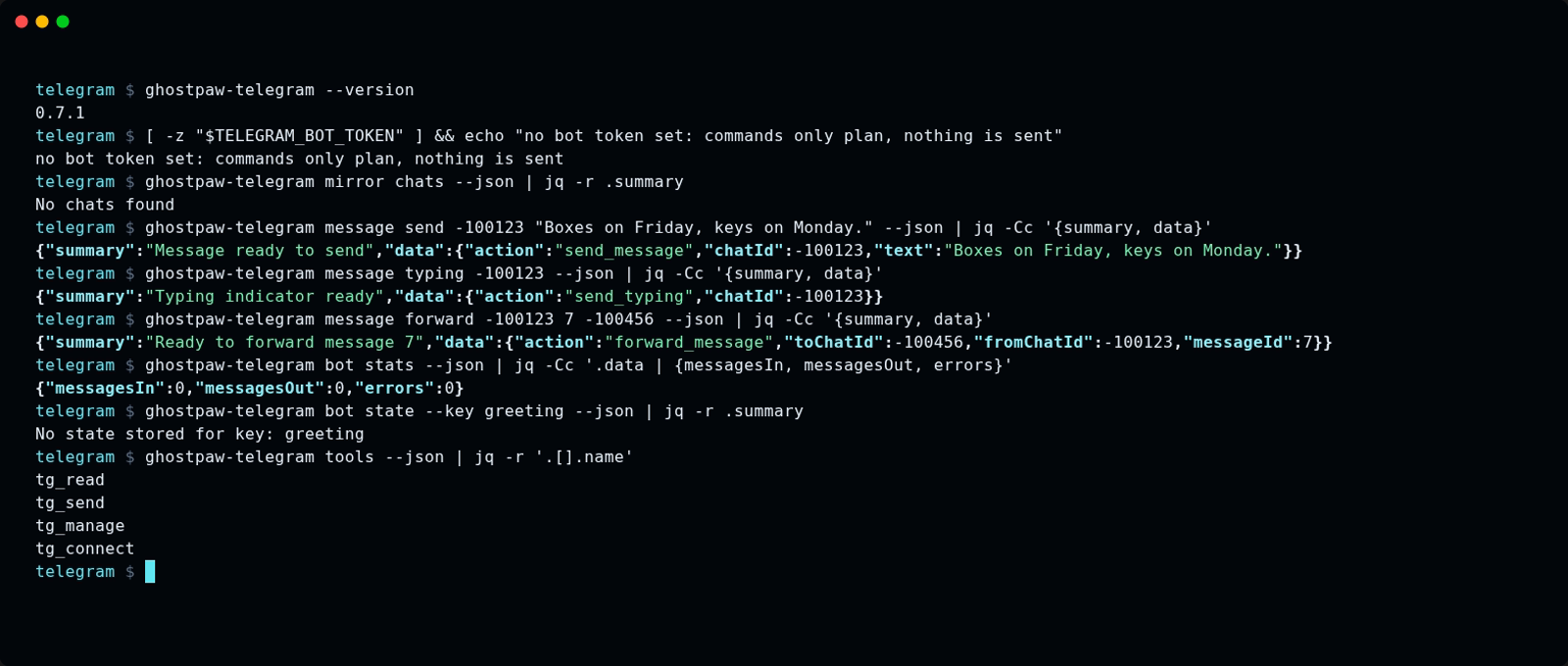
The same session as an animated GIF.
Other release installers:
mise use -g github:GhostPawJS/telegram
ubi --project GhostPawJS/telegram --exe ghostpaw-telegram --in ~/.local/bin
eget GhostPawJS/telegram
For aqua, define a
github_release package in aqua.yaml:
registries:
  - name: telegram
    type: local
    path: telegram-registry.yaml
packages:
  - name: GhostPawJS/telegram@v<VERSION>
    registry: telegram
telegram-registry.yaml:
packages:
  - type: github_release
    repo_owner: GhostPawJS
    repo_name: telegram
    asset: ghostpaw-telegram-{{trimV .Version}}-{{.OS}}-{{.Arch}}.tar.gz
    format: tar.gz
    replacements: { amd64: x64 }
    overrides:
      - goos: windows
        asset: ghostpaw-telegram-{{trimV .Version}}-windows-{{.Arch}}.zip
        format: zip
    files:
      - name: ghostpaw-telegram
Install scripts verify SHA256SUMS. To verify a downloaded archive's
build attestation:
gh attestation verify <archive> -R GhostPawJS/telegram
Set GHOSTPAW_VERIFY=attestation for attestation verification in install.sh.
Binaries are unsigned; macOS binaries carry an ad-hoc signature. For a browser
download on macOS, remove quarantine with
xattr -d com.apple.quarantine /path/to/ghostpaw-telegram.
Linux binaries require glibc 2.28+; use npx on Alpine.
See the binary build workflow.
Sizes for 0.7.1 (Node 26.12.1 inside each binary):
| linux-x64 | 41.6 MB tar.gz | 117.4 MB |
| linux-arm64 | 41.1 MB tar.gz | 115.1 MB |
| darwin-arm64 | 44.8 MB tar.gz | 146.6 MB |
| darwin-x64 | 46.3 MB tar.gz | 149.5 MB |
| windows-x64 | 38.4 MB zip | 105.6 MB |
Release installation is checked on ubuntu-24.04, macos-15 and windows-2025.
npx / npm (for npm-based environments)
npx @ghostpaw/telegram --help
npm install -g @ghostpaw/telegram
Requires Node 24+ for the built-in node:sqlite module. The npm package is 816 KB unpacked.
Library (for harnesses embedding it in code)
npm install @ghostpaw/telegram
import { tools } from '@ghostpaw/telegram';
See library usage.
Quick Start
import { DatabaseSync } from 'node:sqlite';
import { createBot, initTelegramTables } from '@ghostpaw/telegram';
const db = new DatabaseSync('bot.db');
initTelegramTables(db);
const bot = createBot({
token: process.env.TELEGRAM_TOKEN!,
db,
onMessage: async ({ message, user }) => {
console.log(user?.firstName, message.text);
},
});
await bot.start();
Webhook mode — pass a webhook config instead:
const bot = createBot({
token: process.env.TELEGRAM_TOKEN!,
db,
webhook: { path: '/webhook', port: 8443, secretToken: process.env.TG_SECRET },
onMessage: async ({ message, user }) => { },
});
await bot.start();
Docs
Read the manual for usage guides, recipes, architecture and entity references.
- Overview: what the manual covers and where to start
- Human usage: using the library directly in code
- LLM usage: tools, skills and the soul prompt for agents
- Recipes: patterns for menus, keyboards and replies
- Architecture: how the code is laid out
- Chats: every conversation the bot has seen
- Messages: inbound and outbound messages
- Users: bot and human accounts
- Members: who is in which chat, with status
- Callbacks: inline keyboard button presses
- Files: photos, documents and voice notes
- Reactions: emoji reactions and their counts
What It Stores
Every update is mirrored into SQLite before your handler runs:
- Messages — text, media, edits, reply edges, albums, threads (FTS5 full-text index with Unicode diacritic folding)
- Users — first name, last name, username, language code
- Chats — title, type, member count, forum flag
- Members — status, permissions, admin title per chat
- Reactions — emoji per user per message, with per-emoji counts and event log
- Files — metadata + raw bytes stored as BLOB, SHA-256 deduplicated; downloaded in the background for every incoming file (
DEFAULTS.autoDownload is deprecated and unused; it does not change this behaviour)
- Callbacks — inline button presses with data and answered state
- Bot state — arbitrary key/value store and running statistics
All eight tables are created in one call: initTelegramTables(db).
Two Audiences
Human developers
Use the read, write, and network namespaces for direct-code access to every domain operation:
import { read, write, network } from '@ghostpaw/telegram';
const chat = read.getChat(db, chatId);
const messages = read.listMessages(db, { chatId, limit: 50 });
const results = read.searchMessages(db, chatId, 'invoice');
const chain = read.replyChain(db, chatId, messageId);
const bytes = write.getFileBlob(db, fileId);
await write.sendMessage(bot.client, chatId, 'Hello');
await write.sendPhoto(bot.client, chatId, fileId);
await write.sendDocument(bot.client, chatId, buffer, { caption: 'Report' });
await write.broadcast(bot.client, chatIds, 'Announcement');
const stream = write.createStream(bot.client, { chatId });
await stream.append('Thinking...');
await stream.replace('Done.');
See docs/HUMAN.md for the full human-facing guide with worked examples.
LLM agents
Use the tools, skills, and soul namespaces for a structured runtime surface:
import { tools, skills, soul } from '@ghostpaw/telegram';
const allTools = tools.telegramTools;
const readTool = tools.getTelegramToolByName('tg_read');
const result = readTool?.handler(db, { subcommand: 'search_messages', chatId, query: 'invoice' });
const allSkills = skills.telegramSkills;
const prompt = soul.renderTelegramSoulPromptFoundation();
Every tool returns a discriminated result with outcome: 'success' | 'no_op' | 'error', structured data, and next-step hints. No thrown exceptions to parse.
See docs/LLM.md for the full AI-facing guide covering soul, tools, and skills.
Package Surface
initTelegramTables(db) | One-shot DDL — call once at startup |
createBot(config) | Full bot composition with built-in fetch transport; polling or webhook |
adaptBot(grammy) | Bridge a raw grammy Bot to the MockBot executor interface |
read | Query the local SQLite mirror (no network) |
write | Send messages, media, and actions; manage file BLOBs |
keyboards | Build inline keyboards and callback buttons |
network | Manage polling and update dispatch |
render | Pure markdown and text transformation |
tools | 4 JSON-schema tools for LLM agents |
skills | 6 workflow playbooks for LLM agents |
soul | Herald persona for system prompts |
DEFAULTS | Tuneable runtime constants |
Tools
Tools return plans by default; existing synchronous handlers perform no outbound actions.
To execute send and moderation actions, create an async facade explicitly:
const facade = tools.createTelegramToolFacade({
  client: bot.client,
  execute: true,
  perChatPerSecond: 1,
  globalPerSecond: 30,
  maxRetries: 2,
});
const result = await facade.handler(db, 'tg_send', {
  subcommand: 'send_message', chatId: 123, text: 'Hello',
});
Omit execute to retain plan-only behavior. Execution reuses the outbound
executors, returns the shared result shape with action data and sent message
IDs where applicable, and masks bot tokens in errors. Capacity-one token buckets
limit each API call per chat and globally; Telegram 429 retry_after responses
pause retries, with two retries by default. Limits apply per facade instance;
reuse one facade for callers sharing a bot. Partial execution can occur when a
multi-call action fails (for example, kick bans then unbans).
Four tools shaped around operator intent:
tg_read | Query messages, chats, users, reactions, edit history, reply chains |
tg_send | Send, edit, delete, forward, pin messages; set reactions; broadcast |
tg_manage | Ban, unban, restrict, promote, kick users; query member status |
tg_connect | Get bot stats, read bot state, list active chats |
Each tool exports runtime metadata — name, description, JSON Schema, side-effect level, readOnly flag — so agent harnesses can wire them without reading docs.
Skills
Six workflow playbooks as markdown strings:
manage-telegram-conversations | Read context, reply, pin, track threads and albums |
moderate-chat-effectively | Detect violations, warn, restrict, ban with audit trail |
handle-group-administration | Promote, demote, migrate, configure permissions |
broadcast-to-audience | Compose, send, handle errors, retry failed chats |
search-and-retrieve-messages | Full-text search, reply chains, edit history |
stream-progressive-responses | Debounced streaming with overflow and error recovery |
The package has zero runtime dependencies. It uses Node 24 global fetch for
Bot API requests and an in-repo synchronous Markdown parser. grammy and marked
are development dependencies used for compatibility tests.
createBot accepts optional api: { fetch, apiRoot } settings for an injected
fetch implementation or a custom Bot API endpoint. The default endpoint is
https://api.telegram.org.
adaptBot continues to accept grammy Bot instances. Calls without uploads use
api.raw; file uploads use the built-in client, so grammy API transformers do
not apply to uploads. Its optional second argument accepts { fetch, apiRoot }.
Development
npm install
npm test
npm run typecheck
npm run lint
npm run build
npm run test:dist
npm run check:deps
The repo is pinned to Node 24.14.0 via Volta. Use whichever version manager you prefer.
Support
If this package helps your project, consider sponsoring its maintenance:

Anonyfox • MIT License