ashi


ash (the built-in agent of agent-sh) running as a standalone interactive TUI — no shell underneath, just the agent.
Same backend, tools, slash commands, providers, and skills as agent-sh, mounted in a chat-style interface with session history, branching, and LLM-driven compaction.
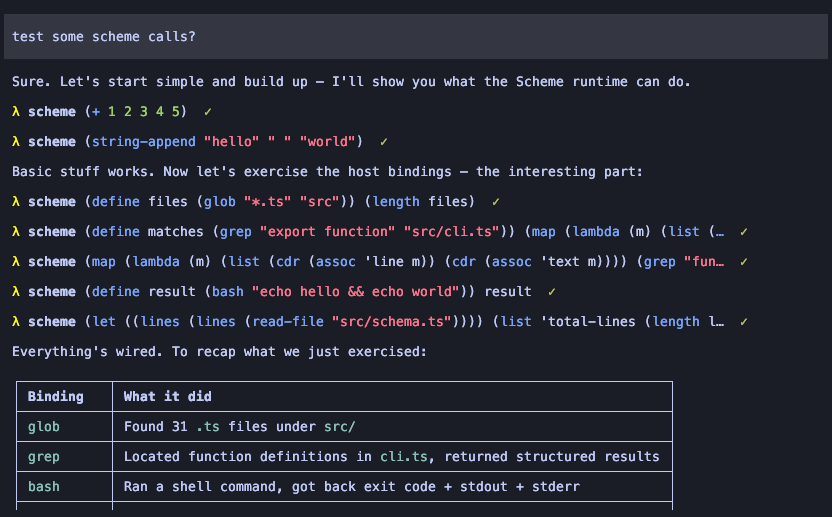
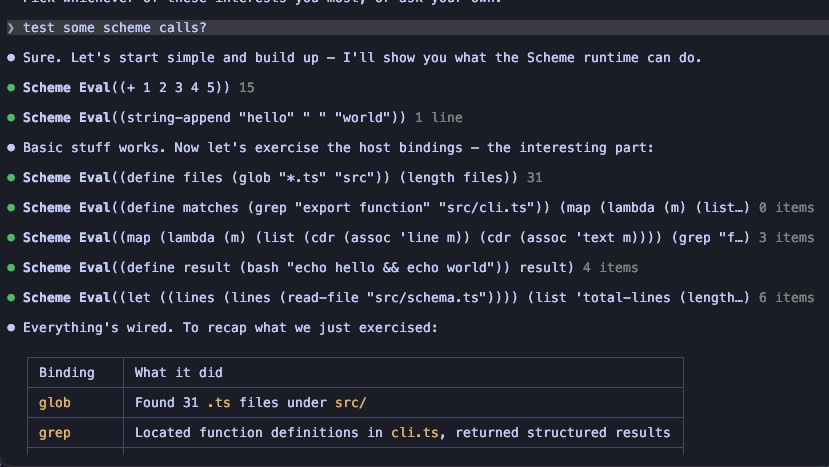
Rendering is decoupled — even how ashi draws tool calls and results is a swappable render extension. Same agent, same conversation; load a different render extension and the whole TUI restyles, no code changes:
The claude-code-style renderer is ashi-ink, a working Ink (React) renderer; see Extending ashi for the contract.
Install
npm install -g @guanyilun/ashi
ashi
Reads ~/.agent-sh/settings.json for provider profiles and defaults, same file as agent-sh. The quickest path is exporting OPENROUTER_API_KEY or OPENAI_API_KEY and running ashi.
To scaffold the config directory from scratch:
ashi init
ashi auth login
Usage
ashi
ashi --provider openrouter
ashi --model anthropic/claude-sonnet-4
ashi -e claude-code-bridge --backend claude-code
CLI flags
--provider <name>    Provider profile from ~/.agent-sh/settings.json
--model <id>         Override model
--api-key <key>      Direct API key
--base-url <url>     OpenAI-compatible base URL
--backend <name>     Agent backend (default: ash). Requires the matching
                     backend extension to be loaded, e.g. via -e.
-e, --extensions     Extra extensions to load (comma-separated)
The built-in backend is ash. To use a different one (claude-code, opencode, pi), load the corresponding bridge extension with -e and pass --backend <name>.
Management subcommands
ashi install <name> [--force]   Install an extension into ~/.agent-sh/extensions/
ashi uninstall <name>           Remove an installed extension
ashi list                       List installed extensions
ashi auth login [provider]      Store an API key (interactive)
ashi auth logout <provider>     Remove a stored key
ashi auth list                  Show configured providers
ashi init [--force]             Scaffold ~/.agent-sh/ (settings, AGENTS.md)
These mirror agent-sh's management commands so ashi works as a standalone CLI without needing the full agent-sh install.
Keybindings
Esc          Cancel active turn
Ctrl+C       Clear editor
Ctrl+D       Quit (when editor is empty)
Ctrl+T       Toggle thinking-block visibility (hidden by default)
Shift+Tab    Cycle thinking level (off → low → medium → high → …)
Ctrl+O       Expand/collapse all tool calls and results in chat
The current thinking level is shown in the footer as [level] next to the model name.
Typing / (commands) or @ (files) opens a suggestion popup: ↑/↓ to move, Tab or Enter to accept, Esc to dismiss.
Sessions
Many sessions per cwd, fresh by default:
/resume       Browse past sessions in this cwd (interactive picker)
/new          Start a fresh session (discards in-memory context)
/name <text>  Set a display name for the current session
/sessions     Text dump of all sessions in this cwd
Each session is its own tree (one JSONL file per session). Every entry has an id and parentId; sibling branches stay on disk; you can rewind and branch within a session.
/fork              Interactive in-session tree picker
/fork <id-prefix>  Direct rewind to a specific entry
/branch            Text dump of the active branch (root → leaf)
Storage: ~/.agent-sh/extensions/ashi/history/<cwd-slug>/sessions/<id>.jsonl. Each line is a SessionEntry:
type SessionEntry =
  | { type: "session"; id; parentId: null; cwd; timestamp; version }
  | { type: "message"; id; parentId; timestamp; message: AgentMessage }
  | { type: "compaction"; id; parentId; timestamp; summary; firstKeptId; tokensBefore };
Raw AgentMessage objects are stored verbatim (full tool call arguments, tool results, etc.) so /resume and /fork faithfully reconstruct the original conversation.
Compaction
LLM-driven structured compaction, triggered automatically when prompt tokens cross the threshold or manually with /compact:
- Walk back from the newest message until ~20K tokens are kept; never cut at tool results or mid–assistant-tool-call group.
- LLM summarizes the older span into a structured format (Goal / Constraints / Progress / Decisions / Next Steps / Critical Context).
- The live message array becomes
[summary, ...kept messages].
- The summary is persisted as a
CompactionEntry carrying summary, firstKeptId, and tokensBefore. Subsequent compactions reference the previous one's summary so chains stay coherent.
If the LLM call fails or the conversation is too short, falls through to the default eviction.
Display configuration
Per-tool compactness lives under ashi.display in ~/.agent-sh/settings.json:
{
  "ashi": {
    "display": {
      "default": { "result": "preview", "previewLines": 5, "expandedLines": 200 },
      "read":    { "result": "hidden" },
      "ls":      { "result": "hidden" },
      "grep":    { "result": "summary" },
      "bash":    { "result": "preview" },
      "edit":    { "result": "preview" },
      "write":   { "result": "preview" }
    }
  }
}
result modes:
"hidden" — call line only while streaming; line count (↳ 42 lines) after completion."summary" — 2-line tail while streaming; line count after completion."preview" — last previewLines lines of output (default 5), with a ... (N more lines) hint when content overflows.
For edit_file / write_file, the diff frame is treated as the output and follows the same gating: shown for preview, hidden for hidden/summary (the call line already carries +12 -3 stats). The line-count hint is suppressed for diff-producing tools so edits stay quiet.
Hit Ctrl+O to toggle expansion across all tool entries in chat — result bodies show their output regardless of mode, and call lines with truncated labels (e.g. long bash commands) reveal their full text. Press again to collapse. Expanded output is still tail-capped to expandedLines (default 200) so Ctrl+O on a huge result can't flood the scrollback — the rest shows as a … (N earlier lines hidden) note. The agent always receives the full output; only the on-screen display is bounded.
Each tool inherits from default and is overridden by its own block. Unknown tool names fall through to default.
Extending ashi
Other extensions can customize chat and tool-result rendering — and even swap the whole
TUI renderer (pi-tui, Ink, …) — without forking ashi. See EXTENDING.md
for the chat/tool render hooks, the declarative tool render schema, and the renderer
contract. For non-render concerns (commands, settings, tools, providers), use the
standard agent-sh extension API.
Install from source
Alternative to the npm install, useful for hacking on ashi itself:
agent-sh install ashi
export PATH="$HOME/.agent-sh/bin:$PATH"
agent-sh install runs npm install and npm run build in the copied directory and symlinks the built bin into ~/.agent-sh/bin/.
By default the copy pulls the published agent-sh from npm. When ashi's source depends on an unreleased core — a kernel change you haven't published yet — add --dev so the install links against the checkout you're running instead:
agent-sh install ashi --dev --force
--dev repoints the copied package's agent-sh dependency at the running host's checkout (the one the global agent-sh is linked to). The build then sees the local types, and a later npm run build at the repo root flows through without reinstalling — the kernel rebuild rule from Development applies. Re-run the install to refresh ashi's own dist after frontend changes.
Development
@guanyilun/ashi depends on the published agent-sh package. To iterate against a local checkout, use npm link:
cd /path/to/agent-sh
npm run build
npm link
cd examples/extensions/ashi
npm install
npm link agent-sh
npm run dev
Rebuild agent-sh (npm run build at the repo root) whenever you change the kernel — the link picks up dist/ directly. To go back to the published version, run npm unlink agent-sh && npm install inside examples/extensions/ashi.
License
MIT